
Most signup docs still tell you to store one bit: the address is valid, or it isn't. That shortcut looks tidy in a form handler and falls apart the first time a receiving server says no for a reason that has nothing to do with the mailbox. A shared inbox, a catch-all domain, a greylist, and a typo can all look like failure if you only keep a boolean. Reason codes fix that by giving every result a stable string you can look up, with its own category, retry rule, and signup action.
Table of Contents
- Reason Codes at a Glance
- Reading Enhanced Status Codes and Their Mapping
- Machine-Readable Fields Versus Human Messages
- Detailed Entries for Each Reason Code
- Handling Each Decision in Signup Flows
- Explaining Each Code to Users
- Disposable, Role and Catch-All Addresses Without Over-Blocking
- Troubleshooting Unexpected Reason Codes
- Confirm Your Reason Code Mapping Before Launch
Reason Codes at a Glance
A reason code is a stable, machine-readable string returned with each verification result that explains why an address received that result. The string is the contract. The sentence next to it is only a summary, and your code should branch on the string and its category, never on the wording.
Read the nine codes as a lookup table, grouped by the decision you will take.
| Reason code | Decision category | Retry | Meaning |
|---|---|---|---|
| mailbox_verified | deliverable | Not needed | Receiving server accepted the recipient during the SMTP probe |
| disposable_domain | risky | No | Domain appears on a known disposable or temporary email provider list |
| role_account_detected | risky | No | Local part is a shared role such as info, sales or support, not a personal mailbox |
| catch_all_detected | risky | No | Server accepts any recipient, so the mailbox cannot be confirmed to exist |
| syntax_invalid | undeliverable | No, user must correct | Address fails format checks before any network lookup |
| domain_no_mx | undeliverable | No | Domain has no MX record and cannot receive mail |
| smtp_mailbox_not_found | undeliverable | No | Receiving server rejected the recipient as unknown |
| smtp_timeout | unknown | Yes, bounded | Probe did not complete within the time limit |
| smtp_temporary_failure | unknown | Yes, after delay | Server answered with a 4xx deferral that may clear later |
Deliverable means safe to accept. Risky means accept with conditions. Undeliverable means reject or ask for a correction. Unknown means no firm decision yet, so retry or defer.
How the retry column works
Deterministic codes are not retried. A doubled @, a domain with no mail exchanger, a missing mailbox, a disposable domain, a role local-part, and a catch-all answer will not change if you ask the same question a second later. Timeouts and temporary deferrals are different. Retry those with bounded backoff, a small attempt cap, and lower concurrency if one provider starts slowing you down.
A thirty-second reading method is enough for onboarding a new engineer. Find the code in the table, read its category, check the retry column, then open the detailed entry only if you need the trigger or the edge case. If the category already tells you to block, confirm, or wait, you don't need the server's prose.
Reading Enhanced Status Codes and Their Mapping
Raw SMTP answers were never built as a product contract. RFC 3463, published in 2003 as the successor to RFC 1893, introduced Enhanced Mail System Status Codes because the traditional SMTP reply codes were too coarse, and many of them were overloaded for unrelated conditions. The enhanced form is three numbers: class, subject, and detail.
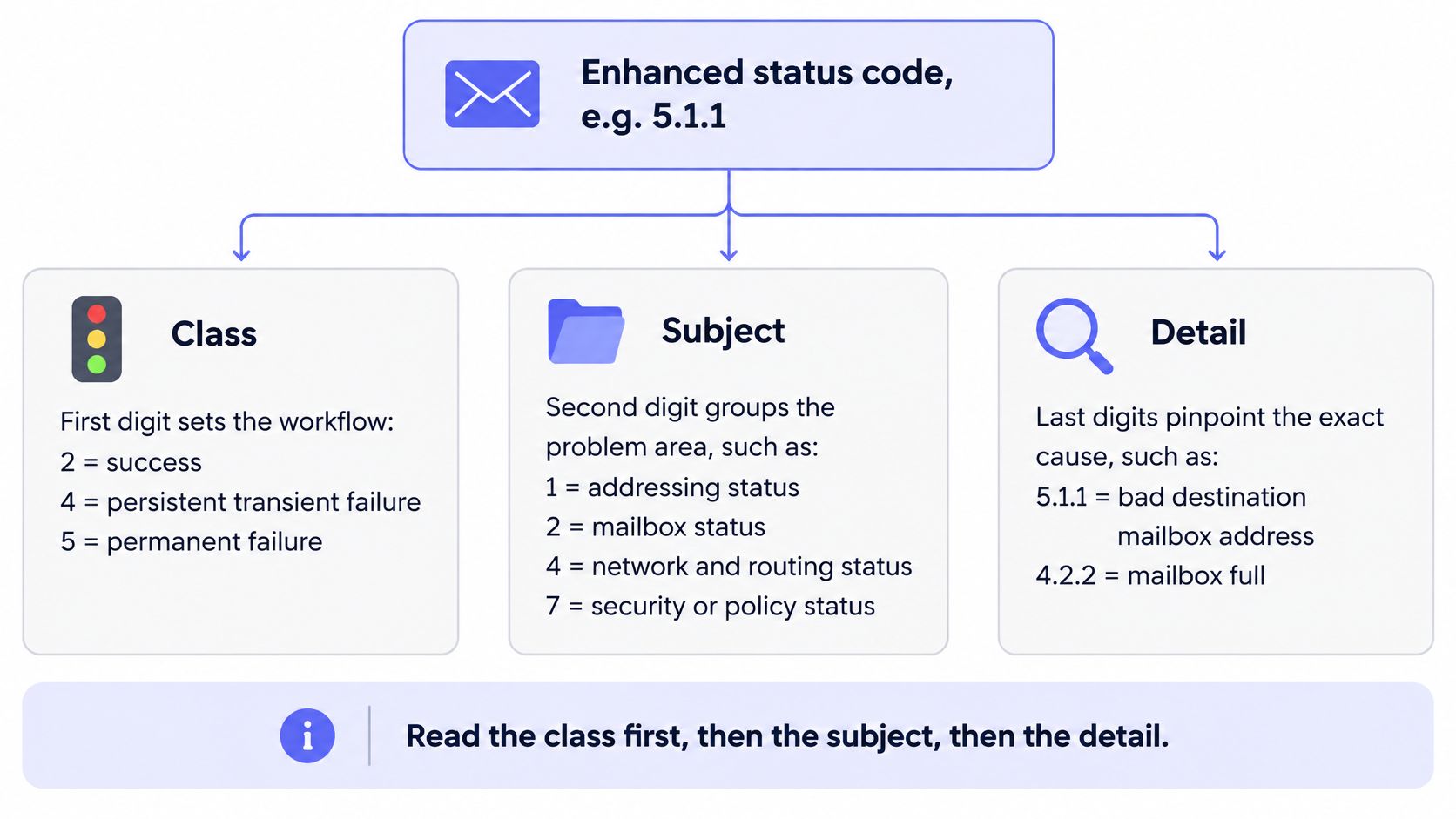
Read the class before anything else, because it sets the workflow. A 2.x.x result is success and needs no retry. A 4.x.x result is a persistent transient failure, so a later attempt may succeed because the address can still be valid. A 5.x.x result is a permanent failure, and the message, the destination, or the recipient data has to change before another send is worth it.
Worked examples make the split concrete. 2.0.0 is generic success. 4.2.2 is a full mailbox: temporary pressure on storage, never proof that the person is gone. 5.1.1 is a bad destination mailbox address. Three digits, three different handling paths.
The subject names the area: addressing, mailbox, mail system, network and routing, protocol, or security and policy. The detail is the specific diagnosis inside that area. Your verifier should map each raw outcome onto one stable reason code, then let product logic branch on that code. Free-form server text stays in the log for humans.
The same three-part reading is what a careful SMTP verification probe has to do before it emits a code. If you also ingest another vendor's results, the ZeroBounce integration setup guide from RapidStart is a useful pattern for keeping the vendor's original status beside your normalized decision.
| Raw SMTP outcome | Reason code | Retry |
|---|---|---|
| 550 unknown recipient | smtp_mailbox_not_found | No |
| 550 policy or authentication block | Leave unmapped, route to troubleshooting | No, confirm by email |
| 421 or 451 deferral | smtp_temporary_failure | Yes, after delay |
| Mailbox full | smtp_temporary_failure | Yes, after delay |
| No answer before the time limit | smtp_timeout | Yes, bounded |
| Domain has no MX record | domain_no_mx | No |
Enhanced codes are evidence, not identity proof. A permanent-looking answer can still be a policy block rather than a missing person, and that case belongs in troubleshooting, not in a hard reject.
A live transcript shows class, subject, and detail in context faster than another paragraph of digits.
Machine-Readable Fields Versus Human Messages
A verification response carries two payloads at once: a machine contract and prose meant for a human reader. The contract starts with the primary reason, the single decisive outcome, and each reason maps to exactly one decision category. Integrations branch on that derived category rather than on the code string or any other field in the response. Secondary diagnostic fields explain the path without changing the outcome. Typical companions are syntax_valid, mx_present, smtp_probe_completed, and role_account_detected. A client can render them in an admin drawer. What it cannot do is recompute the verdict from them: a response where syntax_valid and mx_present are both true can still arrive under a risky or undeliverable category, because flags describe checks rather than conclusions.
Healthcare remittance already solved this split. Claim Adjustment Reason Codes record why a claim or service line was paid differently, and Remittance Advice Remark Codes carry extra detail. On the Massachusetts page covering 835 payment advice and CARC/RARC lists, the set works as a controlled vocabulary: codes can apply at claim or service-line level, they must come from the current valid set, and the lists are updated three times a year. Email verification needs the same discipline: one decisive reason, mapped to one category, with observations that must never become a second verdict by accident.
Keep flags and prose apart
Derive the decision category from the primary reason: deliverable, risky, undeliverable, or unknown. Keep retryable separate from user-correctable. A timeout is retryable yet sits outside anything the person at the keyboard can fix. A syntax error is user-fixable and must never enter your worker's retry queue. Mixing those two flags is how forms spin forever on a typo, or how they scold someone for a greylist.
The human message is display metadata. It can be localized, shortened, or rewritten for a new brand voice, and clients must never parse it.
If a sentence changes, signup behavior must not.
What you version
Stable identifiers are immutable. Add a new code instead of renaming an old one. A deprecated code keeps its string and carries a status flag until every consumer has moved. Per code, store an owner, a semantic definition, a severity, remediation guidance, a retry policy, and deprecation status. That retry policy is the field a worker reads when deciding whether a failed check requeues. Wording and UI hints sit beside the record as changeable metadata.
The same strings should appear in the single-check response, in webhooks, and in batch output. One enum then serves the form, the async job, and the warehouse, and you stop maintaining three slightly different dictionaries.
Practical rule: if a field can change without a version bump, it is display metadata. If a client is allowed to branch on it, it is part of the contract.
Detailed Entries for Each Reason Code
Each block below is the contract for one code: what it means, which check fired, a sample payload, and the edge case that usually fools a first integration. Samples use reserved or obviously fake addresses.
Deliverable
mailbox_verified. The receiving server accepted the recipient during the probe, so the address is safe to treat as deliverable. The check that fired is the SMTP probe, after syntax and MX lookups already passed. A sample payload is {"reason":"mailbox_verified","category":"deliverable","retry":false,"score":96,"diagnostics":{"syntax_valid":true,"mx_present":true,"smtp_probe_completed":true}}. Edge case: acceptance during a probe is not a promise the person will open mail, and a later policy filter can still defer a real message. Don't convert this code into a marketing-consent flag.
Risky
disposable_domain. The domain sits on a known disposable or temporary-provider list. The check is that list, not the SMTP conversation. Sample: {"reason":"disposable_domain","category":"risky","retry":false,"diagnostics":{"syntax_valid":true,"mx_present":true}}. Edge case: a privacy alias on a reputable forwarding service can look disposable if your list is sloppy. Confirm the list entry before you withhold an incentive.
role_account_detected. The local part matches a shared role such as info, sales, or support. The check is the role list. Sample: {"reason":"role_account_detected","category":"risky","retry":false,"diagnostics":{"role_account_detected":true,"smtp_probe_completed":true}}. Edge case: a B2B product that sells to teams should allow sales@ and only flag it when the perk is personal, such as a free seat tied to one human.
catch_all_detected. The server accepts any recipient, so this particular mailbox cannot be confirmed. The check is the catch-all test. Sample: {"reason":"catch_all_detected","category":"risky","retry":false,"diagnostics":{"mx_present":true,"smtp_probe_completed":true}}. Edge case: the address may be real. Risky with confirmation is the right call. Undeliverable is not, because you never proved the mailbox is absent.
Undeliverable
syntax_invalid. Format checks failed before any network lookup. Sample: {"reason":"syntax_invalid","category":"undeliverable","retry":false,"user_correctable":true,"diagnostics":{"syntax_valid":false}} for an input like ada@@example.invalid. Edge case: quoted local parts and unusual but legal characters. Reject obvious breakage, and don't invent a stricter grammar than the address standard.
domain_no_mx. The domain has no MX record and cannot receive mail. The check is DNS. Sample: {"reason":"domain_no_mx","category":"undeliverable","retry":false,"diagnostics":{"syntax_valid":true,"mx_present":false}} for user@no-such-host.invalid. Edge case: a short DNS blip can look like a missing exchanger. Re-query once before you blame the typist.
smtp_mailbox_not_found. The server rejected the recipient as unknown, and the enhanced detail supports a bad mailbox rather than a policy refusal. Sample: {"reason":"smtp_mailbox_not_found","category":"undeliverable","retry":false,"diagnostics":{"smtp_probe_completed":true}}. Edge case: some gateways answer with a permanent code for unauthenticated probes. If the text talks about policy or authentication, do not use this code.
Unknown
smtp_timeout. The probe did not finish inside the time limit. Sample: {"reason":"smtp_timeout","category":"unknown","retry":true,"diagnostics":{"smtp_probe_completed":false}}. A timeout is not evidence the mailbox is bad. Retry inside a bound, then leave the account pending. Edge case: one slow provider can exhaust your whole worker pool if every timeout uses the same long wait.
smtp_temporary_failure. The server answered with a 4xx deferral, including a full mailbox or a greylist. Sample: {"reason":"smtp_temporary_failure","category":"unknown","retry":true,"diagnostics":{"smtp_probe_completed":true}}. Edge case: greylisting often clears on a second attempt from the same source after a delay. Immediate tight retries just collect more 4xx answers.
Handling Each Decision in Signup Flows
Call verification synchronously, branch on the decision category rather than the code string, then apply that category's action. The code stays in your logs and analytics. The category is what the form is allowed to understand.
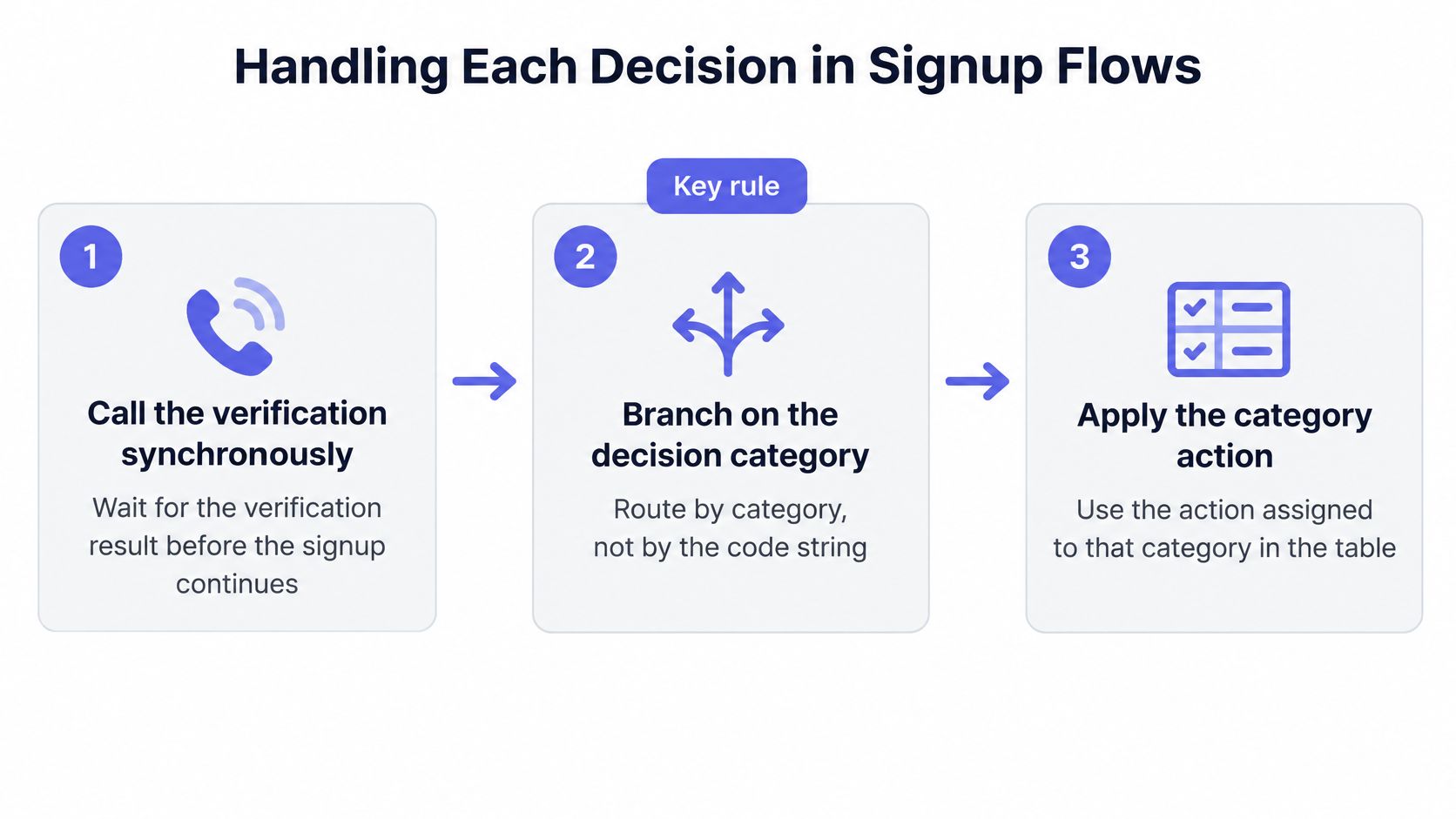
Card networks already separate a stable code from what the app does next. Google's payment integration guidance maps ISO 8583 values such as 00 for approval, 05 for "do not honor," 12 for an invalid transaction, 57 for a transaction not permitted to the cardholder, and 91 for an issuer or switch that is unavailable, into outcomes like SUCCESS, ISSUER_DECLINED, TRANSACTION_INVALID, or HTTP 503. Copy that shape. Keep the granular reason, expose deliverable, undeliverable, risky, or unknown, and don't make the client infer behavior from a sentence. syntax_invalid is deterministic and user-fixable. smtp_timeout should trigger a bounded retry or a deferred check. A mailbox-not-found result is a strong negative signal and should gate signup. Document the enums, version them, and use the same mapping for the form, the webhook, and the batch job.
Say the form budget is about 80 ms on a cached or DNS-only path and under one second when the path includes a full SMTP probe. Don't hold the button longer than that budget. One in-form retry is enough for an unknown result. If it is still unknown, create the account as pending and let a webhook deliver the final decision. Raw codes never appear in the UI. A syntax error gets a correction prompt. A timeout gets no prompt at all.
A SaaS signup flow that creates the account before the category is known will email dead addresses and will also block people who only needed a confirmation link.
| Decision category | Signup action | User message | Fallback |
|---|---|---|---|
| deliverable | Create account and continue | None | Standard confirmation email |
| risky | Allow with confirmation, withhold incentives | Ask the user to confirm the address or use a work email | Confirmation link before activation |
| undeliverable | Block submission inline | Field-level correction prompt | User corrects and resubmits, no automatic retry |
| unknown | Retry once, then accept as pending | Neutral note that the address is still being checked | Webhook delivers the final decision |
Growth will ask to "just block anything risky" during a referral campaign. Resist that. Risky still creates the account, holds the perk, and waits for the confirmation click. Undeliverable is the only category that stops the submit button.
Explaining Each Code to Users
The sentence on the form is not the decision. It tells the person what to do next, and it never names the code, the server, or the list that matched.
syntax_invalid: "This doesn't look like a complete email address. Check for typos, such as a doubled @."
domain_no_mx: "We couldn't find a mail server for this domain. Check the spelling after the @."
smtp_mailbox_not_found: "We couldn't confirm this mailbox. Try another address or check the spelling."
disposable_domain: "Please use a personal or work address so we can send your confirmation."
role_account_detected: "This looks like a shared inbox. Use a personal address for your own account, or continue if this is a team account."
catch_all_detected: "We'll send a confirmation link to make sure you can receive mail here."
smtp_temporary_failure: "We're still checking this address. You can continue, and we'll confirm it shortly."
Two results stay silent. mailbox_verified needs no message, because the form just continues. smtp_timeout needs no message either, because the account proceeds as pending and a spinner or a neutral status is enough. A sentence that says "invalid" during a timeout teaches the user to change a good address.
What support should hear
Support agents should see the code and the category in the admin tool, while the customer only sees the lines above. If someone forwards a screenshot, you can still tell a typo from a greylist without having printed smtp_temporary_failure on the page. Rewrite any of these lines for tone. Don't add the provider name, the list name, or a promise that the mailbox "doesn't exist" when the evidence was only a failed confirmation.
Disposable, Role and Catch-All Addresses Without Over-Blocking
A disposable_domain result is evidence of a risky address, not proof of bad intent. Treating detection as a binary block is the popular anti-abuse move, and it overreaches. AtData's look at burner identities is clear that disposable addresses can fuel repeated free-trial, promotion, referral, and loyalty claims, so one actor creates many accounts and corrupts funnel data. The same piece is also clear that a blanket block rejects privacy-conscious users, testers, travelers, domestic-abuse survivors, and people on temporary forwarding addresses.
European guidance stresses purpose limitation, data minimisation, accuracy, storage limitation, and confidentiality. That doesn't mean every suspicious address should be kept or profiled forever. Separate "this domain is disposable" from "this person is abusing you."
Use graded controls, weakest first.
- Allow with confirmation: send the link, create the account, and don't grant the perk yet.
- Limit incentives: skip the free trial extension, referral credit, or loyalty bonus on a risky category.
- Require stronger authentication: step up only when the account is about to touch money or admin rights.
- Block when signals align: a disposable domain plus repeated signups from one device is a different case from a single disposable address.
role_account_detected should stay open for B2B. An info or sales inbox is often the right contact for a company account. Flag it only where the benefit is personal. catch_all_detected means you couldn't confirm the mailbox, so trigger confirmation instead of rejection. A deeper pass on list quality sits in this guide to disposable email detection.
What you keep, and what you measure
Don't retain a single check after it completes. Delete batch uploads once the job is done. A workable ceiling is about 72 hours. Don't keep suspicious addresses in your own logs longer than the stated purpose needs, and don't build a side profile from them.
Block rate is a vanity metric here. Measure incentive abuse prevented, legitimate conversion lost, recovery success, and false-positive appeals. If appeals from real customers rise while abuse stays flat, your strongest control is too strong.
A disposable domain is a reason to withhold the perk, not a reason to decide who the person is.
Troubleshooting Unexpected Reason Codes
Read the enhanced code and the receiving server's diagnostic text together. One top-level SMTP number can have several causes, so a hard-bounce versus soft-bounce label will mis-file the account. Mailer To Go's bounce diagnostics put it plainly: a 550 may be an unknown recipient, a policy or authentication block, content rejection, or another permanent-looking condition, while 421 and 451 commonly mean throttling or a temporary deferral that calls for a controlled retry rather than suppression.
Signup and lifecycle code rarely says which signal should block registration, retry, ask for confirmation, quarantine, or allow onboarding with fewer privileges. Map each code to confidence that the mailbox is unusable, the user-facing line, and the next action. SMTP evidence is contextual. It isn't an identity check.
| Symptom | Likely cause | Check | Fix |
|---|---|---|---|
| Business address returns smtp_mailbox_not_found | Receiving server blocked the probe for policy or authentication reasons | Read the enhanced code and server text together | Treat as unknown for gating, then confirm by email |
| Spike of smtp_timeout for one provider | Provider throttling or greylisting | Count timeouts per MX domain over one day | Retry with backoff and lower concurrency |
| Corporate addresses flagged catch_all_detected | Domain accepts all recipients | Check the domain's catch-all behavior | Allow with confirmation instead of blocking |
| Sudden rise in domain_no_mx | Resolver failure or typo domains entered at sign-up | Run the MX Record Checker on sample domains | Re-query DNS, then correct the input prompt |
| Raw codes visible to users | Code string used as message text | Review the UI mapping | Map each code to a message from the reference table |
| Rejections rise after a mapping change | Client branches on message text | Audit the branching logic | Switch to code and category enums |
Checks that pay off the same day
Count timeouts per mail-exchanger domain across one day before you suppress a whole provider. Compare odd domains with your MX Record Checker and Disposable Email Checker, and run a DNS lookup online when you need a second opinion that the name still resolves. Audit whether any client still branches on message text. That last bug shows up as a sudden rejection spike right after you improve a sentence.
A non-deterministic failure should be retried with backoff and lower concurrency. It should not be stored as a mailbox verdict. If the enhanced detail is in the security or policy subject and the text mentions authentication, keep the address out of smtp_mailbox_not_found even when the first digit is 5.
Confirm Your Reason Code Mapping Before Launch
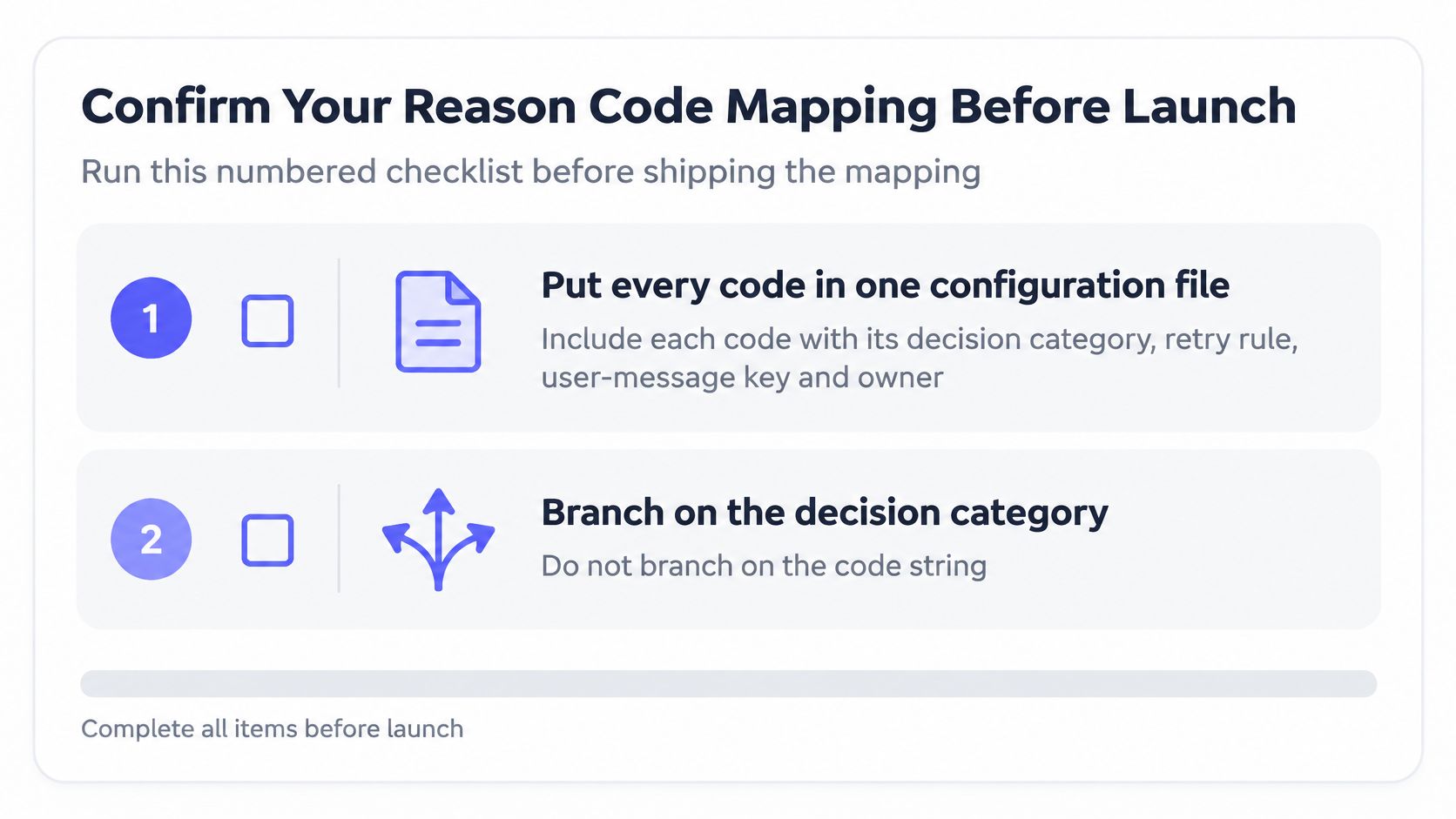
Ship the mapping only after this checklist passes. Each step exists because a broken contract is quiet until real signups hit it.
- Put every code in one configuration file with its decision category, retry rule, user-message key, and owner.
- Branch on the code string and the category, never on message text.
- Test each category with addresses you control: a syntax error, a non-existent domain, a disposable domain, a role address, and a catch-all domain.
- Set the form's time budget above the probe latency, and confirm that timeouts fall into the unknown path.
- Log the code, category, and decision for each signup, and set a retention period that matches the purpose of that log.
- Review false-positive appeals monthly and loosen risky-code handling where legitimate users are caught.
- Track deprecation notices and version changes so mappings move before a code is retired.
Step 3 is where teams often cheat, by testing only a happy mailbox and a blank field. Include a catch-all domain you operate and a role address that is in live use, or you will learn the behavior from a customer. If you generate the case list with a model, validate AI-generated tests before release the way 99tests describes, because a plausible address is not a controlled fixture.
I would start today with step 1. Export the nine codes from the quick-reference table into one file and assign an owner to each row. Until someone owns smtp_timeout, retries will be whatever the last pull request happened to loop.
Mailbeam returns a machine-readable reason, a decision you can branch on, and a score for each address, so signup code can accept, confirm, correct, or defer without guessing from server text. The same reason strings are meant for forms, webhooks, and list cleaning, with EU-hosted processing and a default data-processing addendum. Visit Mailbeam and wire the nine codes into your signup handler before the next campaign.