
You've added an email field to signup, checked it with a browser regex, and watched the form accept addresses that later fail in production. Marketing sees fewer activated users, support sees “I never received the email,” and your CRM keeps accumulating records that nobody can contact. The problem isn't the input element. It's the decision your backend makes when an address is syntactically plausible but operationally uncertain.
A verify email address API can check syntax, domain configuration, SMTP behavior, disposable-domain signals, role addresses, and other indicators before your application commits to a new account. The difficult part is not sending the HTTP request. It's deciding what to do with valid, invalid, unknown, and catch_all without blocking legitimate users or accepting data that will damage later workflows.
Table of Contents
- Why Signup Verification Is a Backend Problem
- Prerequisites Before You Make the First Call
- Calling the Verify Email Address API Step by Step
- Reading Validity Scores and Reason Codes
- Using Webhooks for Async and Bulk Workflows
- Handling Latency, Errors, and Ambiguous Results
- Production Checklist and Privacy Posture
Why Signup Verification Is a Backend Problem
A familiar incident starts with a report that signup-to-active conversion has fallen. The first suspect is usually onboarding copy or a broken welcome-email template. Engineering eventually finds a less visible combination of problems: users typed addresses with small mistakes, temporary inboxes passed the client-side check, and role accounts entered through team signup forms never reached a person who could activate the product.
A browser-side regular expression can identify malformed input. It can't reliably determine whether the domain publishes mail-routing records, whether the destination server responds to an SMTP mailbox probe, or whether the address belongs to a disposable domain. Those checks require server-side networking, provider-maintained intelligence, and controls that you must never expose in a single-page application.
Practical rule: Treat the client as an input-quality layer. Treat the backend as the authority that evaluates delivery risk.
The historical foundation matters. RFC 5321 was published in October 2008, standardizing SMTP, the transport mechanism that verification systems use when testing whether a server can accept mail. Modern services combine syntax checks, MX checks, and mailbox-level probes, but they're still operationalizing SMTP delivery rules rather than merely validating a string.
What the API evaluates
A production integration commonly receives signals for:
- Syntax, including malformed local parts and invalid domain structure.
- Domain and MX availability, which indicates whether the domain has a plausible mail destination.
- SMTP behavior, including connection failures, timeouts, and meaningful
RCPT TOresponses. - Disposable-domain membership, useful for identifying temporary inboxes.
- Role-based addresses, such as shared administrative mailboxes that may not represent an individual user.
- Free-provider classification, which can be useful for segmentation but usually shouldn't be an automatic rejection reason.
- Catch-all behavior, where the receiving server accepts arbitrary recipients and prevents a definitive mailbox conclusion.
The account record is only one part of the cost. Bad addresses create failed transactional sends, contaminate marketing segments, consume CRM capacity, and can provide an easy path for abuse if your signup flow has weak identity or rate controls. A backend decision also gives you a stable place to apply policy consistently across web, mobile, partner, and administrative signup paths.
Why a boolean is insufficient
The most damaging implementation pattern is if valid then create_user else reject. It loses the difference between an address that is definitively undeliverable and one that a remote server refused to answer. SMTP probing can be highly accurate on non-catch-all domains when the server returns a meaningful response, with one benchmark reporting 95 to 99 percent accuracy for those definitive labels, as described by BounceProof's overview of email validation methods. Catch-all domains remain non-deterministic, so they belong in a risk category rather than a “verified” category.
Your service should preserve the upstream status, reason codes, and request metadata. Product can then block an address with a clear correction message, allow it with an additional verification step, or accept it while scheduling a later check. That decision logic is the backend work.
Prerequisites Before You Make the First Call
Start with the boundary, not the endpoint. Provision the verification credential on your server and keep it out of browser bundles, mobile binaries, and public configuration. A leaked client-side key can let an attacker consume quota, probe addresses, or use your account as an abuse relay.
Create separate credentials for development, staging, and production. Record each key's rate limit, quota, allowed origins or IP restrictions, and webhook permissions in your deployment documentation. The exact values are provider-specific, so capture them from the provider dashboard rather than hard-coding assumptions in application code.
For authentication details, keep the implementation aligned with the provider's Mailbeam authentication documentation. Your application should load the key from a secret manager or protected environment variable, rotate it through your normal credential process, and ensure that request logs never print the authorization header.
Choose the signup timing model
A synchronous call is appropriate when the result controls whether you create an account immediately. It gives the form a direct answer, but it adds upstream latency and forces you to define a timeout policy. A deferred flow keeps the critical path responsive, but your user model needs an explicit pending state and your product needs a follow-up action when the result is risky.
Use a simple decision:
- Synchronous gating for low-volume signup decisions where an immediate result improves data quality.
- Soft signup with deferred verification when preserving conversion matters more than deciding before account creation.
- Batch or asynchronous processing for existing lists, imports, and periodic hygiene.
Don't assume every plan supports all three modes. Confirm whether your chosen tier provides single-address synchronous verification, bulk endpoints, webhooks, or only uploaded batch jobs before you build the integration contract.
Design the minimum audit record
Until your retention policy is settled, store the request ID, normalized outcome, reason code, latency, and provider error class rather than the raw email address. If your support team needs correlation, use an internal user ID or a carefully controlled digest instead of putting email contents into general-purpose logs.
The API call should have its own timeout, retry policy, and observability fields. Signup must not inherit an unbounded timeout from the HTTP client, because one slow destination server shouldn't hold a browser request open indefinitely.
Calling the Verify Email Address API Step by Step
A reliable implementation separates transport, provider parsing, and product policy. That makes it possible to replace a vendor or tune acceptance rules without rewriting signup.
1. Select the endpoint shape
Prefer a POST endpoint with a JSON body when the address can contain aliases, plus signs, or characters that need careful URL encoding. A typical route is:
POST /v1/verify
A GET request with query parameters can work for simple diagnostic tools, but it creates more opportunities for addresses to appear in proxy logs, browser history, analytics, and cache keys. Keep the call server-side and send only the fields the provider requires.
2. Authenticate and trace the request
Send the bearer token in the Authorization header. Add an X-Request-Id generated by your service, then record the same identifier alongside the signup attempt. You'll need that correlation when a user reports a failure and the provider's response is the only evidence of what happened.
A representative request looks like this:
POST /v1/verify HTTP/1.1
Host: api.example-verifier.test
Authorization: Bearer SERVER_SIDE_TOKEN
X-Request-Id: signup-7f2c
Content-Type: application/json

{
  "email": "person+trial@example.com",
  "timeout_ms": 3000,
  "accept_catch_all": false
}
The timeout override and catch-all flag are provider-specific. If your provider doesn't support them, keep those controls in your own service and map them to the available endpoint options.
3. Validate the response contract
Don't let provider JSON leak directly into frontend logic. Map it into a typed internal object with stable enums and nullable fields. A representative response might look like this:
{
  "status": "unknown",
  "valid": false,
  "score": 72,
  "reasons": [
    "catch_all_domain",
    "smtp_connect_timeout"
  ],
  "request_id": "signup-7f2c"
}
The score in this example is illustrative response content, not a universal scale or a verified benchmark. Your service should treat the provider's documented range as a contract, validate that the value is numeric, and avoid making policy decisions from an undocumented threshold.
4. Map transport errors separately
An HTTP failure isn't the same as an invalid address. Preserve that distinction:
400usually indicates a malformed request. Return a developer-visible error and fix the integration rather than rejecting the user as undeliverable.401indicates an authentication or environment problem. Alert the service owner.429indicates throttling. Apply bounded retry behavior or move the check to a queue.5xxindicates a provider-side failure. Follow your signup fallback policy.
The application should never turn every non-200 response into “invalid email.” That creates false rejections and makes incident diagnosis unnecessarily difficult.
| Field | Direction | Type | Purpose |
|---|---|---|---|
email |
Request | String | Address submitted for evaluation |
timeout_ms |
Request | Integer or omitted | Optional upstream time budget |
accept_catch_all |
Request | Boolean or omitted | Controls whether catch-all results may pass policy |
status |
Response | Enum | Coarse outcome such as valid, invalid, unknown, or catch_all |
valid |
Response | Boolean or nullable | Provider's high-level interpretation |
score |
Response | Numeric or nullable | Confidence or risk signal defined by the provider |
reasons |
Response | Array of strings | Machine-readable evidence for policy and support |
request_id |
Response | String | Correlation identifier for logs and support |
5. Keep policy in your service layer
A VerificationResult object might contain status, score, reasons, provider_request_id, and checked_at, while a separate SignupDecision contains allow, challenge, or reject. This prevents a provider's valid field from becoming a permanent business rule.
Write contract tests for malformed JSON, missing fields, unknown reason codes, slow responses, and duplicate request IDs. Providers add new reason codes over time. Your parser should tolerate an unfamiliar code and route it to a safe fallback instead of crashing the signup handler.
Reading Validity Scores and Reason Codes
A verification response usually contains several layers of evidence: a boolean, an enum status, a score, and an array of reasons. Those fields answer different questions. The boolean expresses the provider's summary, the status describes the category, the score supports ranking or policy, and the reasons explain why the service reached its conclusion.
A score is not a probability unless the provider explicitly defines it that way. Don't interpret 80 as “an 80 percent chance of delivery,” and don't create a universal cutoff because another API uses a similar-looking range. A catch-all server can accept arbitrary recipients while still leaving the actual mailbox unknown, so the correct product action may depend more on catch_all_domain than on the numeric score.
For a deeper explanation of response interpretation, see Mailbeam's guide to email validation APIs. Use the raw response to tune your decisions, but store a normalized policy outcome separately so downstream systems don't need to understand every provider-specific code.
| Reason Code | Meaning | Recommended Action | User Impact |
|---|---|---|---|
invalid_syntax |
The address structure is malformed | Block and ask the user to correct it | Immediate, actionable message |
no_mx_record |
The domain lacks a usable mail destination | Hard reject unless you have a verified exception | Explain that the domain can't receive mail |
syntax_ok |
Formatting passed, but deeper checks may not have run | Continue evaluation or allow with a later check | Avoid claiming mailbox ownership |
smtp_connect_timeout |
The destination didn't respond within the probe budget | Soft challenge or queue a retry | Don't accuse the user of entering a bad address |
smtp_connect_refused |
The destination refused the connection | Treat as uncertain unless the provider classifies it as definitive | Offer email confirmation rather than blocking |
greylisted |
The server temporarily deferred the probe | Retry asynchronously or soft challenge | Keep the signup path available |
role_address |
The address appears associated with a function or team | Allow, challenge, or restrict by product policy | Explain only if role accounts are unsupported |
disposable_domain |
The domain is identified as temporary or disposable | Block or require stronger verification | Provide a clear reason and alternate path |
catch_all_domain |
The server accepts recipients without confirming the mailbox | Mark as high risk, not verified | Avoid false certainty |
unknown |
Evidence is incomplete or contradictory | Allow with friction or defer | Never show “invalid” unless evidence supports it |
Don't collapse the evidence
Store the provider response in a restricted verification record if your retention policy permits it, then retain only the fields needed for operations. At minimum, preserve the normalized status, reason set, provider request ID, and decision taken. That lets you compare false rejection reports with the original evidence without logging the full address in every application event.
A useful user experience distinguishes correction from uncertainty. “Check the spelling” fits invalid_syntax; “We'll send a confirmation email” fits an unknown or catch-all result. The message should describe what the user can do next, not expose SMTP terminology that they can't act on.
Using Webhooks for Async and Bulk Workflows
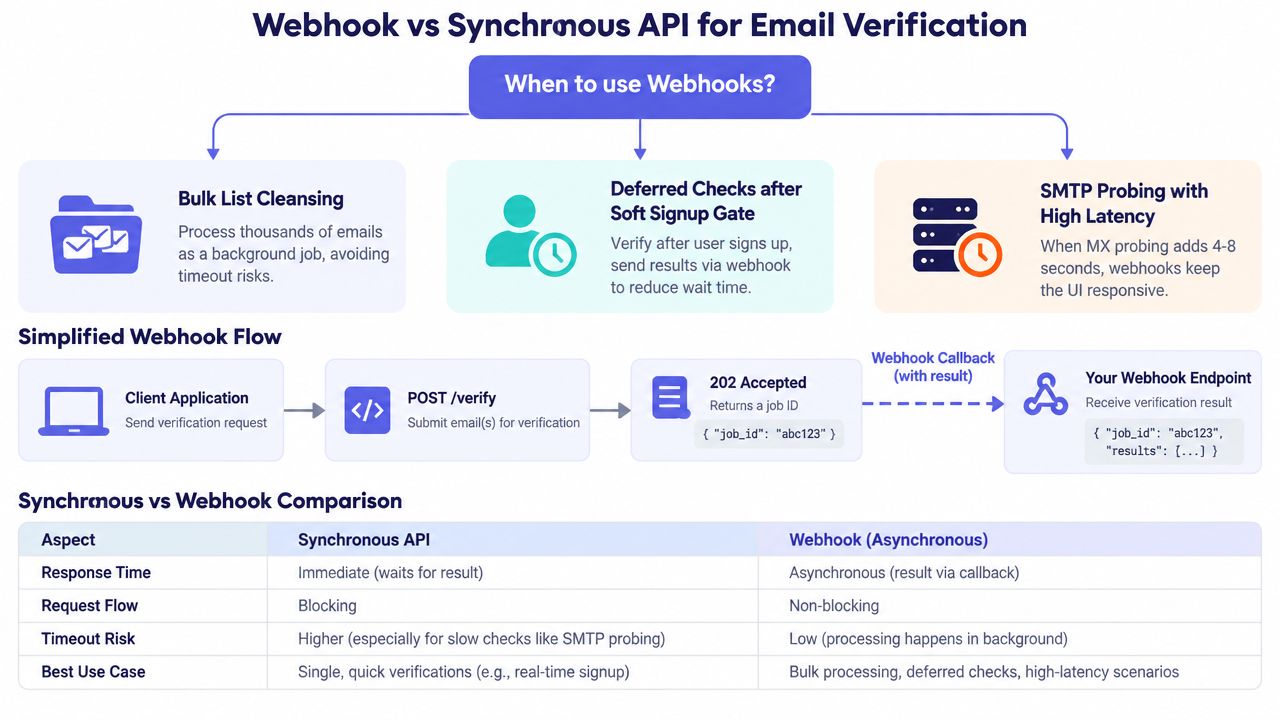
Synchronous verification belongs on the signup path only when the latency budget and failure policy are acceptable. A webhook is a better fit for bulk list cleansing, a soft signup gate that creates a pending account, or an SMTP probe that could hold the request open for several seconds.
Mail providers can respond slowly, greylist probes, or throttle repeated requests. A background job lets your application acknowledge the event, persist a verification job, and update the user record when the provider finishes. It also makes retries explicit instead of tying them to a browser connection.
Register the callback safely
Create a webhook subscription with a registration URL and a secret that remains server-side. Some providers send a verification challenge through a GET request before activating the subscription. Return the challenge exactly as documented, and reject unexpected methods or origins at the edge.
For each callback, calculate an HMAC-SHA256 digest over the raw request body using the signing secret. Compare the calculated value with the signature header using a constant-time comparison. Parse JSON only after signature verification, because parsing or reserializing the payload before hashing can change its byte representation.
A Node handler can follow this shape:
import crypto from "node:crypto";

export function verifySignature(rawBody, received, secret) {
  const expected = crypto
    .createHmac("sha256", secret)
    .update(rawBody)
    .digest("hex");

  return crypto.timingSafeEqual(
    Buffer.from(expected),
    Buffer.from(received)
  );
}

export async function handler(req, res) {
  const rawBody = await readRawBody(req);
  const signature = req.headers["x-webhook-signature"];

  if (!signature || !verifySignature(rawBody, signature, process.env.WEBHOOK_SECRET)) {
    return res.status(401).end();
  }

  const event = JSON.parse(rawBody);
  await processOnce(event.id, event);
  return res.status(204).end();
}
Python uses the same principle:
import hmac
import hashlib
import json

def valid_signature(raw_body, received, secret):
    expected = hmac.new(
        secret.encode(),
        raw_body,
        hashlib.sha256
    ).hexdigest()
    return hmac.compare_digest(expected, received)

def handle_webhook(raw_body, received):
    if not valid_signature(raw_body, received, WEBHOOK_SECRET):
        raise PermissionError("invalid signature")

    event = json.loads(raw_body)
    process_once(event["id"], event)
Use the provider's documented header and event identifier. The names above are implementation placeholders, not a universal webhook schema.
Make retries harmless
Use the event ID or provider-supplied idempotency key as a unique database value. Insert it before applying the business update, and make the update transactional where possible. If the event already exists, return success without repeating side effects such as sending email, changing account status, or creating a CRM contact.
Expect exponential backoff and duplicate delivery. Keep failed events in a dead-letter store with the raw signed payload protected by the same retention rules as verification data. If a callback arrives after signup completion, compare the event's user reference and verification timestamp with the current record. A late invalid result should trigger the policy you agreed on, such as requiring confirmation or restricting high-risk actions, not deleting an account.
Use the provider's webhook implementation documentation to align challenge handling, signature headers, and retry semantics with the actual service contract.
Handling Latency, Errors, and Ambiguous Results
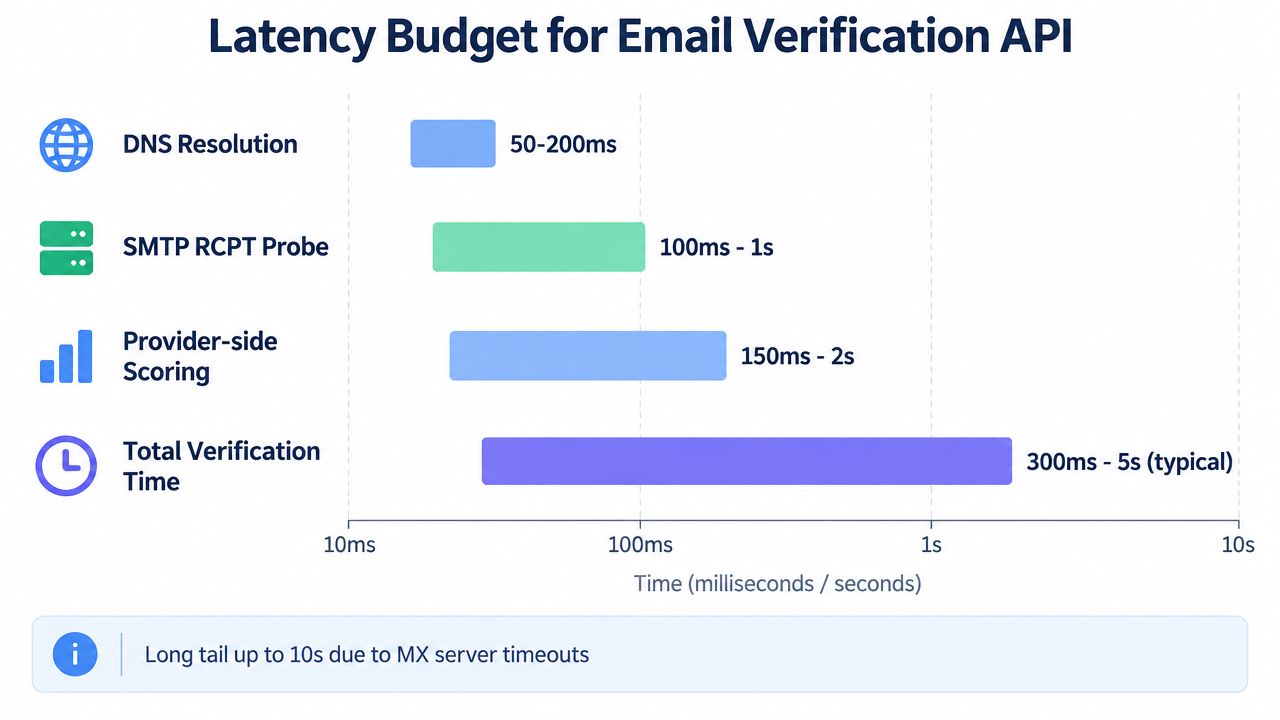
SMTP probing isn't a truth machine. It depends on DNS resolution, remote server behavior, greylisting, connection limits, and the reputation of the probing infrastructure. A modern comparison reported definitive results in 23 milliseconds for cached or DNS-only paths versus 3,500 milliseconds for a legacy SMTP-only workflow, while its real-time API model reported false positives falling from 2.3 percent to 0.1 percent. Those figures come from Email Check's real-time validation comparison, and they illustrate a trade-off, not a universal SLA.
Set both a hard client timeout and a shorter internal decision budget. The client budget protects the signup request. The internal budget determines whether you can wait for a meaningful answer before switching to a fallback. Don't retry synchronously when the first call has already consumed the user-facing budget. Queue the check instead.
Use a three-way decision
A practical policy separates evidence from inconvenience:
- Hard reject when syntax is malformed, the domain has no usable mail destination, or the provider returns a definitive disposable-domain result that your product forbids.
- Soft challenge for catch-all, unknown, greylisted, role-based, or inconclusive SMTP outcomes. Create a pending state, send a confirmation link, add rate limits, or restrict sensitive actions until ownership is demonstrated.
- Silent allow when the verifier times out, returns a temporary upstream failure, or is unavailable, provided your abuse controls and confirmation flow remain active.
Allowing on infrastructure failure may sound risky, but blocking users because a third-party verifier is down can turn an operational incident into a signup outage. The welcome-email delivery result becomes a useful side channel. If it bounces, enqueue a recheck and apply the same policy without forcing the original browser request to wait.
Treat unknown as uncertainty
In 2026, SMTP restrictions are an increasingly important problem for verification systems, especially with corporate gateways and mailbox providers that throttle or block probes. Overloop's coverage of email verification APIs describes the growing importance of unknown and catch-all outcomes and the fact that different providers can classify the same address differently because their probe sequences, timeout thresholds, and IP reputations differ.
That means your UI shouldn't say “invalid” when the evidence says “unknown.” Explain the next step, record the reason, and make retry behavior deliberate. A probabilistic policy protects conversion better than a binary gate pretending that remote SMTP servers always provide complete information.
Production Checklist and Privacy Posture
Before deployment, test the entire path as an operational dependency, not just as an HTTP integration. Confirm that separate environments use separate keys, that secret rotation works, and that request IDs connect signup logs, provider responses, queue jobs, and webhook events. Test 429, 5xx, malformed responses, slow destinations, duplicate callbacks, and provider timeouts in staging.
Your release checklist should include:
- Environment separation: Keep development, staging, and production credentials isolated.
- Key rotation: Rotate credentials through a managed secret store and verify rollback procedures.
- Timeout budgets: Define what the signup request waits for and what moves to background processing.
- Fallback behavior: Decide whether temporary verifier failures allow signup, trigger a challenge, or create a pending record.
- Observability hooks: Track latency, status distribution, reason codes, retry counts, and webhook failures without exposing raw addresses.
- Policy ownership: Assign an accountable owner for each decision before launch.
The privacy architecture deserves equal attention. Sending an email address to a third-party verifier is a personal-data processing event, not a neutral technical lookup. A GDPR-focused guide to email verification recommends reviewing the processing relationship, data-processing agreements, subprocessors, retention, and deletion terms, including the risk of a vendor retaining addresses for analytics beyond the immediate verification purpose.
| Integration stage | Primary owner | Accountability |
|---|---|---|
| Form collection and messaging | Frontend | Explain correction and challenge states without exposing internal probe details |
| API call and policy mapping | Backend | Protect credentials, enforce timeouts, and preserve reason codes |
| Secrets, signatures, and access controls | Security | Review key storage, webhook verification, and log exposure |
| Legal basis and vendor review | Legal or privacy | Document the processing purpose, DPA, subprocessors, residency, and deletion path |
Minimize the payload, restrict access to verification records, and define how cached outcomes expire. Don't promise EU processing, short retention, or deletion unless the selected provider's contract and documentation support those requirements. Mailbeam is one option that provides a real-time HTTP verification endpoint, machine-readable verdicts and reasons, asynchronous batch workflows, webhooks, and EU-focused data handling described in its product materials. Evaluate it, or any alternative, against your own legal and operational requirements rather than accepting marketing claims as architecture.
A verify email address API integration doesn't ask only whether an address is valid. It asks what evidence exists, how much uncertainty the product can tolerate, what happens when the verifier is unavailable, and whether the data flow is defensible.
If you're implementing signup verification, use Mailbeam to evaluate real-time verdicts, scores, and reason codes in your backend, then connect asynchronous checks through webhooks or batch workflows as your volume grows. Start by defining your unknown and timeout policies, and use the API documentation to build the integration around those decisions rather than around a boolean field.