You've got a signup form that looks clean in staging, then real users start typing addresses your regex never expected. Some get blocked even though they're legitimate. Others slip through and later bounce, which makes the product team question whether the problem was validation, deliverability, or both.
That's the trap with email format address handling. It's not one rule, it's a stack of decisions, and each layer answers a different question: is the string shaped like an address, should we normalize anything before checking it, and can the mail system deliver to it?
Table of Contents
- Why Email Format Address Validation Still Trips Teams Up
- The RFC Foundations of Email Address Syntax
- Anatomy of a Valid Email Address
- Regex Patterns for Email Format Address Validation
- Normalization and Pre-Validation in Signup Validation
- Internationalized Email Addresses and Unicode Handling
- Common Pitfalls in Signup Email Format Checks
- Client-Side and Server-Side Validation Compared
- Connecting Format Validation to Deliverability Checks
- Quick Reference for Email Format Address Validation
- Frequently Asked Questions on Email Format Address Validation
Why Email Format Address Validation Still Trips Teams Up
The most common failure mode is overconfidence in a single pattern. A team writes one regex, ships it inside the form handler, and treats the result as a verdict. That works until it rejects a real mailbox, or worse, accepts a string that can't be delivered, which then pollutes activation metrics and support queues.
The deeper issue is that format and deliverability are not the same thing. A syntactically neat string can still point to a dead domain, a mailbox that doesn't exist, or an address format your infrastructure can't transport. On the other hand, a validator that rejects every unusual address will exclude legitimate users without warning, especially in multilingual markets.
Use three separate questions
A practical pipeline asks three different questions in order. First, is the string structurally valid under the relevant grammar. Second, should any safe normalization happen before storage or comparison. Third, can the address survive real-world delivery checks after signup.
Practical rule: keep syntax validation, normalization policy, and deliverability verification separate. If you collapse them into one step, the error message becomes vague and the product logic becomes brittle.
That separation matters because email is still a massive identifier and communication channel. Industry estimates for 2025 place the worldwide email-user population at approximately 4.55 billion people and about 56% of the global population, with roughly 82% of all internet users using email, and about 376 billion emails sent and received each day in 2025 (scale data). At that scale, a sloppy format rule doesn't just frustrate one user, it can distort the whole funnel.
If you're mapping your own syntax layer, it helps to anchor it to a shared vocabulary like email syntax validation. The rest of the stack only works if everyone on the team agrees on where the format check ends.
The RFC Foundations of Email Address Syntax
RFC 5321 and RFC 5322 are often mentioned together, but they cover different layers. RFC 5321 defined the SMTP mailbox syntax using the original ASCII-based mail model, while RFC 5322 defined the structure of Internet message headers and address fields. That split still matters, because a mailbox string can be legal in one context and awkward in another.
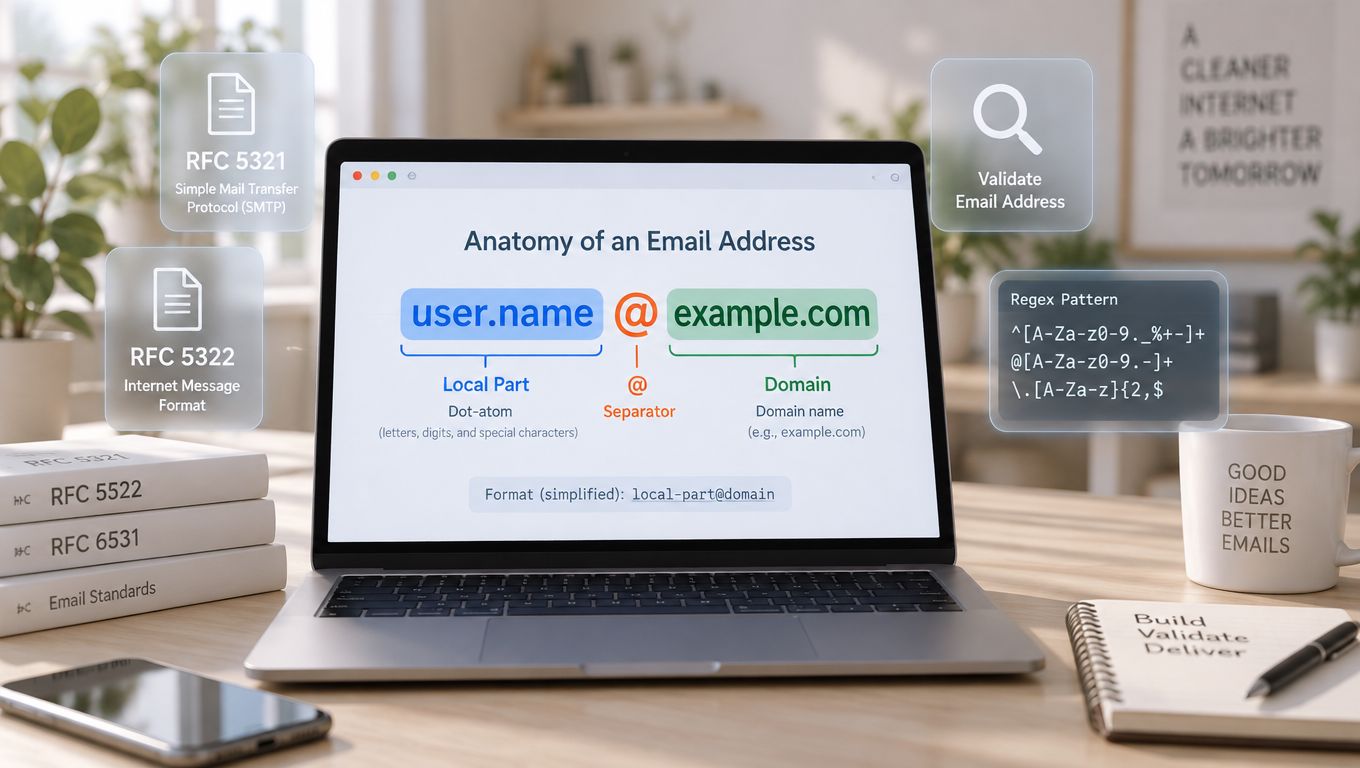
At the simplest level, an email address has a local part before the @ symbol and a domain part after it. Conventional validators check for exactly one @, one usable local part, and a domain that looks syntactically valid. That's the right starting point, but it's not the full standard anymore.
Where Unicode enters the picture
In 2012, the IETF published the internationalized-email framework, including RFC 6531, which introduced SMTPUTF8 and extended the older ASCII rules instead of replacing them. That means a production system can't assume every valid address is pure ASCII. Non-ASCII characters may appear before the @, inside internationalized domain names, or in both places, as long as the surrounding transport supports it (RFC 6531).
An address can be syntactically valid and still be the wrong choice for your transport stack.
That's the practical takeaway for product teams. Legacy ASCII syntax still underpins most of the internet mail ecosystem, but modern systems serving multilingual audiences need to understand both the older grammar and the internationalized one. A validator that rejects every non-ASCII character is too strict. A validator that accepts Unicode without SMTPUTF8-aware infrastructure is too loose.
Anatomy of a Valid Email Address
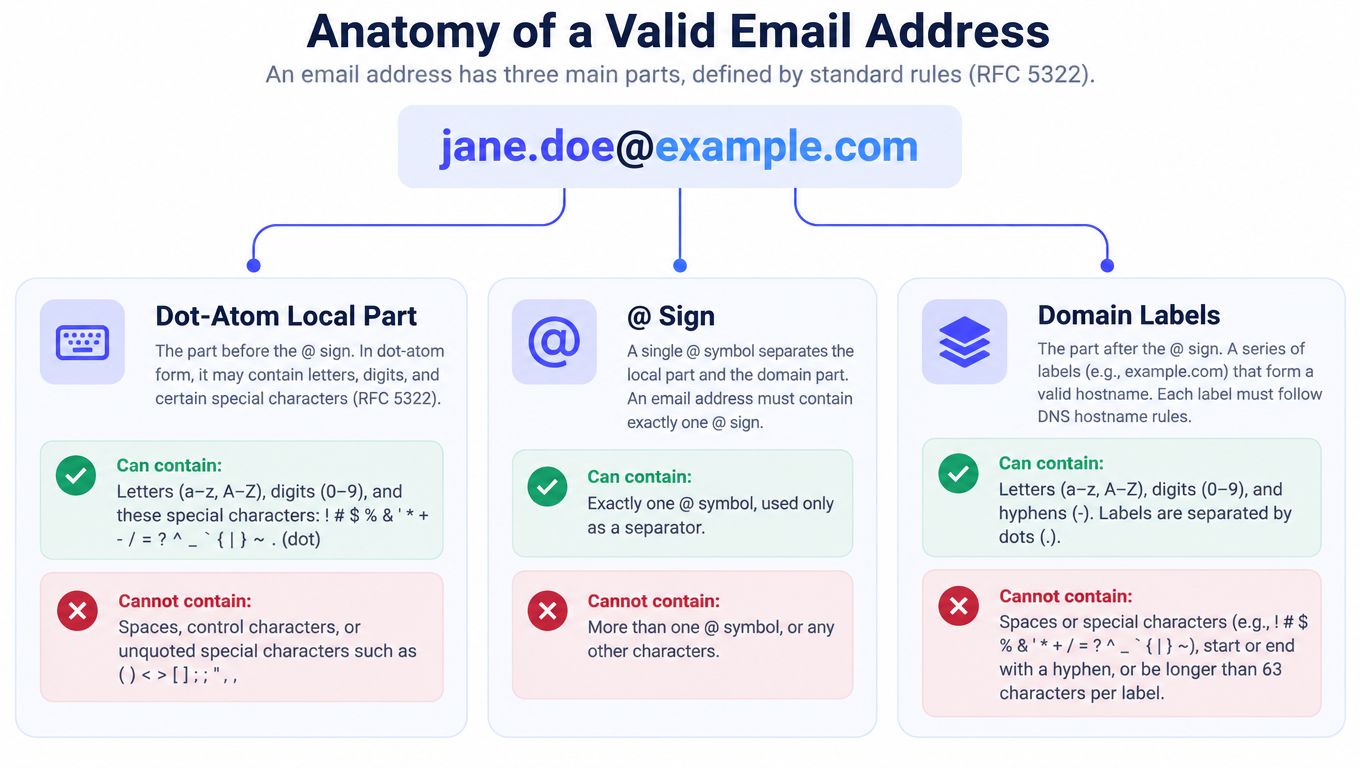
The address format most organizations think about is the dot-atom form, because it's the most interoperable. In that form, the local part may contain permitted atext characters separated by periods, but periods can't begin, end, or appear consecutively. The domain part is the delivery destination, and RFC 5322 treats it as part of the address grammar rather than a free-text label (RFC 5322).
What each part can and can't do
The local part can also be a quoted string under RFC 5322, which means some unusual characters are legal even though they're uncommon in signup forms. That's why a “simple” regex often creates false negatives, especially when it assumes every mailbox looks like name.surname. The safer rule is to treat dot-atom as the default path and reserve edge-case handling for systems that need it.
The @ sign is a single separator, not decoration. Whitespace and comments around it may exist in obsolete grammar, but modern signup input should not accept them as ordinary user text. Keep the user-facing rule stricter than the historical grammar, because that reduces ambiguity without breaking the underlying standard.
The domain must still behave like a real hostname. If it doesn't, the address might be syntactically interesting but operationally useless. That distinction saves you from confusing “looks like an address” with “can receive mail.”
Regex Patterns for Email Format Address Validation
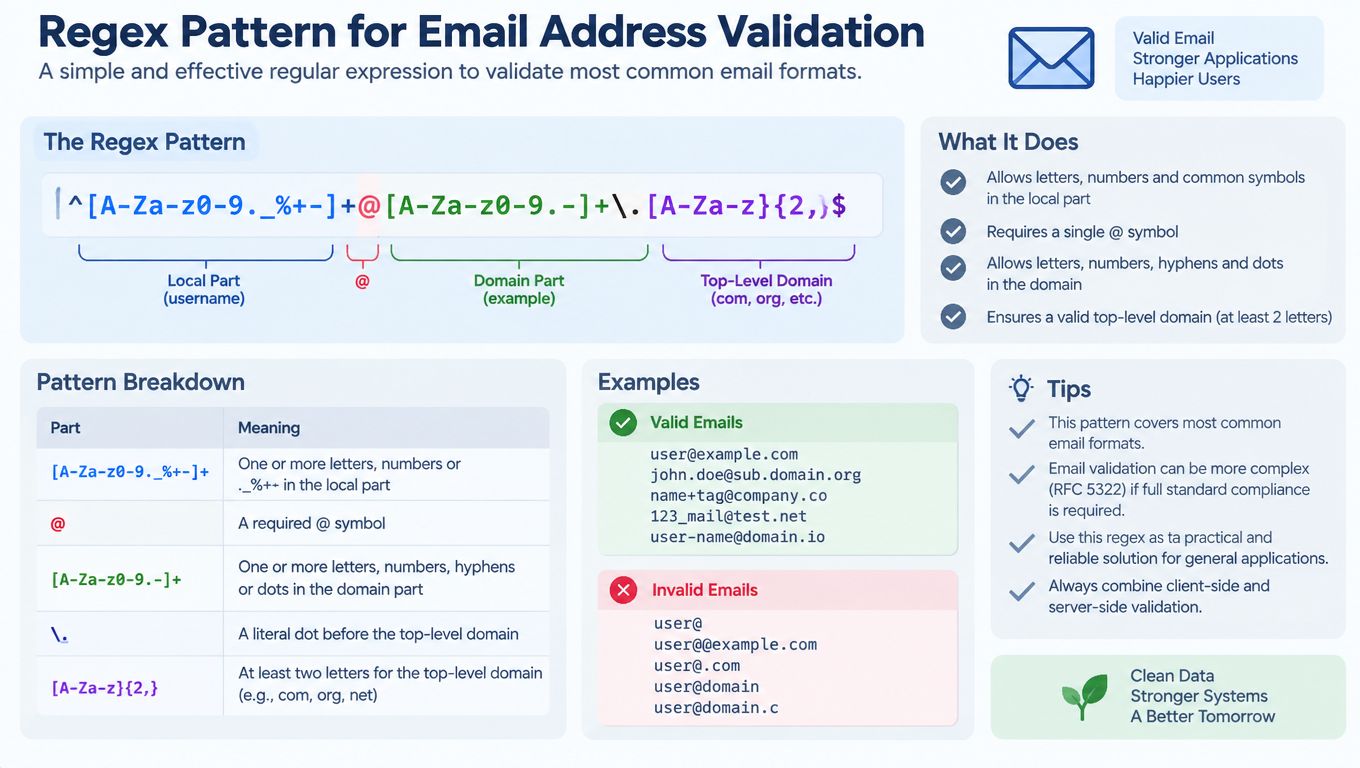
A good regex for signup is a shape check, not a proof. The smallest useful pattern catches obvious junk fast, the middle-ground pattern gives the backend a cheaper first pass, and the longest pattern usually creates more maintenance than value. The .NET guidance makes the same point directly: a regular expression can verify structure, but it isn't a substitute for checking that the email exists (Microsoft guidance).
Three tiers that make sense in production
A permissive client-side hint can be as simple as checking for one @ and no whitespace. It gives users fast feedback without pretending to be authoritative. On the server, a slightly stricter pattern can reject obvious formatting errors while still leaving room for quoted local parts or internationalized handling elsewhere in the pipeline.
The famous “official” mega-pattern that floats around forums is usually the wrong trade. It looks authoritative, but it often blocks valid edge cases, becomes hard to debug, and encourages teams to stop thinking about downstream checks. That's especially risky in a signup flow where the regex runs on untrusted input and should stay fast and predictable.
Rule of thumb: if a pattern is too long to explain to a teammate in one minute, it's probably too much logic for your form gate.
If you need a service layer that exposes syntax decisions as an API rather than a wall of regex code, Mailbeam's syntax validation API is one example of how teams package that first-pass check. Even then, the output should be treated as a coarse sieve. The final answer belongs to later checks.
Normalization and Pre-Validation in Signup Validation
Normalization comes before validation, but only for changes that don't rewrite user intent. Trim surrounding ASCII whitespace, because that's almost always accidental. Leave the local part alone unless your receiving system has a documented canonicalization rule, because the exact spelling can matter.
Lowercasing is safer on the domain side than on the local part. Domains are compared through hostname rules, while the local part may be case-sensitive in some environments, even if many providers treat it leniently. Plus-addressing is another place to be careful, since name+tag@example.com is often intentional and shouldn't be “corrected” away by the app.
| Action | Safe to Auto-Apply | Risk if Mishandled |
|---|---|---|
| Trim surrounding ASCII whitespace | Yes | Hidden signup failures from copy-paste artifacts |
| Lowercase the domain | Usually yes | Bad comparisons if mixed case is stored inconsistently |
| Lowercase the local part | No | Can change user intent or break exact-match systems |
| Strip plus tags | No | Collapses distinct user workflows and aliases |
| Preserve Unicode input | Yes | Display and storage errors if the form rewrites it |
A clean pre-check sequence
- Store the raw input for audit and troubleshooting.
- Trim only safe outer whitespace.
- Normalize the domain representation if your stack needs it.
- Run syntax validation on the cleaned string.
- Hand off to deliverability checks when the address passes shape rules.
That sequence keeps the form honest. Format validation tells you whether the address is well-formed, not whether it will receive mail.
Internationalized Email Addresses and Unicode Handling
Internationalized addresses break the old ASCII-only assumption. RFC 6531 allows non-ASCII characters in mailbox addresses through SMTPUTF8, but transport still depends on both endpoints advertising support, so a valid address can still fail in transit (RFC 6531 on SMTPUTF8).
Separate syntax from transport
There are three checks to keep apart. ASCII-syntax validity means the string fits the older email rules. Unicode or EAI syntax validity means the address is valid under internationalized-email grammar. Transport compatibility means the sender and receiver can move the message over SMTPUTF8-capable systems.
Signup forms often collapse those checks into one result. That creates avoidable confusion. A Unicode address can be valid and still fail later if the route does not support SMTPUTF8. Domain handling needs similar care. Compare or convert internationalized domains through the right ASCII-compatible form when your stack requires it, but keep the user-visible Unicode version for display.
Store original, compare safely
Keep the exact address the user entered. If your application needs deduplication or case-aware matching, store a normalized comparison form alongside it. Do not rewrite the visible string just because the backend wants a stable key.
Right-to-left scripts and mixed-script strings deserve extra UI care because display and spoofing risks increase when rendering and comparison get mixed together. A validator should return reason codes that distinguish malformed Unicode, unsupported EAI, invalid domain encoding, and unavailable routing, not one generic failure. Browser-side input type=email checks can still help with basic hygiene, but they do not replace server parsing or SMTP checks.
Common Pitfalls in Signup Email Format Checks
A syntactically valid address can still be a bad signup. Typos in popular domains or top-level domains, role mailboxes such as info@ or postmaster@, disposable inboxes, missing mail routing, and catch-all domains all affect what happens after the form submits. The cheapest useful detection is usually a layered verdict, not a binary accept-or-reject.
What to watch for first
- Role addresses: These often indicate a shared mailbox rather than a direct user identity. They may be valid, but they're poor signals for activation quality.
- Disposable and temporary inboxes: These can inflate registration counts without producing durable users.
- Missing mail routing: If the domain can't route mail, the address is useless for verification, reset flows, and transactional alerts.
- Catch-all domains: These accept many messages, which makes existence checks ambiguous and increases uncertainty.
- Typos that look plausible: Users often mistype domains in ways a shallow regex will never catch.
The right error copy explains the problem without exposing the scoring model. “Use a company or personal inbox that can receive mail” is better than “rule 17 failed.” If you do block, say why in user language and keep the decision data minimal so support can troubleshoot without turning validation logs into a shadow profile.
Client-Side and Server-Side Validation Compared
Browser validation is useful, but it's only a first pass. HTML5 input type=email rejects line breaks and expects a single address, which gives users immediate feedback before the form hits your backend. That's helpful for UX, but it's not a security boundary and it can't decide whether a mailbox is real.
What belongs in each layer
Client-side validation should catch obvious formatting mistakes early and keep the form responsive. Server-side validation should own the actual parsing logic, because it controls storage, comparison, and every downstream decision. That's where you can combine a permissive shape check with richer policy rules and, when needed, a verification API.
A layered pattern keeps the interface fast and the backend honest. The browser gives hints. The server checks structure. The verification service decides whether the address is worth trusting for signup, alerts, or recovery.
Don't let browser validation become policy. Let it be a convenience layer.
The reason this matters is simple. Users can bypass the client. Automated submissions can bypass the client. Your backend has to assume the browser never ran at all.
Connecting Format Validation to Deliverability Checks
Once the address passes syntax, the next question is whether mail can reach it. That's where verification services move beyond format into deliverability, checking things like mail routing, mailbox existence, disposable behavior, role-based patterns, free-provider signals, and catch-all assessment. Mailbeam documents that kind of layered endpoint, including syntax validation, MX records, SMTP existence, disposable-domain detection, role-based address detection, free-provider checks, and catch-all behavior assessment, with low-latency responses for real-time flows and asynchronous options for bulk work (verification overview).
Why the handoff matters
A signup form needs a fast answer. A batch cleanup job can wait longer. That's why the right design usually splits real-time gating from offline hygiene, even if both use the same core checks. The product question is not only “is this address valid,” it's also “what should the UI do with this result.”
Reason codes make that possible. A syntax failure can produce one message, an unsupported Unicode case another, and a deliverability problem a third. That keeps support teams from guessing and gives product managers a cleaner view of where signups fail.
If you're evaluating a verification vendor or building the flow in-house, look for outputs that preserve this distinction instead of flattening everything into invalid. Once you do that, the form stops being a dead end and becomes an informed decision point.
Quick Reference for Email Format Address Validation
Use this as the working checklist when wiring a new form or reviewing an old one.
Regex and normalization cheat sheet
- Browser hint: simple shape feedback only, no policy.
- Server regex: permissive enough for dot-atom and clean enough to reject obvious junk.
- Normalization: trim only safe outer whitespace, lowercase the domain if your stack expects it, preserve the local part unless you have a documented rule.
- Unicode: keep the original address, and only compare through normalized forms when your transport and storage model support it.
- Verification API: use for deliverability, role, disposable, and catch-all decisions.
| Layer | Catches | Misses |
|---|---|---|
| Browser input check | Obvious formatting errors | Deliverability, routing, mailbox existence |
| Server syntax check | Structural mistakes, malformed addresses | Whether mail will arrive |
| Verification API | Mail routing and risk signals | Product policy choices, user intent |
Log only what support needs to explain the outcome. Under GDPR, that means keeping validation records proportional, purpose-limited, and short-lived where possible. Don't turn email checks into a long-term behavioral dossier.
Frequently Asked Questions on Email Format Address Validation
Should I reject plus-addressing? No. Plus-addressing is often a legitimate aliasing pattern, so rejecting it creates false negatives and frustrates power users. Keep it unless your product has a very specific business rule.
What about quoted-string local parts? Support them if your parser does, but don't assume every downstream system can handle them cleanly. Accepting them at the edge is safer than rewriting them away.
How should I log validation results under GDPR? Log the minimum needed to explain the outcome and debug failures, not the full history of user behavior. Keep reason codes, avoid unnecessary content retention, and limit how long the records stay around.
If you're wiring email checks into a real signup flow, Mailbeam gives you a real-time verification API, reason codes, and layered checks for syntax, routing, and deliverability. If you want to compare a form gate against an operational verifier and see how that fits your stack, visit Mailbeam and map it to your signup, recovery, or list-cleaning flow.