
A free-trial campaign can look like a win until the next morning. Signups doubled overnight, activation collapsed, and support tickets stacked up from accounts nobody can reach. I check the domain column before I touch the ad budget. A small set of throwaway domains often explains the spike. The same domain can be harmless in QA, where an engineer needs a mailbox that dies after a test, and damaging in production, where that mailbox never comes back for billing, recovery, or a fraud review.
Disposable email domains are short-lived inboxes built so someone can receive a message without exposing a primary account. They slip past forms because the address is syntactically valid, the MX record answers, and the confirmation link lands before the inbox expires. A format check will not catch that. Password reset then fails, the trial never converts, and your activation rate looks like a product problem.
Scripted creation is a separate layer. Browser verification for safer signups helps when the session itself looks automated, but it does not decide whether the mailbox will still exist tomorrow. Domain policy does that work.
Below are ten services, scored by what they break in a real signup flow: recovery, testing, false positives, and blocklist maintenance. The close is a policy, not a blanket block.
Table of Contents
- 1. Mailinator (mailinator.com)
- 2. Guerrilla Mail (guerrillamail.com and related domains such as sharklasers.com)
- 3. 10 Minute Mail (10minutemail.com)
- 4. Temp-Mail (temp-mail.org)
- 5. YOPmail (yopmail.com)
- 6. Trashmail (trashmail.com)
- 7. Maildrop (maildrop.cc)
- 8. Mohmal (mohmal.com)
- 9. Getnada (getnada.com)
- 10. FakeInbox (fakeinbox.com)
- How the 10 disposable email services compare on lifetime, inbox visibility, reuse, and typical use
- Build a Blocklist That Stays Current
1. Mailinator (mailinator.com)
Mailinator is the public inbox most signup stacks meet first. Any local part at mailinator.com is created on the fly, and anyone who knows the name can read the mail without logging in. That is handy for QA and a bad place for a password reset.

What a public inbox breaks
- Recovery: A reset link is readable by whoever guesses the inbox name. Do not send secrets there.
- Testing: End-to-end jobs that parse Mailinator mail fail the day production blocks the domain, unless staging is a separate config.
- False positives: Low. This domain is almost never a real customer mailbox.
- Blocklist maintenance: Easy. One stable, well-known domain, not a rotating pool.
Say your QA suite creates billing-test@mailinator.com, waits for the receipt, and asserts the subject line. That workflow belongs on an explicit allowlist in non-production. Production should keep the check on and return a clear reason, the pattern in blocking Mailinator at signup. I show "Please use a permanent email address" rather than a generic invalid-email error.
2. Guerrilla Mail (guerrillamail.com and related domains such as sharklasers.com)
Guerrilla Mail hands out a temporary inbox and rotates the hostname. sharklasers.com and guerrillamailblock.com sit beside the main domain, so a one-line block of guerrillamail.com misses the next signup.
People use it to open a gated whitepaper or a trial without a durable address. Abuse teams see the same family when someone farms promo codes across free-tier accounts. The mailbox only has to live long enough for the confirmation click.
Practical rule: A hand-maintained list of Guerrilla hostnames will be wrong within a week. Treat the family as a feed you refresh, not a config constant.
Coverage is weaker than many teams assume. An independent 272-test comparison of 17 detection services against 16 known disposable providers reported an average detection rate of 59%, while published open-source domain lists ranged from roughly 4,000 domains to about 100,000 entries, according to Prospeo's disposable detection comparison. I log the reason code on every block so a new sibling domain shows up in the deny log before it shows up in a community list. MX and SMTP checks fill the gap for hostnames that are live and not yet classified.
3. 10 Minute Mail (10minutemail.com)
A user searching "temporary email" often lands here first. The inbox is built for one confirmation, not a customer relationship.
A 2026 roundup of temporary mail services describes 10 Minute Mail as an address that expires after 10 minutes, with extensions in additional 10-minute increments, and places the launch in 2006. The brand is old, recognizable, and still suited only to a single verification.
Friction versus a hard block
Forms that accept the domain collect accounts that never confirm and cannot be recovered after the timer ends. That is abandoned-trial noise, not a privacy alias you can email later. For a low-value newsletter, I would rather add a second check than reject every match and argue with legitimate testers. For a paid trial or a referral credit, I block it.
Disposable email detection should return a classification you can read before you ship the rule. Pair that with a sentence that says why the address was rejected, not a red box that only says "invalid."
4. Temp-Mail (temp-mail.org)
Temp-Mail offers a temporary inbox across several domains, in the browser and in an app. Users grab it for a one-time download. During a promotion, growth teams see a burst of signups that never open a second email.
The volume is not a rounding error. A 2026 analysis reported that disposable addresses appeared in 12% of 14 million form submissions, about one in eight registrations, and identified more than 55,000 known disposable-email domains, per Mailbeam's explanation of disposable addresses. That 12% is a dataset-specific estimate, not a universal rate, and it will move with industry and traffic source. Across a large signup stream it is still enough to warp activation.
How I measure this domain family
- Cohorts: Split activation by disposable versus durable domains for the campaign, not for the whole product.
- Double opt-in: Keep it on lower-risk flows so a throwaway address fails closed without a hard block.
- List review: Temp-Mail adds and rotates domains. A quarterly static file will miss the new ones.
I do not treat every non-match as a good user. Domain class says nothing about whether the person intends to pay.
5. YOPmail (yopmail.com)
YOPmail lets anyone pick a name and open that mailbox. There is no login. Messages disappear after a stretch of inactivity, yet the name can be reused for months, which is why testers like it and why attackers like it too.
A forum signup at producthunt-reader@yopmail.com is a privacy habit. The same pattern in a billing flow is a recovery failure, because you cannot prove who holds the inbox and you should not send a password reset or a contract there. Test teams still want named mailboxes so a script can fetch a confirmation without provisioning a real account. Give them a staging allowlist. Do not turn the check off in code "just for the release."
Flag the domain at signup and offer a path that is actually usable: a work address or a personal mailbox the user controls. MX and SMTP checks still matter on the edge cases, including lookalike hostnames and subdomains your list has not absorbed. I would rather delay a high-value action, such as issuing a promo credit, than reject a newsletter signup outright and train the user to lie with a cousin's Gmail.
6. Trashmail (trashmail.com)
Trashmail can forward to a real inbox for a set period or a set number of messages, then drop the alias. That is a different product from a public inbox anyone can open.
A privacy-minded reader creates one alias per newsletter and kills it when the mail gets noisy. Another creates one alias per vendor to see who leaked the address. Both are legitimate. Blanket blocking treats them like promo fraud.
A measurement study of seven popular disposable services collected approximately 2.3 million messages associated with about 210,000 domains over three months, documented in this Illinois study of pixel tracking on disposable mail. The scale shows why a tiny static list fails, and the tracking findings matter if your verification pipeline renders mail or stores the address longer than the decision requires.
Classify the behavior, not just the brand
- MX and SMTP: Forwarding aliases often look like ordinary mail hosts. Domain membership alone under-calls them.
- Role and free-provider checks: They tell you whether you are looking at a shared inbox, a consumer provider, or something disposable-shaped.
- Recovery: Do not make email the only way back into the account. A second factor survives a dead alias.
I keep Trashmail as a risk signal. Low-risk users proceed. Promotions and referrals wait.
7. Maildrop (maildrop.cc)
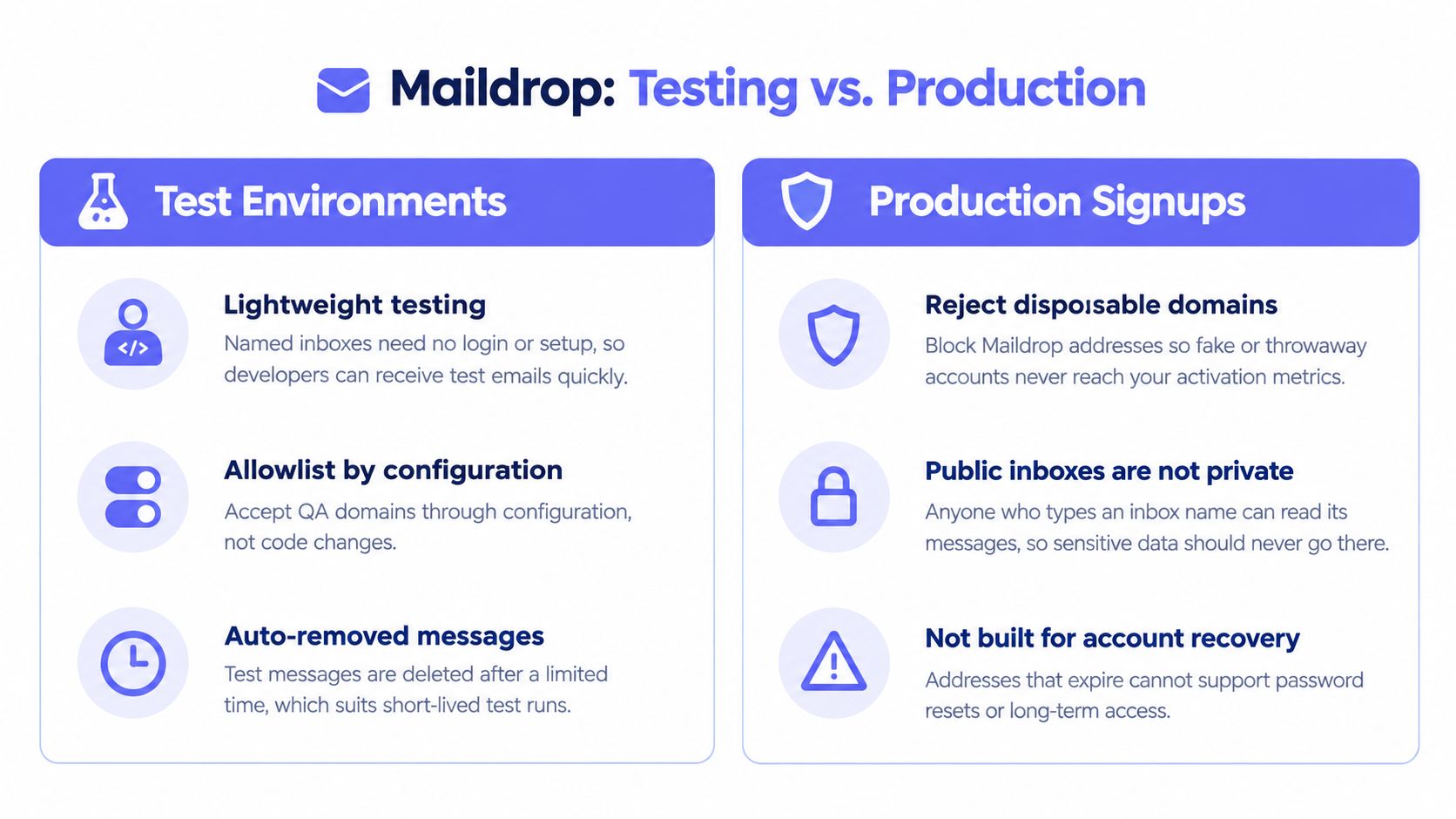
Maildrop is a no-registration inbox on maildrop.cc. Name the local part, receive the mail, and expect it to vanish. Developers use it as a lightweight test mailbox on a laptop. Users use the same trick for a forum confirmation or a free trial.
Split test and production in config
The mistake is one boolean for the whole company. Production should reject Maildrop. Staging should accept a named allowlist. That split belongs in configuration, not in a branch someone deletes during a cleanup.
If the domain already slipped into your user table, a batch CSV pass finds the accounts that need a follow-up before you email them a renewal. I would not delete those users on the first pass. Ask for a durable address, and freeze perks until they provide one.
If your engineers need Maildrop on Monday and your fraud review needs it blocked on Tuesday, the allowlist is an environment setting. It is not a comment in the signup handler.
8. Mohmal (mohmal.com)
Mohmal generates a short-lived address behind a simple web inbox, and it shows up often for products with Arabic-speaking users. A signup system aimed at the Middle East and North Africa will see this family even when US-centric blocklists barely mention it.
Someone in that audience uses Mohmal for a trial or a newsletter because they do not want a primary address in a form. Platforms serving the region then report a higher share of disposable signups from the same family, mixed with real people who have few convenient alternatives. A global "block all disposable" switch will cut fraud and also cut those users.
I tune the rule by audience. Where the only local options are temporary inboxes, offer phone verification or a social login beside the email field, and write the error so it names the problem. Watch false-positive reports. If support keeps seeing the same reason code from one country, the list is too blunt for that market, and the fix is a second path, not a quieter error string.
9. Getnada (getnada.com)
Getnada spreads temporary inboxes across more than one domain and throws the mail away after use. It is the usual shape of this category: not one hostname you memorize, but a family verification tools have to keep tracking.
A user grabs an address for a free download. Your logs then show repeated registrations, different local parts, same disposable family, all inside one campaign window. That pattern is multi-accounting even when each address passes a syntax check.
Check at signup, then check again during list hygiene. New flags appear after the account already exists. Real-time gating stops the next one. A batch job cleans the ones you already stored. I watch reason-code counts by campaign. If disposable hits cluster on a single giveaway, the incentive is the problem, and blocking one brand will not fix the next brand that shows up tomorrow. Aggregate the counts. You do not need to keep every rejected address to see the pattern.
10. FakeInbox (fakeinbox.com)
FakeInbox is built for a quick, anonymous confirmation. The inbox expires on its own. Users pull a one-time code for a trial. Analytics then shows a spike of disposable signups on the morning of a giveaway, because the prize rewards the fastest account, not a real customer.
Score it before you block it
Okta's write-up of a Vietnamese cybercrime operation describes disposable domains used in coordinated signup fraud tied to SMS pumping and International Revenue Sharing Fraud, with suspicious registrations spread across multiple disposable domains. That is abuse. A journalist opening a trial on a throwaway address is not the same event. The domain is one signal next to velocity, device and IP reputation, phone checks, and what the account does after creation.
- Reason codes: Show a specific next step, not "email invalid."
- Risk score: Hard-block the giveaway path. Let a low-risk signup continue with extra friction.
- Campaign cuts: Separate promo abuse from ordinary interest before you kill the channel.
I do not want one verdict for every flow. FakeInbox on a password reset is a block. FakeInbox on a blog comment is noise.
How the 10 disposable email services compare on lifetime, inbox visibility, reuse, and typical use
| Item | Inbox Lifetime | Public Inbox | Reusable Address | Typical Use |
|---|---|---|---|---|
| Mailinator | Short, automatic expiry | Yes; anyone can access by inbox name | Yes; choose a named inbox | QA testing and one-off signups |
| Guerrilla Mail | About one hour | Not specified | No; temporary inbox | Gated content and single-use registrations |
| 10 Minute Mail | About ten minutes; may be extendable | Not specified | No; random address per visit | One-time confirmation emails |
| Temp-Mail | Short; automatic expiry | Not specified | No; designed to be discarded | Testing and one-off confirmations |
| YOPmail | Removed after inactivity | Yes; anyone can access by inbox name | Yes; choose a named mailbox | Newsletters, forums, and test automation |
| Trashmail | Configurable by time or message limit | No public inbox described | Yes; managed forwarding aliases | Privacy-conscious signups and vendor tracking |
| Maildrop | Limited period; automatic message removal | Yes; named inboxes need no login | Yes; named inbox | Developer testing and temporary confirmations |
| Mohmal | Short; automatic expiry | Not specified | No; temporary address | One-off verifications |
| Getnada | Automatic expiry; duration unspecified | Not specified | No; temporary inbox | Free downloads, trials, and testing |
| FakeInbox | Automatic expiry; duration unspecified | Not specified | No; temporary address | Anonymous, single-use signups |
Build a Blocklist That Stays Current
Block high-risk public inboxes outright. Mailinator, YOPmail, and FakeInbox do not support recovery, and the false-positive cost is small. Treat rotating families and forwarding aliases, Guerrilla Mail, Temp-Mail, Getnada, and Trashmail, as risk signals. Allow the low-risk path, hold promotions, and ask for a second factor before anything expensive. Allowlist QA domains such as Maildrop and Mailinator only in non-production config. For a regional service such as Mohmal, pair the block with another way in, or you will trade fraud for lost users.
Freshness is the maintenance problem. Recent monitoring reported 10,864 new disposable domains during a 34-day period, an average of 319.5 per day, and found that only 34.52% of tracked domains could still receive mail in that snapshot, according to IsItDisposable's August 2026 state of disposable email. A stale list misses the new domains and keeps dead ones that add noise.
Log reason codes so new domains surface in days, not quarters. Measure time-to-detection, the share of disposable signups caught before activation, the false-positive rate, and how often domain intelligence disagrees with behavior. Keep those metrics in aggregate. A DNS or SMTP pass does not prove malicious intent, and you do not need the raw address sitting in a warehouse to run the report.
If you sell on a storefront, the same split applies when you block Shopify buyers by email: stop the public-inbox order, and review the alias instead of banning the person. Mailbeam's batch verification is a practical way to audit last quarter's signups by domain, then gate the next signup with the same reason codes you already trust in the logs.
Mailbeam checks addresses in the signup path and in bulk, including a disposable flag and a reason code you can show to the user. That is the difference between a blocklist you edit by hand and a check that keeps up with rotating disposable email domains. See how it fits your flow at Mailbeam.