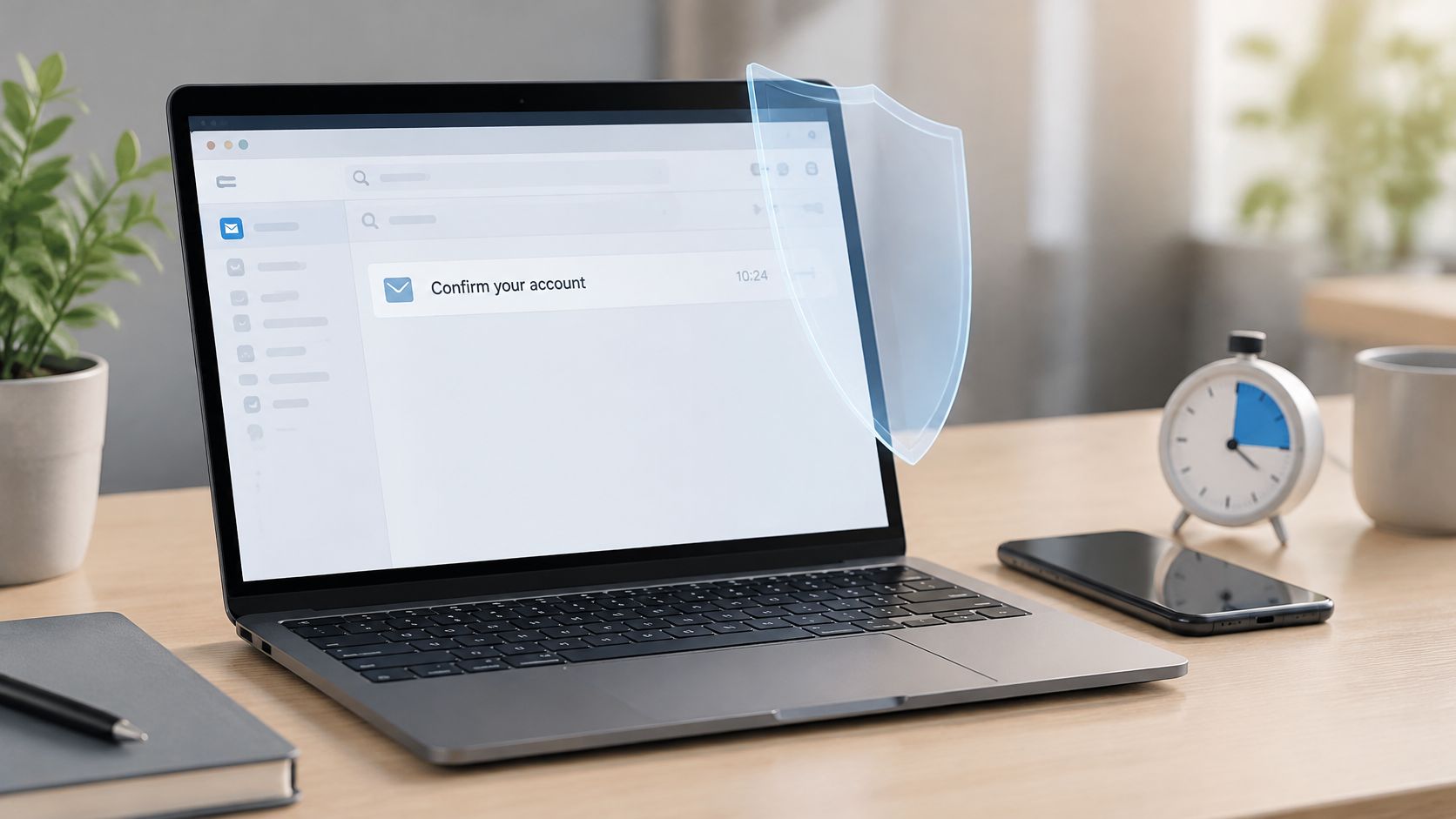
The most popular advice about temporary email is also the least useful: generate an address, paste it into a form, and assume you're protected. That can keep your main address off a mailing list, but it doesn't tell you who can read the new inbox, what happens after it expires, or whether you'll lose access to the account you've just created.
Learning how to create a temporary email safely starts with choosing what you're willing to lose. For a download, losing the mailbox may be harmless. For an account that holds receipts, personal information, or recovery links, it can become a serious problem.
Table of Contents
- Temporary Email Options Compared
- How to Create a Temporary Email Step by Step
- What to Do When the Confirmation Never Arrives
- Why Signup Forms Block Temporary Addresses
- Privacy and GDPR Limits of Disposable Inboxes
- Which Address Fits Your Signup
Temporary Email Options Compared
A temporary email is a separate mailbox created without a permanent personal account, intended for short-lived tasks such as signup confirmations, downloads, and application testing.
What makes it temporary is expiry, not price. According to Mailbeam's disposable-email guide, reported mailbox lifetimes range from approximately 10 minutes to several days, depending on the provider and configuration. A free permanent mailbox isn't temporary just because you don't pay for it.
Services often group disposable mailboxes and aliases together, but they solve different problems.
Temporary mailbox types and what they expose
| Mailbox type | Who can read messages | Typical lifetime | Best use |
|---|---|---|---|
| Public disposable inbox | Anyone who knows or guesses the address | Provider-set expiry, commonly minutes to days | One-time confirmations and downloads |
| Password-protected temporary mailbox | Whoever holds the password or private access link | Provider-set expiry, commonly minutes to days | Low-risk trials and app testing |
| Forwarding alias on your own domain | You, through your permanent inbox | Until you revoke the alias or stop maintaining its routing | Signups you want to keep but control |
| Plus-address alias | You, through your existing inbox | While the underlying account and provider support remain active | Sites that accept plus signs |
A mailbox and an alias aren't interchangeable
A public inbox prioritizes convenience. You may be able to open it just by entering its address, which also means someone else can do the same. A protected temporary mailbox adds an access credential, but you still need to understand its retention and recovery rules.
A forwarding alias gives a website a different address while delivering its messages to an inbox you already own. A plus-address, such as your existing username with an added tag, usually works similarly, although both your mail provider and the signup form must support it. Deleting a sorting filter doesn't necessarily disable delivery to a plus-address.
Practical rule: Choose by the sensitivity and expected lifespan of the signup, not by how free the address looks.
Say you're downloading a PDF that requires an email confirmation. A short-lived mailbox may be enough. Creating a lasting alias is unnecessary unless you want follow-up messages.
How to Create a Temporary Email Step by Step
Pick a provider with clear access rules. Check whether the inbox is public or protected, when access ends, and whether someone else can reuse the address. If the provider doesn't explain those points, choose another service rather than guessing.
Generate a random address. Use the provider's random-name option instead of your name, birthday, work username, or a predictable sequence. The part before the at-sign shouldn't identify you or make the inbox easy to guess.
Keep the registration low-risk. Use it for a disposable test account, a resource download, or another task you can abandon without consequences. Don't send identity documents, financial information, recovery codes, or password-reset messages to a public inbox.
Test receipt before entering details. Send a harmless message from another account you own and confirm that it appears before the mailbox expires. Check the provider's sender restrictions and whether it accepts mail from the target site's domain; receiving your test message doesn't guarantee that every sender is allowed.
Alias warning: An alias routes messages to an existing inbox. It doesn't create a separate mailbox with independent login credentials, so don't expect to sign into it as a new email account.
Complete the signup and confirmation. Copy the address rather than retyping it, submit the form, and open the expected confirmation message while access remains available. Check the destination before following the link, complete verification, and sign out of the test account when you're finished.
End the mailbox's use deliberately. Delete it if the service provides that option, or let it lapse once the task is complete. If you decide to keep the account, change its email to a lasting address before abandoning the temporary one.
Why the precautions matter
A study published through Oberlin's digital repository collected 856,886 messages across four disposable-email services and found exposed sensitive information, including full names and home addresses. An inbox without password protection shouldn't be treated like your personal email account.
The visual below summarizes the creation and confirmation routine. Apply the privacy checks before using the generated address.
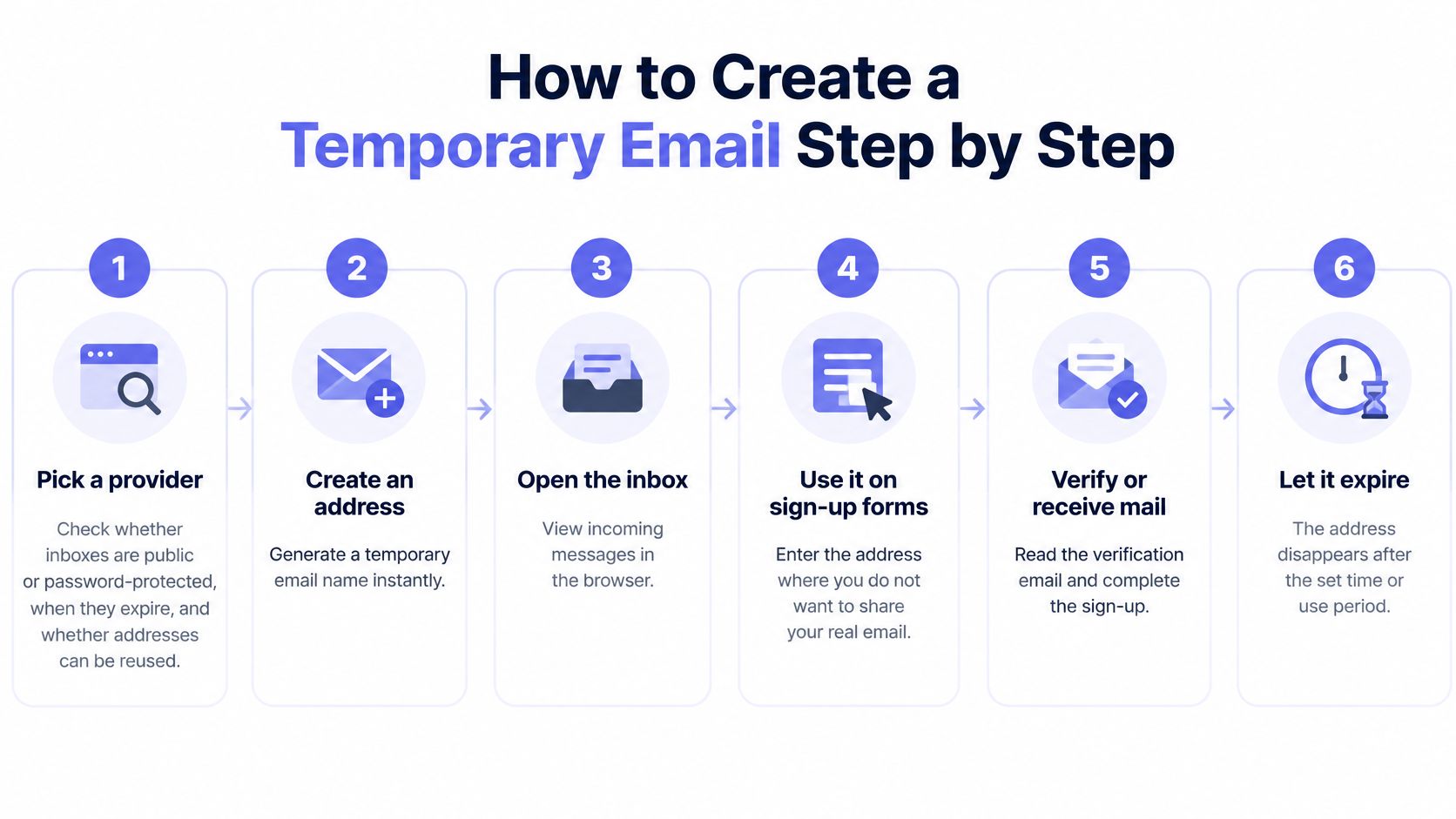
A successful run is simple: the expected message arrives while you can still access the inbox, the confirmation completes, and you haven't submitted confidential details. For application testing, also verify that the confirmation link can't be reused after successful activation.
What to Do When the Confirmation Never Arrives
Start with the mailbox's expiry indicator. If access has ended, repeatedly requesting another confirmation won't repair that address. Generate a fresh mailbox and restart the signup if the website allows it, or update the pending registration through its support process.
If the mailbox is still active, refresh its message list and inspect any spam or junk view it offers. Some interfaces don't update automatically, and not every temporary-mail service has folders. Keep the original inbox tab open while you troubleshoot so you don't accidentally generate a different address.
Separate delivery problems from address problems
Work through these checks before requesting more messages:
- Sender restrictions: Read the temporary provider's delivery rules for blocked senders or domains. A mailbox can receive your test email while refusing the website's confirmation.
- Exact spelling: Compare the submitted address with the address displayed in the inbox. A missing character or an old address copied from another tab can send the message somewhere you can't read.
- Delivery delay: Allow a little time while keeping an eye on expiry. Avoid pressing resend repeatedly, because the website may invalidate earlier confirmation links.
If a confirmation finally arrives, use the newest valid message rather than opening every earlier attempt. If the form reports an explicit address rejection, waiting for email won't help because the site may never have sent one.
Change the approach when the address is expired or rejected. Repeating the same request isn't a delivery strategy.
A different provider may work for a disposable task. For an account you intend to keep, use a forwarding alias connected to an inbox you control instead.
Some services also require phone verification. If a legitimate, low-risk test permits rented numbers, you can find temporary phone numbers through quackr, but check the site's rules first and don't make a temporary number your lasting recovery method.
Finish by confirming the account through a working route, or decide that the signup asks for more access than the task is worth.
Why Signup Forms Block Temporary Addresses
A form can reject your address before sending any confirmation. That's usually a decision about account abuse, deliverability, or database quality, not a judgment about your reason for wanting privacy.
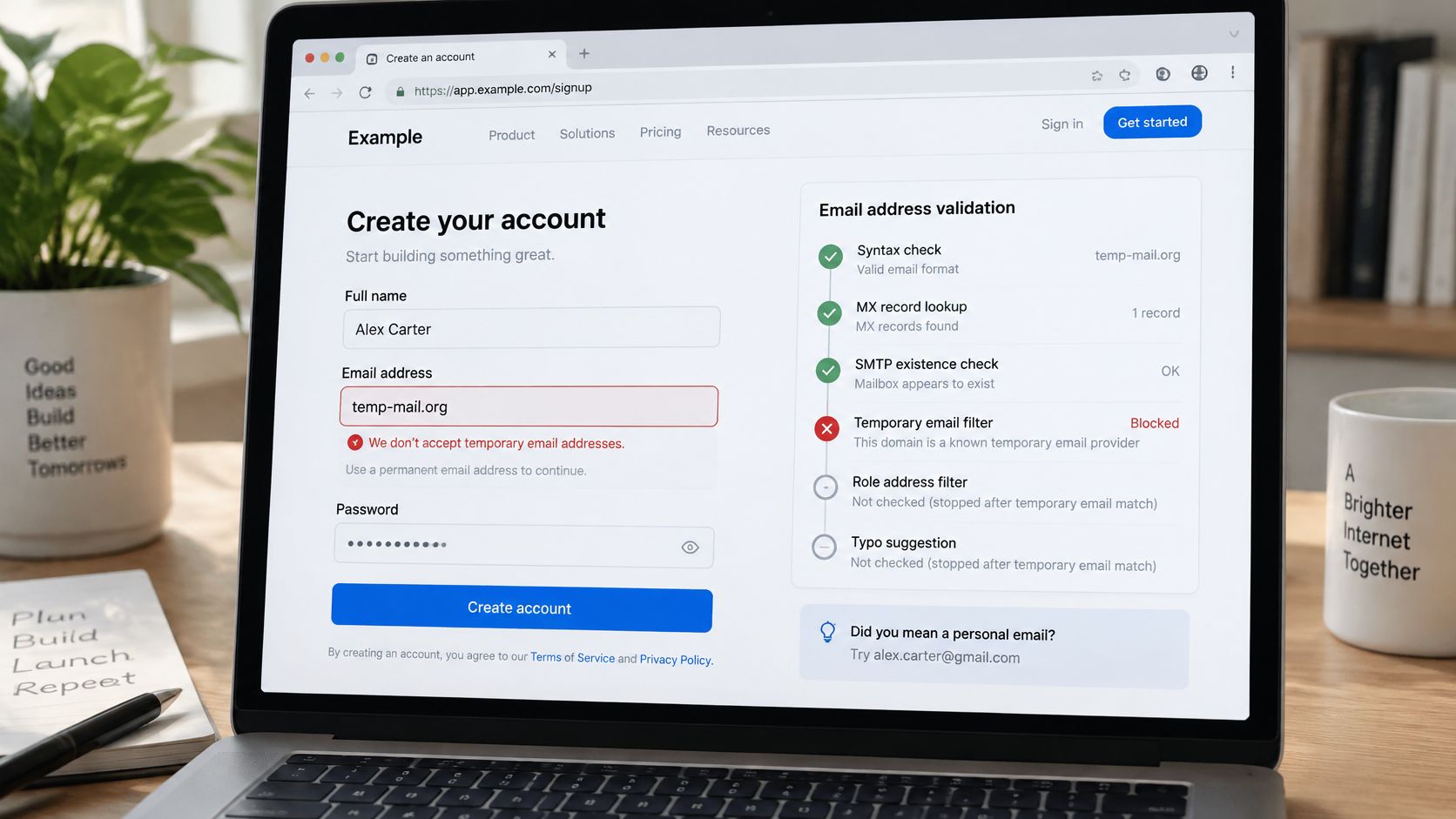
An address-policy rejection can look like this:
What the form checks
A verification system can inspect address syntax, check the domain's mail-routing records, probe SMTP availability, identify role addresses, suggest typo corrections, and compare the domain with disposable-provider lists. Implementations differ, and these checks don't necessarily run in a fixed sequence. Mail-routing records alone don't establish that the specific recipient exists.
A site may reject known disposable email domains even when the address otherwise looks valid. The guide to disposable email domains explains why the domain, rather than just the random-looking username, matters. Updated lists can also change whether a previously accepted address passes.
The scale helps explain the scrutiny: ZeroBounce identified more than 5 million disposable email addresses in 2025. That's a database-quality concern, but it doesn't establish that every person using one is acting dishonestly.
Our real-time verification detects disposable addresses at registration and returns a single boolean in the verify response, covering Mailinator, YOPmail, Guerrilla Mail and 50,000+ other throwaway services. Disposable and role-based detection can block throwaway addresses and department mailboxes such as info@ and admin@ before they enter the system.
The video offers another format for exploring the signup issue:
Responding to a block
- Use a lasting alias: Choose an address you control if you need ongoing access and the site permits aliases.
- Change providers when permitted: Don't keep submitting the same rejected domain, and don't use alternatives to evade a site's stated restrictions.
- Request another verification route: Contact support when your signup is legitimate but the privacy option you chose isn't accepted.
Product teams should make that fallback visible. A useful error explains the restriction without labeling a privacy-conscious user as fraudulent.
Privacy and GDPR Limits of Disposable Inboxes
A disposable address doesn't make you anonymous, and it doesn't remove legal obligations. An address can still be personal data when someone can link it to an identifiable person. The TempMailSpot guide to GDPR and temporary email also explains that temporary mail doesn't stop a website from processing IP addresses, cookies, device information, or account activity.
The useful distinction is data minimisation versus anonymity. You can withhold your main email address while still identifying yourself through the rest of the form, a logged-in browser session, or later activity.
What that means for your signup
- Consent still matters: Using a disposable address doesn't cancel permissions you give or make the signup terms irrelevant. Read what you're agreeing to, especially where marketing choices are separate from account creation.
- Retention needs scrutiny: An expiry label may describe how long you can open the inbox, not when every stored copy disappears. Look for separate explanations of mailbox access, message deletion, logs, and backups.
- Recovery needs continuity: Decide whether the service will ever need to reach you again. A successful confirmation today doesn't establish a usable recovery route later.
- Disclosure still happens: The website receives the address you submit. Its handling of that address and any sharing with service providers remain separate privacy questions.
Share fewer details, not just a different address.
Before submitting a form, ask why the website needs email, whether it will send anything you must retain, and how you would regain access without that mailbox. If you can't accept the answers, use a permanent alias or skip the registration.
For product teams, GDPR email compliance involves more than deciding which address domains to accept. Explain restrictions, provide an alternative verification route, and don't demand extra personal information merely because a user prefers an alias. Combine address checks with relevant abuse signals rather than treating privacy preferences as proof of fraud.
Which Address Fits Your Signup
Which sign-ups suit a temporary address
| Task | Temporary address? | Reason |
|---|---|---|
| Free trial or newsletter | Yes | Low stakes if no payment or lasting access is involved |
| Downloading a PDF or whitepaper | Yes | A one-time confirmation may be all you need |
| Testing an app or form in development | Yes | A disposable inbox suits throwaway test data |
| Shopping account that sends receipts | Alias only | Receipts and resets may need a lasting inbox |
| Bank, payment or tax account | No | Password resets and statements must stay available |
| Healthcare or patient portal | No | Health-related messages and identity data are sensitive |
| Account recovery for any service | No | Expired addresses can't receive reset links |
| Government or identity documents | No | Public inboxes can expose personal details |
Treat a trial that requires billing details as a financial commitment, not a throwaway signup. Likewise, a newsletter you want to read needs a lasting delivery address.
Check access before committing
Ask these questions about the actual provider and account:
- Inbox access: Is it public, protected by a password, or accessible through a private link?
- Message retention: When are messages deleted, rather than merely hidden from your view?
- Address reuse: Could another person receive mail sent to this address later?
- Reset exposure: Would a password-reset request deliver a usable link to this mailbox?
- Account continuity: Could you recover the website account after the mailbox disappears?
These aren't theoretical concerns. A disposable-email measurement study found that accounts could be hijacked through password resets, and that some services retained messages for as long as 30 days despite advertising shorter expiration periods.
Choose a temporary mailbox for one-time tasks, a maintained forwarding alias for accounts you want to keep, and a secure permanent address for money, health, identity, and recovery. For business communication that needs continuity, choose an appropriately maintained professional email address.
If losing access would cost money, time, or private information, don't use a temporary address. For a suitable low-risk task, pick the mailbox type, generate a random address, complete the confirmation, and delete the mailbox when you're done. The safest temporary email is one you stop relying on when the task ends.
If you build signup forms, Mailbeam offers real-time email verification to help distinguish disposable addresses from other registration problems. Visit Mailbeam to create a free account and test your flow with a plan that includes 1,000 verifications per month, with no credit card required.