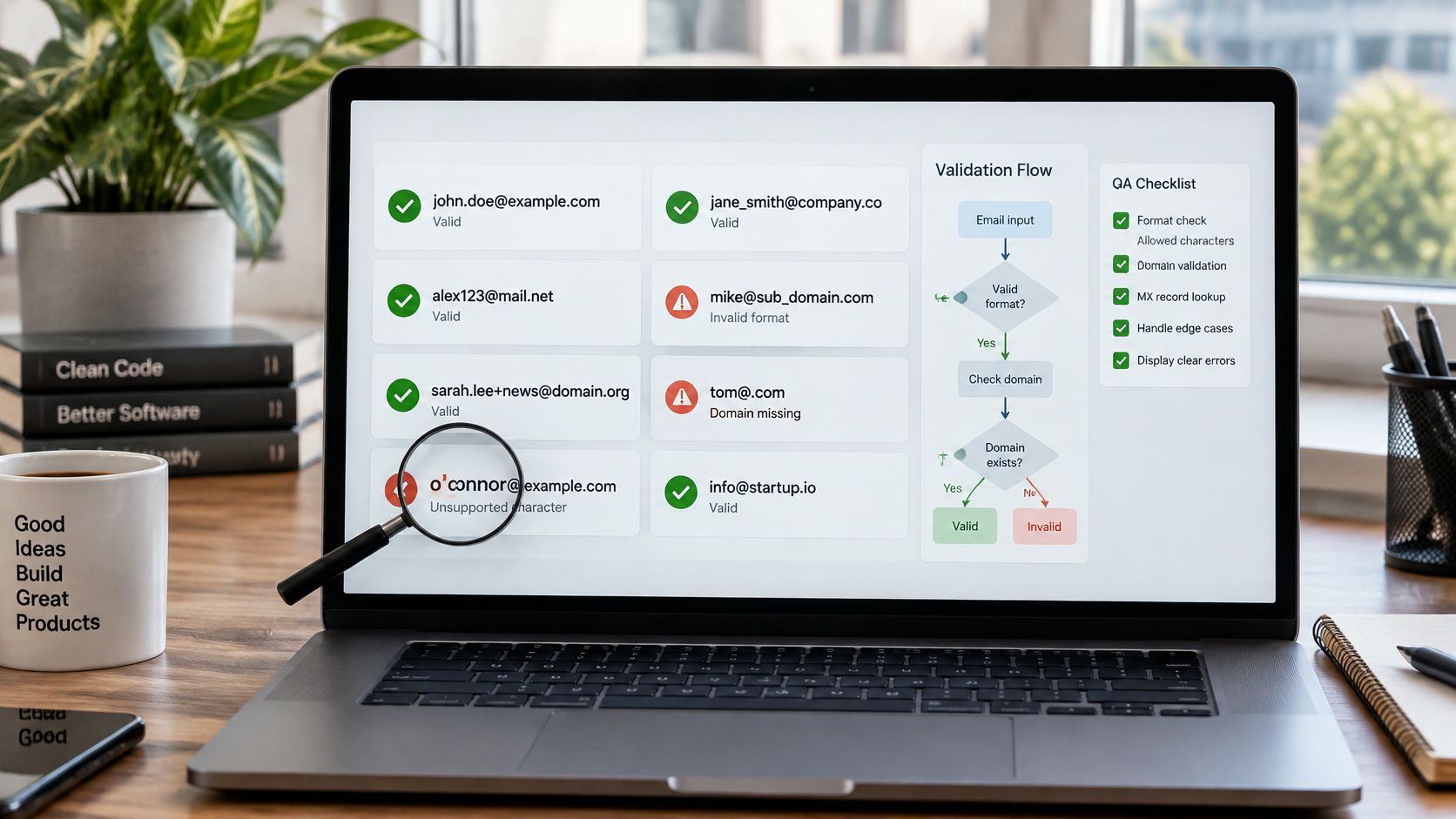
A signup form rejects a customer's address because it contains an apostrophe. The customer tries again, changes the address to something that passes, and may never finish registering. In another test, the form accepts an address with two dots in a row, then a confirmation message bounces. Both failures point to the same problem: a validator that treats email as a simple pattern instead of an address with distinct syntax and delivery checks.
A reliable list of valid email addresses can't be built by looking for a name, an at-sign, and a familiar domain ending. RFC 5322 defines an address using a local part and a domain, separated by @, and allows more than the plain formats many signup forms expect. Syntax is only the first check, though. An address can be correctly formed but still point to a domain or mailbox that can't receive mail, as the Internet Engineering Task Force's RFC 5322 makes clear.
The examples below pair eight valid formats with the bug each one exposes, the result a validator should return, and a useful reason code. Keep them as regression cases: they'll catch brittle rules before a customer does.
Table of Contents
- 1. Dot-Separated Local Part
- 2. Plus Addressing and Sub-Addressing
- 3. Quoted Local Part
- 4. Special Symbol Characters in the Local Part
- 5. IP Address Literal Domain
- 6. Multi-Level Subdomain
- 7. Internationalized Domain Name
- 8. Role-Based Address
- How the eight valid email formats compare for validation testing
- Turn These Test Cases Into a Repeatable QA Suite
1. Dot-Separated Local Part
A signup validator should accept first.last@example.com and anna.schmidt@example.org. A dot can separate parts of an unquoted local name, so a rule that rejects every dot in the local part will block valid addresses.
The bug to catch is a regular expression that allows dots only in the domain or treats any local-part dot as an error. Expected result: syntax valid, with no failure reason. If a later domain or mailbox check fails, return that result separately rather than labeling valid syntax as malformed.
Test the boundaries too
Add first..last@example.com, .first@example.com, and first.@example.com as negative regression cases. In an unquoted dot-atom local part, dots cannot lead or trail the text, and consecutive dots are not allowed. Return invalid_syntax for these cases instead of a vague message such as “email looks wrong.”
Preserve the address as entered. Case normalization or provider-specific dot handling may help identify possible duplicates, but changing the stored value can misrepresent how different providers interpret addresses. For a newsletter signup, accept first.last@example.com as syntactically valid, then verify it before sending a confirmation email. The QA distinction is direct: a dot between local-part atoms is valid; a dot in a forbidden position is not.
2. Plus Addressing and Sub-Addressing
A plus sign is allowed in an unquoted local part, so user+newsletter@example.com should pass syntax validation. People use this pattern to label signups, sort incoming mail, and see which service supplied their address. jane+signup-2026@example.org is another valid test input.
The bug is a restrictive character allowlist that permits letters, digits, dots, and perhaps underscores, but rejects +. Expected result: syntax valid. Use valid_syntax if your system assigns a success reason code, or return a successful result with no failure reason. Don't label the address disposable just because it contains a plus sign.

Separate syntax from account policy
Plus addressing and disposable mail are different signals. A disposable service may issue many addresses, but the plus character itself doesn't prove abuse. If you block every plus address, you'll reject legitimate people who use it for filtering without preventing someone from creating multiple accounts through other means.
A practical policy is to accept the format, then check separately for disposable-domain risk and duplicate-account behavior. If your product wants one account per underlying mailbox, define how you identify a normalized base address, document that rule, and avoid applying one provider's dot or plus behavior to every domain. For example, a user signing up for a campaign-specific bakery offer with customer+bakery@example.com should not be blocked at the syntax layer.
Return distinct outcomes: valid_syntax for the address format, disposable_domain if a separate check confirms a throwaway provider, and a product-specific duplicate result if your account rules identify an existing account. That gives support and users a clear explanation instead of blaming a valid plus sign.
3. Quoted Local Part
"john doe"@example.com is a valid but uncommon format. Quoted local parts can contain characters, including spaces, that aren't accepted unquoted. Other useful test cases are "john..doe"@example.com and "a\"b"@example.com, where the escaped quotation mark checks whether the parser handles quoting rules instead of splitting the address at the first quote.
The bug here is a parser that treats every space or repeated dot as invalid without checking whether the local part is quoted. Expected result: syntax valid when the quoting and escaping are well formed. If your product deliberately excludes quoted addresses, return a policy-specific reason such as unsupported_local_part_format, not invalid_syntax. That difference tells engineers whether the parser is wrong or the product is applying a narrower acceptance policy.

Parse safely, then decide what to support
Most consumer signup forms won't encounter quoted addresses often. Supporting them can still create edge cases in display code, exports, logs, and systems that assume the local part contains only simple characters. Don't “clean” the value by stripping quotes or spaces, since that changes the address.
If you accept the format, keep the original input and escape it before rendering it in a page, log, or CSV export. If your product doesn't support it, explain that limitation clearly and allow a user to contact support rather than presenting an incorrect syntax diagnosis. A QA engineer can use the email validation format guide while adding quoted local parts to a parser regression suite.
Syntax success still doesn't establish that the domain exists or that the mailbox accepts mail. Keep those outcomes separate: valid_syntax means the text follows the accepted address grammar, while a later domain or SMTP result can still indicate a delivery problem.
4. Special Symbol Characters in the Local Part
Consider o'brien@example.com, j_smith-2026@example.net, and info!team@example.org. Apostrophes, underscores, hyphens, and other permitted characters can appear in an unquoted local part. A validator that accepts only letters, digits, dots, and hyphens will reject some correctly formed addresses, including names that contain an apostrophe.
Expected result for a standards-compliant syntax check: accept the address, with valid_syntax or no failure reason. The exposed bug is an underspecified character allowlist, often buried in a home-built regular expression. Such a rule can look effective against malformed input while excluding real customers without notice.
Practical rule: Validate according to the address grammar, not according to the characters you happen to see in your own inbox.
A person named O'Brien might use o'brien@example.com at work. If the form rejects it, telling them to remove the apostrophe is not a useful workaround: the replacement may belong to someone else or may not exist. Likewise, don't reject j_smith-2026@example.net because a pattern assumes the local part can contain only a name and a period.
Report the layer that failed
Use a maintained parser or a verification service instead of growing a custom regex every time a new input breaks. Then give users a reason that matches the actual result. invalid_syntax should mean the address doesn't follow the syntax rules. A failed MX or SMTP check is a delivery finding, not a reason to claim that an apostrophe is illegal.
For QA, test each symbol independently and in combinations your product supports. Add these valid examples to the release suite, then pair them with malformed controls. The goal isn't to accept every string; it's to reject actual syntax errors without turning arbitrary character preferences into a hidden signup rule.
5. IP Address Literal Domain
user@[192.0.2.1] uses an IP address literal instead of a hostname. The bracketed form is permitted by email standards, so it can pass a thorough syntax check even though it's rare in ordinary public signup flows. An IPv6-style case, admin@[IPv6:2001:db8::1], tests whether the parser recognizes the explicit literal form rather than treating its colons as a generic domain error.
The regression bug is a validator that either rejects every bracketed domain as malformed or accepts it and then assumes ordinary hostname-based DNS checks apply. Expected result: syntax valid, followed by a separate policy or delivery outcome. For most consumer products, rejecting IP literals may be a sensible policy, but the user-facing reason should be ip_literal_not_supported or another explicit policy reason, not invalid_syntax.
Keep the test address safe
Use reserved documentation addresses in fixtures, not a real mail server's address. These examples exist to exercise parsing, not to send mail. A test runner should stop after the syntax and policy checks, or use a mocked domain result, rather than trying to deliver to the literal.
A signup form for a public service might reasonably tell the user, “Use an email address with a domain name.” A developer tool designed for standards-focused input handling could instead accept the syntax and let a later verification layer decide whether delivery is possible. Both are defensible choices, provided the API and interface distinguish valid syntax from accepted product policy.
Don't promise that a syntactically valid literal is deliverable. Mail providers and network configurations may not accept it, and hostname MX checks don't establish mailbox existence for this form. Record the outcome by layer, for example valid_syntax followed by ip_literal_not_supported, so the regression suite can verify both parser behavior and product policy.
6. Multi-Level Subdomain
user@mail.eu.example.co.uk is a valid-looking address on a multi-level domain. support@eu.west.example.de exercises a different combination of subdomain labels. The number of dots in a domain doesn't tell you whether it is malformed; corporate systems, regional teams, and country-specific domain structures can all use several labels.
The bug is a domain check that assumes every address ends in exactly name.tld, or that treats a country-code suffix such as co.uk as an invalid extra part. Expected result: syntax valid if the labels follow domain rules. A later DNS check should determine whether the domain has usable mail routing, rather than the syntax parser guessing from the number of dots.
Validate labels, not a dot count
Check the characters and lengths of each domain label, and handle the complete domain as a whole. This catches actual label defects without rejecting a corporate address just because it has a regional or departmental prefix. If the domain passes syntax but has no mail exchange records, return a domain-level reason such as no_mx_records; don't report invalid_syntax.
Say a company routes a European team through mail.eu.example.co.uk. A two-part-domain assumption would reject that employee before the application even checks whether the company can receive mail. An MX lookup is the right next step for mail-routing evidence. Mailbeam's MX Records check confirms whether the domain has valid mail exchange records configured and reachable, while a passing MX result still doesn't prove a particular mailbox exists.
For analytics, don't assume that the last two labels always identify the organization's registrable domain. Use public-suffix-aware domain handling when grouping addresses, so subdomains and country-specific structures aren't collapsed into inaccurate buckets. Keep this domain interpretation separate from the user's typed address and from mailbox verification.
7. Internationalized Domain Name
jürgen@bücher.example tests whether a signup form assumes that every input character is ASCII. Internationalized domain names can contain characters outside the basic Latin alphabet, while DNS lookups use an ASCII-compatible representation. The Punycode form for this example's domain is xn--bcher-kva.example, so user@xn--bcher-kva.example is a useful companion test.
The common bug is rejecting the Unicode domain outright or sending it into a DNS lookup without converting the domain first. Expected result: accept the domain syntax, normalize the domain for DNS-based checks, and preserve the user's original form for display. The validator should report a domain or delivery failure only if the relevant lookup fails, not because the user typed a supported internationalized domain.

Keep domain and local-part support distinct
Convert the domain to its Punycode representation before DNS checks, and retain both the original and normalized forms where your system needs them. Show the person the address they entered rather than unexpectedly replacing it with an encoded string. Test both Unicode and Punycode inputs through the same signup flow to catch differences between frontend validation, backend parsing, and DNS handling.
The local part raises a separate question. Unicode in the part before @ requires support for internationalized email through SMTPUTF8, and not every mail path supports it. Don't treat Unicode in a domain as proof that the local part will work everywhere. For a signup at a company that serves customers in multiple languages, the system should make its support policy explicit and avoid a blanket “ASCII only” rule that rejects internationalized domains it can handle.
Return a specific result for each layer: valid_syntax for a supported input format, a domain-check outcome after normalization, and an SMTP-related outcome if the mail path can't support the address.
8. Role-Based Address
info@example.com, support@example.org, and admin@example.net are syntactically valid addresses. They usually identify a department or shared inbox, not one person. A validator that treats every role name as malformed is confusing address syntax with a decision about who may create an account or receive marketing messages.
The regression bug is a list of blocked prefixes built into the syntax rule. Expected result: syntax valid, with a separate role_address signal when role-based detection identifies the mailbox. A SaaS product might permit a shared support address to create an organization account, while a consumer product may require an individual email for a personal profile. That is a product choice, not an email grammar rule.

Route the signal to the right workflow
Role-based status is useful context for segmentation and routing. For a B2B signup, sales@example.org may belong in a company sales queue rather than a personal marketing journey. A shared address can also be exactly what an organization wants for a team account, so blocking it automatically may prevent a useful signup.
For an account that requires an individual user, return a clear policy result such as role_address, then explain what kind of address the flow needs. Don't call the address invalid if it passes syntax and has a functioning mailbox. Mailbeam's guide to role-based email addresses can help teams think through how these addresses differ from personal inboxes.
Keep the checks independent: valid_syntax records the format result, a role-based flag describes the mailbox type, and an account policy decides whether that type is acceptable for the current workflow. This gives support teams a useful explanation and lets product engineers change signup rules without weakening the parser.
How the eight valid email formats compare for validation testing
| Item | Local Part Rule | Common Validator Mistake | Typical Use |
|---|---|---|---|
Dot-separated local part (first.last@example.com) |
Single dots may separate atoms; no leading, trailing, or consecutive dots outside quotes. | Rejecting valid dot-separated names or accepting invalid dot placement. | Common personal and business addresses. |
Plus addressing (user+tag@example.com) |
Plus signs are allowed; delivery of the tag depends on the provider. | Rejecting plus signs as invalid. | Signup tracking, filtering, and testing. |
Quoted local part ("john doe"@example.com) |
Quoted strings can contain spaces and otherwise restricted characters, with escaping rules. | Rejecting all quoted forms or mishandling them when displaying or storing. | Standards testing; rare in everyday use. |
Special symbols (o'brien@example.com) |
Unquoted local parts may include permitted symbols such as apostrophes, underscores, and hyphens. | Using an overly restrictive pattern that allows only letters, digits, and dots. | Real names and organizational naming conventions. |
IP address literal domain (user@[192.0.2.1]) |
No special local-part rule; the domain is an IP literal in brackets. | Rejecting the address based on assumptions about the domain format. | Testing, diagnostics, and internal systems. |
Multi-level subdomain (user@mail.eu.example.co.uk) |
No special local-part rule; multiple domain labels are valid. | Assuming domains must have exactly two parts. | Regional, departmental, or product subdomains. |
Internationalized domain (jürgen@bücher.example) |
Unicode local parts require SMTPUTF8 support; Unicode domains use IDN encoding for DNS. | Rejecting non-ASCII input or skipping domain normalization. | Email for users of non-English languages and scripts. |
Role-based address (info@example.com) |
Generic local parts follow ordinary address syntax. | Treating role-based status as a syntax failure. | Shared business inboxes and team contact addresses. |
Turn These Test Cases Into a Repeatable QA Suite
Store each example as a fixture alongside its expected syntax result, any policy decision, and the reason code your product should return. Include both the valid cases in this guide and their malformed counterparts. For example, a quoted local part should pass syntax when quoting is supported, while a local part with unquoted consecutive dots should fail with invalid_syntax.
Keep the test layers separate. A parser test shouldn't depend on a live SMTP server, and a role-based policy test shouldn't fail because a test domain happens to lack MX records. Mock domain and mailbox results where needed, then add integration tests for the verification service and the signup flow. That way, an external timeout won't make a syntax regression look like a parser defect.
For every release, assert what the user sees as well as what the API returns. A frontend can accidentally reject an address before the backend's more capable validator ever receives it. Check the submitted value, the returned valid state, the machine-readable reason, and the message shown in the form. For Mailbeam, the response includes validity, a reason, and per-check results, so engineers can test the outcome rather than infer it from a generic failure.
Treat syntax-valid but policy-blocked cases as their own expected outcomes. An IP literal can be syntactically acceptable but unsupported by your product; a role address can be valid while requiring a different account workflow. If the message says “invalid email” for either case, your interface is collapsing two distinct decisions and making it harder for customers and support staff to understand what to do next.
Run the fixtures automatically whenever you change validation rules, signup components, or verification-provider settings. Then include them in end-to-end tests that cover keyboard entry, pasted addresses, error rendering, and successful submission. This is the same kind of release discipline used to catch checkout failures before release: exercise unusual but legitimate inputs before they reach customers.
A strong list of valid email addresses isn't just a collection of examples. It's a set of explicit expectations about syntax, delivery evidence, and product policy. Keep those expectations version-controlled, review reason-code changes alongside the code that introduces them, and add every newly discovered edge case as a fixture.
Mailbeam offers real-time verification that checks syntax, MX records, SMTP mailbox existence, disposable addresses, role-based addresses, and catch-all behavior, with machine-readable results for signup flows. Add the formats in this guide to your regression suite, then visit Mailbeam to explore its verification API and tools.