
In a 2026 study of 210,427 role-based email checks, 52.1% of addresses were invalid and only 13.5% were valid, according to recent role-based address verification data. That result changes the product question. You shouldn't ask whether every shared inbox is bad. You should ask what the address represents, how it will be used, and whether your signup or messaging workflow can handle that distinction.
Table of Contents
- What Role Based Email Addresses Are and Why They Show Up Everywhere
- From RFC 2142 to Modern Signup Stacks
- The Deliverability and Engagement Risk Most Teams Underestimate
- Detection Heuristics for Role Based Email Addresses
- Block, Flag, or Allow Choosing the Right Signup Strategy
- Why Blocking Every Role Address Is the Wrong Default
- Wiring Role Based Detection Into a Real Product Flow
- A Practical Policy Checklist for Engineering and Growth Teams
What Role Based Email Addresses Are and Why They Show Up Everywhere
Role-based email addresses belong to a function, department, or operational process rather than a named individual. Common examples include info@, support@, sales@, admin@, billing@, and contact@. A company may route them to a shared inbox, ticketing system, distribution list, or several employees at once.
That setup is useful for inbound communication. A support team can keep using support@company.com even when staff members change. A small business can publish info@company.com without exposing an employee's personal address. The address represents the job to be done, not the person currently handling it.
The distinction matters in product flows because many systems need human-level identity assurance, not merely a deliverable destination. An address can accept mail and still fail to identify one accountable user. The practical definition is laid out in this role-based email glossary, where shared and function-specific inboxes are treated differently from personal mailboxes.
Why they appear in almost every form
Role addresses show up across SaaS signups, lead forms, support portals, and imported contact lists for several practical reasons:
- Shared access: Teams may want several employees to access one account.
- Public contact habits: Many small businesses publish only a general address.
- Operational continuity: A department address survives staff turnover.
- List collection: Marketing teams often upload addresses gathered from company websites.
- Abuse resistance: Some users prefer a team inbox for trials or vendor evaluation.
The first four reasons can be legitimate. The last one can create risk if a product grants access, sends invitations, or enrolls an entire team based on an address no individual controls.
| Prefix | Typical use | Verified role-address finding |
|---|---|---|
contact@ |
General inquiries | Valid only 3.3% of the time in the cited dataset |
marketing@ |
Marketing requests | Valid 9.3% of the time |
info@ |
General company contact | Valid 13.4% of the time |
hello@ |
General or brand contact | Valid 15.0% of the time |
office@ |
Office administration | Valid 27.9% of the time |
The safe conclusion isn't that every prefix should be rejected. It's that a role address should become a policy signal. Your product needs to decide whether the address is acceptable for account creation, outbound marketing, billing, support, or identity-sensitive actions.
From RFC 2142 to Modern Signup Stacks
The convention behind role mailboxes is older than most modern web applications. RFC 2142 was published in 1997 and established widely expected organizational mailboxes such as postmaster@ and abuse@. Business-facing addresses including info@, sales@, and support@ later became familiar patterns across company domains, building on the same idea of contacting a function instead of a person.
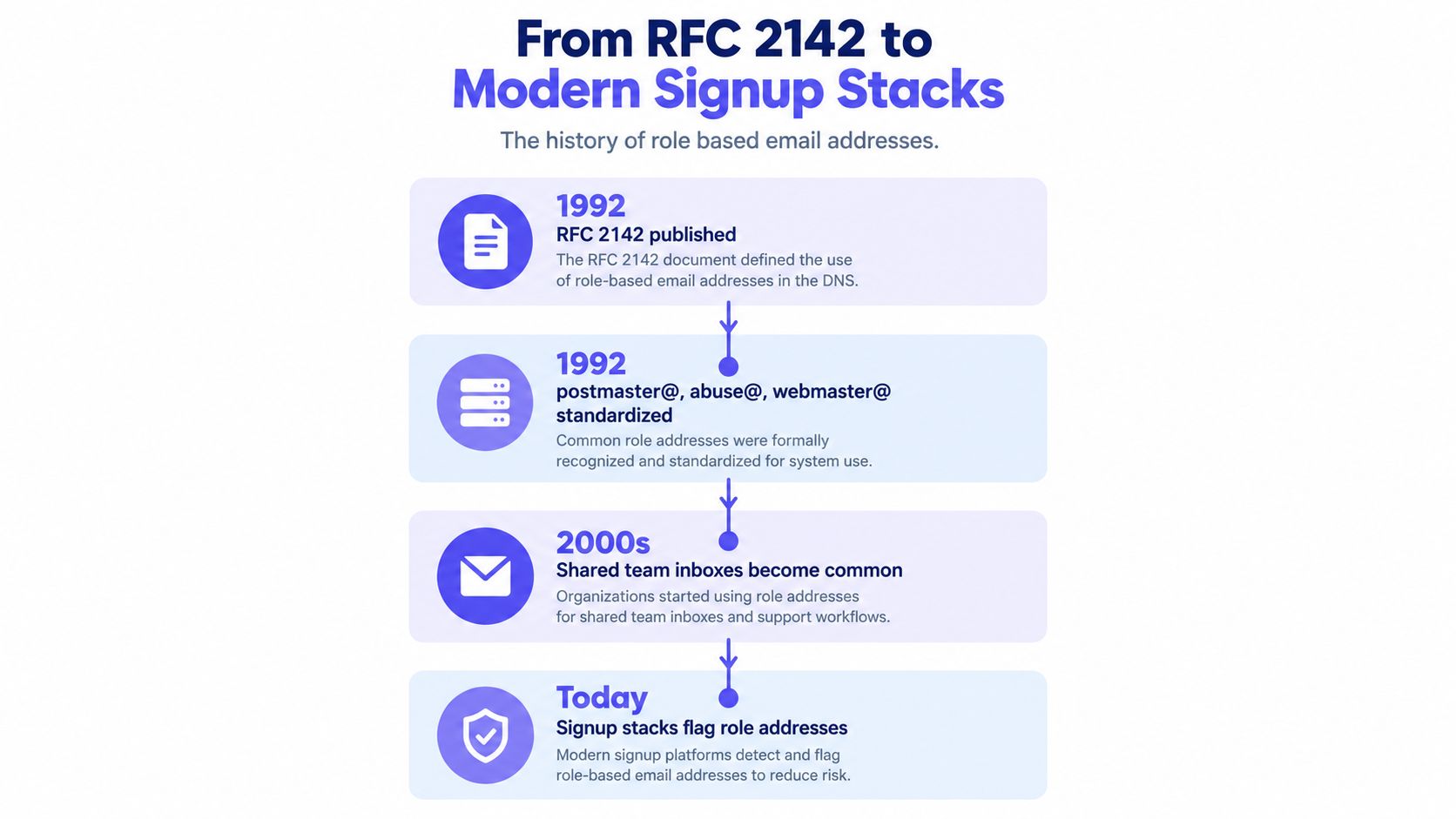
Why the old convention still matters
Operational mailboxes solve a real organizational problem. A domain needs a stable way to receive abuse reports, administrative notices, and other messages that shouldn't depend on one employee's continued employment. The same principle later spread to sales, billing, human resources, and customer support.
Cloud collaboration tools made the pattern easier to deploy. Shared inboxes, aliases, distribution groups, and helpdesk queues let several people work from one departmental address without sharing a personal mailbox. For a small company, support@ may be the only practical customer-service channel.
That operational usefulness creates a verification edge case. A role address may have valid syntax, a working mail domain, and a mailbox that accepts messages. None of those checks proves that the address maps to one individual. The technical delivery path confirms that the organization can receive mail. It doesn't confirm who should own an account or who can authorize a purchase.
Valid delivery doesn't equal personal identity
A verification system therefore needs at least two separate outcomes:
- Can this address receive mail?
- Does this address represent one person?
Those outcomes shouldn't be collapsed into a single valid or invalid label. Treating every role account as invalid blocks legitimate operational use. Treating every accepted mailbox as a personal identity weakens account controls, invitation logic, and marketing consent records.
A role address can be deliverable without being a suitable recipient for one-to-one communication.
The right signup architecture preserves that distinction. It records the address's technical status, identifies whether it appears role-based, and applies a product rule based on the action the user wants to perform.
The Deliverability and Engagement Risk Most Teams Underestimate
The risk isn't evenly distributed across role-based email addresses. Prefixes that are rarely monitored or tied to old systems can behave very differently from active departmental inboxes. A blanket rule hides that signal and forces product teams to choose between unnecessary rejection and careless acceptance.
The available verification data shows a clear spread among common prefixes. contact@ and marketing@ perform poorly in the cited sample, while office@ is materially more often valid. That doesn't make office@ a personal mailbox, but it does show why a single role-address bucket is too crude for product policy.
What the risk looks like in practice
A shared inbox creates several failure paths:
- A message may reach a queue that nobody actively monitors.
- Several recipients may receive the same message and assume someone else will handle it.
- A former employee may still be present in the routing rules.
- One recipient may report unwanted mail, affecting the sender's reputation.
- Engagement data may describe a team inbox rather than a real decision-maker.
The cited industry guidance also reports that B2B lists commonly contain 3% to 8% role accounts, and that role-based recipients can produce complaint rates 2 to 5 times higher than personal addresses in outreach contexts. Those figures support segmentation, not an automatic ban. A support reply, invoice, or security notice has a different purpose from a cold campaign.
| Prefix | Validity signal in cited data | Practical marketing interpretation |
|---|---|---|
contact@ |
3.3% valid | Treat as high-risk for outbound campaigns |
marketing@ |
9.3% valid | Review before acquisition or outreach sends |
info@ |
13.4% valid | Avoid assuming one person is reading it |
hello@ |
15.0% valid | Segment and monitor rather than blindly accept |
office@ |
27.9% valid | More likely to be active, but still non-personal |
Separate message purpose from address type
The same address can be unsuitable for one workflow and appropriate for another. Sending a promotional sequence to info@ may produce poor engagement and unclear consent. Sending a support response to support@ may be exactly what the customer expects.
The prefix is a routing signal, not a complete risk verdict.
For growth teams, the practical rule is to suppress or separately segment role addresses before outbound marketing. For product teams, the rule is more nuanced. Preserve operational access where the mailbox is part of the customer's business process, then apply stronger checks before granting personal entitlements or using the address as proof of individual identity.
Detection Heuristics for Role Based Email Addresses
Role detection works best as a layered heuristic stack. A single prefix comparison is cheap, but it misses aliases, regional conventions, and role addresses that appear on less common subdomains. An advanced SMTP probe alone is also insufficient because it can confirm mailbox acceptance without proving individual ownership.
Start with the local part
Normalize the address before comparing it with your role dictionary. Convert the local part to lowercase and account for formatting variants such as dots and plus-tags according to your product's email identity rules. Maintain separate categories instead of one long list:
- Operational:
postmaster@,abuse@,security@,noc@ - Departmental:
support@,sales@,billing@,admin@ - Public-facing:
info@,contact@,hello@ - Specialized:
legal@,careers@,press@,privacy@
RFC-derived operational names deserve special treatment because organizations may need them for standards, abuse handling, or security contact. Your own SaaS data can extend the list, but every addition should have a documented reason and review owner.
Add domain and delivery signals
After the inexpensive local-part check, inspect the domain-level evidence. Catch-all behavior can make many addresses appear acceptable even when the recipient isn't specifically provisioned. Disposable-domain detection helps identify a different risk category, while role-only subdomains and team aliases can provide supporting evidence.
Use SMTP recipient checks only when the earlier layers are inconclusive and your provider permits the technique. The response should confirm mailbox acceptance, not override a strong role signal. Keep the result explainable by returning a reason code such as role_prefix_match, catch_all_domain, smtp_accepted, or role_signal_conflict.
| Detection layer | Signal checked | Latency | False-positive risk |
|---|---|---|---|
| Local-part normalization | Known role prefix and formatting variants | Lowest | Moderate if the list is too broad |
| Domain inspection | Catch-all behavior and domain classification | Low | Moderate |
| Disposable-domain check | Temporary or disposable domain signals | Low | Low for role detection, separate for abuse |
| SMTP verification | Recipient acceptance response | Higher | High if treated as proof of personal identity |
| Policy classification | Prefix, domain, and verification result together | Depends on earlier layers | Lowest when reason codes are preserved |
A useful output isn't just role_address: true. Return confidence or a category that lets the product distinguish definitely role, probably role, and role-shaped but otherwise acceptable. That makes the next decision visible to engineering, support, and compliance teams.
Block, Flag, or Allow Choosing the Right Signup Strategy
A signup flow has three defensible responses to a role address. Block protects a strict identity or deliverability policy. Flag preserves access while giving downstream systems a risk signal. Allow accepts the address and monitors what happens after the account is created.
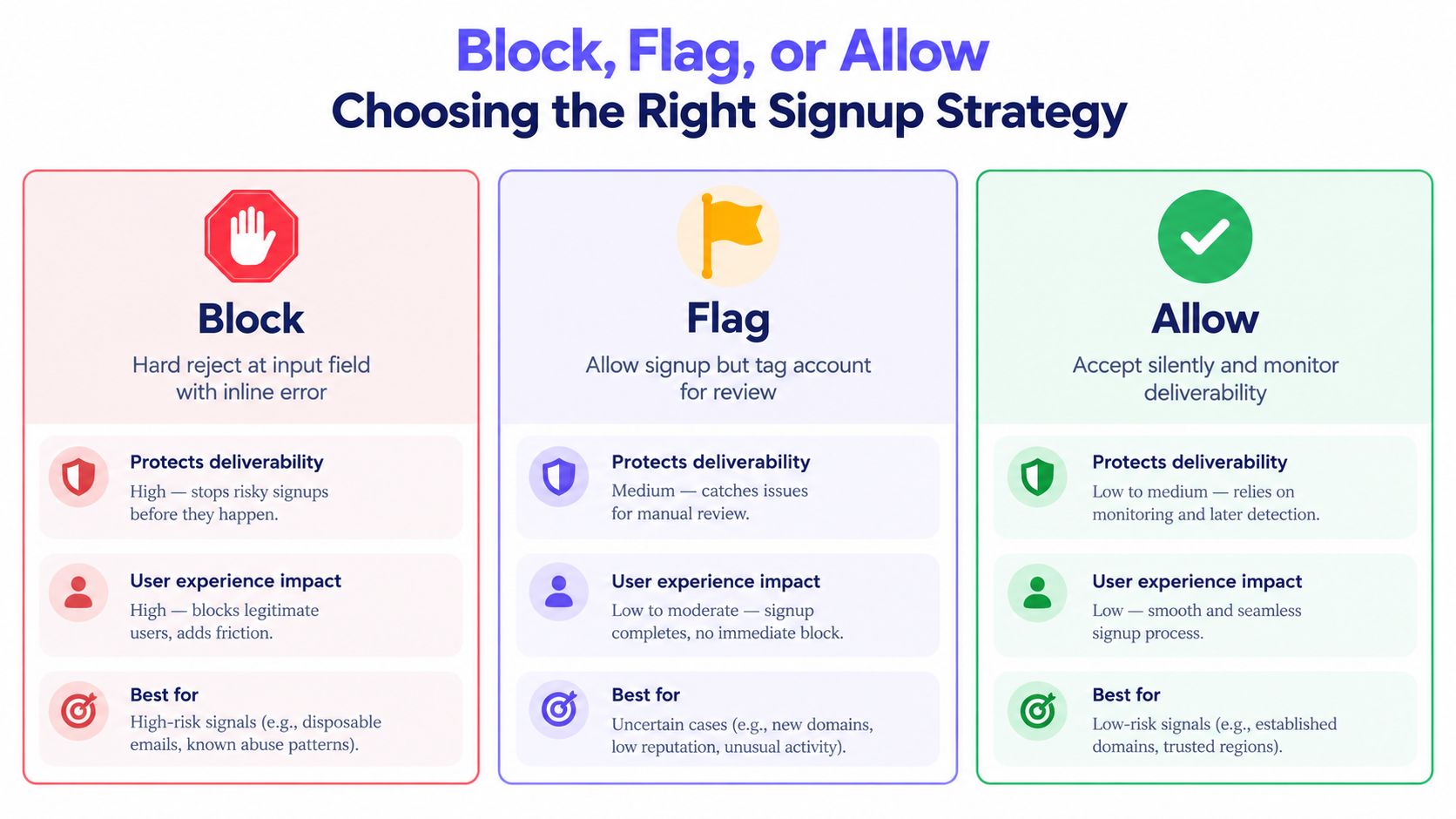
Compare the three policies
Blocking is appropriate when the address is being used as a personal login, a high-risk consumer signup, or a credential for an action that requires one accountable person. The drawback is real. Businesses that legitimately operate from support@ or info@ may be pushed toward personal Gmail addresses, abandoned signups, or support tickets.
Flagging usually provides the best balance for B2B trials. The user can continue, while your account record receives a role classification. You can then use that signal for invitation limits, manual review, billing controls, or a separate nurture path without presenting an unnecessary error during registration.
Allowing with monitoring fits operational products. A helpdesk, status platform, invoice system, or support integration may need to communicate with shared inboxes. In that case, watch bounce and complaint behavior, preserve the classification, and avoid treating successful delivery as proof of a named user.
| Strategy | Product behavior | Best fit |
|---|---|---|
| Block | Reject at the field and explain the alternative | Personal identity and strict consumer flows |
| Flag | Create the account and attach a role risk state | B2B trials and mixed-use SaaS |
| Allow | Accept silently and monitor downstream signals | Operational and transactional workflows |
The error message should match the policy. A hard rejection can say, “This address appears to be a shared inbox. Use a personal work address to create an individual account.” Don't expose an internal reason code or imply that the company address is invalid.
For flagging, keep the classification invisible unless the next step needs clarification. A verification API can provide the technical checks that sit behind this decision, including syntax, domain, mailbox, disposable, catch-all, and role signals. The important design principle is to keep verification separate from the user-facing policy, as described in this guide to email verification API integration.
Why Blocking Every Role Address Is the Wrong Default
A universal block treats a useful organizational convention as if it were abusive by nature. That fails when the address is the correct destination for the task.
Compliance teams may need monitored addresses for abuse reports, privacy requests, security contacts, or data protection matters. A product that rejects every function-based address can make it harder for a customer to configure the contact channel their organization actually uses. The legal requirements vary by jurisdiction and situation, so engineering shouldn't turn a broad prefix list into an automatic legal conclusion.
Support creates a second problem. A small business may have no IT department, no directory of named users, and no reason to maintain individual addresses for a vendor account. Forcing the owner to use a personal address can add friction without addressing the underlying abuse risk.
Operations create a third. Transactional systems may send notices to shared inboxes because the department, not an individual, owns the workflow. A billing platform that refuses every billing@ destination could prevent the customer from receiving invoices through its established process.
Use tiers instead of one gate
A practical policy can separate addresses into three groups:
- Restrict: Prefixes with strong evidence of abuse, poor validity, or unsuitable acquisition use.
- Review: Ambiguous departmental and public-facing addresses that may be legitimate but aren't personal.
- Allow: Operational and compliance-oriented destinations needed for support, security, legal, or administrative communication.
The decision should also depend on message type. Marketing acquisition needs stricter list hygiene. A support reply, invoice, security notice, or legal notice may need the address to remain available.
Role detection should route the workflow, not automatically close the door.
Document the reason for each tier, review exceptions with legal and support stakeholders, and let the account record preserve the original classification. That approach gives engineering a deterministic rule without pretending that every business uses email in the same way.
Wiring Role Based Detection Into a Real Product Flow
A reliable implementation separates fast browser feedback from authoritative server policy. The browser can catch obvious formatting problems immediately, but it shouldn't make the final decision. The server needs the normalized address, verification result, reason code, and policy version before it creates or rejects the account.
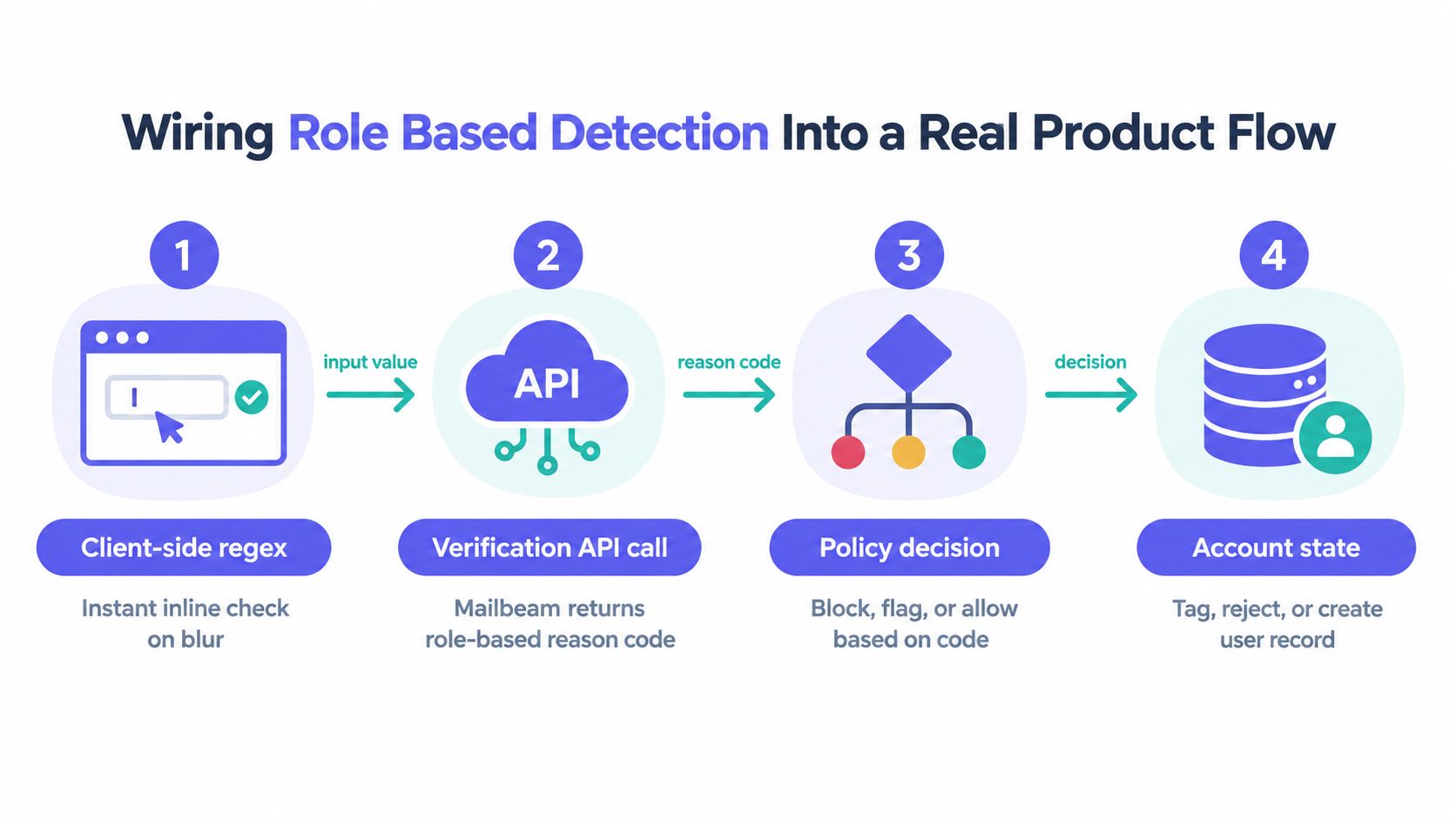
A four-step implementation
Client-side check: Run a lightweight email-format check on blur or submit. Show immediate feedback for malformed input, but don't label an address as role-based solely in the browser.
Server-side verification: Send the normalized address to your verification service. Store the response fields you need, including validity, role classification, reason code, and any delivery-related status. The role account detection API can serve as the role-specific verification layer in this pattern.
Policy decision: Map reason codes to product outcomes. A high-risk role prefix can produce a hard block, a medium-confidence departmental match can produce a soft flag, and an operational address can pass through for the relevant workflow.
Account state: Persist the decision on the user or organization record. Include the verification timestamp, policy version, normalized address, raw classification, and final action so support and compliance staff can explain the result later.
Don't let a timeout become an accidental approval. Define retry behavior, respect provider rate limits, and decide whether an unavailable verification service should fail closed, fail open, or place the signup into a pending state. That choice depends on the cost of abuse versus the cost of blocking legitimate customers.
Keep asynchronous results consistent
Some checks finish later than the initial form submission. Webhooks should update the account state idempotently, using an event identifier or equivalent deduplication mechanism. If the user has already progressed, the system should apply the new result to the correct account rather than creating a second record or overwriting a newer decision.
Store both technical result and business outcome. “Role detected” is not the same as “signup rejected.” That separation lets growth change a nurture rule without rewriting verification history, and it lets compliance audit why a specific address was allowed.
A Practical Policy Checklist for Engineering and Growth Teams
Put this checklist in the signup specification, implementation ticket, or review document. It turns role detection from an undocumented edge case into an owned product decision.
- Maintain explicit categories: Keep allow, flag, and block lists keyed to operational, departmental, public-facing, and specialized prefixes.
- Document the policy: Record why each category receives its treatment and identify the engineering owner.
- Preserve reason codes: Store the verifier's classification and the final product action on the user or organization record.
- Separate message types: Apply stricter rules to acquisition and outbound marketing than to support, billing, security, and legal communication.
- Keep client and server rules aligned: Use browser feedback for speed, but let the server make the authoritative decision.
- Handle uncertainty deliberately: Define retry, timeout, rate-limit, webhook, and manual-review behavior before launch.
- Measure by role bucket: Compare bounce, complaint, delivery, and engagement behavior across role categories rather than merging every prefix.
- Review exceptions: Give support and compliance a documented path for legitimate operational addresses.
- Protect retention boundaries: Align stored verification results with your privacy notice, deletion rules, and access controls.
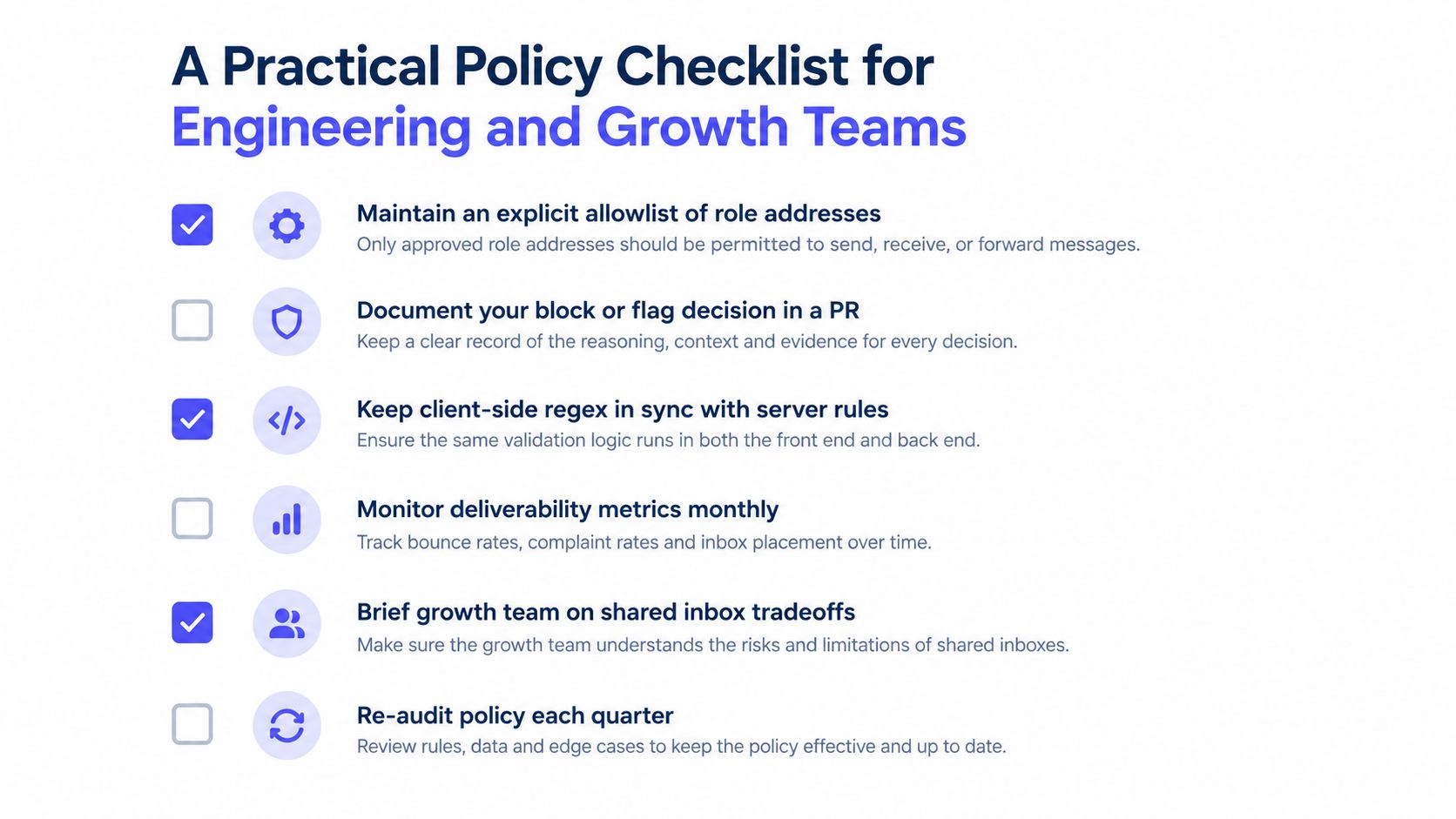
The decision rule is simple: restrict role addresses when the workflow requires personal identity or protects outbound reputation, flag them when uncertainty is manageable, and allow them when the mailbox is the correct operational destination. Deliverability, compliance, and user experience improve when the policy follows the message purpose instead of the prefix alone.
Mailbeam provides real-time email verification with role-based detection and machine-readable reason codes for signup and list-hygiene workflows. Use Mailbeam to evaluate shared inboxes alongside syntax, domain, disposable, catch-all, and mailbox signals, then route each result through your own block, flag, or allow policy.