
A signup form rejects an address that looks perfectly normal. The visitor sees a red message, tries again, and wonders whether the product is broken. Behind that small piece of interface, your system may have parsed the address, queried DNS, contacted a mail server, classified the domain, and translated several uncertain signals into one product decision.
That's the useful way to understand real-time email validation. It isn't a magical yes-or-no test, and it isn't the same as cleaning an old marketing list. It's a staged, synchronous risk-control pipeline that runs while a person is waiting for signup to complete. Its quality depends on the checks you run, the latency you permit, the meaning you assign to ambiguous results, and the data you retain.
Table of Contents
- What Real-Time Email Validation Actually Does at Signup
- The Layered Checks Behind a Single Verification Call
- Why Latency Shapes the Validation Pipeline
- Scores, Reason Codes, and Deterministic Product Decisions
- Integration Patterns for Signup and Batch Workflows
- Where Real-Time Validation Stops Being Fraud Control
- GDPR and EU Compliance Implications for Verification Logic
- A Practical Checklist Before You Ship Validation Live
What Real-Time Email Validation Actually Does at Signup
The red error appears under jane.doe@example.com just after the visitor presses Create account. Rewind a moment. The browser sent the form data to your backend, your backend made a request to a verification service, and the service returned structured results before your application decided whether to create the account or send a confirmation message.
That's an inline decision, not a background cleanup job. The address is checked at the moment it enters your system, the result influences whether signup continues, and the round trip becomes part of the form's perceived speed. A slow or unavailable validator can make a healthy signup flow feel unreliable.
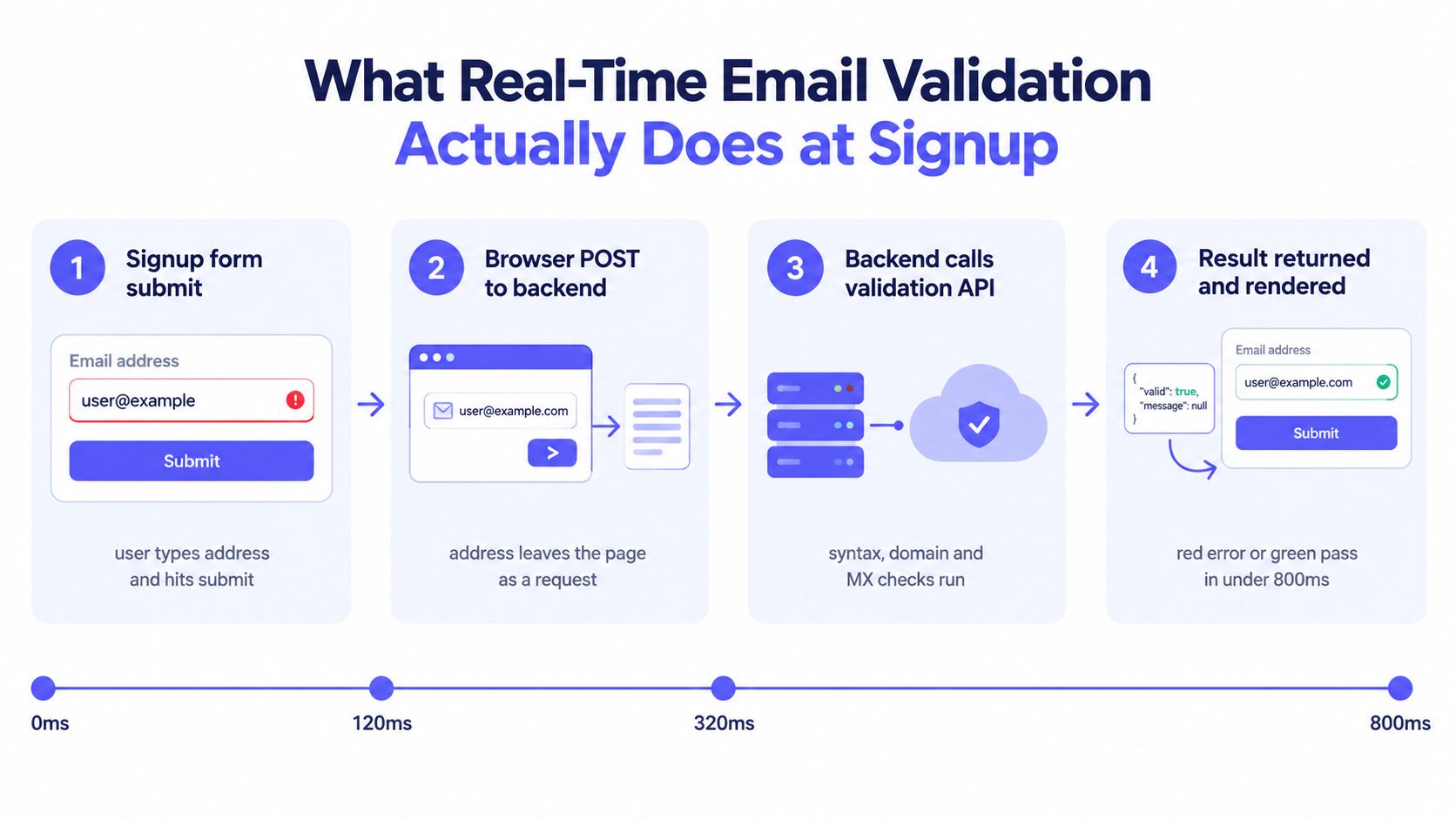
A practical request path looks like this:
- The browser submits the address. Client-side syntax checks can catch an obvious typo, but they shouldn't be your security boundary.
- Your backend forwards a normalized request. Keep the provider credential on the server, not in browser JavaScript.
- The validator runs progressive checks. Syntax, MX, SMTP, disposable-domain, role-account, free-provider, and catch-all signals answer different questions.
- Your application chooses an action. It may block, accept with a warning, or require a confirmation email.
The distinction matters for deliverability. An address can look valid yet fail at mailbox level, and a domain can publish mail records while accepting uncertain recipients. Stronger intake controls help you protect your sender reputation by preventing questionable data from flowing directly into transactional and marketing systems.
Practical rule: Treat the validator as a decision service with explainable outputs, not as a green checkmark attached to an input field.
For EU products, the call also creates a processing event. The address, request context, result, and audit record need a defined purpose, retention policy, and vendor arrangement. Compliance isn't a document you review after launch. It's part of how the signup endpoint behaves.
The Layered Checks Behind a Single Verification Call
Take jane.doe@example.com. A useful validator doesn't ask only whether the string contains an @ symbol. It evaluates signals from different layers, because each layer has a different failure mode and a different level of certainty.
Seven checks, seven questions
Syntax runs first. It rejects a missing @, malformed local parts, or an unusable domain shape quickly. This is a formatting decision, not proof that a mailbox exists.
MX lookup asks whether the domain advertises mail exchangers. A domain may exist on the web without being configured to receive email, so checking only general domain existence is insufficient.
SMTP verification goes deeper. The verifier connects to the relevant mail server and exchanges the stages needed to test the recipient, including MAIL FROM and RCPT TO. A 250 response generally indicates acceptance, while 450 can represent a temporary or greylisting response and 550 commonly indicates rejection. Even this layer proves mailbox behavior only as observed at that moment. You can learn more about understanding verification and validation when designing the distinction between a check and a business decision.
Disposable-domain detection identifies temporary inbox providers. A throwaway address may receive a message today but still be inappropriate for a trial, incentive, or sensitive workflow.
Role detection flags shared addresses such as info@, support@, or postmaster@. A role address isn't automatically invalid. A B2B procurement workflow may need to accept it, while an individual-user product may prefer a named mailbox.
Free-provider recognition distinguishes a consumer mailbox such as Gmail from an address on a company domain. This is classification, not a validity verdict. Product teams should avoid treating free-provider status as suspicious by default.
Catch-all probing tests whether a mail server accepts arbitrary recipients. If it returns acceptance for addresses that aren't known to exist, the validator can't confidently prove that jane.doe@example.com is a real mailbox. Catch-all is therefore an uncertainty signal, not an automatic invalid result.
| Layer | What It Tests | Example | Typical Verdict |
|---|---|---|---|
| Syntax | Address formatting | jane.doeexample.com |
Invalid syntax |
| MX | Mail-receiving configuration | example.com has mail exchangers |
Pass or no MX |
| SMTP | Recipient-level server response | Recipient accepted or rejected | Pass, soft fail, or hard fail |
| Disposable | Temporary-provider membership | Throwaway inbox domain | Flag or block |
| Role | Shared mailbox pattern | info@example.com |
Flag |
| Free provider | Consumer-provider classification | jane@gmail.com |
Informational |
| Catch-all | Whether unknown recipients are accepted | Server accepts arbitrary names | Unknown or risky |
A team that collapses these outcomes into valid: true loses the information needed for UX, fraud controls, and support. Your internal contract should preserve each reason code, even when the first product version exposes only a simple message. A server-side design can also benefit from a focused email validation check that separates formatting, domain, mailbox, and policy results.
Why Latency Shapes the Validation Pipeline
Latency determines which checks belong in the critical path. A DNS or MX-only lookup commonly completes in 20 to 120 milliseconds, while full SMTP verification commonly takes 500 milliseconds to 3,000 milliseconds per address, according to the MX versus SMTP validation accuracy benchmark. SMTP needs a network connection and mailbox probing, so remote server behavior can add uncertainty that a DNS lookup doesn't have.
Accuracy has the opposite shape. MX-only validation catches approximately 80% to 85% of undeliverable addresses in mixed lists, while SMTP-based validation can reach approximately 95% to 99% accuracy on cooperative domains by detecting mailbox-level failures that DNS alone can't see, as documented in the same benchmark. Neither figure means a validator can guarantee delivery. Mailbox providers can accept a message and later filter it, reject mail because of sender reputation, or change their behavior after the check.
A second benchmark frames the engineering problem differently. Syntax checks are effectively immediate, MX lookups are usually suitable for synchronous forms, and SMTP checks should be timeout-bounded or deferred when a domain is slow or ambiguous, according to guidance on syntax, MX, and SMTP verification.
A useful operating split
| Approach | Typical Latency | Accuracy Signal | Signup Fit |
|---|---|---|---|
| Syntax | Effectively instantaneous | Formatting only | Always synchronous |
| MX-only | 20 to 120 ms | Domain mail capability | Synchronous |
| Full SMTP | 500 to 3,000 ms per address | Mailbox-level signal on cooperative domains | Conditional or bounded |
| Deferred SMTP | User isn't held for the full probe | Deeper result arrives later | Step-up or post-signup |
For signup, run syntax, MX, disposable, and role classification inline. Give the entire validation request a firm budget, then return unknown or pending when SMTP can't produce a reliable answer in time. A user shouldn't stare at a spinner because a recipient domain greylisted your probe.
A timeout isn't the same as an invalid mailbox. Model uncertainty explicitly, then decide whether the workflow needs confirmation, review, or a later retry.
The right action depends on the value of the signup. A newsletter form may accept an unknown result and rely on confirmation. A high-risk account recovery flow may require a deeper check or an additional challenge. The pipeline should preserve the distinction between “we observed rejection” and “we couldn't obtain a conclusive answer.”
Scores, Reason Codes, and Deterministic Product Decisions
A validator response should look more like an event than a badge. It may contain a numeric score, individual checks, and reason codes such as invalid_syntax, no_mx, disposable, role_based, free_provider, catch_all, and smtp_softfail.
The score helps rank outcomes, but it shouldn't own the policy. Score bands need calibration against your own bounce, confirmation, abuse, and conversion data. Copying a vendor's threshold without understanding its population can turn a useful signal into a blunt gate.
Put an owner behind every reason code
A product manager should be able to answer what happens when each code appears. So should engineering, support, security, and compliance. The frontend shouldn't invent behavior because an unfamiliar enum fell through a default branch.
| Reason Code | Score Band | Product Action | Example Trigger |
|---|---|---|---|
invalid_syntax |
Lowest band | Block at form | Missing @ or malformed address |
no_mx |
Low band | Block, with correction guidance | Domain has no usable mail exchanger |
disposable |
Low band for sensitive flows | Block or step up | Temporary inbox provider |
role_based |
Middle band | Soft-flag or accept by workflow | info@example.com on B2B signup |
free_provider |
Informational band | Accept | Consumer mailbox classification |
catch_all |
Uncertain band | Accept with confirmation or step up | Server accepts unknown recipients |
smtp_softfail |
Uncertain band | Retry, pending, or step up | Temporary SMTP response or timeout |
Consider a B2B signup using info@company.example. Blocking it may reject a legitimate buying team. Accepting it without confirmation may create an account that nobody monitors. A sensible policy can accept the registration, require a confirmation email, and attach the reason code to the account for later review.
The user-facing message should describe an action, not expose infrastructure jargon. “Check the domain for a typo” is useful. “SMTP soft fail” may be accurate internally but confusing on a form. Keep the detailed reason in the server event and map it to localized, actionable copy at the product boundary.
Design decision: A reason code is only useful when it leads to a named action, an owner, and a measurable outcome.
Use different policies for different workflows. A public trial, a regulated account, an invitation, and a password reset don't share the same tolerance for disposable, role-based, catch-all, or uncertain addresses. Deterministic rules reduce inconsistent decisions across frontend, API, CRM, and support tooling.
Integration Patterns for Signup and Batch Workflows
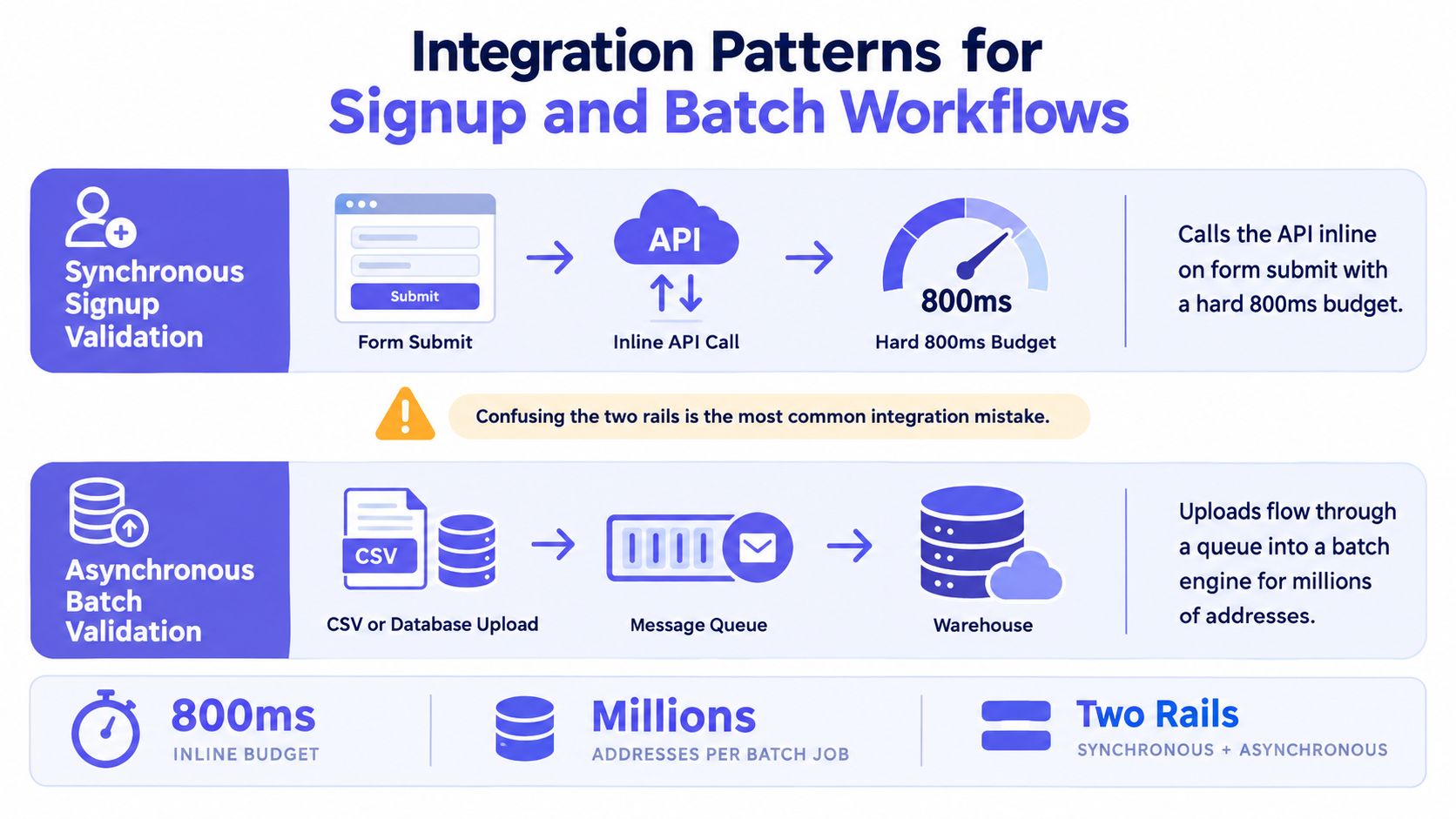
Real-time signup validation and batch verification use different rails. Confusing them is a common integration error because both may call what appears to be the same verification service.
The synchronous rail
On form submission, your backend sends one address to the validator and waits for a bounded response. The plan notes for this workflow specify a hard 800ms budget, so the application needs a clear fallback when the provider doesn't respond within that window.
The browser can show a soft loading state while the server works. It should surface only hard failures inline, preserve the entered address, and avoid making a temporary provider outage look like a user mistake. Your backend proxy should hide API keys, normalize provider-specific reason codes, enforce timeouts, and emit an audit event for every accepted or rejected decision.
A proxy also gives you one place to apply policy. The UI receives your stable contract rather than a vendor's changing response shape. For implementation patterns around an address-verification endpoint, see this email verification API guide.
The asynchronous rail
Batch processing starts with a CSV, database extract, or queued set of existing addresses. The application doesn't keep a visitor waiting. A worker submits records, receives results through polling or webhooks, and then updates CRM status, suppresses risky recipients, or schedules a confirmation action.
Webhook delivery creates its own engineering obligations:
- Idempotency: Store an event identifier or deterministic record key before applying an outcome.
- Replay safety: A repeated event must produce the same final state, not duplicate messages or credits.
- Signature verification: Reject payloads that don't pass authentication before parsing business fields.
- State transitions: Allow
pendingto becomevalid,invalid, orunknownwithout overwriting newer decisions. - Operational visibility: Record delivery attempts, failures, and retry outcomes separately from the verification result.
This split lets signup stay responsive while batch workflows take the time needed for deeper analysis. It also makes ownership clearer. Product owns the synchronous user decision. Data and marketing operations own list hygiene and downstream suppression.
Where Real-Time Validation Stops Being Fraud Control
A clean validation result answers a narrow question: can this address receive mail under the conditions observed by the verifier? It doesn't identify the person holding the keyboard, confirm that the person owns the inbox, or establish that the signup is legitimate.
That boundary rules out several common assumptions. Someone using stolen credentials may submit a real, deliverable address. A genuine customer can commit friendly fraud. A device can behave like a bot while presenting a valid mailbox, and a phone account can be compromised through a SIM swap without changing the email address.
The 2026 case study on fake signup prevention and email verification makes this limitation explicit. Email validation can block disposable, gibberish, and invalid signups, but it doesn't catch abuse that uses real inboxes. The same source positions validation as one layer in a wider fraud stack, alongside behavioral, payment, and shipping checks.
Build the control stack deliberately
Use validation to reduce bad-mail risk and produce a useful signal for downstream systems. Pair it with controls that observe behavior and transaction context:
- Device and session signals: Look for unusual device reuse, automation patterns, or abrupt changes in account behavior.
- Velocity rules: Limit repeated signups, recovery attempts, and promotional claims by account, device, network, or payment context.
- Network reputation: Consider IP and proxy risk as separate evidence, never as a substitute for mailbox checks.
- Step-up challenges: Require stronger proof before high-value actions, regardless of whether the email passed SMTP.
- Payment and shipping consistency: Compare transaction attributes when the workflow involves money or fulfillment.
Document this scope before launch. If product teams later interpret smtp_pass as “fraud-free,” the validator will receive blame for losses it was never designed to prevent. A reason code should feed risk evaluation, not terminate it.
GDPR and EU Compliance Implications for Verification Logic
For an EU-first product, email validation is a processing operation, not merely a network utility. An address can identify a natural person, so even a syntax check may involve personal data. The engineering design should therefore connect each request and response to a stated purpose.
Turn legal requirements into system behavior
Start with lawful basis. A legitimate-interest rationale for deliverability or abuse prevention needs a balancing assessment that considers the user's rights and expectations. Marketing use is a separate purpose, and consent may be relevant when the address is used for promotional communication. Don't treat one signup checkbox as permission for every later use.
Vendor review needs equal specificity. Ask where requests and logs are processed, which subprocessors participate, how cross-border transfers are handled, and whether a signed DPA is available. EU-only storage may be a product requirement, but it still needs verification through contracts and technical documentation.
Retention should be narrow. Keep only the fields required for the operational purpose, set automatic expiry for validation logs, IP addresses, and reason codes, and preserve longer records only when they are tied to an active, documented fraud matter. Mailgun's 2025 state of email deliverability introduction provides wider industry context on authentication and hygiene, but it doesn't replace your own privacy assessment.
| Pipeline Step | Personal Data? | Lawful Basis | Storage Location | Retention Limit |
|---|---|---|---|---|
| Syntax check | Potentially, if address identifies a person | Defined signup or abuse purpose | Approved processing region | Delete after decision where possible |
| MX lookup | Usually linked to submitted address | Same documented purpose | EU processing environment if required | Short operational window |
| SMTP result | Yes when linked to an individual address | Deliverability or security rationale | Vendor and application locations reviewed | Auto-expire result details |
| Policy decision | Yes, if attached to an account | Signup, security, or service purpose | Application audit store | Keep only for support or audit need |
| Webhook payload | Often includes address and reason code | Same as originating workflow | Signed event store | Expire after reconciliation |
| Fraud case record | Yes | Security or legal necessity | Restricted EU-accessible store | Retain while case remains active |
Map these obligations into API fields. A payload should indicate purpose, decision, reason code, processing region where relevant, and deletion behavior. For a practical implementation perspective, review this GDPR email verification guide, then have privacy counsel validate the final design.
A Practical Checklist Before You Ship Validation Live
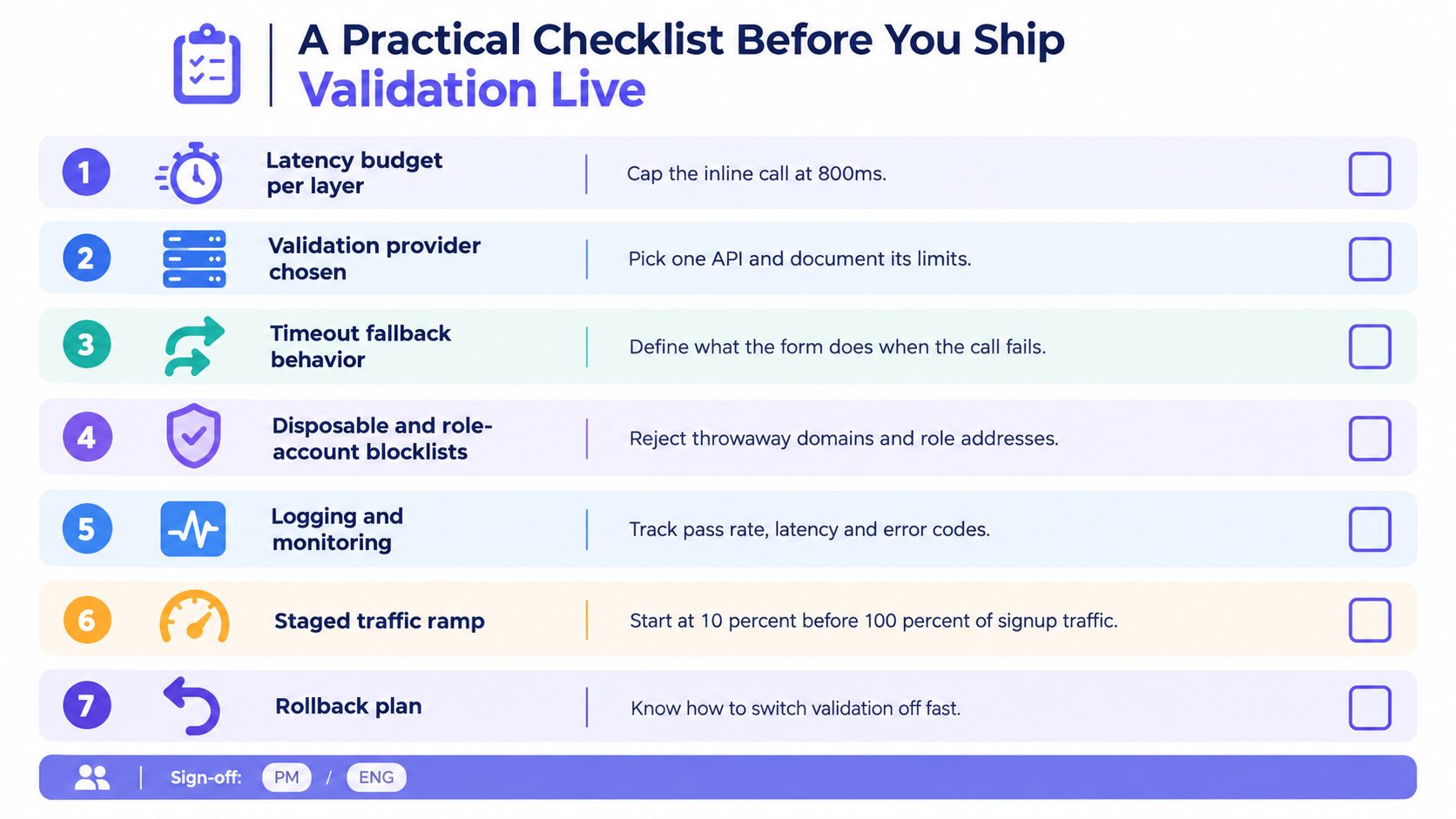
A launch review should force product, engineering, security, and privacy to answer the same questions. Don't approve a vague statement such as “we'll validate emails in real time.” Approve a defined pipeline with explicit behavior for pass, fail, timeout, and uncertainty.
Questions the team should answer
- Latency budget: Which checks run synchronously, and what happens at the 800ms limit?
- Provider limits: What does the chosen API guarantee, what does it classify as unknown, and how are rate limits exposed?
- Reason taxonomy: Are
invalid_syntax,no_mx,disposable,role_based,free_provider,catch_all, andsmtp_softfailstable internal enums? - Fallback behavior: Does a timeout accept the user, require confirmation, queue a retry, or pause a sensitive action?
- UX copy: Can the visitor fix a typo from the message, and does the form avoid blaming them for a provider outage?
- Policy ownership: Who approves different outcomes for consumer, B2B, marketing, recovery, and regulated workflows?
- Webhook security: Are signatures checked, retries safe, and duplicate events harmless?
- Data governance: Where are requests processed, which fields are stored, and when does each record expire?
- Monitoring: Which dashboards track latency, provider errors, unknown results, hard failures, and changes in signup conversion?
- Traffic rollout: Can you test with a staged portion of signup traffic before enabling the rule everywhere?
- Rollback: Can on-call disable enforcement while retaining observability if the validator misbehaves?
Two launch mistakes deserve special attention. First, teams treat a catch-all response as proof that an address is invalid and block legitimate users. Catch-all means the validator can't establish mailbox existence with confidence. Second, teams log complete provider payloads indefinitely, creating unnecessary privacy exposure and an audit burden that a simple retention job would prevent.
Release criterion: Every ambiguous result must have an intentional user experience, a server-side action, and an expiration path for its stored data.
Ship the smallest policy that protects your workflow, then monitor outcomes before tightening it. A validator should make decisions more explainable, not hide uncertainty behind a binary field.
Mailbeam offers a developer-facing real-time verification API with structured validity results, numeric scoring, reason codes, and checks for syntax, MX, SMTP, disposable, role-based, free-provider, and catch-all signals. Visit Mailbeam to evaluate how its EU-focused processing and synchronous or batch workflows could fit your signup validation design.