
No single check proves an email is valid in isolation. The practical answer is a layered workflow: syntax and DNS checks are the minimum foundation, syntax-only checks typically catch about 3% to 5% of invalid addresses, DNS/MX raises detection to roughly 20% to 30%, and adding an SMTP probe can push total invalid-address detection to 85% to 95% in many list types.
You're probably here because a form already shipped, users are registering, and something feels off. Confirmation emails don't arrive, hard bounces creep up, sales reps complain about dead leads, or a perfectly normal-looking address turns out to be disposable, catch-all, or stale by the time you use it.
That's why how to check if an email address is valid isn't really a regex question. It's an operational workflow. Syntax filters obvious junk. MX checks tell you whether the domain is set up to receive mail. An SMTP RCPT probe gives you a stronger mailbox-level signal. Then a scoring layer catches the messy real-world stuff binary validation misses.
Table of Contents
- Why Email Validation Is Harder Than It Looks
- Catching Typos With Syntax and Regex Checks
- Confirming the Domain Accepts Mail With MX and DNS
- Probing the Mailbox Itself With an SMTP Handshake
- Scoring Addresses With Disposable, Role, and Free-Provider Signals
- How Verification Freshness Changes the Answer
- Building the Stack Yourself or Using a Managed API
Why Email Validation Is Harder Than It Looks
The failure mode is familiar. A signup form goes live, the frontend uses a quick email regex, QA signs off, and the team assumes the problem is solved. Then the bounced mail starts. Some users typed gmal.com instead of gmail.com. Some entered an address on a domain that resolves in DNS but doesn't accept mail. Some corporate domains accept every SMTP probe because they're configured as catch-alls.
That's the first lesson production systems teach you. A valid-looking string is not the same thing as a deliverable mailbox.
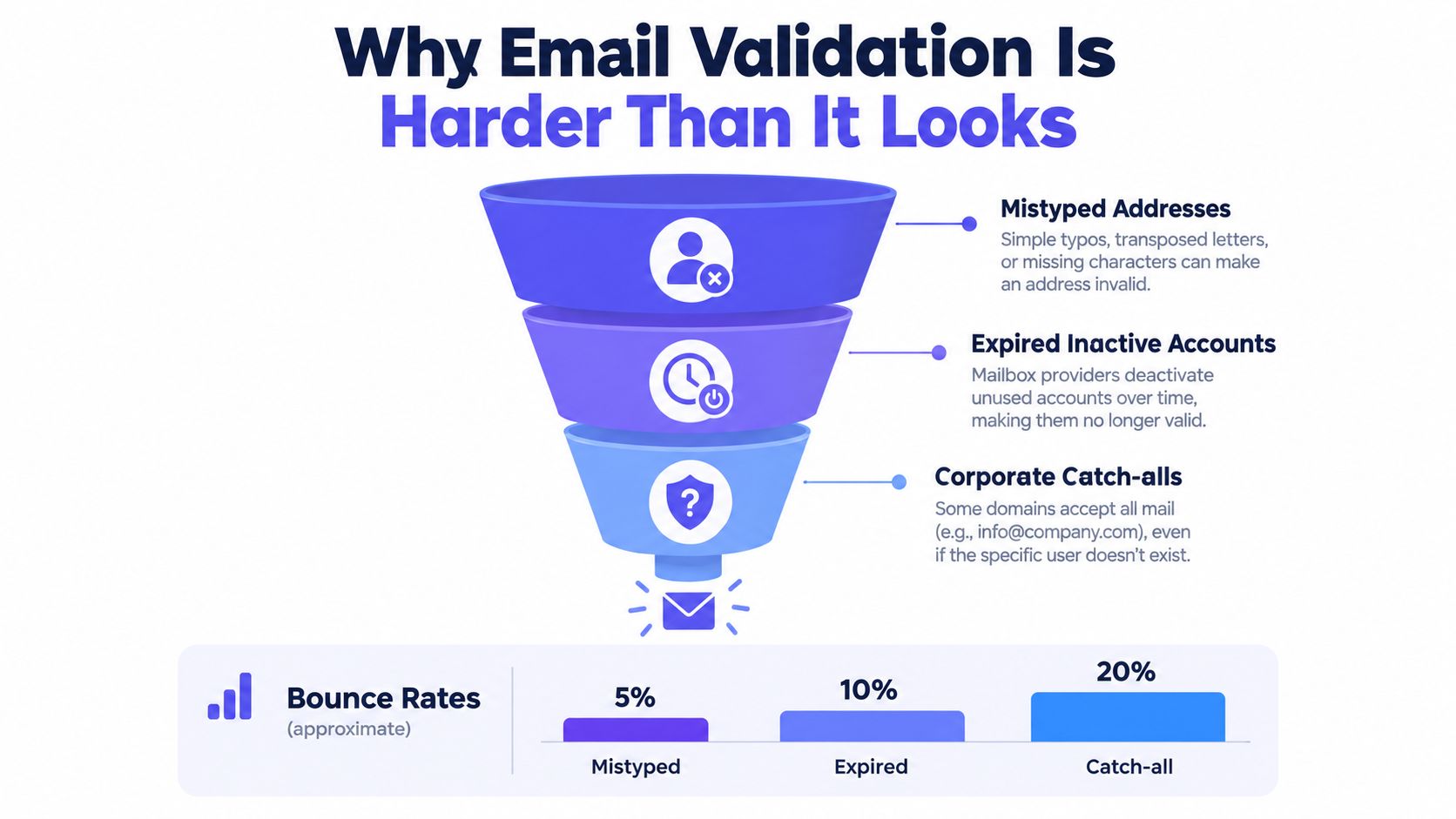
What each layer catches
A syntax check catches malformed input fast and cheaply. It rejects broken shapes before you touch the network. That matters in signup flows where latency and user feedback both count.
Then DNS and MX checks catch the next class of errors. A typo domain can still look perfectly plausible to a regex. If the domain doesn't publish a usable mail route, the address isn't useful no matter how clean the local part looks.
SMTP goes one step deeper. You ask the receiving system whether it will accept mail for that recipient. Sometimes you get a clear accept or reject. Sometimes you get greylisting, throttling, anti-abuse defenses, or catch-all behavior that tells you less than you hoped.
Practical rule: each validation layer exists because the previous one leaves blind spots.
Why this matters to deliverability
The business case isn't subtle. A 2026 deliverability benchmark reported about 12.3% of verified B2B addresses were still flat-out invalid, while unverified lists showed 20% to 30% invalid-address rates, and some B2C datasets had 5% to 15% disposable-address rates. The same benchmark notes that hard bounce rates above 2% can damage reputation or trigger provider intervention, so many senders aim for less than 0.5% hard bounces and less than 2% total bounces (email deliverability benchmarks for 2026).
That's why experienced teams don't treat validation as a one-time utility call. They stack checks, score outcomes, and decide what to accept, what to challenge, and what to re-check later.
Catching Typos With Syntax and Regex Checks
The first pass should be boring, fast, and strict enough to block junk without pretending it can prove deliverability. At the standards level, the foundation is RFC 5322 for address grammar and RFC 5321 for transport behavior. In practice, modern validators start with well-formed syntax before doing anything else (email address validation CLI guide).
Start permissive, then reject bad shapes
A common starter regex looks like this:
^[A-Za-z0-9._%+-]+@[A-Za-z0-9.-]+\.[A-Za-z]{2,}$
It's useful because it catches obvious structural problems:
- Missing separator like no
@ - Broken domain tail like no dot in the domain
- Illegal characters in places most consumer forms shouldn't accept
- Short junk endings that don't resemble a real top-level domain
But don't confuse “helpful” with “complete.” Real email syntax allows more edge cases than most product teams want to support in a signup flow. If you try to capture the full grammar in one regex, you usually end up with something unreadable and still wrong.
Where naive regex fails
Some patterns reject addresses that are perfectly usable. Others allow strings no mail system should see. I usually split the job into two passes: a readable structural regex, then explicit guards for known-bad shapes like consecutive dots or a trailing dot in the domain.
| Input | Naive Regex Verdict | Correct Verdict | Why It Matters |
|---|---|---|---|
alice+promo@example.com |
Reject | Accept | Plus addressing is common and shouldn't break signup |
alice..smith@example.com |
Accept | Reject | Consecutive dots usually indicate bad input |
alice@example.com. |
Accept | Reject | Trailing dots can sneak through simplistic patterns |
alice@-example.com |
Accept | Reject | Domain labels shouldn't start with a hyphen |
alice@example |
Reject | Reject | Missing domain suffix is still malformed |
A solid form implementation pairs server-side validation with browser hints. Use input[type="email"] so the browser catches obvious format mistakes before submit, but keep enforcement on the server.
Syntax answers one question only: is this shaped like an email address? It does not answer whether mail can go anywhere useful.
If you're tightening your format layer, this breakdown of email validation format checks is a good companion to implementation work.
Confirming the Domain Accepts Mail With MX and DNS
A signup form can collect sarah@examplle.com, pass a clean syntax check, and still be dead on arrival. The next question is whether the domain publishes a usable path for inbound mail. If it does not, there is no point spending more time on that address.
What the MX check proves
Start with DNS. Query the domain for MX records, because MX is the standard way a domain declares which hosts handle its mail. SMTP also allows a fallback to the domain's A or AAAA record when no MX record exists, per RFC 5321, so a validator that treats "no MX" as an automatic hard fail will reject some deliverable addresses.
That fallback is rare enough that I would not treat it as a green light by itself. It is better handled as a separate outcome, something like "mail route uncertain" or "A-record fallback only," so the rest of your pipeline can decide whether to try SMTP, accept with caution, or block.
Typo domains often fail here fast. NXDOMAIN, SERVFAIL, empty answers, or broken delegation usually mean you are looking at a domain that was mistyped, expired, or never set up for mail.
Why a generic DNS lookup is not enough
A domain can resolve perfectly for its website and still reject every email sent to it. Checking for any DNS record tells you the domain exists. It does not tell you where mail should go.
That distinction matters in production. Web and mail are configured by different teams all the time, especially at larger companies, and they break independently. An MX-aware check keeps your validator tied to mail routing instead of generic domain existence.
A few implementation choices make this layer more useful:
- Cache DNS results briefly during a request or short session to avoid repeat lookups on the same domain.
- Respect TTLs so stale MX data does not linger after a provider migration or outage.
- Classify failures clearly as no route, temporary DNS error, or route found, instead of collapsing everything into valid or invalid.
The operational edge case
Mail routing changes more often than many teams expect. Domains switch providers, misconfigure DNS during a cutover, or publish records that pass one resolver and fail on another because of propagation or delegation problems. That is one reason a validation result has a shelf life. A domain that looked fine last week can turn into a bounce source today.
If you want a practical DNS walkthrough, this guide on how to check MX records matches the way this layer is usually implemented in a real validation stack.
Probing the Mailbox Itself With an SMTP Handshake
A signup form accepts sarah@company.com. Syntax passes. The domain has MX records. Minutes later, your welcome email bounces because the mailbox does not exist. That gap is why teams add an SMTP probe.
An SMTP handshake asks the receiving mail server a narrower question than the earlier layers asked. Will this server accept mail for this specific recipient right now?
What the handshake looks like
At a high level, the flow is simple:
- Resolve the destination mail host.
- Open a connection to the SMTP service.
- Identify your client with
EHLOorHELO. - Send a
MAIL FROMenvelope sender. - Send
RCPT TOfor the address being checked.
RCPT TO is the key step. A 250 reply usually means the server is willing to accept that recipient. A 5xx reply usually means a hard failure. A 4xx reply sits in the middle. It often means a temporary condition, rate limiting, greylisting, or a provider that does not want to answer mailbox existence questions cleanly.
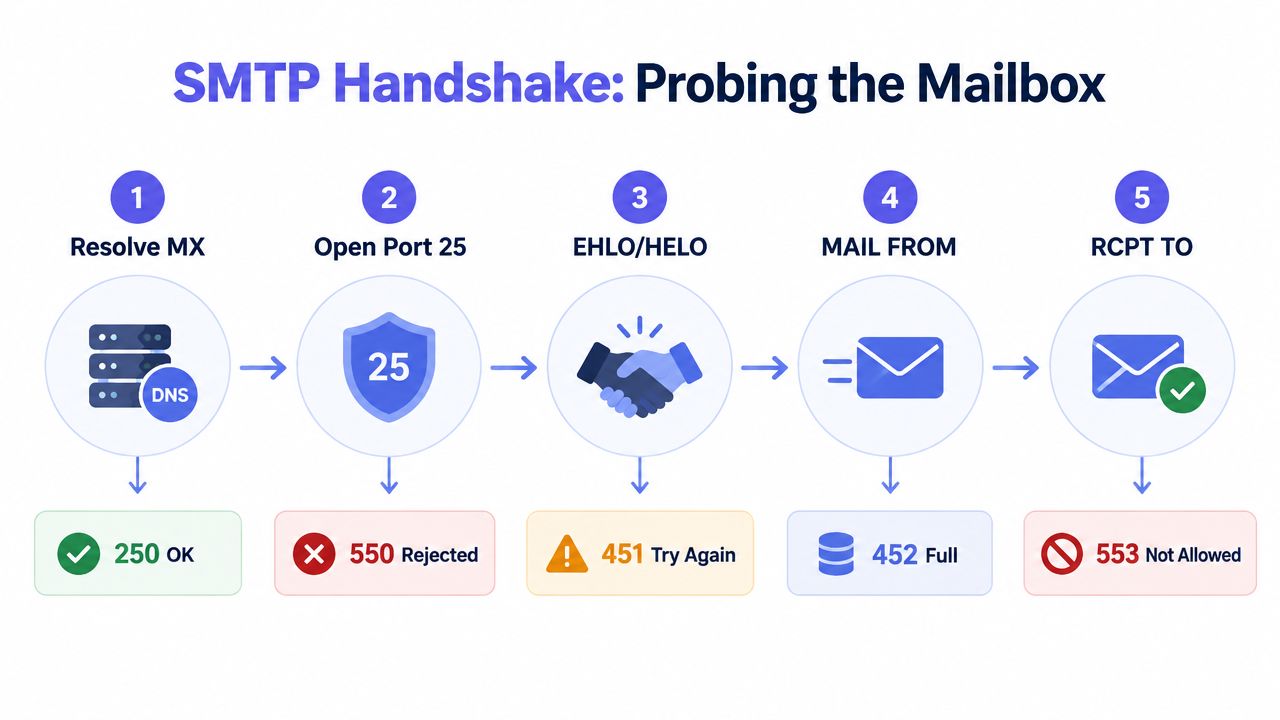
What RCPT TO proves and what it doesn't
A positive SMTP result is useful, but it is easy to overrate.
It proves the receiving system accepted that recipient during that one SMTP conversation. It does not prove a person uses the inbox, reads it, or will keep it active. It also does not prove your future production mail will be accepted from your real sending infrastructure, with your real IP reputation, authentication setup, and message content.
That distinction matters in production. I treat SMTP as a strong signal for mailbox existence, not as final truth.
Where SMTP checks break down
Catch-all domains are the classic trap. They accept mail for any local part, so ceo@domain.com and not-a-real-person@domain.com can both look good during the probe.
Anti-abuse controls create a second problem. Large mailbox providers often throttle unknown clients, tarpitting them with slow responses or returning ambiguous 4xx codes. Some providers accept RCPT TO for privacy reasons and decide later whether to bounce or drop the message. From a validator's perspective, those addresses are inconclusive even though the handshake completed.
That is why storing “SMTP accepted” as “known good” causes trouble. Store the raw outcome and your confidence level instead.
Practical implementation notes
The hard part is not sending RCPT TO. The hard part is classifying replies without turning your signup flow into a timeout factory.
A few rules help:
- Set short, sane timeouts so one slow mail host does not stall the request path.
- Treat
4xxas retryable or inconclusive, not invalid. - Use a real-looking
MAIL FROMbecause some servers reject empty or suspicious envelope senders during probes. - Expect blocked outbound SMTP on many cloud platforms and PaaS environments.
- Separate synchronous and async paths if you need fast form submission and deeper verification.
I have had the best results by keeping signup validation conservative. Syntax and MX can run inline. SMTP often belongs in a background job, or behind a tight timeout with an inconclusive fallback. That avoids punishing legitimate users because a remote mail server is slow, defensive, or temporarily broken.
Later in your build, this walkthrough helps when you want to see the flow visually in motion:
Scoring Addresses With Disposable, Role, and Free-Provider Signals
By this point you know whether the address is well-formed, whether the domain can receive mail, and whether the mailbox may accept SMTP. That still doesn't tell you whether the address is a good identifier for your product.
I stop thinking in binary terms and start scoring.
Signals that change trust, not validity
A disposable inbox might accept mail and still be terrible for account durability. A role address might belong to a real mailbox, but it doesn't map cleanly to one person. A free provider account is often fine, but in some B2B flows it tells you the user didn't use a company address.
Industry guidance explicitly warns that catch-all domains, role-based addresses, and disposable inboxes can all look valid at the SMTP layer while still being poor-quality or non-durable contacts. The same guidance says role accounts and disposable addresses should be excluded rather than merely marked valid in workflows that care about contact quality (email verification guidance for recruitment deliverability).
A practical scoring model
You don't need an elaborate machine learning system. You need stable business rules.
| Signal | Example Pattern | Typical Score Impact | Recommended Action |
|---|---|---|---|
| Disposable domain | Temporary mailbox provider domain | Strong negative | Block, step-up verify, or quarantine |
| Role address | info@, support@, admin@ |
Moderate negative | Accept only if the use case allows shared inboxes |
| Free provider | Consumer mailbox domain | Mild context-dependent impact | Accept, but segment separately in B2B flows |
| Catch-all behavior | Domain accepts arbitrary recipients | Uncertain | Allow with caution and monitor downstream engagement |
| Mailbox accepted after SMTP | Positive RCPT response | Positive but not decisive | Combine with the rest of the score |
A score gives product and growth teams room to act intelligently:
- Hard reject obvious disposable abuse in signups.
- Accept with confirmation when the address is deliverable but lower trust.
- Flag for CRM review when the address is role-based or catch-all.
- Route to double opt-in when you want a human-confirmed next step.
That approach is much closer to how production systems behave than pretending every address is either valid or invalid.
How Verification Freshness Changes the Answer
A lot of teams validate an address once, write verified=true, and never revisit it. That's one of the fastest ways to let list quality drift without noticing.
Valid today doesn't mean valid later
Employees leave companies. Domains lapse. Mail routing changes. Shared inboxes get retired. Catch-all settings flip. Even addresses that looked solid during signup can go stale surprisingly fast.
A 2026 re-check study found that only 74.3% of addresses were still valid after 30 days, 44.9% after 31 to 90 days, and 19.2% after more than 90 days (email list decay study for 2026). That's the part most email validation guides skip. They focus on whether an address is valid now, not whether your stored result is still trustworthy when you send.
Treat verification as time-bounded data
This changes how you design the system. Every verification result should carry a timestamp. High-stakes flows, like password recovery, billing notices, or handoff to sales, deserve fresher checks than a low-priority newsletter segment.
A previously verified address can become stale fast enough that a quarterly refresh is close to no verification at all.
In practice, freshness belongs in your data model. Not as a note in documentation, but as something your pipeline can evaluate before a send, a sync, or an outbound sequence.
Building the Stack Yourself or Using a Managed API
There are two realistic ways to ship this in production. Build the layers yourself, or call a service that already runs them.
What the DIY route gives you
A homegrown stack usually includes:
- A syntax layer in your application code
- A DNS resolver for MX or fallback mail-route checks
- An SMTP probe worker that handles mailbox acceptance tests
- A scoring module for disposable, role-based, free-provider, and catch-all signals
The upside is control. You can tune each rule to your product, store exactly the fields you want, and decide which paths run synchronously during signup versus asynchronously afterward.
The downside is operational drag. SMTP probing from cloud infrastructure is notoriously brittle. Networks block or throttle outbound mail ports, remote servers rate-limit unfamiliar clients, and inconclusive responses pile up unless you design careful retry logic.
What a managed API changes
A managed verification API pushes most of that complexity off your plate. You send an address, the service handles syntax checks, DNS resolution, mailbox probing, and scoring, then returns a verdict you can use in the app.
That path is often easier when latency matters in forms or when your team doesn't want to babysit SMTP edge cases. If you're comparing providers, this piece on evaluating email verification API accuracy is useful because it focuses on what the verdict means, not just feature lists.
One option in that category is Mailbeam's email verification API, which returns a validity decision, score, and machine-readable reason code from checks like syntax, MX, SMTP existence, disposable detection, role-account detection, and catch-all assessment. It's built for direct use in signup flows as well as bulk maintenance.
How to choose
| Factor | DIY Stack | Managed API |
|---|---|---|
| Control over rules | High | Moderate |
| SMTP maintenance burden | High | Low |
| Signup integration speed | Slower | Faster |
| Handling disposable and role signals | You build it | Usually included |
| Compliance and data handling | Your responsibility | Vendor responsibility, subject to their model |
| Reliability under provider quirks | You own retries and fallbacks | Vendor owns most of the edge handling |
Choose DIY if email verification is core infrastructure for your product and you want full control over every edge case. Choose a managed API if your team cares more about dependable verdicts in production than operating the plumbing behind them.
Mailbeam gives developers a real-time API and web tools to validate addresses across syntax, MX, SMTP, disposable, role-based, and catch-all checks, with reason codes you can plug straight into signup and list hygiene flows. If you want an EU-hosted option built around GDPR-first handling and fast form-safe responses, visit Mailbeam.