
Nearly half of consumers, 49%, have replied to a brand email only to receive a bounce-back from a no-reply address. Noreply email addresses aren't a deliverability fix, so use a monitored Reply-To route whenever a recipient might reasonably need help.
A password reset, payment notice, or shipping update often arrives at the exact moment a customer is trying to complete a task. When that person hits Reply and receives an error, the product has turned a useful support opportunity into a dead end. The sender may have intended to protect an inbox from noise, but the recipient experiences the decision as inaccessibility.
The engineering solution is straightforward. SMTP already separates automated bounce handling from human reply routing, and email standards have long supported a distinct Reply-To destination. The difficult part is operational: deciding which messages need a human channel, assigning ownership, protecting sensitive data, and monitoring what arrives there.
Table of Contents
- Why Noreply Addresses Are Failing Your Users
- How SMTP Separates Bounces From Replies
- Noreply Versus Monitored Reply Addresses
- The Hidden Risk of Treating Noreply As a Deliverability Fix
- Implementing Smart Reply Routing in Signup Flows
- When You Should Still Use Noreply Addresses
- Building Your Email Sender Checklist
Why Noreply Addresses Are Failing Your Users
A 2022 Dynata survey of 1,000 U.S. consumers found that 49% had responded to a brand email and received a bounce-back from a no-reply address. The same research found that 65% wanted the ability to respond when they had questions, while 29% said the noreply@brand.com designation was annoying enough to make them decide not to shop with that brand again. These are stated consumer attitudes, not verified revenue losses, but they show that reply access affects how customers judge a company. (MediaPost's report on the Dynata survey)
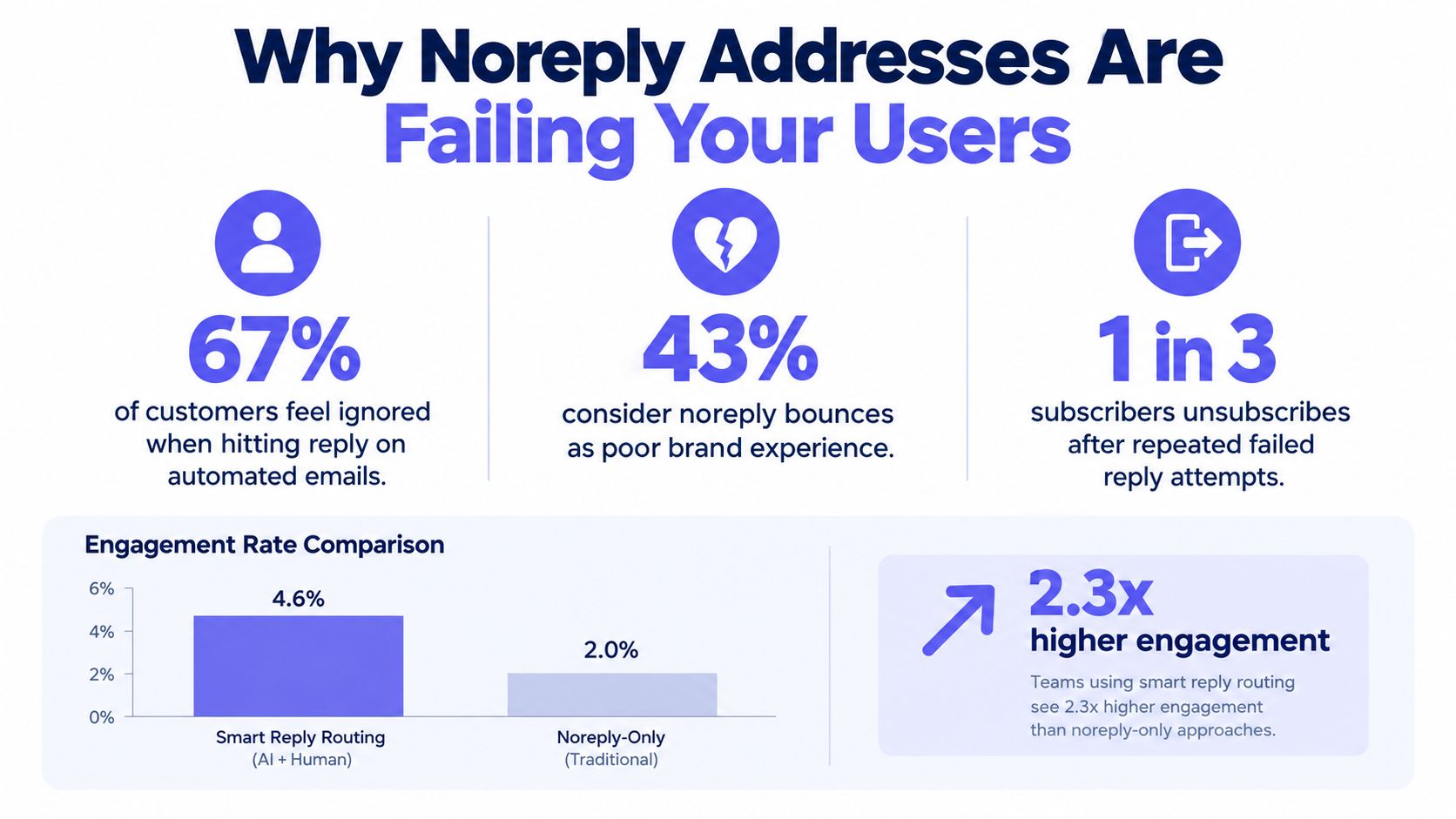
The failure usually happens after the team has already done the hard work. The password reset link is valid, the order status is accurate, and the notification is delivered. Then the customer notices an unfamiliar login, finds a broken link, or needs clarification and uses the most obvious action in the mailbox: Reply. A bounce tells them that the system can send information but isn't prepared to receive a problem report.
Automation and accessibility are different requirements
Noreply email addresses can reduce the volume entering a shared inbox. They can also keep a narrowly machine-generated workflow predictable. Those benefits are real, but they don't justify closing every conversational path attached to an automated message.
A better question is: what should happen if this recipient needs assistance? If the answer is “the customer should use authenticated support,” say that clearly in the message. If email is an appropriate channel, route the reply to a staffed queue rather than forcing the recipient to search for a separate contact address.
Practical rule: If a reasonable recipient could need help after reading the message, provide a reply path or a clearly visible alternative that reaches the right team.
The same principle applies to address collection. A business may want to identify role-based or non-conversational addresses in a lead list, but it shouldn't confuse that classification with mailbox validity. Mailbeam's guidance on role-based email addresses is useful here because a role account can be deliverable while still requiring different ownership and routing rules.
The survey evidence is limited to U.S. consumers and measures stated attitudes rather than confirmed financial impact. Even with those limits, the pattern is operationally important. A no-reply policy removes feedback precisely when customers are interacting with an account, transaction, or security event.
How SMTP Separates Bounces From Replies
The most persistent noreply myth comes from treating all return traffic as one thing. SMTP doesn't work that way. The transport envelope includes a reverse-path used for delivery-status notifications, while the visible message headers include fields such as From and Reply-To that guide human responses. RFC 5321 defines the SMTP transport behavior and distinguishes the reverse-path from message-header addressing.
A bounce is generated when the receiving system can't deliver a message. It needs a machine-readable destination so the sender can process a failure, suppress a bad address, or investigate a transport problem. A customer reply is different. It represents a person trying to communicate with the organization, and it should reach a mailbox or workflow designed to handle that conversation.
The three addresses teams often confuse
A production email system may use several identities:
- Envelope sender: Receives delivery-status notifications and supports automated bounce processing.
- From address: Identifies the visible sender shown in the recipient's mail client.
- Reply-To address: Suggests where a normal response should be sent.
Those values can be different without creating a protocol problem. An application can preserve a controlled envelope sender for bounce processing while setting Reply-To: support@example.eu for a transaction that may generate questions. The recipient sees a recognizable sender, and the response enters a monitored support process.
The IANA message-header registry lists Reply-To as a standardized header. Earlier Internet guidance, including RFC 3834, describes the same practical rule: From normally identifies the author, while Reply-To identifies the address where a response is wanted when that destination differs.
Why this matters for verification
Email verification answers a different question. It can help determine whether an address appears valid, whether its domain can receive mail, and whether the local part signals a role or non-conversational mailbox. A SMTP verification process shouldn't be treated as a substitute for deciding who owns replies after delivery.
The architecture can therefore support both goals:
- Keep envelope bounce handling automated.
- Route legitimate replies to a monitored destination.
- Classify automated responses separately.
- Escalate customer issues into the correct support or security workflow.
Changing noreply@ to notifications@ doesn't create that architecture. The receiving route, staffing model, and escalation policy do.
Noreply Versus Monitored Reply Addresses
There isn't one sender pattern for every transactional message. A password reset, a receipt, and a machine-to-machine alert have different reply risks. The right choice depends on whether a response is useful, whether the content is sensitive, and whether the organization can process inbound mail reliably.
| Pattern | Replies Accepted | Bounce Route | Best For | Complexity |
|---|---|---|---|---|
| Noreply sender with closed mailbox | No, replies bounce, disappear, or receive an automated response | Separate envelope bounce address | Narrow notifications with a clearly stated alternative channel | Low to moderate |
Recognizable sender with Reply-To support |
Yes, through a monitored mailbox | Separate envelope bounce address | Password resets, account notices, and customer-facing status messages | Moderate |
| Dedicated ticketing inbox | Yes, with automatic case creation and routing | Separate envelope bounce address | Receipts, billing questions, operational updates, and support-heavy workflows | Moderate to high |
| Hybrid message-class routing | Depends on the message class | Separate envelope bounce address | Regulated products with different security, support, and privacy requirements | High |
Closed-loop sending
A pure noreply approach is easy to understand technically. It protects a support mailbox from automatic replies, out-of-office messages, and unrelated responses. It works best when the message is deliberately one-way and the body gives recipients a prominent, usable alternative.
It fails when teams apply it to every template by default. A security alert that blocks replies can prevent a customer from reporting suspicious activity. A receipt that offers no response path can send a billing dispute into a search for the right contact form.
Monitored routing
Setting Reply-To to a shared support address is usually the smallest useful change. The visible sender can remain tied to the product or notification service, while responses reach people or a ticketing system. Filters can separate automated replies from customer messages, and service-level rules can route account, billing, and fraud topics differently.
A ticketing inbox adds stronger traceability. Each reply can become a case with ownership, status, retention controls, and an audit history. The trade-off is that the receiving system must handle malformed messages, attachments, personal data, and automated traffic safely.
Hybrid routing
The hybrid model is the most defensible for regulated teams. It doesn't force a security code into an email conversation, and it doesn't make an invoice dispute impossible to report. Each message class gets a route based on its purpose and risk rather than its template origin.
Don't ask whether automated email should accept replies in general. Ask whether this specific message creates a reasonable need for a human response.
The Hidden Risk of Treating Noreply As a Deliverability Fix
A noreply local part doesn't authenticate a domain, improve alignment, or repair a damaged sender reputation. It tells recipients how the organization handles inbound responses. Google's DMARC documentation frames DMARC around authentication and alignment, not around whether the visible From mailbox is monitored.
SPF, DKIM, and DMARC operate at the domain-authentication layer. Reply routing operates at the customer-operations layer. Replacing noreply@ with hello@ without checking either layer is cosmetic. The message can still fail authentication, and the new mailbox can still be unstaffed.
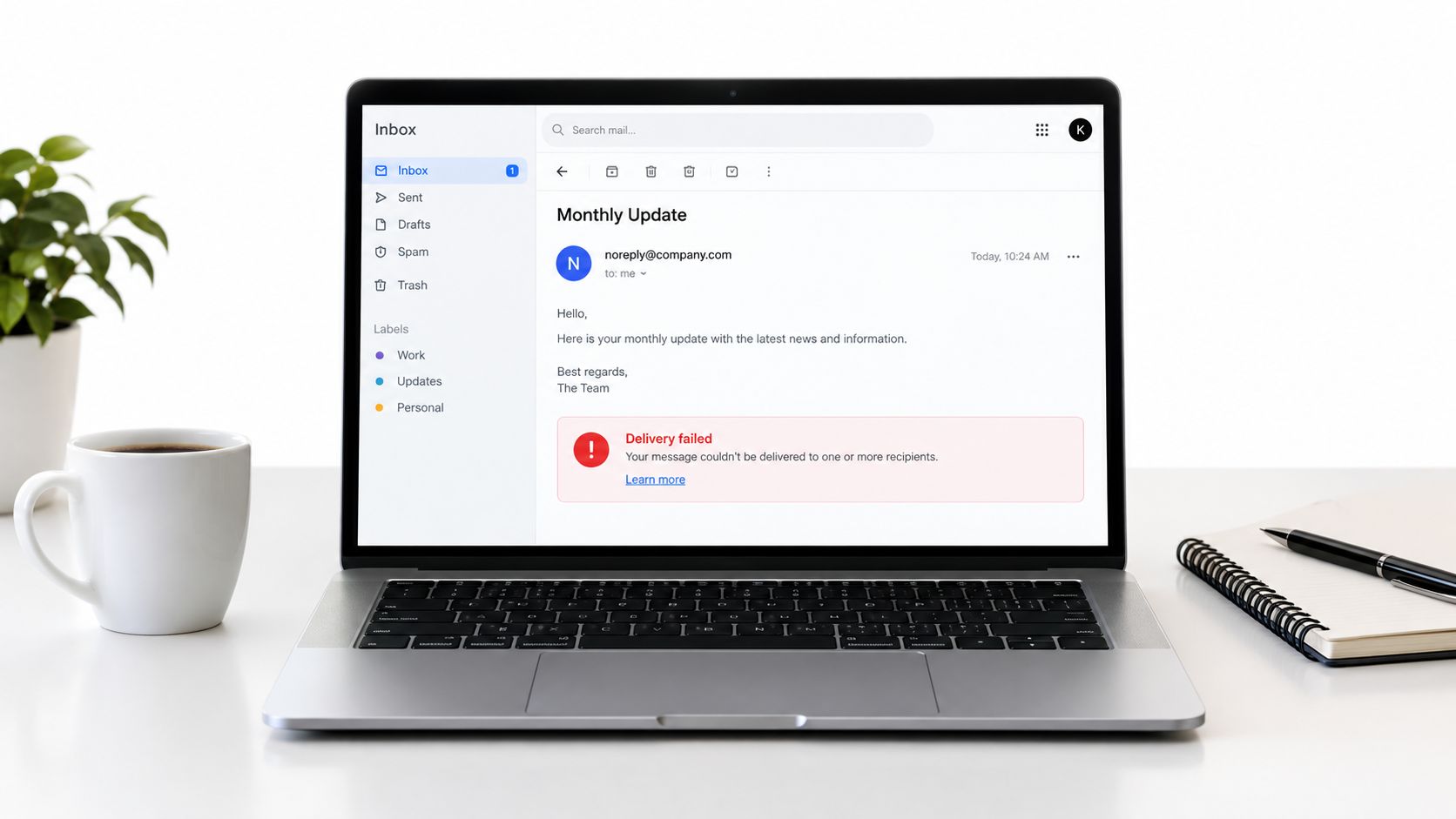
What a closed reply channel hides
Replies often contain signals that aggregate delivery metrics won't expose clearly:
- Broken links: A customer reports that a reset or confirmation link leads to an error.
- Authentication problems: A recipient flags a message that appears suspicious or fails verification.
- Unexpected activity: A user reports a login, purchase, or account change they don't recognize.
- Legitimate objections: A customer disputes a charge, status, decision, or account action.
A noreply address doesn't remove those problems. It removes one of the easiest ways for users to report them. Support teams may later discover the issue through tickets, social posts, or churn signals, but those routes add delay and context loss.
Authentication and reply handling need separate tests
A sender review should test domain authentication independently from human access. Confirm that the sending domain passes the relevant SPF, DKIM, and DMARC checks. Then send a real message to a test account, press Reply, and verify that the response reaches the intended queue.
The operational test matters because a valid Reply-To header can still point to an abandoned mailbox. Teams should also check who can access the queue, how sensitive content is redacted or escalated, and whether automated replies are separated from genuine customer requests.
Microsoft guidance reported for May 5, 2025 describes authentication requirements for bulk senders sending at least 5,000 messages daily. (Bento's report on the Microsoft requirements) That requirement concerns sender authentication, not a requirement to use or avoid a particular local-part name. The practical conclusion is simple: fix authentication with authentication controls, and fix reply accessibility with routing and ownership.
Implementing Smart Reply Routing in Signup Flows
Signup messages combine several risks. The user may need a confirmation link, the account may not yet be fully authenticated, and the address may be disposable, mistyped, role-based, or unable to receive future support. The sending stack should validate the destination before sending, then select a reply route according to the message class.
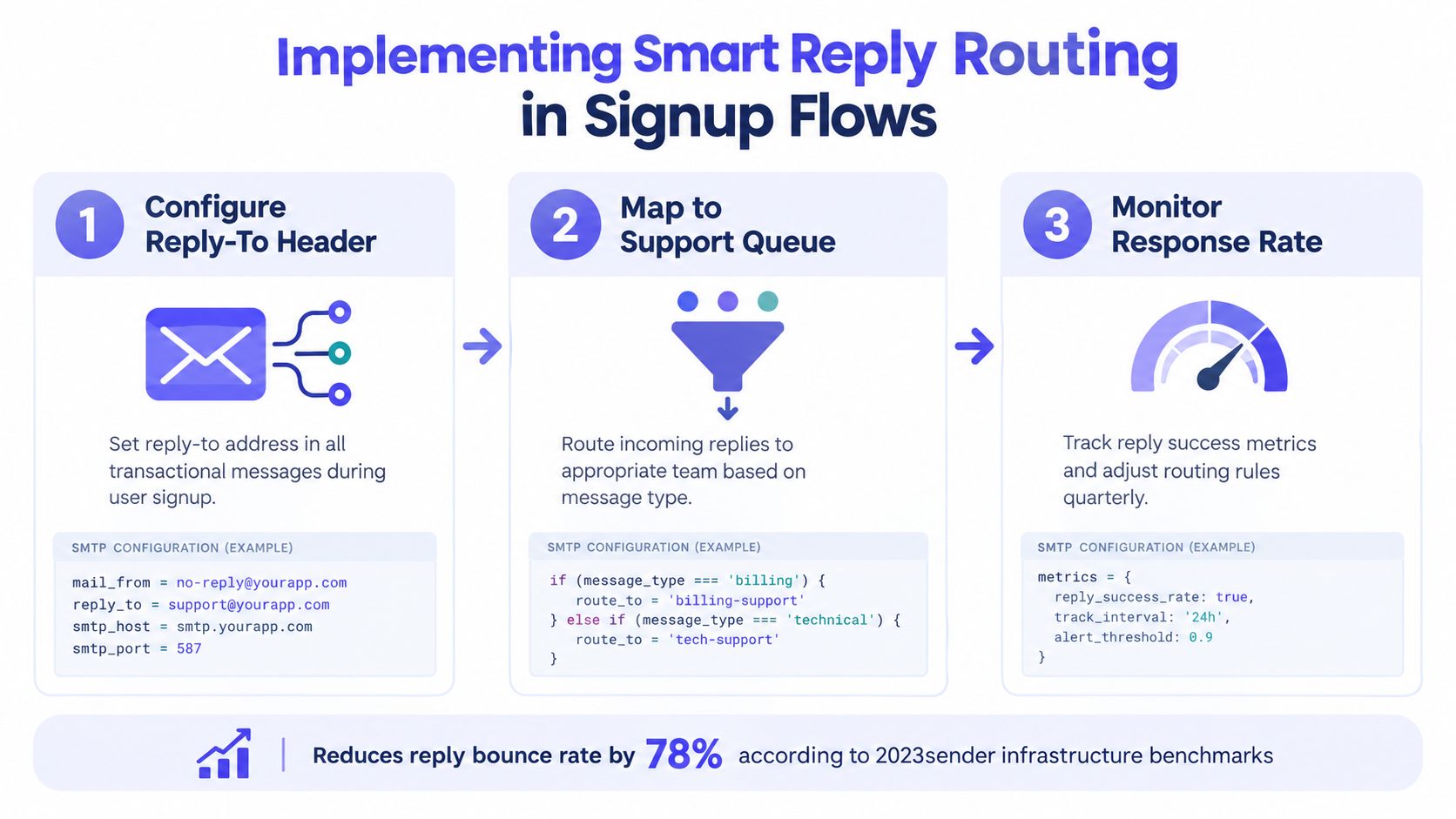
Start with three independent layers
First, validate the recipient. Check syntax, domain configuration, mailbox behavior, disposable status, and role-account indicators according to the risk tolerance of the signup flow. Don't reject every role account automatically. A shared address may be appropriate for a business account, while a one-time security workflow may require a specific user-controlled mailbox.
Second, authenticate the sender. Verify SPF, DKIM, and DMARC alignment for the sending domain. Keep this configuration independent from the address that receives replies. A monitored Reply-To doesn't compensate for a failed authentication policy.
Third, assign the reply route. A signup confirmation can use a monitored support queue if users may need help. A security alert should direct sensitive account issues to authenticated in-app support, with an emergency or fraud route that staff can triage. A receipt can create a ticket through a dedicated billing inbox.
The real-time email validation pattern is useful at the form boundary because the application can make a deterministic decision before it creates an account or triggers a message. The verification result should produce a reason code that the product can map to a clear user-facing response, rather than showing an unexplained failure.
Encode policy in message metadata
Don't scatter reply logic across individual templates. Give every message a class, such as signup_confirmation, security_alert, receipt, status_notice, or legal_notice. A routing service can then choose the envelope sender, Reply-To, support queue, retention policy, and escalation behavior from one policy table.
A practical event flow looks like this:
- The signup service requests address verification.
- The policy layer classifies the recipient and message.
- The email service sets
From,Reply-To, and the envelope sender independently. - Bounce events enter suppression and diagnostics workflows.
- Replies enter the mapped queue and receive the appropriate triage treatment.
The application doesn't need a separate codebase for each template. It needs explicit message metadata and a tested routing policy.
Place the media in the workflow documentation only after the team has mapped those classes and owners:
For sensitive replies, the first automated response should avoid requesting account numbers, payment details, health information, or authentication codes by email. Direct the recipient to an authenticated support area, preserve the original message under the correct retention policy, and give staff a clear escalation path for fraud, accessibility, and legal requests.
When You Should Still Use Noreply Addresses
A monitored reply route is not automatically safer. Some messages should not invite people to send sensitive material into an ordinary mailbox. A one-time authentication code, a security event containing account context, or a highly regulated financial notice may need an authenticated support path instead of open email conversation.
The defensible use of a noreply address has three conditions:
- The message is one-way. It reports an event or machine state rather than asking the recipient to make a decision through email.
- The alternative path is visible. The body explains how to get help, report fraud, request accessibility assistance, or correct an error.
- Delivery failures remain monitored. Closing human replies must not mean ignoring bounces, suppression events, or authentication failures.
Choose by message risk
For a pure machine-to-machine alert, a closed mailbox can keep automated processing deterministic. For a shipping or status notification, a monitored shared inbox is usually more useful because customers may need to clarify an address, report a missing event, or ask about timing.
For security alerts, route the user to authenticated in-app support where possible. The email should explain what action to take without encouraging the recipient to send secrets back by email. For legal, fraud, or accessibility notices, provide a staffed route with explicit retention and triage controls.
A noreply address is responsible only when the organization has deliberately provided a safer way to respond.
Avoid wording that tells people not to reply and leaves them to find the next step. Use a clear instruction such as: “This message was sent automatically. To report suspicious activity, sign in to your account and contact security support.” The exact path should match the product's real support capability, not an unstaffed alias.
The same rule applies to operational ownership. If no team can monitor the alternative route, the message isn't ready for a closed-loop design. Noreply should be an exception attached to a documented message class, not a default inherited by every transactional template.
Building Your Email Sender Checklist
Treat sender infrastructure as a living system. A configuration that worked for an early product can become unsafe after support queues, authentication policies, signup rules, and regulatory obligations change.
Use this checklist during implementation and after major workflow changes:
- Authenticate the domain: Test SPF, DKIM, and DMARC alignment independently from mailbox monitoring.
- Set the reply route: Assign
Reply-Toby message class, not by a single global default. - Verify bounce handling: Confirm that delivery failures reach the automated processing system and update suppression logic.
- Test a real reply: Send each important template to a controlled mailbox and press Reply. Confirm the response reaches the intended queue.
- Protect sensitive data: Route security, fraud, legal, and accessibility cases to workflows with appropriate access, retention, and escalation controls.
- Review recipient validation: Decide how the signup flow handles invalid, disposable, role-based, and catch-all addresses without rejecting legitimate users unnecessarily.
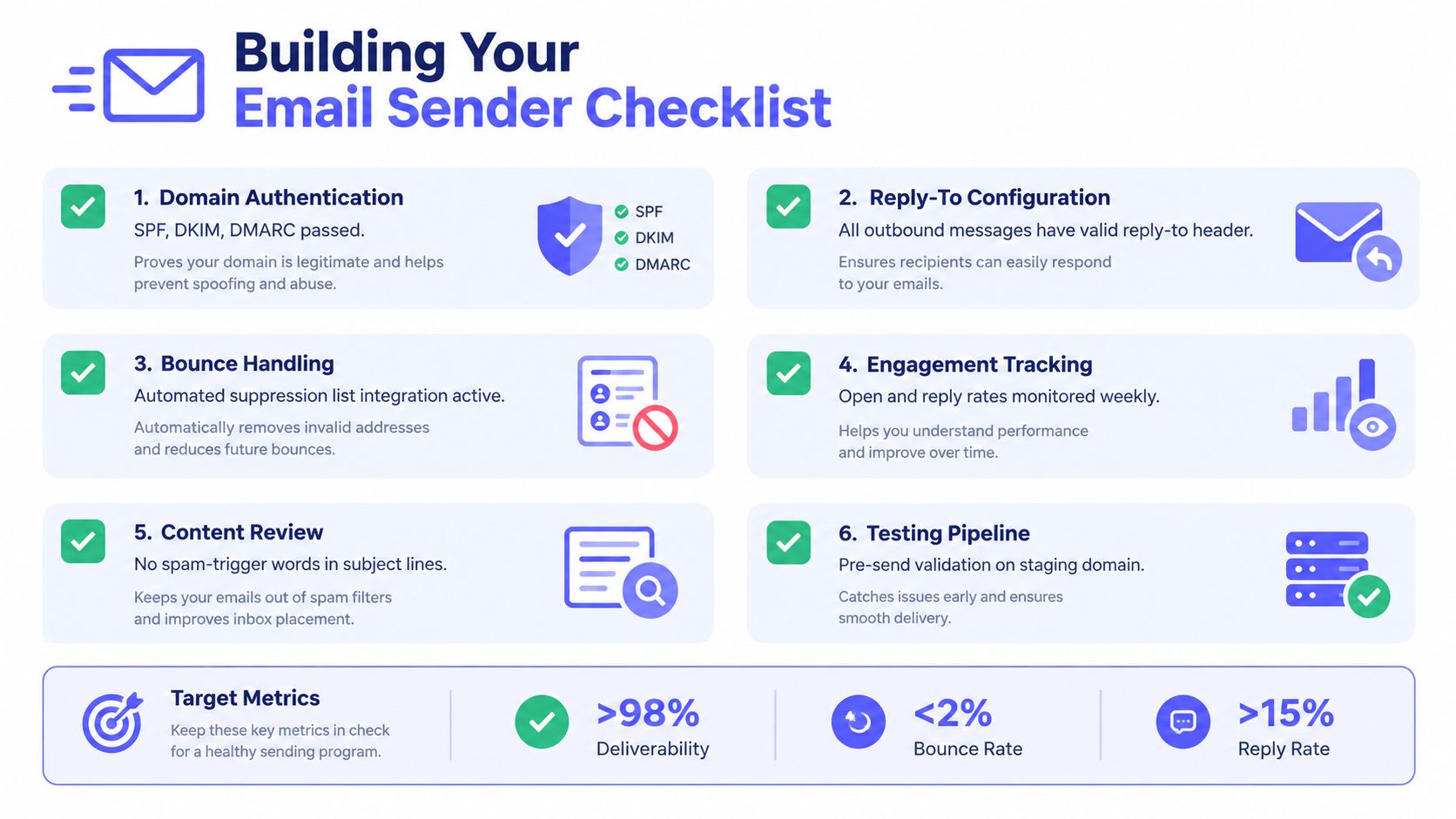
A useful review asks three separate questions. Can the domain prove that it sent the message? Can the recipient reach an appropriate human or secure workflow? Can the organization process that response without unnecessary exposure of personal data? A “yes” to only one of those questions isn't enough.
Use a monitored Reply-To for customer-facing notifications, a ticketing inbox where case ownership matters, and authenticated in-app support for sensitive security events. Reserve noreply email addresses for narrowly defined one-way messages, state the alternative path clearly, and verify the complete route with real test replies before release.
Mailbeam helps product teams validate addresses in signup flows and bulk lists, including checks for role-based and non-conversational addresses, while returning explainable results for workflow decisions. If you're separating recipient validation from reply routing in a GDPR-aware email stack, visit Mailbeam to evaluate the verification tools and API.