
A list can look healthy in your CRM and still be deteriorating without warning. One 2026 industry report estimates that at least 28% of an average email database becomes invalid or risky within a single year (Data Partners' list hygiene statistics). That makes bounce prevention a systems problem, not a cleanup task you schedule when a campaign goes wrong.
To reduce email bounce rate reliably, connect four controls: validate addresses when people sign up, verify older records before sending, suppress confirmed failures immediately, and monitor the reputation signals that determine whether future messages reach the inbox. A clean list helps, but it won't compensate for weak authentication, careless retries, or sudden sending spikes.
Table of Contents
- What Email Bounce Rate Measures
- Why Lists Decay and Hygiene Has to Be Continuous
- Pre-Send Validation Checks That Catch Bad Addresses
- Real-Time Verification at Signup Versus Bulk Cleaning
- Engagement-Based Suppression That Protects Sender Reputation
- Sender Reputation Tactics That Multiply Every Other Effort
- KPIs and Monitoring to Prove the Bounce Rate Is Falling
What Email Bounce Rate Measures
Email bounce rate is the share of sent messages that receive a non-delivery response from the receiving mail server. Calculate it as:
bounced emails ÷ total emails sent × 100
The denominator determines what the result means. Measure bounce rate by campaign or reporting window, not by subscriber. A list with 100,000 contacts and 1,800 hard bounces has exceeded the 2% benchmark described in Cloudflare's deliverability guidance. The CRM may still show a large, usable audience, while one campaign exposes the addresses that cannot receive mail.
Separate permanent failures from temporary ones
A hard bounce means delivery will not succeed unless the recipient data changes. Common causes include an unknown user, deleted mailbox, invalid domain, or permanent rejection by the receiving server. Suppress confirmed hard bounces in every sending system before another campaign can target them.
A soft bounce signals a different problem. The mailbox may be full, the receiving server may be unavailable, the provider may defer delivery through greylisting, or the message may exceed a size limit. One soft failure does not make an address unusable. Repeated failures require investigation because they can indicate a stale inbox, provider throttling, or sender reputation trouble.
Many email service providers combine hard and soft failures in their headline bounce-rate metric. Report the categories separately in operational dashboards. Hard bounces call for suppression, while soft bounces call for controlled retries and diagnosis.
| Hard Bounce | Soft Bounce |
|---|---|
| Usually permanent | Usually temporary |
| Unknown user, deleted mailbox, invalid domain | Full mailbox, outage, greylisting, throttling |
| Suppress immediately | Retry according to a defined policy |
| Strong list-quality signal | Diagnose by code, provider, and repetition |
| Repeated sends worsen hygiene and reputation | Repeated failures may reveal deeper delivery issues |
A practical target is under 2% total bounces, with hard bounces tracked independently. Some guidance classifies hard-bounce performance below 0.3% as best-in-class and 0.3% to 1% as healthy, while rates above 1% warrant immediate investigation (Cloudflare's deliverability guidance).
Practical rule: Do not ask only whether a campaign bounced. Identify the addresses, response codes, repetition pattern, and whether suppression occurred before the next send. These checks connect verification, signup validation, and ongoing hygiene to the KPIs that reveal whether bounce prevention is working.
Why Lists Decay and Hygiene Has to Be Continuous
Poorly maintained email lists can reach 5% to 10% bounce rates within a year (Data Partners' list hygiene statistics). That risk grows through job changes, abandoned inboxes, expired domains, provider changes, temporary accounts, and capture errors. An address can be valid when collected and fail months later.
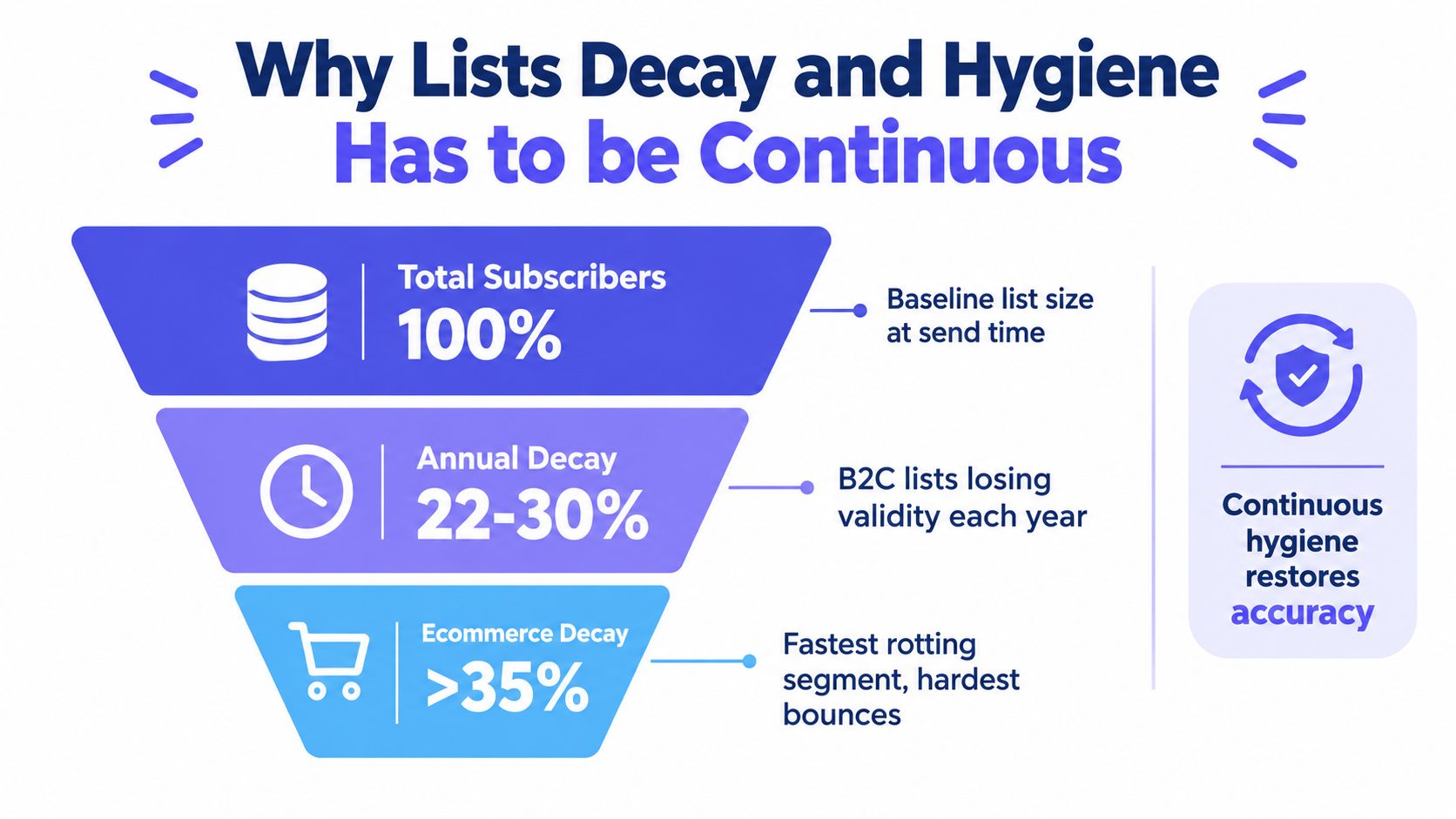
Decay continues between bulk cleaning jobs. A quarterly scrub removes addresses that have already failed, but it cannot stop tomorrow's typo, abandoned mailbox, or disposable signup from entering the database. Continuous hygiene connects three controls: validate addresses at signup, verify risky records before sending, and process delivery events after each campaign. That chain protects acquisition quality, bounce rate, and sender reputation together.
Three decay paths need different controls
Temporal decay affects legitimate contacts whose circumstances change. A business address may stop working after an employment change, while a consumer inbox may remain registered but abandoned. Pre-send verification and suppression after confirmed failures address this path.
Behavioral decay appears when subscribers stop engaging. It may not create an immediate bounce, yet inactive addresses can become stale and reduce campaign quality. Engagement-based suppression limits that exposure without deleting every quiet contact prematurely.
Acquisition-driven decay starts at capture. A typo, disposable address, role account, or catch-all domain can pass a basic form and enter CRM automation. Real-time validation, clear correction messages, and double opt-in reduce the chance that bad data becomes active sending inventory. These checks add signup friction, but that trade-off is usually smaller than cleaning a polluted database later.
A working hygiene program combines point-of-capture validation, pre-send verification, post-send event processing, and scheduled review of older records. This guide to email list hygiene can help marketing and engineering teams document the maintenance process.
Pre-Send Validation Checks That Catch Bad Addresses
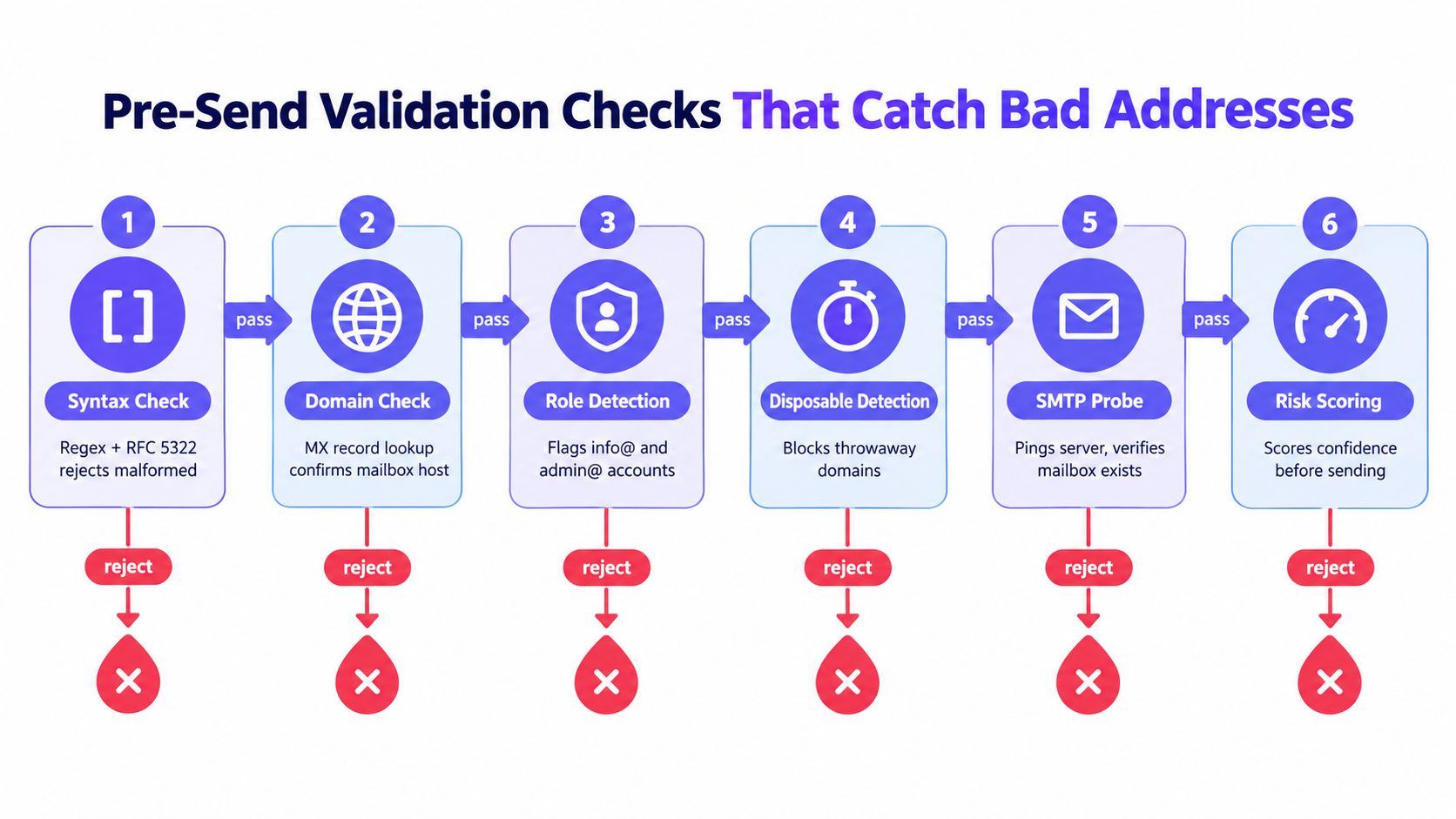
Pre-send verification works best as a layered decision process. Start with inexpensive checks, then spend more time only when an address survives the earlier gates. The objective isn't to label every contact with false certainty. It's to separate invalid, risky, and safe enough to send before a campaign creates reputation damage.
Run checks in an order that preserves speed
Syntax validation rejects malformed addresses before any network request. Check the structure against practical email syntax rules, but avoid a form regex so strict that it rejects legitimate addresses.
Domain validation confirms that the domain has a functioning mail route. If the domain can't receive mail, classify the address as invalid rather than sending a test message.
Disposable-domain detection identifies temporary providers. Whether to block or warn depends on the product's abuse risk, account model, and compliance requirements.
Role-based detection flags addresses such as
info@,support@, andadmin@. These aren't automatically invalid, but they often have shared ownership, lower engagement, or unclear consent.SMTP probing checks whether the receiving server appears to recognize the mailbox without sending the campaign message. Results can be inconclusive because providers may conceal mailbox existence or accept mail for later filtering.
Catch-all assessment identifies domains that accept any mailbox name. A positive SMTP response on a catch-all domain doesn't prove that the individual address exists, so treat it as risky rather than safe.
Email validation checks for signup and campaign workflows should return a clear reason code, not just a binary result. Syntax and domain checks suit synchronous forms. SMTP probes can take longer and may be blocked, so a real-time flow should use a timeout and fall back to a warning or asynchronous review instead of freezing the user experience.
| Classification | Typical action |
|---|---|
| Invalid | Reject, correct, or suppress before sending |
| Risky | Allow with a warning, request confirmation, or exclude from high-value campaigns |
| Safe | Accept into the active workflow, while continuing to process future bounce events |
Don't treat a verifier's “deliverable” label as permanent truth. Mailboxes change, providers defer mail, and catch-all behavior can obscure the result. Verification reduces preventable failures, but the sending system still needs suppression and monitoring.
Real-Time Verification at Signup Versus Bulk Cleaning
Real-time verification and bulk cleaning solve different problems. Signup validation prevents bad data from entering the active database. Batch cleaning repairs historical records that were collected before validation existed, imported from another system, or left untouched while the list aged.
A product-led SaaS flow usually benefits more from a fast check at registration than from waiting for a periodic scrub. The form can validate syntax, domain capability, disposable status, and other risk signals before it creates a contact or starts lifecycle automation. The trade-off is friction. A strict block on every uncertain result can reject legitimate users, especially at catch-all domains or providers that limit SMTP probing.
Bulk cleaning is the better tool for a legacy database, a reactivation campaign, or a list imported from an event system. It lets you process records asynchronously, inspect reason codes, compare segments, and decide how to handle uncertain addresses before committing to a send. It also avoids putting network latency directly in the signup path, though it can't stop bad records from being used between imports and the next cleaning run.
Choose the control by the failure you need to prevent
| Scenario | Recommended Method | Why | Cost Profile |
|---|---|---|---|
| New SaaS signup | Real-time verification, plus confirmation where appropriate | Stops malformed and disposable addresses before CRM automation | Cost is tied to signup volume and request latency |
| Imported trade-show list | Bulk cleaning before activation | Provides time to classify risky records and review consent | Cost is tied to batch size, with less impact on user experience |
| Reactivation campaign | Bulk verification plus engagement filtering | Protects a stale segment before a high-risk send | Cost is concentrated before the campaign |
| Ongoing lifecycle flow | Real-time checks for new records, batch review for older records | Closes the gap between acquisition and maintenance | Combined cost, but fewer avoidable bounces |
A sensible policy is to block clear invalid results, warn or confirm on ambiguous results, and retain risky records outside the main send until reviewed. Don't use bulk cleaning as an excuse to leave signup forms unprotected, and don't force every historical address through a slow synchronous check.
For teams evaluating implementation patterns, real-time email validation guidance covers the product and engineering trade-off between immediate gating and later list maintenance.
Engagement-Based Suppression That Protects Sender Reputation
Engagement suppression should reduce exposure to stale contacts without deleting valuable subscribers prematurely. Opens can help with directional segmentation, but Apple Mail Privacy Protection makes passive open data less dependable. Clicks, replies, authenticated product activity, purchases, and transactional interactions provide stronger evidence that a contact still has a relationship with the sender.
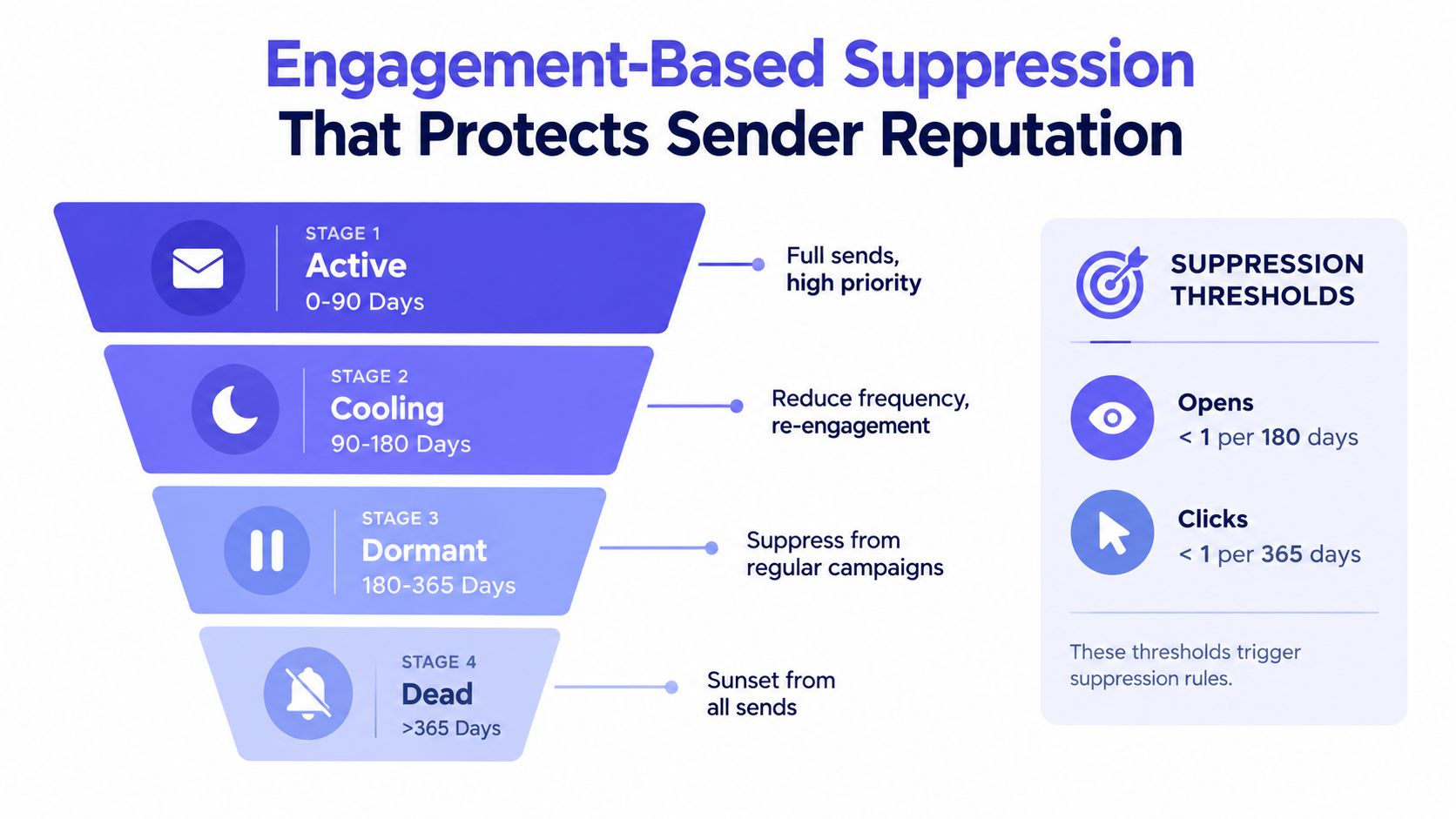
Use rolling windows instead of one blanket unsubscribe rule. Recent clickers can stay in the primary stream even if they don't open every message. Quiet contacts can move to a re-engagement path, while addresses that remain inactive across longer windows can be excluded from routine campaigns.
Build suppression tiers
- Active contacts: Keep normal campaign access for people with recent clicks, replies, conversions, or meaningful product activity.
- Cooling contacts: Reduce frequency and test a preference or re-engagement message instead of continuing full-volume sends.
- Dormant contacts: Suppress from regular campaigns while preserving the record for support, transactional communication, or a future consent-based reactivation.
- Sunset candidates: After a defined re-engagement sequence produces no meaningful signal, stop promotional sends and retain only what business and legal requirements allow.
- Complained addresses: Suppress immediately from promotional mail. Don't attempt to win back someone who has explicitly marked messages as unwanted.
A re-engagement sequence should be short and deliberate, with a clear value proposition, a preference option, and an easy unsubscribe path. The exact number of messages should reflect your consent model and sending context, but the decision must be documented before launch. Otherwise, teams keep retrying because no one owns the sunset rule.
Be careful with role accounts and transactional users. A person may ignore newsletters but click password-reset or billing messages. Suppressing that address from marketing shouldn't block required service communication, and a lack of marketing engagement shouldn't erase product evidence that the account remains active.
Sender Reputation Tactics That Multiply Every Other Effort
List quality is only one side of delivery. A moderately sized, well-managed audience can still encounter problems if the sending domain has poor authentication, the infrastructure sends erratic volume, or recipients consistently report messages as unwanted. Reputation determines how receiving providers interpret the signals generated by your campaigns.

Authentication is foundational. Configure and monitor SPF, DKIM, and DMARC alignment so receiving providers can associate your messages with an authorized domain. Keep marketing and transactional traffic on separate subdomains where possible, because a marketing incident shouldn't automatically contaminate password resets, receipts, or security notices.
Control volume, infrastructure, and complaints
Dedicated infrastructure gives larger senders more control, but it also gives them more responsibility. Shared pools can work well when the provider actively manages abuse and reputation. A dedicated IP or pool makes sense only when the team can maintain consistent volume, monitor reputation, and manage warm-up rather than treating isolation as a cure.
New infrastructure needs a measured ramp. Avoid sudden spikes, keep daily patterns explainable, and coordinate launches with audience quality. Providers evaluate behavior over time, so a clean campaign followed by an abrupt high-volume send can still create a problem.
Feedback loops and complaint handling deserve the same urgency as bounce suppression. A complaint signals that the recipient didn't want the message, while a hard bounce signals that the address can't receive it. Both reduce future delivery potential, but they require different remediation. Suppress complaints quickly, review acquisition and consent sources, and investigate segments that produce unusual complaint or bounce patterns.
For a deliverability engineer, the recurring routine is simple in principle: review event codes after sends, check authentication and provider trends, inspect new-source cohorts, confirm suppression synchronization, and pause or throttle campaigns when the evidence says the audience or infrastructure isn't ready.
A visual reference can help stakeholders understand how bounce rate and delivery rate respond to these controls before they debate isolated campaign metrics.
KPIs and Monitoring to Prove the Bounce Rate Is Falling
A useful dashboard shows which control changed the outcome. Track hard and soft bounces separately, segment results by mailbox provider and acquisition source, and assign every breach to an owner with a defined response.
Treat 2% as the campaign-level ceiling and compare each send with a trailing four-send baseline, rather than judging performance from one campaign. The broader benchmark is supported by GetResponse's email marketing statistics. Cold outreach needs a stricter warning posture because 2% to 3% can indicate risk, while rates above 3% may damage reputation (RevenueFlow's cold email benchmarks).
Use a dashboard that leads to decisions
| KPI | Target | Breach Threshold | Diagnostic Action |
|---|---|---|---|
| Total bounce rate | Under 2% | Above 2%, especially above 5% | Pause expansion, separate hard and soft failures, review acquisition sources |
| Hard-bounce rate | As low as practical, ideally below 1% | Above 1% | Suppress invalid addresses, audit signup and import validation |
| Soft-bounce rate | Low and stable by provider | Repeated provider-specific failures | Inspect deferrals, full mailboxes, throttling, and retry policy |
| Complaint rate | Keep low and stable | Any material increase from baseline | Suppress complainers, audit consent, content, frequency, and targeting |
| SMTP acceptance | Stable across providers | Sudden provider decline | Check authentication, reputation, volume, and response codes |
| List growth versus churn | Growth supported by valid records | Growth outpaces quality controls | Add capture validation and review source-level risk |
Review the current send against the trailing baseline each week. Investigate meaningful variance instead of celebrating one clean result. The address source can matter more than campaign content. If a new acquisition channel generates most hard bounces, correct the form, consent flow, or data handoff rather than running another generic cleaning pass.
Set explicit alerts. Notify the deliverability owner when hard bounces cross the team threshold, one mailbox provider diverges sharply from the others, or a soft-bounce subtype repeats across campaigns. Route the response to the relevant control: improve signup validation for new-record failures, update suppression for stale contacts, or inspect infrastructure for provider-wide failures.
The causal chain should be visible in the reporting. Capture checks determine the quality of new records. Pre-send verification determines campaign eligibility. Suppression limits repeated exposure, while reputation monitoring shows whether these interventions protect future acceptance. A dashboard that cannot connect a breach to one of those controls needs better event mapping and ownership.
Mailbeam provides real-time email verification through an HTTP API and web tools. Its checks cover syntax, MX records, SMTP existence, disposable and role-based addresses, free providers, and catch-all behavior, with batch workflows for list maintenance. Use Mailbeam to connect signup-time validation with pre-send hygiene, then review returned reason codes and bounce events before the next campaign.