
SMTP relaying is the process where an email passes through one or more intermediate mail servers before reaching the final recipient's inbox, formalized in RFC 821 in 1982 and updated by RFC 5321 in 2008. In practice, your application hands the message to a controlled relay, which authenticates the sender, finds the recipient's mail server, queues the message, and forwards it.
You may be dealing with this already. A password-reset email leaves your application, a monitoring alert leaves a server, or a scanner sends a document to a customer. The application usually doesn't deliver that message directly to the recipient's mailbox. It submits the message to a relay, and the relay takes responsibility for the next part of the journey.
That handoff improves reliability, but it also creates a security boundary. A correctly configured relay delivers legitimate mail and protects your sending reputation. A misconfigured relay can become a spam engine, expose credentials, or allow attackers to hide abusive traffic behind your infrastructure.
Table of Contents
- What SMTP Relaying Actually Does
- How Mail Moves Through a Relay
- Why Open Relays Became a Major Problem
- How Relay Abuse Still Happens Today
- Secure Relay Patterns That Protect Deliverability
- What SMTP Relaying Means for Your Sending Infrastructure
What SMTP Relaying Actually Does
Suppose a customer requests a password reset from your SaaS product. Your application creates the message, but it usually isn't responsible for finding the customer's mail server, retrying delivery, managing a queue, or handling temporary failures. Instead, it connects to a Mail Submission Agent, or MSA, and submits the message through an authenticated SMTP connection.
The relay receives that message, checks whether your application is allowed to send, and places it in a queue. It then looks up the recipient domain's mail exchange, or MX, record and connects to the server responsible for accepting mail for that domain. The recipient's mail system performs its own checks and either accepts, defers, rejects, or filters the message.
That's the plain answer to what SMTP relaying is. It's an intermediary delivery path, not a special kind of email content and not a replacement for SMTP itself. SMTP is the protocol, while relaying is the act of passing a message from one mail server to another.
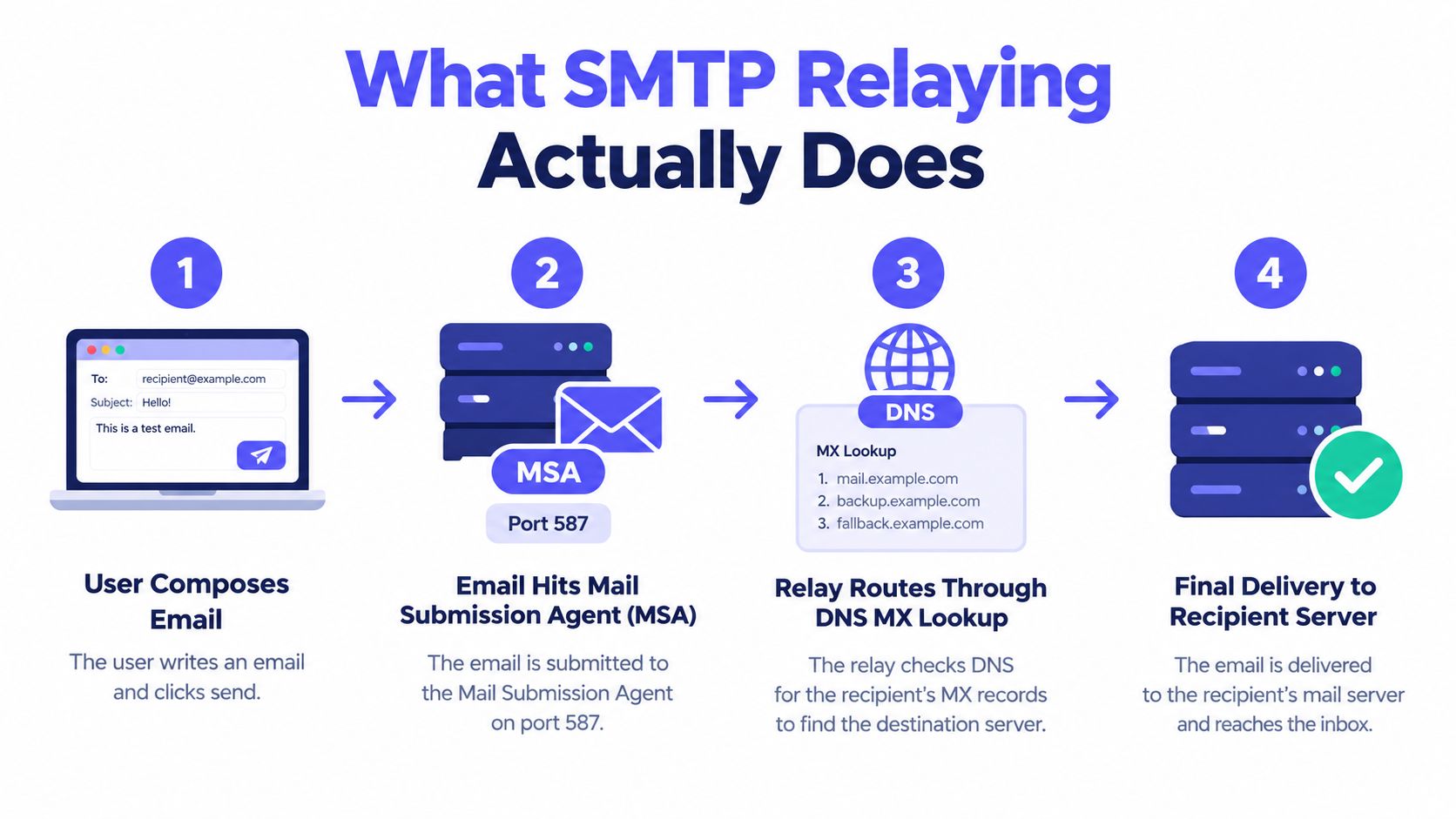
The actors in a typical delivery
A useful mental model has four participants:
- The sending client: This might be an application, CMS, printer, monitoring service, or human email client. It creates the message and submits it to a trusted server.
- The submission or relay server: This server authenticates the sender, applies policy, queues the message, and prepares it for onward delivery.
- The recipient domain's mail server: The relay identifies this server through DNS MX lookup and opens an SMTP connection to it.
- The recipient's mailbox system: The receiving environment decides whether the message reaches the inbox, spam folder, quarantine, or nowhere at all.
The relay doesn't guarantee inbox placement. It guarantees a controlled attempt to deliver the message and provides a place to enforce sending rules. That distinction matters. Your relay can accept a message successfully while the recipient's server later filters or rejects it.
If you want to inspect the destination side of this process, use a dedicated MX record checker to see which mail servers a domain publishes. The result doesn't prove that a particular mailbox exists, but it helps explain where a relay tries to connect.
Why the relay exists
Direct delivery would force every application to manage DNS resolution, retry behavior, authentication, encryption, reputation, and detailed delivery logs. That approach is difficult to operate consistently, especially when several systems send mail for the same organization.
A relay creates a controlled bridge between internal senders and the public email network. It separates message creation from Internet delivery, so your application can hand off work without remaining connected until the recipient's server responds.
Practical rule: Treat the relay as a security gateway, not as an invisible pipe. Every sender using it should have a clear identity, permission, and delivery policy.
How Mail Moves Through a Relay
Think of SMTP relaying as a postal sorting network. You write a letter and take it to a local post office. That office doesn't need to drive the letter to the recipient's house. It identifies the destination, sends the letter through the appropriate network, and retries or returns it when a downstream problem prevents delivery.
Email follows a similar pattern, although each handoff uses SMTP communication between software systems.

The relay lifecycle
1. Submission begins with the sending system.
Your application opens a connection to the relay and introduces itself. In a production setup, the relay expects authentication and an encrypted connection. The application then submits the sender, recipients, subject, body, and any attachments as a complete message.
2. The relay validates the request.
The relay checks credentials and applies its sending policy. It may verify that the sender is authorized, that the account is within its permitted use, and that the message follows local restrictions. If submission fails, the application receives an SMTP error instead of assuming the message was delivered.
3. The message enters a queue.
The relay normally stores the accepted message temporarily while it attempts onward delivery. Queuing is important because the recipient's server may be offline, busy, rate-limiting connections, or temporarily unavailable. The application doesn't need to hold an open connection while the relay manages that delay.
4. The relay resolves the destination.
The recipient address contains a domain, such as example.org. The relay looks up that domain's MX record to determine which mail server accepts incoming messages. It then chooses an available destination according to the published routing information and any local policy.
5. Server-to-server delivery takes place.
The relay connects to the destination server and uses SMTP commands such as MAIL FROM and RCPT TO to transfer the message. The receiving server examines the connection, sender information, authentication signals, message content, and reputation before deciding what to do.
6. The result is recorded.
A useful relay records whether the message was accepted, deferred, rejected, or returned. That record helps you distinguish an application problem from a recipient-server policy decision. For mailbox-level checks before sending, SMTP verification can complement relay monitoring by testing whether a recipient server responds meaningfully to a target address.
Why queuing changes reliability
Without a queue, a temporary failure becomes your application's problem. Your code would need to decide how long to wait, when to retry, how often to retry, and when to notify the user. A relay centralizes those decisions and keeps them separate from the application's core workflow.
That separation also gives operations teams a consistent place to inspect outbound traffic. If five applications send through five different configurations, troubleshooting becomes fragmented. If they use one governed relay layer, administrators can review credentials, routing, policy, and delivery outcomes in one system.
The relay still has boundaries. It can't force a destination provider to accept a message, and it can't repair a false sender identity or a damaged domain reputation by itself. It can only make the delivery attempt controlled, observable, and repeatable.
Why Open Relays Became a Major Problem
An open relay accepts and forwards email from senders who haven't authenticated or received permission. That sounds convenient until you consider the cost of letting an unknown person use your server as their outbound mail system.
An attacker doesn't need to compromise every recipient account if an exposed relay will deliver messages on request. The attacker can submit spam through your server, consume its resources, and associate your server's identity with abusive traffic. Legitimate messages then inherit the resulting reputation problems.
The historical shift is clear. Spamhaus reports that active open relays grew through 2001 and stabilized between 200,000 and 250,000 in 2002, before declining sharply. The same source says open relays had stopped being an important spam vector by 2005 or 2006. The historical account of open-relay abuse also cites NTA Monitor testing in which 1% of corporate UK mail servers were open relays in 2002, compared with 91% in 1997.
What changed in relay design
The industry moved away from permissive forwarding because attackers made unrestricted access impractical. Modern relays typically require some combination of:
- SMTP authentication: The sender proves its identity with credentials or another approved mechanism.
- Sender authorization: The authenticated account can send only from permitted domains or addresses.
- Transport encryption: The connection protects credentials and message data while they travel to the relay.
- Rate controls: The relay limits how quickly a sender can submit messages.
- Audit logging: Administrators can trace activity back to an application, account, device, or user.
These controls solve different problems. Authentication answers, “Who is submitting this message?” Sender authorization answers, “What identity may that sender use?” Rate limiting asks, “Is this amount of activity normal?” Logging answers, “What happened, and which source caused it?”
Why “internal only” can still be dangerous
Teams sometimes trust an internal network too broadly. They allow any device on a trusted subnet to relay, then forget that a compromised workstation, printer, container, or application can use that access. Network location can be one signal, but it shouldn't replace identity and policy.
RFC 5321 documents the evolution from the original SMTP standard, RFC 821, and states that it obsoletes RFC 821. It also explains that the older source-routing relay model was no longer in significant Internet use by the mid-1990s, reflecting the move toward the modern relay architecture described in RFC 5321.
A relay should be open to authorized senders, not open to everyone who can reach its network interface.
The practical lesson is simple. If a system can submit mail, give it a controlled identity and limit what that identity can do. Don't rely on obscurity, private addressing, or the assumption that nobody will discover the relay.
How Relay Abuse Still Happens Today
Open relays are no longer the only concern. Attackers can also abuse legitimate cloud infrastructure by compromising servers, stealing credentials, or deploying software that turns rented compute into a covert sending network.
A 2026 report described a campaign that hijacked 230 cloud servers across AWS, Google Cloud, and Azure to create an SMTP relay network. The significance isn't only the number of servers. It shows that attackers can use ordinary cloud resources and familiar email pathways to distribute abuse, obscure the original source, and damage the reputation of infrastructure that belongs to someone else. The report on the cloud SMTP relay abuse campaign also highlights that teams underuse simple monitoring for unexpected outbound SMTP traffic.

What legitimate traffic looks like
Legitimate relay use usually has an identifiable owner and a predictable purpose. A billing service sends invoices, a monitoring platform sends alerts, or a support system sends ticket notifications. The source account, sender domain, recipient pattern, and timing should make sense together.
Abusive traffic often breaks that pattern. Look for:
- Unexpected outbound SMTP: A server that has never sent mail begins making connections on ports 25, 465, or 587.
- New sending identities: A workload starts using unfamiliar sender domains or addresses.
- Unusual recipient behavior: One credential sends to unrelated domains or a large collection of unknown recipients.
- Sharp activity changes: A quiet service suddenly submits messages at a rate inconsistent with its normal role.
- Missing application context: SMTP traffic appears in network logs without a corresponding product event, job, or user action.
The point isn't to block all email traffic. Platform teams need to compare network telemetry with application logs. A scheduled notification job may explain a short burst, while a new process connecting directly to external mail servers without an approved workflow deserves investigation.
The following video provides another visual explanation of the risk and the infrastructure involved:
Controls that reduce the blast radius
Authentication prevents anonymous submission, but stolen credentials can still be abused. Give each application or device a separate credential where practical, and revoke a single identity without disrupting every sender.
Rate limiting limits how much damage a compromised account can cause before detection. Apply limits by account, application, sender identity, or another boundary that matches your environment.
Sender-domain policy prevents an authorized application from pretending to send for every domain. The relay should know which systems can use which sender identities, and it should reject requests outside that policy.
End-to-end logging lets responders connect a submitted message to its source, relay decision, destination attempt, and final result. Without that chain, teams may see reputation damage without knowing which credential or workload caused it.
Monitoring outbound SMTP is therefore a security task as well as an email operations task. The relay path is valuable infrastructure, and attackers understand that value.
Secure Relay Patterns That Protect Deliverability
The safest production pattern starts with authenticated submission over port 587 or implicit TLS on port 465. Port 587 is designed for authenticated client-to-server submission, while port 465 begins the connection inside TLS. Both approaches create a clearer boundary than allowing unauthenticated application traffic to use a general server-to-server path.
A secure port choice still needs secure identity controls. SMTP AUTH confirms that the submitting client has permission to use the relay, but it doesn't by itself prove that the visible sender domain is authorized. That's why relay security and domain authentication need to work together.
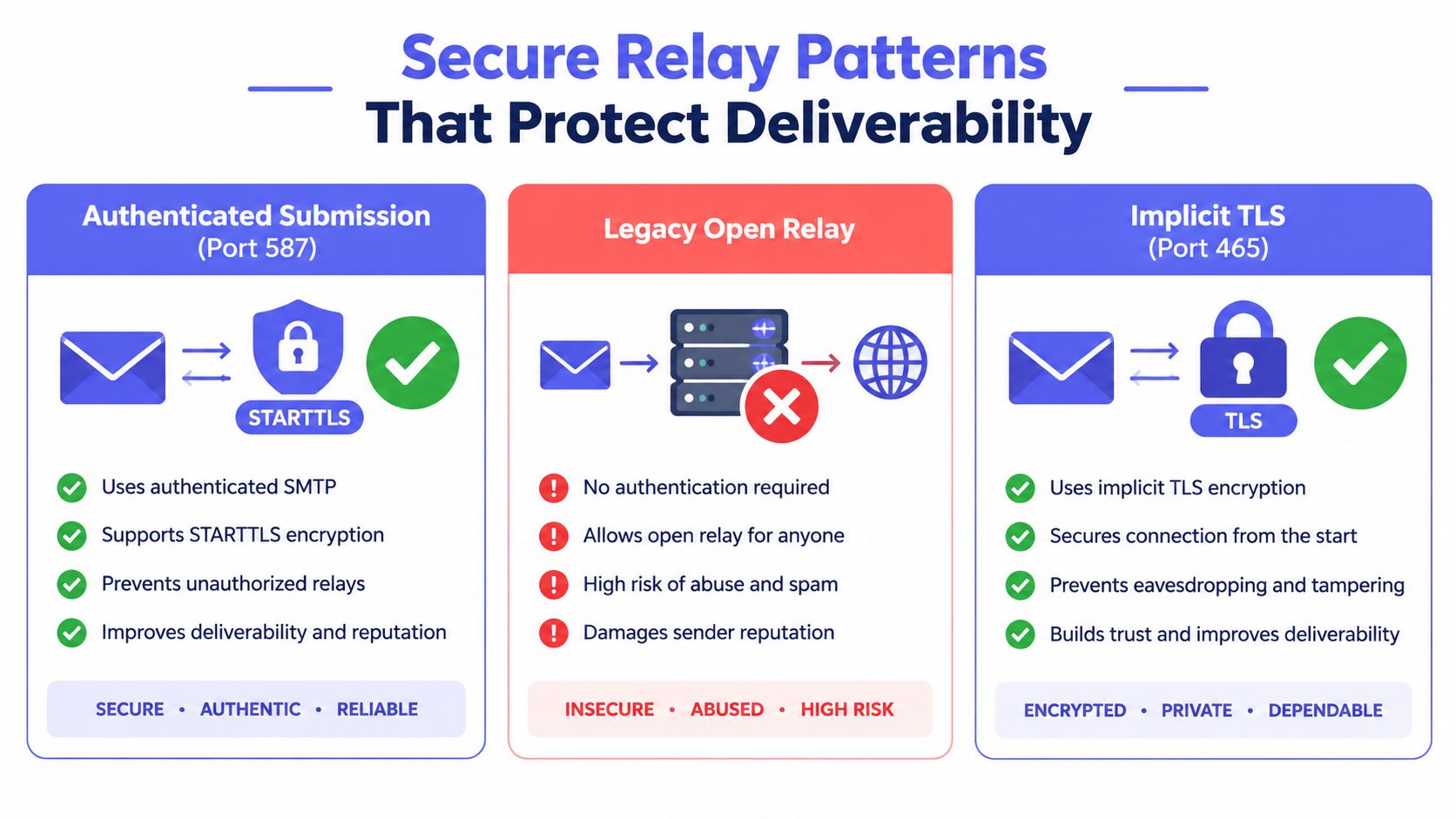
Compare the main patterns
| Relay pattern | How it works | Main concern |
|---|---|---|
| Authenticated submission on port 587 | The client connects, negotiates encryption, authenticates with SMTP AUTH, and submits mail through a controlled service. | Credentials and sender permissions must be managed carefully. |
| Implicit TLS on port 465 | The client establishes an encrypted connection from the start and then authenticates before submission. | The sending client must support the expected TLS behavior. |
| Legacy open relay | The server accepts messages from broad or anonymous sources and forwards them. | Attackers can exploit it for spam, reputation abuse, and unauthorized delivery. |
The security baseline described in this SMTP relay introduction combines authenticated submission with SPF, DKIM, and DMARC alignment. These controls address different parts of sender trust:
- SPF identifies approved sending infrastructure for a domain.
- DKIM adds a cryptographic signature that receiving systems can verify.
- DMARC applies a policy when authentication checks fail and evaluates alignment with the visible sender domain.
A relay can authenticate your application while the receiving provider still rejects the message because your domain authentication is missing or misaligned. Authentication at submission and authentication at receipt are related, but they aren't the same check.
Configuration mistakes have operational costs
A server that permits unauthenticated forwarding can be abused and quickly attract blocklisting. The verified guidance for secure relay warns that improperly configured servers may be blacklisted by major providers within hours or days. That speed matters because the damage can spread before an operations team connects a delivery drop to a relay change.
If your team sees an email authentication error, inspect the entire chain rather than changing one setting at random. Confirm that the client is using the expected encrypted submission path, that the credentials belong to an authorized sender, and that SPF, DKIM, and DMARC policies agree with the domain used in the message.
Security boundary: Encryption protects the connection, authentication identifies the submitter, and domain alignment helps the recipient decide whether the message is trustworthy. You need all three layers for a dependable relay.
What SMTP Relaying Means for Your Sending Infrastructure
SMTP relaying is infrastructure, but teams experience its quality through practical outcomes. A well-governed relay gives applications a reliable submission point, gives security teams a place to restrict abuse, and gives deliverability teams records they can use to diagnose rejection or deferral.
Treat relay configuration as part of your broader sending program. Review which applications, devices, and services can submit mail. Remove unused credentials. Set sender-domain rules. Monitor outbound SMTP activity and compare it with expected application behavior. Review delivery logs when a message fails instead of assuming that accepted submission means inbox delivery.
List hygiene belongs in the same program. Sending to invalid or abandoned addresses creates avoidable delivery failures and can weaken the reputation of the systems associated with your mail. Verification before sending doesn't replace relay authentication, but it can reduce the number of messages your relay has to submit to destinations that aren't viable.
A practical operating model has three layers:
- Submission control: Use authenticated encrypted connections and restrict each sender to the identities it needs.
- Delivery trust: Publish and maintain SPF, DKIM, and DMARC alignment for every sending domain.
- Operational visibility: Record the source, authentication result, routing decision, destination response, and final status for each message.
This approach keeps the relay from becoming a blind forwarding service. It turns the relay into an accountable part of your sending architecture, where legitimate automation can work without giving attackers an unrestricted path to the Internet.
Mailbeam offers real-time email verification through a developer-friendly HTTP API and web tools, including checks for syntax, MX records, SMTP behavior, disposable domains, and catch-all responses. Visit Mailbeam to evaluate addresses before your applications and relay infrastructure attempt delivery.