
The most popular advice about cleaning up email lists is also the least useful: delete everyone who hasn't opened recently, repeat the exercise on a fixed schedule, and trust the verifier's green or red label. That approach treats a mixed database as if every contact carries the same risk. A dormant customer, a newly acquired lead, a role account, a temporary signup, and a recipient who opted out need different actions.
A better system connects every signal to a lifecycle decision. Invalid addresses should be suppressed, temporary failures should be monitored, uncertain results should be segmented, and low engagement should trigger a deliberate re-engagement or frequency decision. The objective isn't the smallest possible list. It's a list your sending systems can govern, explain, and trust.
Table of Contents
- Why Most Email List Cleaning Advice Falls Short
- The Cost of a Decaying Email List
- Building the Cleaning Pipeline From Raw Data to Verified Contacts
- Choosing the Right Policy for Each Risk Segment
- Stopping Bad Addresses at the Front Door With Real-Time Verification
- Re-Engagement Campaigns That Respect Unsubscribe and Consent
- Setting Up Ongoing Monitoring and a Repeatable Cleaning Rhythm
Why Most Email List Cleaning Advice Falls Short
A rigid “clean every 60 to 90 days” rule sounds operational, but it ignores how databases are built. SaaS products collect signups continuously, sales teams import business contacts, ecommerce programs add purchasers, and marketing teams often combine several consent histories in one audience. Those sources don't decay at the same pace or carry the same commercial value.
Survey data cited by Mailgun's deliverability analysis suggests that around 39% to 40% of senders rarely or never conduct list hygiene, while only about 27% do so monthly or more often. The gap matters, but it doesn't prove that one universal cadence will solve the problem. A high-volume acquisition channel may need controls at signup and frequent event processing, while a low-frequency customer newsletter may need a different review pattern.
Replace deletion with decisions
The first mistake is treating “inactive” as a verdict. An open can be missing because a recipient uses privacy protections or a mail client that suppresses tracking. A click, reply, purchase, login, support interaction, or product event can provide stronger evidence that the relationship remains active.
The second mistake is treating verification as certainty. A successful SMTP response doesn't prove that a message will reach a person, and a catch-all result doesn't prove that the mailbox is dead. Similarly, a role address such as billing@ may be valuable in a B2B relationship even though it deserves different treatment from an individual address.
Practical rule: A verifier should produce a reason code and a recommended next state, not a simplistic permission to send.
A useful decision system preserves the original address, normalized address, source, consent status, bounce history, engagement signals, verifier result, reason code, and decision timestamp. That record lets a team answer why a contact was suppressed or retained without reconstructing the decision from scattered campaign logs.
What actually damages performance
The deliverability problem usually comes from the response pattern, not one bad address. Sending repeatedly to confirmed hard bounces creates avoidable failures. Treating every temporary SMTP response as invalid removes potentially reachable contacts. Continuing to message people who have opted out creates a preference and compliance failure, even if their mailbox is technically valid.
Cleaning up email lists works when the workflow separates deliverability risk, engagement risk, consent risk, and business value. It fails when a single score hides those distinctions. The rest of the process should therefore map each category to an explicit action, with suppression lists and audit history treated as core infrastructure rather than disposable campaign data.
The Cost of a Decaying Email List
A list can become a deliverability liability without anyone deleting a record. People change jobs, abandon inboxes, switch providers, and leave domains inactive. A 2025 analysis reported by PR Newswire examined more than 11 billion email addresses verified during the year and found that at least 23% of lists decayed annually, compared with 28% in 2024. It also found more than 2.6 billion invalid addresses, over 1 billion catch-all addresses, and only 62% of submitted addresses classified as valid.
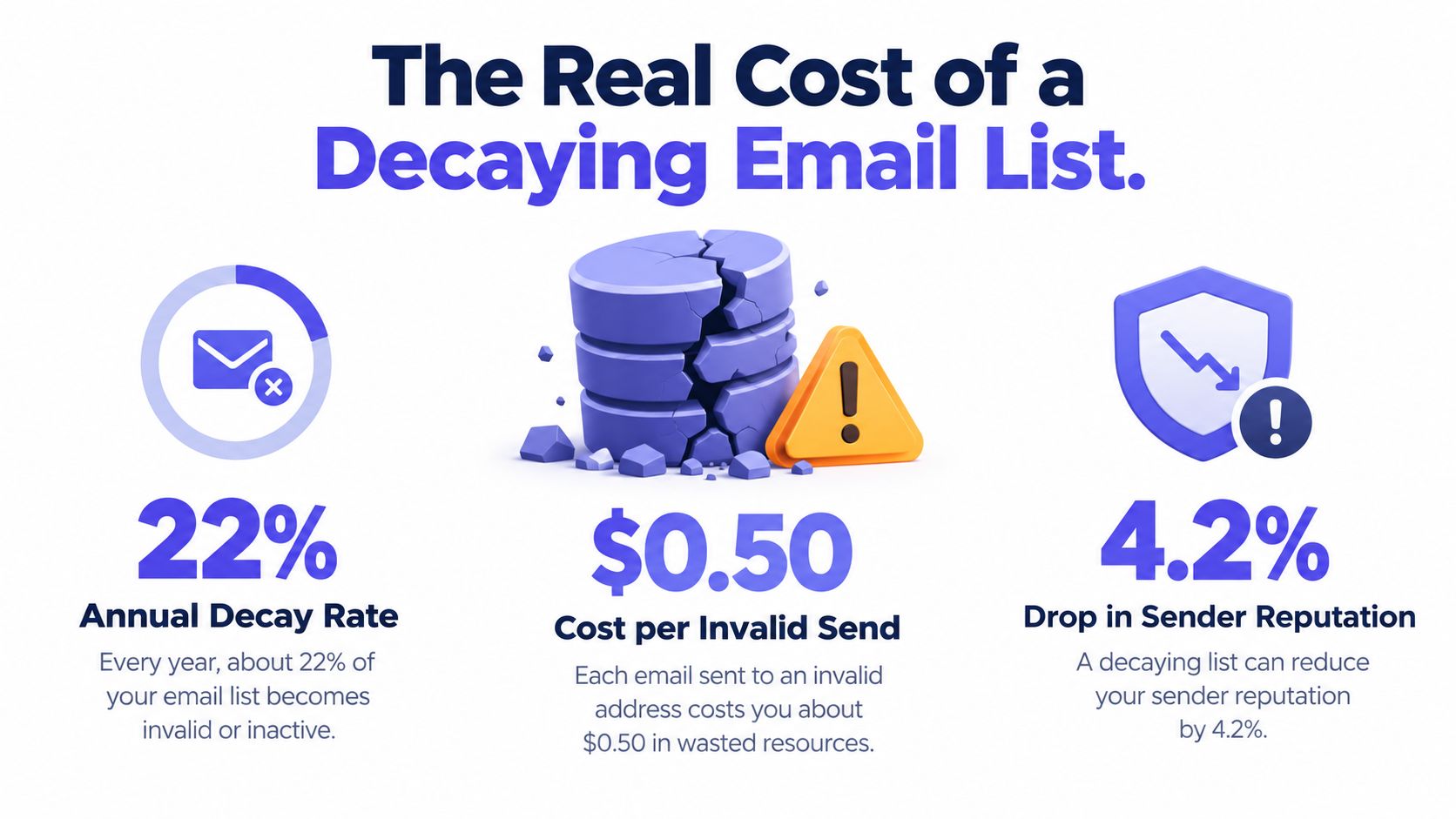
For a database of 100,000 contacts, applying that 23% annual decay rate implies roughly 23,000 records requiring removal, suppression, revalidation, or segmentation before continued sending. The operational decision is not automatic deletion. Each record needs an evidence-based lifecycle action, such as suppression, review, revalidation, or continued sending at an appropriate volume.
Why catch-all results need caution
Catch-all domains accept messages at the SMTP level without confirming that a specific mailbox is active. The result signals uncertainty, not a reliable deliverable or undeliverable verdict. A business address may remain valuable, but sending every uncertain address at full volume adds avoidable risk. Route catch-all contacts into lower-volume testing, account review, or revalidation rather than applying one blanket rule.
Role accounts create a related trade-off. info@, support@, and accounts@ can represent genuine business relationships, while also being shared, redirected, or monitored by several people. Use the account context, acquisition source, consent record, and prior campaign behavior to choose the next state.
List decay also distorts measurement. Dead records lower apparent engagement, hide which acquisition sources produce reachable contacts, and consume campaign attention. A weak result can then look like a content problem when the audience has become unreliable.
Cleaning is also governance
Mailbox validity does not settle the legal question. The Federal Trade Commission's CAN-SPAM guidance requires commercial senders to avoid deceptive headers and subject lines, identify commercial messages, provide a clear opt-out mechanism, include a valid physical postal address, and stop sending after an opt-out request. The FTC says opt-out mechanisms must remain capable of processing requests for at least 30 days after a message is sent, and businesses must honor requests within 10 business days.
Suppression data therefore needs the same care as deliverability data. Preserve unsubscribe events, complaints, and consent history across the ESP, CRM, product database, and imported files. For practical guidance on how hygiene affects delivery failures, see reducing email bounce rate. A cleanup policy should connect each verification outcome to a documented lifecycle action, not treat verification as a permanent verdict.
Building the Cleaning Pipeline From Raw Data to Verified Contacts
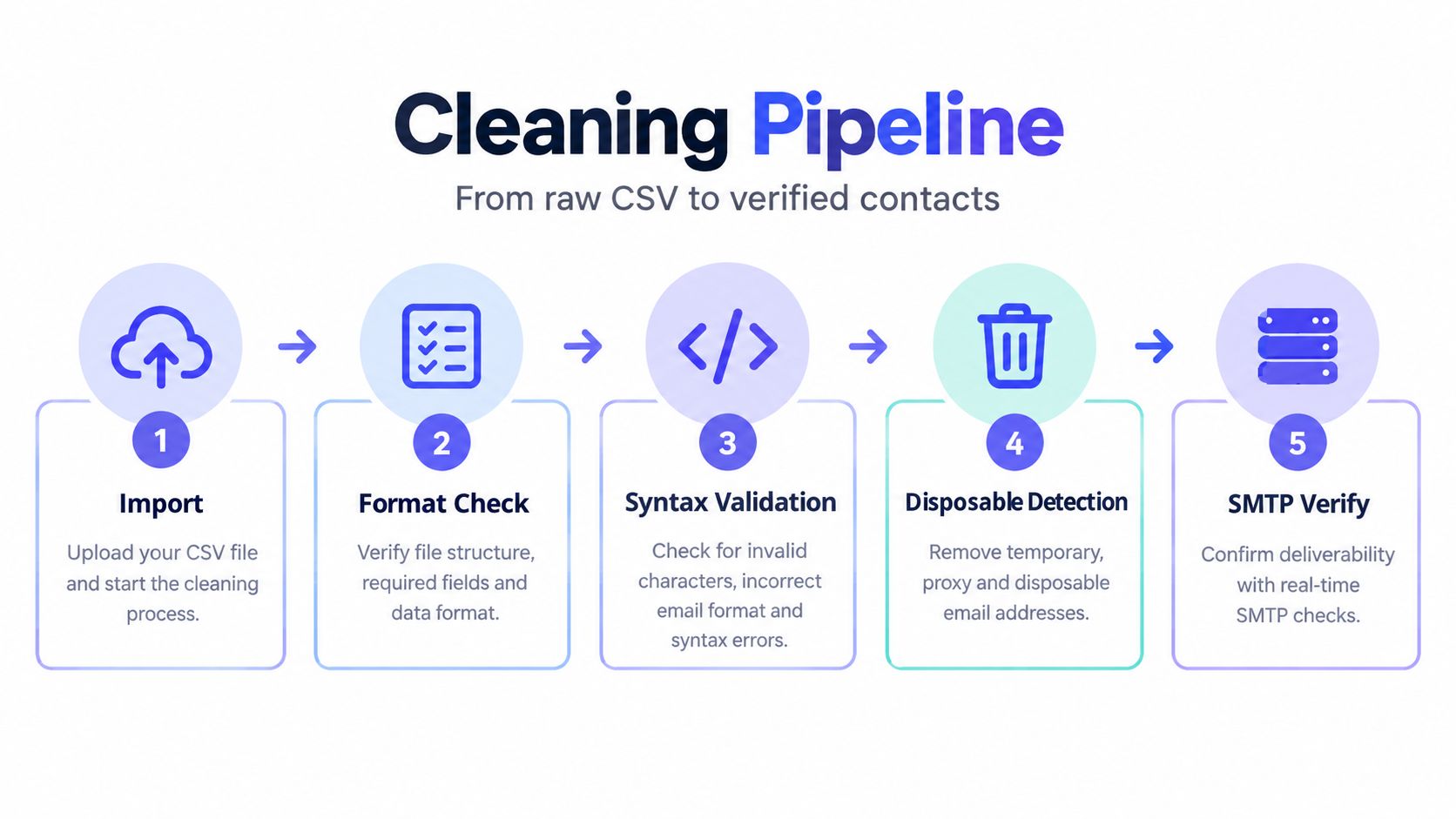
A clean list is not a delete file. It is a risk-segmentation system that preserves evidence, assigns each address a lifecycle state, and records why that state changed. Start with an export and a backup containing the original address, source, acquisition date, consent fields, engagement history, bounce events, unsubscribe status, and relevant customer identifiers. Keep the submitted value untouched so later reviews can separate source data from normalized working data.
Normalize before you deduplicate
Create a canonical comparison value, then deduplicate on the normalized mailbox and domain. Raw-string matching misses capitalization differences and accidental spaces. Preserve three layers:
- Original value: The exact address received from a form, CRM, partner, or CSV.
- Normalized value: The canonical value used for matching and verification.
- Decision metadata: The verifier result, reason code, timestamp, source, and assigned lifecycle state.
Avoid provider-specific rewrites unless your organization has documented the policy and accepted its effects. Consistent comparison matters more than aggressive transformation.
Reject structural failures early
Run syntax checks before deeper verification. Malformed addresses, impossible domain structures, and obvious formatting errors should not consume SMTP capacity. Check whether the domain has a usable MX record or fallback A record. Google's sender guidance supports separating temporary SMTP responses from permanent failures.
Use this sequence:
- Import and preserve: Back up the source and attach a stable record identifier.
- Normalize and deduplicate: Match normalized mailbox-domain pairs while retaining the original.
- Check syntax and domain: Reject malformed values and domains without usable mail routing.
- Classify risk: Flag disposable domains, role accounts, catch-all behavior, and uncertain responses.
- Probe and monitor: Compare SMTP outcomes with delivery and complaint results.
Interpret results as lifecycle signals
A permanent 5xx failure usually moves an address to suppress. A temporary 4xx response moves it to retry, with controlled backoff because throttling and greylisting do not prove that the mailbox is invalid. Catch-all, role-based, and uncertain results should usually enter review, reduce_frequency, or another risk segment rather than receive an automatic send or deletion decision.
The verifier output is evidence, not a permanent verdict. Store it separately from later campaign outcomes. That record allows teams to compare predictions with hard bounces, unknown-user events, complaints, and unsubscribes by source, domain, and acquisition period. Those comparisons show which acquisition channels produce risky contacts and which reason codes need stricter treatment.
Run the pipeline before major sends, at collection points, and on older records. Real-time checks limit new contamination, while batch processing identifies addresses that became unusable after signup. Each result should lead to a documented action, with suppression and consent records preserved across connected systems.
Choosing the Right Policy for Each Risk Segment
Verification results matter only when each outcome leads to a defined lifecycle action. Treat the list as risk segments, not a binary delete-or-keep queue.
| Contact type | Recommended action | Why | Watch out for |
|---|---|---|---|
| Hard bounce or permanent 5xx failure | Suppress immediately and retain the event in the audit record | The failure indicates a permanent delivery problem | Do not delete the suppression record or let another system re-import the address |
| Temporary 4xx failure | Retry with controlled backoff, then review repeated failures | Throttling and greylisting can resolve without intervention | One temporary response does not prove the mailbox is invalid |
| Role-based address | Segment and assess by account context, consent, and past outcomes | A shared mailbox may still be a legitimate business contact | Do not delete every info@ or billing@ address automatically |
| Catch-all result | Place in a risk segment, reduce exposure, or review manually | SMTP acceptance does not confirm the specific mailbox | Catch-all is not equivalent to deliverable |
| Disposable-domain signup | Block, quarantine, or require a stronger product-specific flow | Temporary addresses can distort user and engagement data | Consider the use case before blocking legitimate users |
| Valid but inactive recipient | Re-engage, reduce frequency, or suppress marketing under a documented policy | Inactivity is an engagement signal, not necessarily an invalid address | Do not rely on opens alone, especially where tracking is limited |
For disposable addresses, a dedicated disposable email detection workflow can distinguish temporary domains from ordinary free-provider addresses. The resulting action depends on the product. A free trial may require a company address, while a public community may permit temporary access but exclude that address from long-lived marketing.
Use complaint thresholds as guardrails
Gmail's sender requirements advise keeping user-reported spam below 0.1% and avoiding 0.3%. For a campaign sent to 10,000 recipients, those boundaries mean fewer than 10 complaints as the target and 30 as the danger line, according to the sender requirements.
Use these figures as stop conditions, not permission to mail every address below the threshold. Pause a rollout when complaints rise unexpectedly, particularly within an acquisition source, role segment, or catch-all group. A low complaint rate does not justify sending to people who already opted out.
Review complaint trends by segment and acquisition period before restoring an address to regular sending. A recipient with uncertain verification and rising complaints may need reduced frequency or manual review, while a confirmed hard bounce belongs in suppression.
The policy should distinguish marketing suppression from transactional eligibility. Someone who unsubscribes from promotions may still need password resets, invoices, or security alerts. Keep communication categories separate, document the legal basis and preference behavior, and apply suppression logic to the correct stream. Retain the audit trail so later policy changes do not erase why an address was restricted.
Stopping Bad Addresses at the Front Door With Real-Time Verification
Real-time verification is a risk-routing control, not a simple delete-or-keep filter. Bulk cleaning repairs existing records. An address check at registration, lead capture, checkout, invitation, and account-recovery flows prevents new risk from entering systems that may later send email.
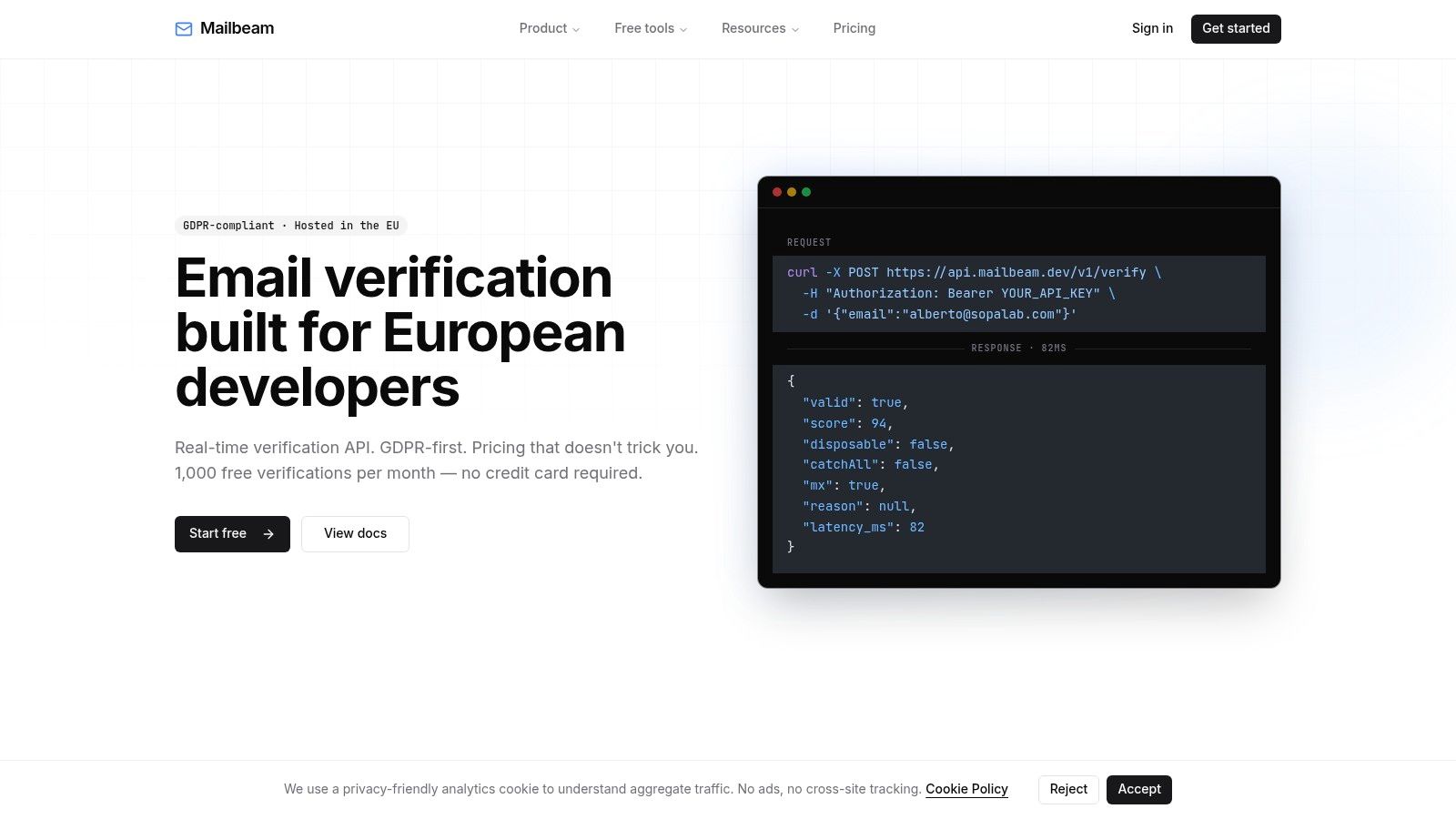
Return a validity result, risk score, and machine-readable reason. Map each outcome to a lifecycle action:
- Hard block: Reject malformed addresses and clearly unacceptable disposable signups when the product requires a durable identity.
- Soft warning: Allow role accounts, catch-all domains, or uncertain SMTP results into confirmation, review, or a restricted sending segment.
- Silent accept: Accept lower-risk addresses when signup friction could reduce conversion, then manage uncertainty through confirmation, segmentation, or limited sending.
The verifier's output should change what happens next. A hard block prevents account creation or requests correction. A soft warning can trigger email confirmation before marketing eligibility. A silent accept can still remain excluded from high-volume campaigns until engagement or delivery history supports broader sending.
Explain the decision in user-facing language. “Please enter a valid email address” helps with syntax errors, but it does not explain a disposable-domain policy or why a business mailbox needs confirmation. Keep technical reason codes in application logs and show concise, respectful copy to the user.
Keep the request inside the signup budget
Mailbeam's real-time verification information describes response times of roughly 80 milliseconds for cached or DNS-only paths and under one second for full SMTP probes. That can support synchronous form submissions, but timeout handling still needs a defined policy. If the verifier is unavailable, accept the address provisionally, queue the check, or request confirmation later based on the flow's risk tolerance.
Store the result with the user record, while treating it as time-bound evidence rather than a permanent verdict. Domains change and mailboxes close. Use webhooks or event processing to route later outcomes into the CRM, ESP, and suppression service.
A GDPR-first implementation needs a clear data map. Document what the verifier receives, where processing occurs, how long batch data remains available, which systems retain the result, and how users can exercise their rights. EU organizations should separate verification metadata from unnecessary personal profiling and retain only what supports the product, compliance, and deliverability decision.
For an implementation pattern, review real-time email validation. The key decision is how each reason code affects the lifecycle: create friction, assign review, require confirmation, limit sending, or allow normal progression.
Re-Engagement Campaigns That Respect Unsubscribe and Consent
A valid address can still be a poor marketing recipient. Consider a former trial user who hasn't clicked recently but still logs into the product, a purchaser who only wants receipts, and a newsletter subscriber whose consent record is incomplete. They shouldn't all receive the same “we miss you” sequence.
Start by defining the eligible group from more than open data. Use recent clicks, replies, purchases, product activity, support interactions, preference selections, and consent history. Exclude known complainers, unsubscribed contacts, hard bounces, and anyone whose marketing permission can't be established under your policy.

Design the sequence around choice
A practical sequence can use a value reminder, a preference update, and a clear final decision. The first message should explain what the recipient will gain by staying. The next should offer a lower frequency or narrower content category. The final message should make the unsubscribe or continued-consent choice obvious, without disguising the message as a transactional notification.
Set a stopping rule before the first send. If the recipient clicks, replies, updates preferences, or confirms continued interest, move them into the appropriate active segment. If they unsubscribe, suppress marketing immediately. If they do nothing, don't keep extending the sequence indefinitely.
The final non-response action depends on consent quality and business need. Where permission is uncertain, suppress marketing and preserve the record of the decision. Where the recipient remains a customer, retain access to necessary account communications while excluding promotional messages.
Make opt-out handling observable
Only about 14% of emails in a 2025 benchmark used a compliant list-unsubscribe header, according to the Mailgun benchmark report. That leaves many teams handling opt-outs manually, which increases the chance that one system records the request while another keeps sending.
Use a centralized preference service or synchronized suppression events. Test unsubscribe links, one-click flows, imports, and category-specific preferences. Keep the event, timestamp, source, and affected communication categories available for audit. Deleting the contact may hide the problem, but it doesn't prove that future sends will stop.
Setting Up Ongoing Monitoring and a Repeatable Cleaning Rhythm
A cleanup is successful only if the next campaign doesn't recreate the same problem. Monitor hard-bounce rate, unknown-user rate, complaint rate, unsubscribe velocity, temporary failures, and verifier outcomes by source, domain type, acquisition period, and communication category.
Gmail's guidance sets below 0.1% as the spam-complaint target and 0.3% as a level to avoid, as noted earlier. Use those thresholds as operational alarms, not as performance promises. A sudden change in one segment deserves investigation even if the blended account rate remains acceptable.
Put each control on a schedule
- Every send: Process hard bounces, complaints, and unsubscribes immediately.
- On collection: Verify syntax, domain health, disposable status, and other policy-specific risks.
- After campaigns: Compare verifier classifications with actual delivery and complaint outcomes.
- On a recurring review: Reassess catch-all, role-account, inactive, and temporary-failure policies.
- Before important sends: Run a focused audit of the target audience and suppression synchronization.
Avoid four common failures: deleting suppression records, treating SMTP acceptance as guaranteed delivery, applying one inactivity rule to every segment, and judging the verifier by pass rate alone. The useful measure is downstream behavior, including delivery outcomes, complaints, unsubscribes, and source quality.
Build the runbook around a short checklist: preserve the source export, normalize and deduplicate, classify failures, apply segment policies, synchronize suppression, run a monitored cohort, review outcomes, and document exceptions. That process turns cleaning up email lists from an emergency exercise into ordinary sender governance.
Mailbeam provides real-time email verification with machine-readable reason codes, plus bulk CSV and asynchronous workflows for reviewing deliverable, risky, and undeliverable contacts. Use Mailbeam to add verification at signup or support a repeatable list-hygiene process with EU-focused data handling.