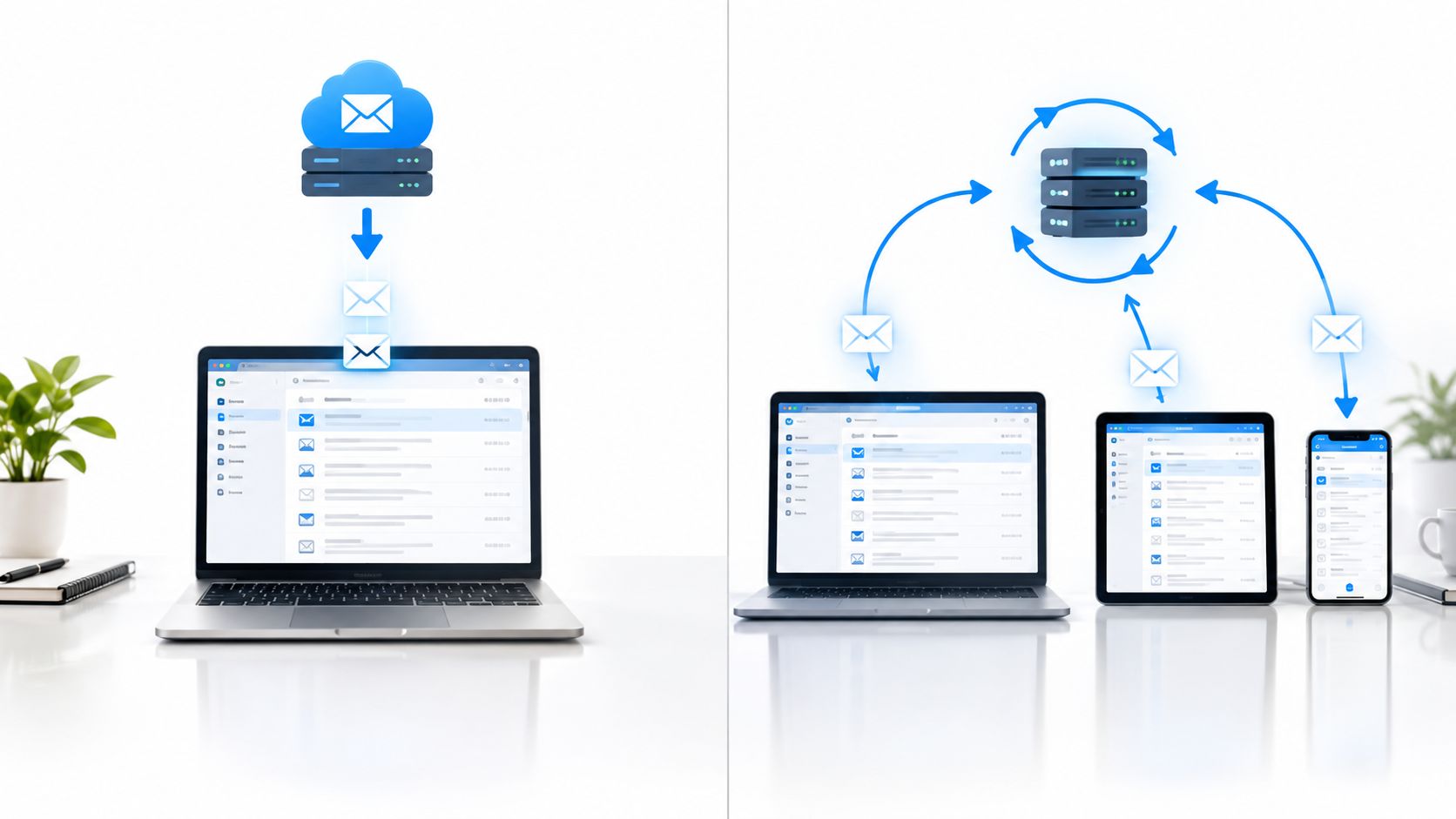
You've just created a mailbox for a new product, connected it to a phone and a desktop client, and reached the configuration screen. The client asks for a protocol: IMAP or POP3. Both can retrieve email, but they make opposite assumptions about where your mailbox belongs.
IMAP assumes the server owns the canonical mailbox. POP3 assumes the client will own the downloaded copy. That distinction affects folders, read status, offline access, backups, authentication, and recovery. Choosing the wrong protocol can leave messages missing from one device, duplicate local archives, or a mailbox that stops connecting after a provider removes password-only access.
Table of Contents
- A New Mailbox and Two Protocol Defaults
- How IMAP and POP3 Actually Move Mail
- Sync, Folders, and Offline Behavior Compared
- Privacy, Backups, and Where Mail Really Lives
- Authentication, MFA, and Modern Provider Policy
- Matching the Protocol to Real Use Cases
- Choosing Between IMAP and POP3 in 2026
A New Mailbox and Two Protocol Defaults
Think of the choice as an ownership decision, not a feature comparison.
IMAP, or Internet Message Access Protocol, keeps the mailbox on the server and lets clients synchronize its state. Folders, flags, read status, deletions, and message content remain associated with the server-side mailbox. A phone, desktop application, and webmail session can work against the same account without each becoming a separate mailbox.
POP3, or Post Office Protocol version 3, retrieves messages toward a local store. Its traditional workflow is simple: connect, download messages, and commonly remove them from the server after successful retrieval. The local client becomes the practical place where the message history lives.
That makes the difference between IMAP and POP3 more important than the familiar shorthand of “sync versus download.” IMAP exposes a remote mailbox. POP3 transfers messages into a local mailbox. One preserves shared state. The other minimizes the amount of shared state the server must maintain.
If you're designing a new mail service, first define the intended ownership model:
- Does the server need to remain authoritative? Choose IMAP.
- Will several clients access the same account? Choose IMAP.
- Does one controlled device need a local archive for offline use? POP3 may fit.
- Will another system need server-side folders, flags, or sent-mail visibility? Choose IMAP.
Both protocols remain relevant in modern deployments alongside webmail and HTTP-based email APIs. They solve a different problem from sending mail or calling a provider's application API. For a practical foundation, see this overview of what an email server does.
| Decision factor | IMAP | POP3 |
|---|---|---|
| Canonical mailbox | Server | Usually the local client |
| Multiple devices | Designed for shared access | Poor fit |
| Folders and flags | Stored and synchronized | Limited or absent |
| Offline workflow | Uses a local cache | Downloads messages locally |
| Server storage | Messages remain available | Messages may be deleted after retrieval |
| Best default | Most personal and team mailboxes | Deliberate single-device archives |
My default is IMAP. POP3 is still useful, but only when local ownership is an intentional requirement rather than an accidental side effect of configuration.
How IMAP and POP3 Actually Move Mail
The wire-level difference becomes clear when you follow the state transitions.
POP3 is a short transaction
A POP3 session moves through three broad states:
- AUTHORIZATION: The client establishes its identity with the server.
- TRANSACTION: The client examines available messages and retrieves them.
- UPDATE: The server applies changes, including messages marked for deletion.
The client uses RETR to download a message and DELE to mark it for deletion. The deletion normally becomes final when the session ends. A client can be configured to leave copies on the server, but that's a client policy layered onto a download-oriented protocol, not the central POP3 model.
UIDL gives a client a way to recognize previously seen messages. That helps a client avoid downloading the same message repeatedly, but it isn't full mailbox synchronization. It doesn't reconcile folder structures, read state, sent items, or flags between independent clients.
POP3 therefore works well when the client wants to say, “Give me the messages I haven't collected.” It works poorly when the client wants to say, “Show me the current shared state of this mailbox.”
IMAP is a conversation with the mailbox
IMAP clients can inspect and operate on the server's mailbox without downloading every message in full. A client can use SELECT or EXAMINE to open a mailbox, STATUS to inspect selected state, and FETCH to retrieve message data, headers, body parts, and flags.
STORE changes server-side flags, such as read or unread state. UID provides stable message identifiers within the mailbox context, which helps clients track changes. IDLE can let a client wait for push-style notifications instead of repeatedly reconnecting just to ask whether something changed.
The email delivery and retrieval lifecycle makes the distinction easier to place: SMTP handles sending, while IMAP and POP3 retrieve or expose messages after delivery.
| Aspect | POP3 | IMAP |
|---|---|---|
| Session style | Short-lived retrieval transaction | Longer-lived mailbox conversation |
| Primary action | Download messages | Inspect and synchronize mailbox state |
| Message retrieval | Usually complete messages | Selected headers, parts, or full content |
| Deletion | DELE marks messages for removal |
Deletion is a synchronized mailbox change |
| Folder model | Typically centered on one inbox | Server-side folders and mailbox selection |
| State tracking | Basic retrieval history with UIDL |
Flags, identifiers, searches, and mailbox state |
| Notifications | Usually requires reconnecting or polling | Can use IDLE for push-style updates |
POP3 generally uses less protocol and synchronization work because it downloads complete messages and maintains little shared state. A University of Victoria performance evaluation reported more TCP connections and higher average TCP delay for IMAP in its tested scenarios, attributing the difference to IMAP's more complex retrieval and synchronization process.
That result doesn't make POP3 operationally faster in every workload. IMAP can fetch only headers or selected body parts, while POP3 may repeatedly transfer large messages. Benchmark complete-message throughput, first-screen latency, bandwidth per mailbox, reconnect behavior, and server CPU under concurrent clients. IMAP costs more state management because it delivers more capability.
Sync, Folders, and Offline Behavior Compared
The practical decision comes down to what happens after the first client reads, moves, flags, drafts, or deletes a message.
Server-owned continuity
IMAP treats the server as the source of truth. If a user reads a message on a phone, the read flag can be visible from the desktop client and webmail. If the user moves a message into a project folder, other clients can observe that folder change. Drafts, sent items, trash, and custom folders can remain part of one shared mailbox model.
POP3 typically gives the client a flat stream of messages from the inbox. Once the client downloads and removes a message, the server no longer provides the same shared context to another client. A second device may never see the message, or it may see a separate copy if the first client was configured to leave the original on the server.
| Capability | IMAP | POP3 |
|---|---|---|
| Multiple devices | Same mailbox state across clients | Separate local experiences |
| Read and unread state | Synchronizes through the server | Usually local to the client |
| Folders | Server-side folders remain available | Local organization varies by device |
| Sent mail | Can be stored in a shared server folder | Often exists only in the sending client |
| Drafts | Can remain available to connected clients | Usually local unless separately handled |
| Offline reading | Cached messages can remain available | Downloaded messages are locally available |
| New client setup | Resynchronizes from the server | Sees only messages still available to retrieve |
This is why IMAP is the right answer for a shared support inbox, a phone-plus-laptop workflow, or any account accessed through webmail and desktop software. Each client can maintain a cache, but the cache isn't the authority.
Client-owned offline access
IMAP does support offline work, but a fresh client has to synchronize before it has a useful local cache. If the device has never retrieved the mailbox, it won't magically contain the account's history while disconnected. A configured client can cache selected or complete messages, depending on its settings and available storage.
POP3 with server copies disabled gives a stronger form of local independence. The client downloads the messages, and the device can read them without contacting the server afterward. That's valuable for a single-machine archive, but it shifts responsibility for continuity to that machine.
Practical rule: Choose POP3 only when “this device owns the archive” is a deliberate policy. If that sentence makes you uncomfortable, use IMAP.
The tradeoff is straightforward. IMAP preserves continuity across devices. POP3 maximizes local control after retrieval. Don't configure POP3 on multiple clients and expect them to behave like synchronized views. If one client retrieves and removes a message, another client may have nothing left to collect.
Privacy, Backups, and Where Mail Really Lives
POP3 isn't automatically more private because it downloads email locally. IMAP isn't automatically safer because it keeps email on a server. Privacy depends on where the authoritative copy lives, who controls backups, how devices are protected, and how many plaintext copies exist.
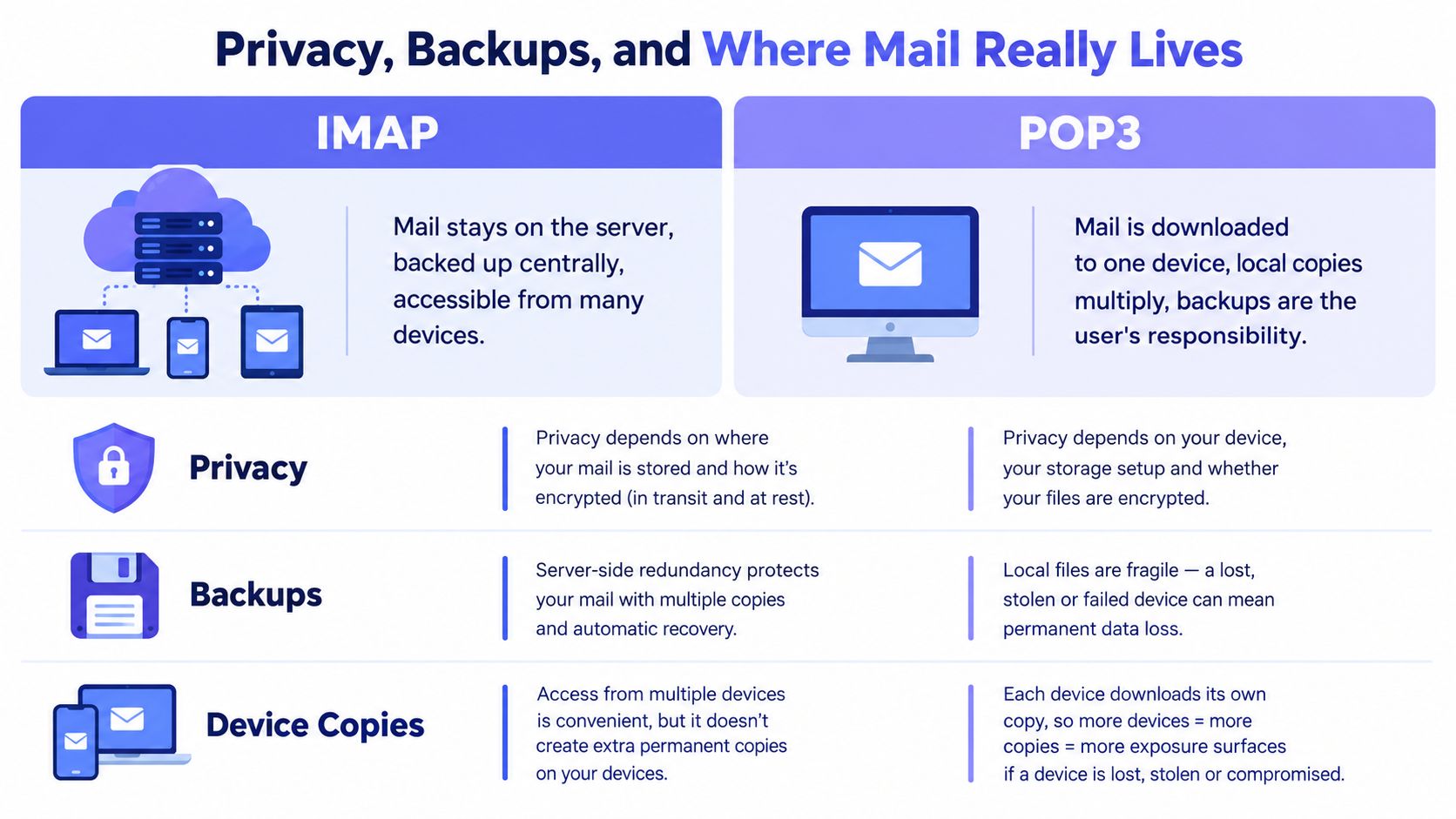
Consider a POP3 account configured to delete messages from the server. A laptop now holds the practical archive. A stolen laptop exposes that archive if the disk isn't protected. A failed disk can destroy the history if backups don't exist. A misconfigured backup job can create the same risk while giving the owner false confidence.
IMAP creates a different threat model. The server remains the authoritative mailbox, so provider retention, account recovery, administrative access, jurisdiction, and server-side backup practices matter. A server copy can be easier to preserve centrally, but it also means more mailbox content remains under the provider's control.
Match the protocol to the threat
A stolen phone usually exposes whichever messages that phone cached, regardless of whether the account uses IMAP or POP3. A shared family computer creates a similar problem. The protocol doesn't replace device encryption, screen locks, malware defenses, access controls, or sensible session management.
A subpoena or administrative request affects the system that holds the authoritative copy. With IMAP, that's generally the server. With POP3, the local archive may be the important copy, but upstream copies could still exist if the client retained them or the provider maintains retention systems.
An independent export or backup is valuable under either model. IMAP users shouldn't confuse server availability with a complete continuity plan. POP3 users shouldn't confuse local possession with durable backup.
The MX record explanation is useful for understanding where delivery infrastructure fits, but delivery routing doesn't answer the more important ownership question: where can you recover the mailbox after accidental deletion, ransomware, device loss, provider lockout, or migration?
Use IMAP with independent exports or backups when the mailbox matters. Use POP3 for local archiving only when you're prepared to own retention, recovery, and endpoint security yourself.
Authentication, MFA, and Modern Provider Policy
Protocol support and authentication support are separate decisions. Selecting IMAP doesn't guarantee that a provider will accept the password you enter, and selecting POP3 doesn't automatically make a connection insecure.
Traditional IMAP and POP3 login flows generally rely on a username and password. The protocols themselves don't perform a second-factor challenge. An MFA-enabled account may therefore require OAuth, an app password, or provider-specific configuration rather than the account's ordinary password.
Microsoft disabled Basic Authentication for Exchange Online POP3 and IMAP access in 2022, as documented in Microsoft's explanation of POP and IMAP. A client can still be conceptually correct for IMAP or POP3 and fail because the tenant rejects legacy authentication.
Google Workspace has also been moving supported Gmail integrations toward OAuth-only access. The relevant issue is not “IMAP versus POP3 security.” It's whether the provider permits the protocol and whether the client can complete the provider's required identity flow. Email authentication guidance covering modern provider requirements separates those layers and highlights the operational importance of OAuth, MFA, app passwords, and provider policy.
| Provider | IMAP | POP3 | Authentication method | Notes |
|---|---|---|---|---|
| Microsoft 365 | Availability depends on tenant and mailbox policy | Availability depends on tenant and mailbox policy | OAuth is the modern path; Basic Authentication is disabled for Exchange Online access | Verify tenant settings and client support |
| Google Workspace | Supported integrations may require OAuth | Provider and account policy determine availability | OAuth is increasingly required for supported Gmail integrations | Confirm scopes, consent, and application configuration |
| Self-hosted or hosted mail | Usually controlled by the operator | Usually controlled by the operator | TLS plus password, OAuth, or app password depending on the service | Document the exact client and authentication policy |
OAuth for mailbox access isn't the same as full access to Microsoft Graph or the Gmail API. A self-hosted client using IMAP or POP3 can have a narrower permission scope than an application using a provider's broader API. Administrators need to approve the right application, scopes, consent flow, and account policy.
Before troubleshooting, answer these questions:
- Which provider is serving the mailbox?
- Is IMAP or POP3 enabled for this account and tenant?
- Does the client support OAuth for that protocol?
- Is an app password permitted, or is it deliberately blocked?
- Are TLS, consent, and application scopes configured separately from DNS and delivery?
An address can be syntactically valid and have working mail routing while the client still fails authentication. Treat identity policy as its own diagnostic layer.
Matching the Protocol to Real Use Cases
A protocol recommendation becomes easier when you start with the operating environment rather than the mailbox brand.
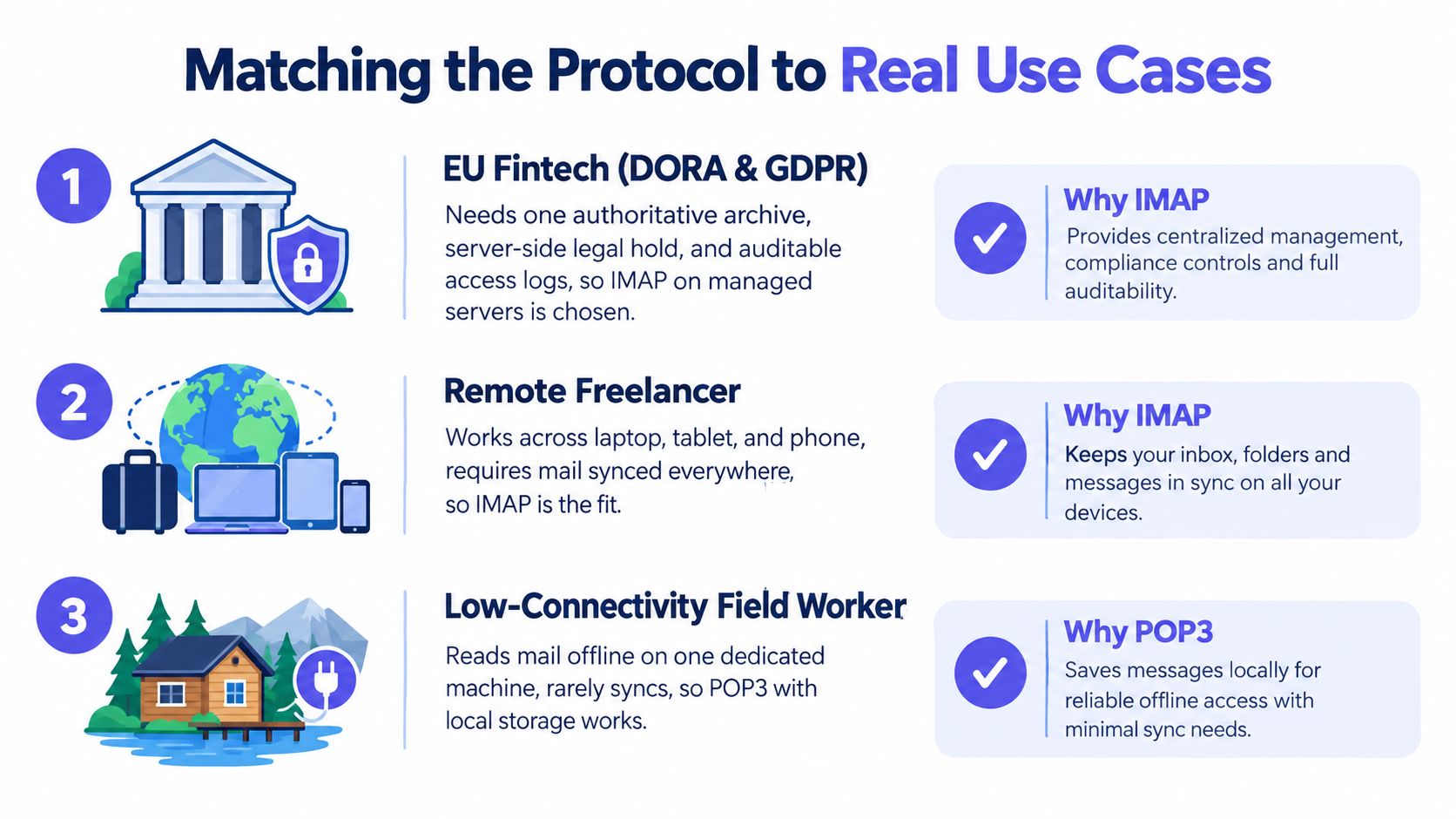
A regulated EU fintech
A hypothetical regulated fintech needs one authoritative archive, controlled retention, auditable access, and a recovery process that doesn't depend on one employee's laptop. The organization may also need EU-hosted infrastructure and documented handling of mailbox data. Those requirements belong to the mail platform and its governance controls, not to IMAP alone.
IMAP is the appropriate client-access protocol because it keeps mailbox state on the managed server. Administrators can then implement retention, export, access logging, backup, and identity controls at the platform layer. POP3 would create local archives that are harder to govern consistently and easier to lose or duplicate.
Recommendation: Use IMAP, because server-owned state supports centralized continuity and control.
A startup with a shared support inbox
A growing team has sales and support staff opening the same mailbox from laptops, phones, and webmail. They need to see which messages are read, which are flagged, which belong in a particular folder, and which drafts or replies are already in progress.
POP3 actively works against that workflow. It can remove messages after one client retrieves them, and local folder organization won't become shared mailbox state. IMAP gives each client a view of the same server-managed folders and flags.
Recommendation: Use IMAP, because the team needs synchronized state rather than independent downloads.
A solo developer with unreliable connectivity
A solo developer works from one aging laptop in a location with intermittent connectivity. The goal isn't shared access. The goal is a complete local archive that remains readable when the network is unavailable.
POP3 can be the right call if the client downloads messages, keeps the local store as the canonical archive, and the developer maintains reliable backups. The setup should be intentional. Leaving server copies enabled can protect against device loss, but it also changes the ownership model and may lead to duplicate retrieval unless the client tracks downloaded messages correctly.
Recommendation: Use POP3 only when one device is intentionally canonical and its archive is backed up.
A fourth scenario is common among remote workers: one account accessed from a laptop, tablet, and phone. That isn't a borderline case. It's exactly what IMAP was designed to handle. If the user wants the same folders and read state everywhere, choose IMAP and solve offline access through client caching and independent backups.
The strongest recommendation is also the simplest: use IMAP for shared state, and use POP3 for deliberate local ownership. Don't choose POP3 merely because a setup screen offers it.
Choosing Between IMAP and POP3 in 2026
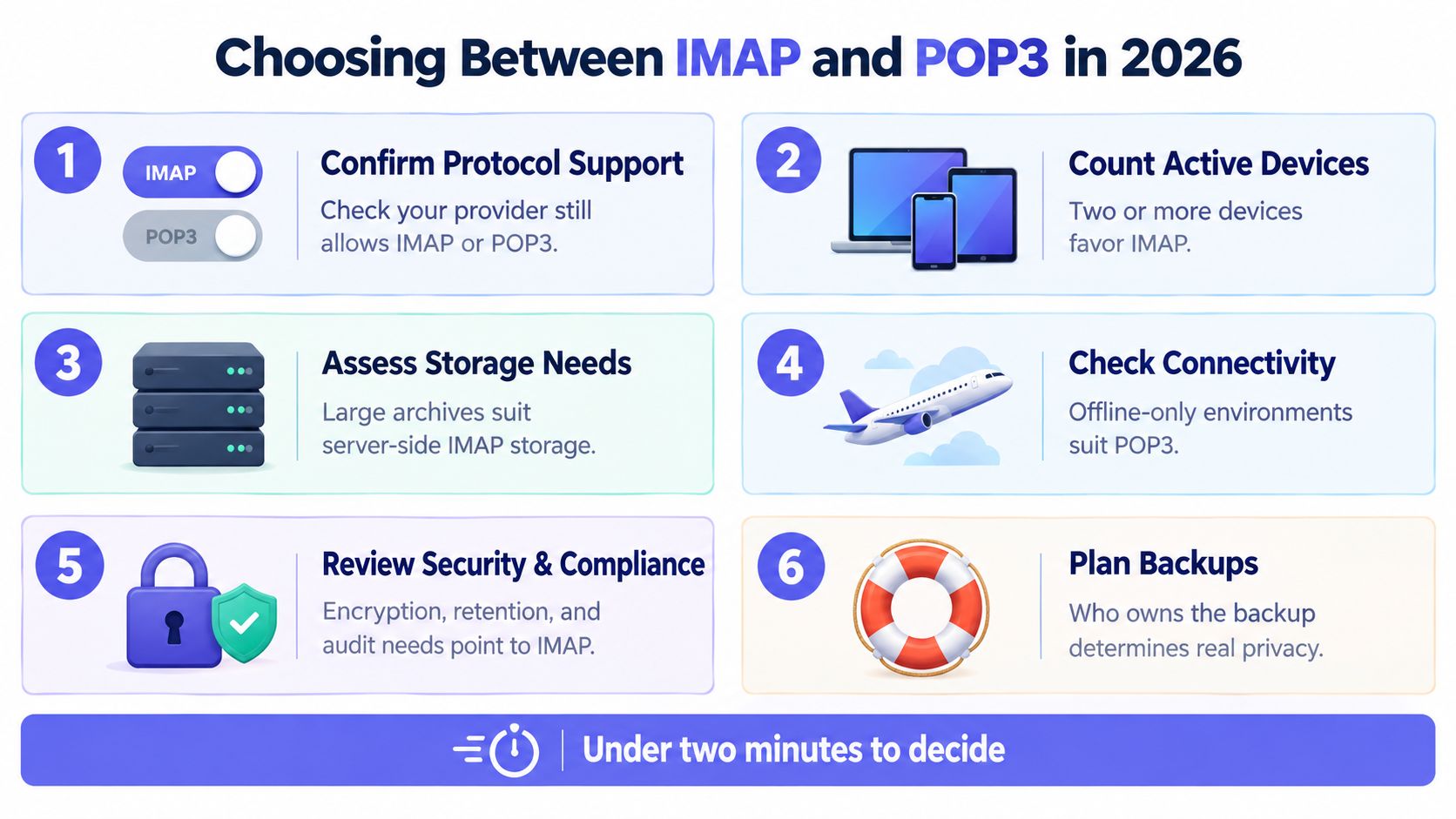
You can make the decision quickly if you check the constraints in the right order.
- Confirm protocol support. Check the provider's current documentation and account policy. If the provider has disabled the protocol or your tenant blocks it, no client setting will fix the connection.
- Count active devices. One controlled device supports POP3. A phone plus computer, webmail, or shared access points strongly toward IMAP.
- Assess mailbox state. If folders, flags, sent items, drafts, and read status must persist centrally, choose IMAP. If the client only needs a stream of messages for local storage, POP3 remains viable.
- Check authentication. Confirm whether the client supports OAuth for the chosen protocol. If the provider permits app passwords, verify that policy explicitly. Don't assume MFA accounts accept ordinary passwords.
- Review retention and recovery. Decide who owns backups, exports, deletion recovery, and device replacement. A local POP3 archive without independent backup is a fragile system of record.
- Check connectivity and storage. Offline-first, single-device, or deliberately isolated workflows can justify POP3. Large shared archives and selective retrieval favor IMAP's server-side model.
My recommendation is firm: choose IMAP by default. Choose POP3 only when single-device local storage is the feature you need, not when it's merely the easiest option in an old configuration guide.
Protocol choice and authentication choice are independent. A Microsoft 365 or Google Workspace user can use IMAP with the provider's approved OAuth flow. POP3 still has a place, but it survives where its download model is intentional, controlled, and backed up.
Mailbeam helps you validate email addresses before they enter signup and account workflows, with real-time checks for syntax, MX records, SMTP reachability, disposable domains, and provider-related issues on EU-hosted infrastructure. If you're building a mailbox-connected product and want cleaner validation before authentication or delivery problems reach users, visit Mailbeam.