
An email server is network infrastructure that sends, routes, stores, and retrieves messages through standardized protocols. Its core server-to-server protocol, SMTP, was standardized in August 1982 and relies on TCP port 25, so its health determines whether signup emails land or vanish.
You submit your email address during registration, the payment succeeds, and the product sends an activation message. The user never receives it. Sometimes the address was mistyped. Sometimes it belongs to a disposable mailbox, points to a domain with no working mail destination, or reaches an inbox provider that distrusts the sender. The visible symptom is an abandoned signup, but the underlying failure sits in the email pipeline.
Table of Contents
- Why Understanding an Email Server Matters Right Now
- The Core Roles Behind Email Server Architecture
- Protocols and DNS That Make Servers Work Together
- Self-Hosted, Hosted, and Hybrid Email Server Deployments
- How Email Verification Connects to Server Health and Reputation
- Practical Checkpoints for Server Setup and Deliverability
Why Understanding an Email Server Matters Right Now
People asking what is an email server usually expect a dictionary definition. They need something more useful: an explanation of what happens between the moment a user submits a form and the moment a message appears in an inbox.
An email server is a coordinated set of services that accepts, transfers, delivers, stores, and exposes messages. It isn't necessarily a physical machine in your office. It might be infrastructure you operate yourself, a hosted mailbox platform, a transactional email service, or a combination of systems connected through DNS.
The distinction matters because a signup flow can fail at several different points:
- The address may be syntactically invalid. Your application can reject it before attempting delivery.
- The recipient domain may lack a usable mail route. The sending system then has nowhere reliable to deliver the message.
- The destination may accept mail but distrust the sender. Authentication, routing, and sender history influence whether a message reaches the inbox or spam folder, as Klaviyo's explanation of email server deliverability describes.
- The mailbox may exist but be unsuitable for your workflow. A disposable, role-based, or catch-all address can create poor-quality accounts or confusing verification results.
Practical rule: Treat signup email as a production dependency, not as a side effect of registration.
A healthy server doesn't guarantee that every message reaches the inbox. It does give each message a valid path, identifies the sending domain, records failures, and supplies signals you can investigate. A broken MX route, unavailable SMTP service, or missing authentication record can turn a successful application event into a failed customer journey.
That's why infrastructure literacy helps product teams. Engineers can separate an application bug from a routing failure. Growth teams can distinguish an invalid address from a spam-placement problem. Security teams can see why sender identity and domain configuration affect more than simple message transfer.
The Core Roles Behind Email Server Architecture
Think of email as a postal network with three different jobs. One service moves an envelope between sorting facilities, another places it in the correct mailbox, and a third gives the recipient a way to read and manage it. Email systems often combine these jobs behind one provider interface, but the responsibilities remain distinct.
Three services with different responsibilities
A Mail Transfer Agent, or MTA, is the router. It uses SMTP to accept outgoing messages and relay them between servers. When your application submits a signup confirmation, the MTA decides where the recipient domain's mail should go and communicates with the destination server.
A Mail Delivery Agent, or MDA, handles the final placement. After the receiving side accepts a message, the MDA sorts it into the appropriate user mailbox. In a hosted service, this may be invisible to you. In a self-managed environment, it can be a separate component responsible for mailbox storage and local delivery.
A Mail User Agent, or MUA, is the client used to read and manage messages. A desktop application, webmail interface, or mobile email app can act as an MUA. The MUA generally accesses stored mail through IMAP or POP3 rather than moving mail between independent domains.
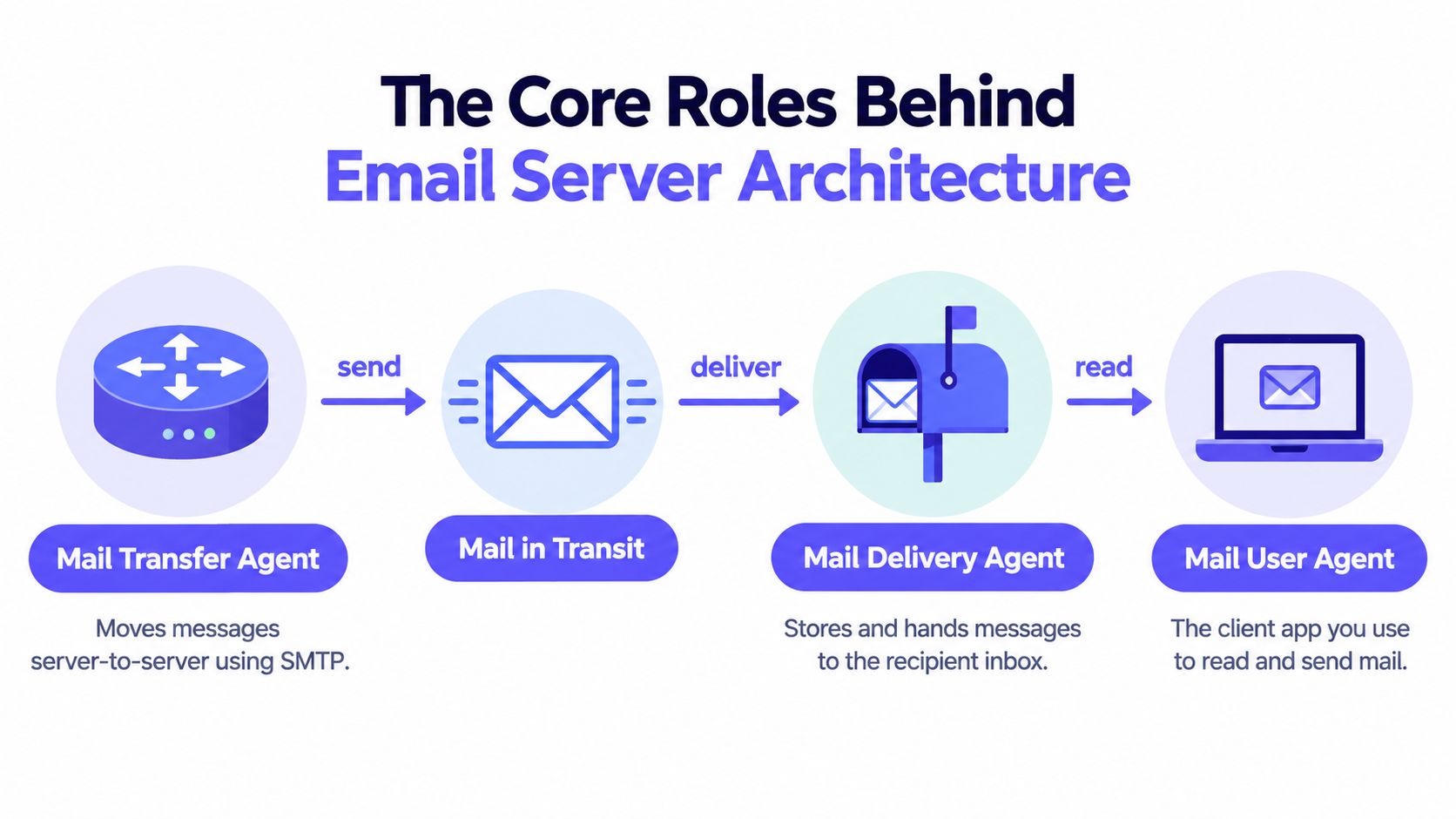
A signup message in motion
Suppose a user creates an account at example.test.
- The application hands the confirmation message to an outbound MTA.
- The MTA looks up the recipient domain's mail destination and opens an SMTP conversation with the receiving server.
- The receiving infrastructure accepts or rejects the message.
- Its delivery service places accepted mail in the user's mailbox.
- The user's MUA retrieves or synchronizes the message for display.
The application doesn't need to know whether the recipient reads mail in a browser or on a phone. It needs a dependable submission path and meaningful failure feedback. A team evaluating SMTP relay behavior can use this explanation of SMTP relaying to understand the handoff between an application and a transfer service.
When a message fails, the role distinction narrows the search. A submission error points toward the application-to-MTA connection. A rejection from the destination points toward routing, authentication, policy, or recipient validity. A message that was accepted but never appears may involve filtering, local delivery, or mailbox access.
Protocols and DNS That Make Servers Work Together
A signup email can fail before it reaches any mailbox. The application may submit it correctly, yet the sending server can still choose the wrong destination, retry an unavailable host, or encounter a DNS record that points nowhere useful. Email protocols provide the grammar of each handoff, while DNS supplies the address information. Both parts must agree.
Transport and access are different layers
SMTP, the Simple Mail Transfer Protocol, moves messages between mail systems. RFC 821 standardized its core protocol in August 1982, following earlier work in 1981, and established the model that still underpins server-to-server transfer. This inter-server role uses TCP port 25, as documented in the original RFC 821 specification. Later work, including RFC 5321, refined the same protocol family without replacing its basic architecture.
SMTP is push-oriented. A sending server connects to another server and offers a message for delivery. IMAP performs a different job: it lets a mail client view and synchronize messages that remain stored on the server. POP3 also retrieves messages from a mailbox, usually with less emphasis on continuous synchronization.
The distinction gives engineers a useful fault boundary. An application that cannot submit mail needs investigation at the application-to-SMTP handoff, not in the user's IMAP settings. A message that reached the mailbox but does not appear in the client points toward IMAP, POP3, authentication, or client synchronization. These are separate doors into the same system.
MX records tell senders where to go
A sending server normally queries DNS for the recipient domain's Mail Exchanger, or MX, records rather than guessing a mail host. MX records identify the hostnames that accept mail for that domain. This routing model was formalized through RFC 973 and RFC 974 in January 1986, as summarized in this history of MX records.
MX records also assign priority. The sender tries the lowest-numbered priority first and can try another target when the preferred host is unavailable. Each target must resolve to a valid hostname, and inbound delivery typically uses SMTP port 25.
Before activating a signup flow, a team can follow this guide to checking MX records. Incorrect or missing records can cause bounces, deferrals, or delayed delivery, as this guide to checking MX configuration explains. Catching the routing error during verification is safer than discovering it through failed campaigns and damaged sender reputation.
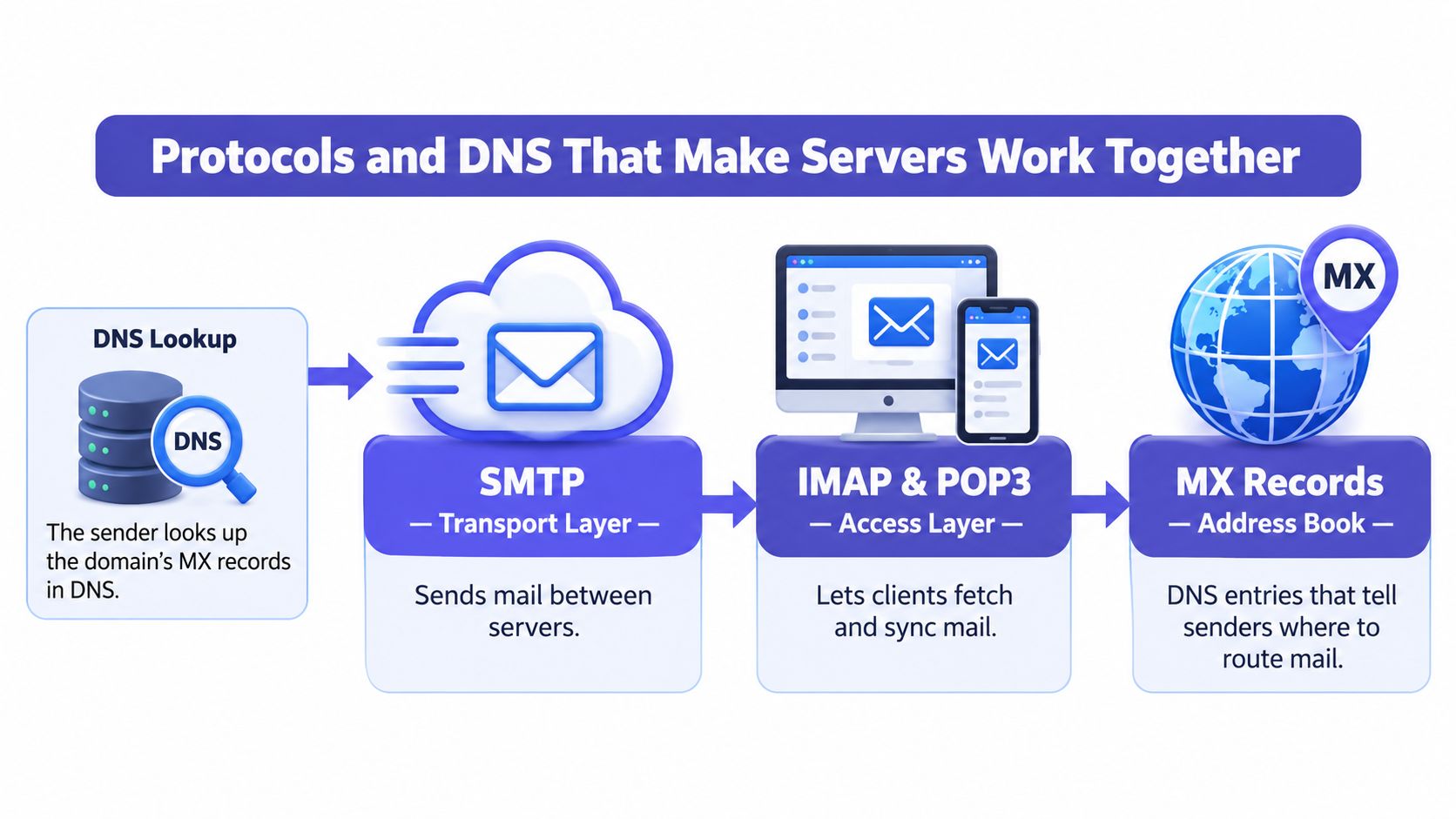
Use this mental map: DNS chooses the destination, SMTP transports the message, local delivery places it in a mailbox, and IMAP or POP3 gives a client access. When delivery breaks, identify the failed job before changing unrelated settings.
Self-Hosted, Hosted, and Hybrid Email Server Deployments
The phrase email server describes a function, not a single deployment pattern. A small organization might run its own MTA and mailbox services. A larger team might use Google Workspace or Microsoft 365 for employee mail, a transactional provider for application messages, and DNS records that connect the domain to each service.
A recent analysis of the top million domains found that self-hosted mail servers declined from 44.6% in 2016 to 22.4% in 2026, while Google Workspace accounted for 21.8% of detectable MX records and Microsoft 365 for 16.8%, according to the One.com analysis of modern email server deployment. Those figures describe detectable infrastructure, not every mailbox or message, but they show why a modern explanation must separate self-hosting from hosted services and DNS-only configuration.
Comparing the models
| Deployment model | Control level | Maintenance effort | Compliance handling | Deliverability risk |
|---|---|---|---|---|
| Self-hosted server | High control over software, data, and routing | You maintain operating systems, queues, security, monitoring, and mailbox services | Direct responsibility for retention, access, logging, and regional requirements | You carry the burden of authentication, IP reputation, abuse prevention, and troubleshooting |
| Hosted SaaS mailbox | Provider controls most infrastructure while you manage users and domain settings | Lower operational burden, with provider-managed service maintenance | Shared responsibility. Review the provider's processing, residency, retention, and administrative controls | Provider infrastructure helps, but your domain configuration and sending behavior still matter |
| Hybrid or API-driven flow | Control is split between application, verification layer, and delivery provider | Moderate effort. You integrate services and monitor handoffs | Choose vendors and data flows deliberately, especially for signup data and regional processing | Pre-delivery checks can prevent obvious failures, while the sending provider manages transport |
Choosing without confusing the layers
Self-hosting can make sense when an organization needs unusual control over storage, routing, or internal policy. It also creates responsibility that hosted providers normally absorb. You must secure the server, maintain the queue, manage mailbox access, publish authentication records, and investigate reputation problems.
Hosted SaaS is usually the simpler choice for employee mail because the provider supplies the mailbox environment and operational tooling. It doesn't mean DNS becomes irrelevant. Your domain still needs to point inbound mail to the right destination, and outbound identity still needs coherent authentication.
A hybrid design often fits product teams. Employee mail can remain on a hosted platform while application messages use a transactional route. A verification service can inspect an address before the application submits a message, reducing avoidable attempts against invalid or disposable destinations. That isn't the same as guaranteeing inbox placement. It is a gate that keeps known-bad inputs from polluting the sending path.
How Email Verification Connects to Server Health and Reputation
A server can be technically reachable and still be a poor sender. Inbox providers assess authentication, routing quality, and sender history, not merely whether an SMTP service answered. That makes an email server a reputation-bearing identity system as well as a transport mechanism.

Consider a registration form that accepts every string resembling an email address. The application may send confirmation messages to mistyped addresses, disposable domains, role accounts, and domains that cannot receive mail. Those messages create hard bounces or low engagement. Over time, the sender's identity carries a history of questionable traffic, even though the originating application worked exactly as coded.
Verification belongs before the MTA
A practical verification gate can inspect an address in layers:
- Syntax validation checks whether the address follows a usable format.
- Domain and MX checks confirm that the domain has a mail route and that the route can be resolved.
- SMTP existence probing communicates with the recipient's mail server to assess whether the mailbox appears to exist, without sending the actual message.
- Risk classification identifies disposable domains, role-based addresses, free providers, and catch-all behavior.
- Explainable scoring turns several signals into a reason your application can use, such as asking the user to correct a typo rather than displaying a generic failure.
This workflow doesn't replace the MTA. It decides whether an address should reach the MTA in the first place. A failed MX lookup, for example, is a different product response from a mailbox that exists but belongs to a disposable service.
The distinction is important because SMTP verification has limits. Some receiving systems conceal mailbox existence, accept all recipients temporarily, rate-limit probes, or defer decisions. A verification result is therefore an operational signal, not an absolute promise that a message will reach the inbox.
Authentication protects the sending identity
SPF identifies authorized sending infrastructure. DKIM adds a cryptographic signature that receivers can verify through DNS. DMARC connects those signals to the visible From domain and supplies a policy for messages that fail alignment. Together, they help receiving providers decide whether a message represents the domain it claims to represent.
Verification protects the input side of the pipeline. Authentication and reputation protect the sender side. You need both. A clean recipient list can't compensate for a misidentified sender, and perfect DNS authentication can't make an invalid mailbox deliverable.
A useful production sequence looks like this:
- The user submits an address.
- Your application validates and classifies it.
- The application accepts, rejects, or reviews the address according to your policy.
- Only accepted addresses enter the transactional sending queue.
- The MTA routes the message and records the result.
- Your monitoring process examines bounces, deferrals, authentication outcomes, and reputation signals.
For a deeper explanation of the business and infrastructure case, see why email verification matters. The central lesson is straightforward: prevent avoidable bad addresses before delivery, then monitor the server and domain signals that determine how receiving systems treat the mail you do send.
Practical Checkpoints for Server Setup and Deliverability
Understanding an email server becomes useful when it gives you a repeatable way to inspect a real flow. Start at the user-facing form and follow the message through validation, DNS, SMTP, mailbox delivery, and monitoring.
A compact production audit
Inspect the input before sending. Confirm that your application catches malformed addresses and applies a clear policy to disposable, role-based, and catch-all results. A user should receive a useful correction message when possible, not a silent registration failure.
Check the recipient's routing. Verify that the domain publishes MX records and that the selected targets resolve correctly. Missing or incorrect routing can cause a bounce or deferral before the recipient's mailbox is even considered.
Confirm the SMTP handoff. Identify which MTA accepts messages from your application, which destination it contacts, and where the queue records success, rejection, bounce, or deferral. A successful API request only proves that your application reached its immediate service. It doesn't prove final delivery.
Separate mailbox access from transport. If a message was accepted but a user can't see it, investigate local delivery, filtering, and IMAP or POP3 synchronization rather than changing the outbound route.
Review sender identity. Check SPF, DKIM, and DMARC alignment for every service authorized to send from the domain. A new transactional provider can create authentication gaps if the domain policy and provider configuration don't agree.
Watch the feedback loop. Track bounce categories, deferred messages, authentication failures, and changes in inbox placement. Look for patterns by recipient domain and message type. A single failure may be an invalid address. A repeated pattern can reveal a routing, configuration, or reputation problem.
Operational habit: Keep application logs, SMTP results, and verification decisions connected by a shared event identifier. That lets you explain why a message wasn't sent instead of guessing after the customer reports a missing email.
A healthy architecture has clear boundaries. Verification decides whether an address is worth attempting. DNS identifies where mail should go. SMTP performs the transfer. The receiving system delivers or rejects the message. Monitoring tells your team which part needs attention.
If you're building this flow, Mailbeam provides an HTTP email verification API and web tools that check syntax, MX records, SMTP existence, disposable domains, role-based addresses, free-provider status, and catch-all behavior, with machine-readable reasons for application decisions. Visit Mailbeam to evaluate how its verification workflow could fit before your signup events enter an email server queue.