
Your signup form saves the new account, your application reports that the welcome email was sent, and the user says nothing arrived. You check the mail SMTP server settings, get a successful connection, and still can't tell whether the problem is your application, DNS, authentication, or the recipient's spam filter.
The missing distinction is reachability versus delivery. A server answering an SMTP connection is useful evidence, but it isn't proof that a particular mailbox exists or that your message will reach the inbox. Troubleshooting gets easier when you identify exactly which stage succeeded and what remains untested.
Table of Contents
- What an SMTP Server Does in Plain Terms
- Ports, Settings and Steps to Configure a Sending Server
- How MX Records Route Mail to the Right Server
- Authentication and TLS Records to Publish
- Reading SMTP Reply Codes and Retry Timing
- Choose the Right Action for Each Mail Check Result
What an SMTP Server Does in Plain Terms
A user submits your signup form. Your application creates a welcome message and hands it to a submission server, usually using credentials assigned to your application. Think of this server as the local post office counter: it accepts the message for onward handling, not necessarily for immediate delivery.
The sending infrastructure then looks up where the recipient's domain receives mail. A mail transfer agent, or MTA, connects to the destination's receiving server and transfers the message. That receiving system applies its own checks before handing accepted mail to mailbox storage or another internal delivery service.
This diagram separates those jobs.
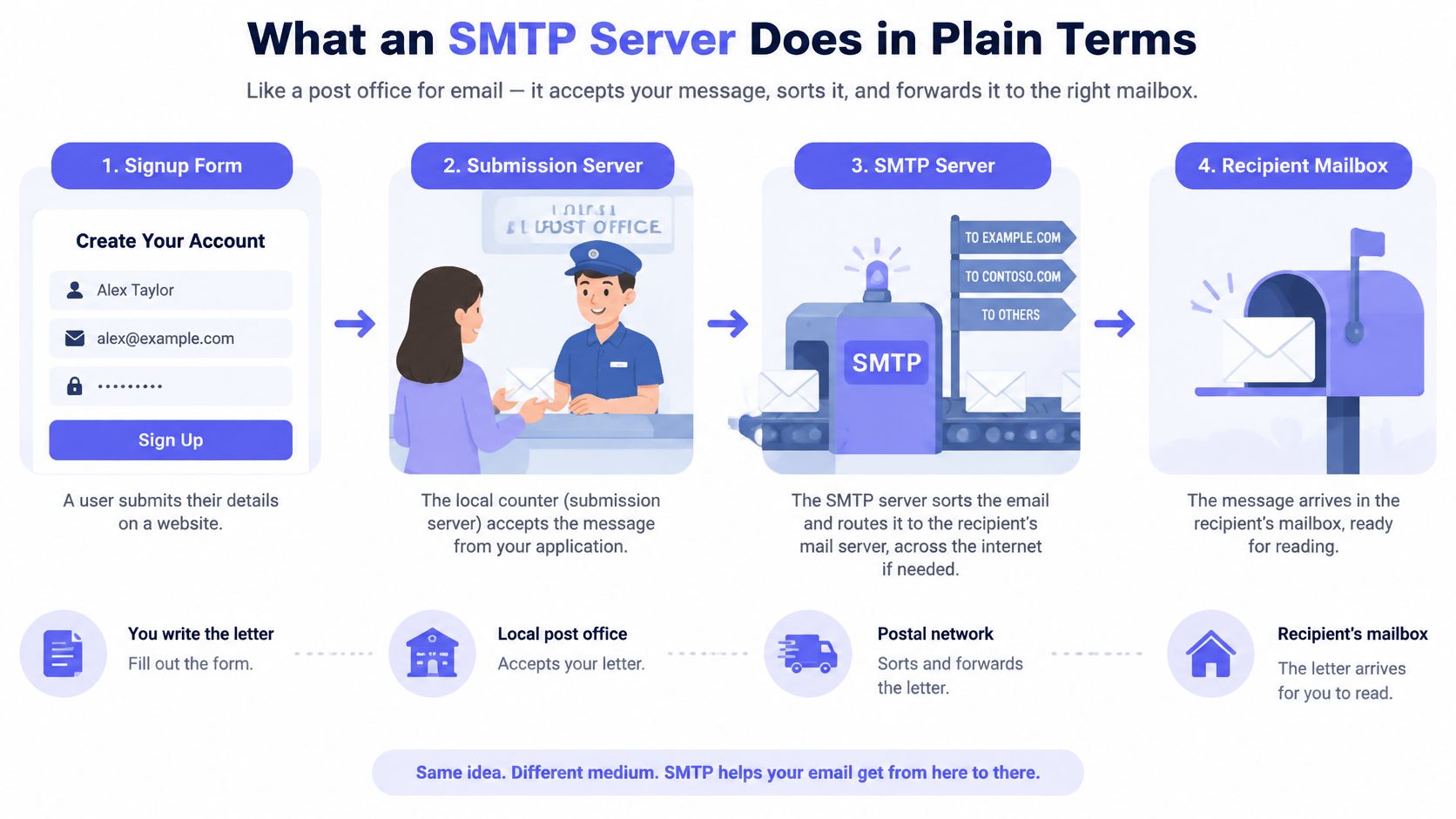
A conversation with distinct checkpoints
SMTP, short for Simple Mail Transfer Protocol, is a text-based command-and-reply conversation. TLS can encrypt that conversation in transit, so text-based doesn't mean it must travel openly across the network.
The commands describe the work being requested:
- EHLO introduces the connecting client and requests the server's supported capabilities.
- MAIL FROM supplies the envelope sender, which is used for transport and failure handling.
- RCPT TO supplies an envelope recipient. The client repeats it for additional recipients.
- DATA starts the message-content stage, including headers and body.
- QUIT closes the SMTP session.
The envelope sender isn't necessarily the address a person sees in the message's From header. Mixing them up makes authentication failures particularly confusing.
A server is a role, not necessarily a machine
The same software can accept application submissions, relay outbound messages, and receive inbound mail. Those are separate jobs even when they share infrastructure.
SMTP moves messages. IMAP and POP let email applications retrieve or manage messages after delivery. Changing an IMAP setting won't repair an application's failed SMTP submission.
Start with ownership: Identify the server your application connects to, the server that receives the recipient's mail, and which of those systems your team controls.
For a hosted setup, you may control the application and sending-domain records without controlling either mail server. That boundary determines which logs you can inspect and which failures you can fix directly.
Ports, Settings and Steps to Configure a Sending Server
SMTP ports, encryption and typical use
| Port | Encryption | Typical use | Practical note |
|---|---|---|---|
| 25 | STARTTLS optional unless policy requires it; plaintext is possible | Server-to-server relay between mail servers | Often blocked outbound by ISPs and cloud hosts; not for normal app submission |
| 587 | Require STARTTLS in your submission configuration | Authenticated client submission, the default choice | Use for apps, CMS and marketing platforms sending from your domain |
| 465 | Implicit TLS from the first byte | Submission over TLS | Select implicit TLS in the client, not STARTTLS |
| 2525 | STARTTLS where the provider supports it | Fallback submission when 587 is blocked | Non-standard; offered by some providers only |
Use the exact hostname, port, and encryption mode your submission provider publishes. If you're operating your own submission service, a practical default is authenticated submission with mandatory STARTTLS, rather than allowing clients to continue without encryption.
For a closer comparison of client encryption modes, SendX explains how to choose the right SMTP submission port. Our guide to the SMTP default port also distinguishes application submission from outbound relay.
Configure the application-facing service
Choose the submission endpoint. Set the application's outgoing-mail host to the submission service, not the recipient domain's receiving host. Record the username format and encryption mode alongside the hostname so a deployment doesn't accidentally combine settings from different services.
Require TLS and validate the certificate. The certificate must be publicly trusted and cover the hostname the application connects to. A certificate for a different mail hostname isn't sufficient, even if both names lead to the same infrastructure.
Require authentication. Give each application a separate SMTP credential, or a provider-supported API key used as an SMTP credential. Keep secrets outside source control and browser code so you can revoke a compromised application's access without interrupting unrelated senders.
Restrict relaying. Permit outbound relay only for authenticated clients or carefully controlled trusted systems. Receiving mail for your own domains and forwarding arbitrary mail for strangers are different permissions. Test that an unauthenticated outsider can't relay between unrelated external domains.
Prepare domain authentication before increasing traffic. Include every legitimate sending service in your inventory, including password-reset mail, billing notifications, support software, and marketing systems. A forgotten application can become a delivery incident when you tighten domain policy.
Inspect the connection with OpenSSL. Use its SMTP STARTTLS mode for a STARTTLS endpoint, or its direct TLS mode for an implicit-TLS endpoint. Confirm certificate verification succeeds, and make sure your application refuses to send credentials if the TLS upgrade fails.
Send to a mailbox you control. Open the complete message headers rather than relying on the inbox preview. Inspect the Received chain, the receiving system's Authentication-Results, and any transport-security details recorded in the trace.
Test the property you actually changed
A connection test verifies connectivity. A successful login verifies that the service accepted the credentials. Neither proves that the message has been signed correctly or that a recipient accepted it.
For the delivery test, compare the application's send event with the submission service's queue or message identifier. Follow that identifier through the sending logs until you see a remote acceptance, a deferral, or a rejection. If your application records only “sent,” change the event name to reflect whether it means submitted, queued, or accepted remotely.
Security check: SMTP AUTH authorizes an application to use a submission service. It doesn't authenticate the visible From domain to the eventual recipient.
Common configuration slips are concrete: an application uses implicit TLS against a STARTTLS listener, a deployment retains an old password, or a certificate covers a different hostname. Domain-authentication mistakes require a separate check, especially a DKIM public key published under a selector that doesn't match the outgoing signature.
Finally, remember that a self-hosted MTA still needs a path to remote receiving servers. Opening an application submission listener doesn't solve blocked outbound relay traffic.
How MX Records Route Mail to the Right Server
The sending MTA takes the domain portion of the recipient address and queries DNS for its MX records. Those records identify the hosts responsible for receiving mail, along with preference values that guide the order in which senders try them.
The routing relationship looks like this.
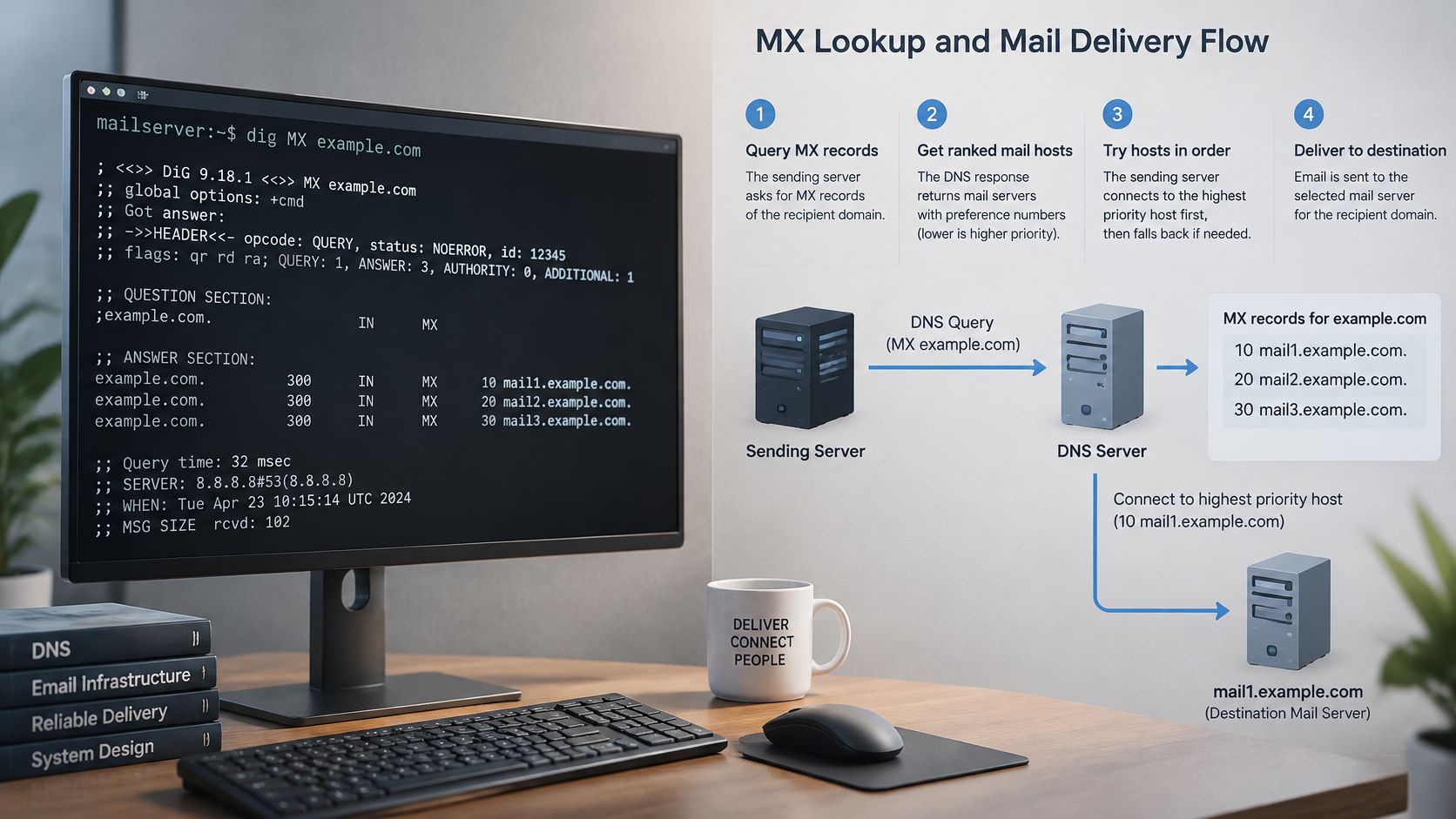
Lower preference values are tried first. Equal-preference hosts can be selected in a randomized order, allowing senders to distribute attempts rather than always choosing the same destination.
The routing model has a long history: the SMTP specification, RFC 5321, describes the standards lineage that includes RFC 974's introduction of DNS-based MX routing in January 1986. The important operational idea is that a domain can designate receiving infrastructure independently of its website.
Distinguish missing records from an explicit refusal
Use a DNS tool such as dig or an MX lookup utility to inspect the recipient domain. Don't stop after seeing a receiving hostname. Check that each MX target resolves to a usable address, including IPv6 where applicable.
These outcomes mean different things:
- MX records found: Continue by resolving their targets and attempting the appropriate receiving hosts.
- No MX records found: Check the domain's address records. SMTP supports an implicit destination fallback, so absence of MX alone doesn't prove that the domain can't receive mail.
- Null MX found: The domain explicitly declares that it doesn't accept email. Its target is represented by a dot, not a receiving hostname.
- MX target unresolved: The domain advertises a receiving host that can't currently be resolved.
- DNS lookup failed: A timeout or resolver failure isn't the same as a confirmed absence of records.
For a visual walkthrough of the lookup process, this video provides additional context.
Preserve the routing reason
Our explanation of what an MX record does helps distinguish receiving infrastructure from application sending settings.
In a signup flow, store the actual DNS outcome rather than a generic failure. No MX, null MX, unresolved target, and DNS timeout shouldn't collapse into the same verdict. A temporary routing problem can prevent a probe from reaching a legitimate user's mailbox.
Authentication and TLS Records to Publish
Records and settings that protect sending servers
| Record or setting | Where it lives | What it does | Effect if missing |
|---|---|---|---|
| SPF | TXT record on the envelope-sender domain | Lists servers allowed to send for that domain | Receivers lack an SPF authorization policy for the domain |
| DKIM | TXT record under the signing domain's selector | Publishes the key used to verify a message signature | Receivers can't verify that signature without its public key |
| DMARC | TXT record under the visible From domain's DMARC label | Sets policy and reporting for authentication alignment | No domain-published DMARC handling policy or reporting destination |
| MTA-STS | DNS policy indicator plus an HTTPS policy file | Requires supporting senders to use trusted TLS to designated MX hosts | Opportunistic sending connections may fall back to plaintext |
| STARTTLS | SMTP server configuration | Upgrades an established connection to TLS | That connection can't upgrade through STARTTLS |
TLS protects a connection between mail systems. SPF, DKIM, and DMARC give receiving systems evidence about sender authorization, message signatures, and how an authenticated domain relates to the visible From domain. These signals address different risks: a secure connection does not authenticate the sender, and authentication does not guarantee inbox placement.
Roll out authentication without losing legitimate mail
Inventory every service that sends on your domain. Publish one coherent SPF policy for the services using the envelope-sender domain, rather than creating competing SPF records.
Enable DKIM signing and publish the matching public key under the selector your sending system uses. Then inspect a received message to confirm its signature refers to that key. A DNS record alone does not make a sending system sign messages.
Start DMARC in monitoring mode and specify a reporting destination. Review reports to find legitimate senders that are missing or misaligned, correct their configuration, then consider moving to quarantine or rejection.
DMARC alignment connects an authenticated SPF or DKIM domain to the visible From domain. Strict and relaxed alignment use different matching rules. Either SPF or DKIM can provide the aligned authentication needed for DMARC to pass; configuring both gives the receiving system another route to verify the message.
Major mailbox providers expect personal-account senders to use SPF or DKIM, and bulk senders to publish SPF, DKIM, and DMARC. Missing authentication or misaligned bulk traffic can lead to throttling, rejection, or spam placement. Check the receiving system's results instead of assuming that published records are working. The email authentication error guide explains how to distinguish authentication failures from other delivery problems.
Apply transport policy to incoming mail
STARTTLS alone doesn't prevent a downgrade to plaintext. RFC 8461, the MTA-STS standard, defines a policy that lets a receiving domain require supporting sending MTAs to use TLS with a trusted certificate for its MX hosts.
Begin with a testing policy. Verify each advertised receiving host, review TLS reports, and then consider enforcement. Keep cryptographic settings current and monitor certificate renewals.
A secure application-to-submission connection doesn't establish that every later transport hop was encrypted.
MTA-STS governs transport to a receiving domain. It does not replace application submission security or sender authentication.
Reading SMTP Reply Codes and Retry Timing
SMTP reply classes and what verification should do
| Reply class | Example codes | Meaning | Verification action |
|---|---|---|---|
| 2xx accepted | 250 | Command or recipient accepted at that stage | Mark as responding, not proof of inbox placement |
| 4xx temporary | 421, 450, 451, 452 | Temporary service failure, greylisting, throttling, or resource problem | Retry within a bounded window; don't mark invalid |
| 5xx mailbox rejected | 550 with mailbox-specific detail | Recipient unavailable, unknown, or disallowed | Treat explicit nonexistent-mailbox text as strong invalid evidence; preserve context |
| 5xx policy rejected | 550 or 554 with policy detail | Transaction, sender, or message refused by policy | Mark risky or inconclusive and investigate the sender |
| No reply | None | Timeout or dropped connection | Return unknown and retry later |
The first digit identifies the reply class, but the command stage and response text determine what the reply proves. A successful greeting isn't recipient acceptance, and recipient acceptance isn't final message acceptance.
Enhanced status codes add detail. A mailbox-address failure and a security-policy failure may share the same basic SMTP code while requiring entirely different actions.
Retry temporary failures, not permanent assumptions
A receiving server may temporarily refuse a connection because it's busy, deliberately greylisting unfamiliar senders, or throttling a source. None of those outcomes establishes that the recipient address is wrong.
RFC 5321's retry guidance gives a general retry interval of at least 30 minutes and says delivery attempts should normally continue for at least four to five days before abandonment. These are delivery-MTA expectations, not a reason to keep a signup request waiting.
A verification service needs a shorter decision path:
- Bound the immediate attempt. Apply connection and command timeouts so the user isn't trapped behind a remote server.
- Schedule follow-up work. Retry transient failures outside the request path, using destination-aware backoff.
- Keep diagnostic context. Store the command stage, reply class, enhanced status, and relevant response text under a controlled retention policy.
- Preserve uncertainty. A connection timeout means no usable answer arrived, not that a mailbox was rejected.
Acceptance is specific to a stage
A catch-all receiving system may accept an arbitrary recipient without confirming that an individual mailbox exists. Some systems also delay recipient decisions until they inspect message content or apply internal rules.
Similarly, a permanent policy rejection can identify a problem with your sending IP, authentication, or transaction rather than with the user's address. Don't turn every permanent SMTP failure into an instruction for the user to change their email.
Implementation rule: Store structured evidence, not only a Boolean pass-or-fail flag.
Delivery infrastructure also needs durable queues, queue-age monitoring, and retry handling that avoids duplicate application events. Verification infrastructure needs conservative verdicts when the remote system doesn't disclose enough information.
Choose the Right Action for Each Mail Check Result
An SMTP check establishes only what the remote system disclosed during that interaction. Authentication, sender reputation, sending volume, content, and recipient-specific rules still affect the eventual delivery outcome.
Verdict and required action for each mail check
| Verdict | Triggering evidence | Required action |
|---|---|---|
| Invalid | Malformed address, explicit null MX, or clear nonexistent-mailbox rejection | Block at signup with a clear message and store the reason |
| Risky | Policy rejection, suspicious address characteristics, or conflicting signals that don't prove nonexistence | Allow with extra confirmation and closer monitoring |
| Unknown | Timeout, temporary refusal still failing after bounded retries, or catch-all domain | Allow and confirm through a welcome email; never record as pass |
A positive, mailbox-specific result can support a higher-confidence deliverable status. That status describes the verification evidence, not a promise about inbox placement.
The distinction helps teams decide what to investigate next.
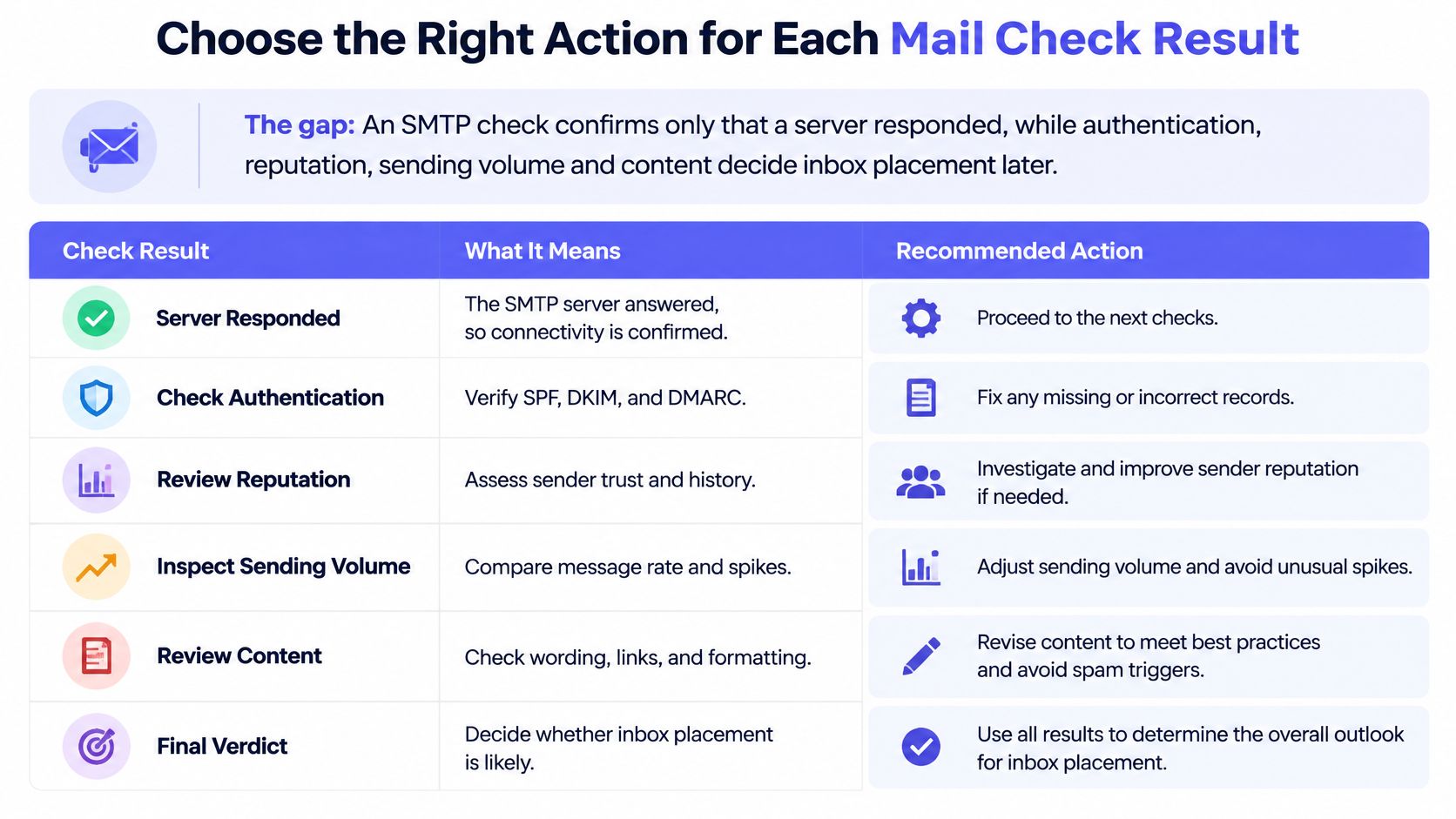
Can a passed SMTP check still lead to a bounce?
Yes. An address can pass an SMTP check and later produce a hard bounce, rejection, or spam placement. The actual message uses a particular sending identity, content, and delivery path that a recipient probe doesn't fully exercise.
Authentication remains a practical gap: Mailgun's deliverability survey found that 53.8% of senders reported using DMARC in 2024. A successful recipient check can't compensate for a sender's missing or misconfigured authentication.
Keep the stages separate in your application model: syntax validation checks address structure; MX discovery finds receiving infrastructure; SMTP dialogue records the remote response; authentication evaluates the sending identity; and inbox placement describes what happens to a delivered message.
Make uncertainty an explicit product decision
Blocking every unverifiable address excludes legitimate users whose domains conceal mailbox existence. Accepting every responding address without confirmation creates a different problem: your team treats incomplete evidence as established ownership.
For catch-all mailboxes, we return unknown rather than pass. Enforce the verdict on your server, not only in browser validation; many users call our verification service from their backend when the form is submitted.
Store a confidence level and machine-readable reason with each decision. Keep transient diagnostics separate from long-lived account records, restrict log access, and delete address-level probe details when they're no longer needed.
For this week's implementation:
- Enforce decisions in the backend. Let users correct invalid addresses without exposing raw server diagnostics.
- Check sender authentication. Verify your legitimate sending sources before tightening policy.
- Log useful evidence. Preserve reply context without collecting unnecessary personal data.
- Run bounded retries. Revisit unknown results asynchronously.
- Review bounces monthly. Compare actual failures with earlier verification verdicts and adjust handling.
Mailbeam offers real-time email verification for signup flows, combining syntax, MX, SMTP, and catch-all checks with explainable results. Visit Mailbeam to connect verification to your backend and handle invalid, risky, and unknown addresses without mistaking an SMTP response for guaranteed inbox delivery.