The most popular advice on this topic is also the most misleading. Search for the SMTP default port and you'll get a confident single number, usually 587, sometimes 25, occasionally 465 with a warning that it's deprecated. Copy that number into your app, your printer, or your verification code without asking what job you're doing, and you'll eventually debug a failure that was never really about the number at all.
Table of Contents
- Why There Is No One Default SMTP Port
- How SMTP Relay and Submission Actually Differ
- Port 25 and the Relay Channel
- STARTTLS Versus Implicit TLS on 587 and 465
- Choosing the Right Port in Real Configurations
- What a Port Test Actually Tells a Verification System
- Common Pitfalls, Quick Answers, and Final Takeaways
Why There Is No One Default SMTP Port
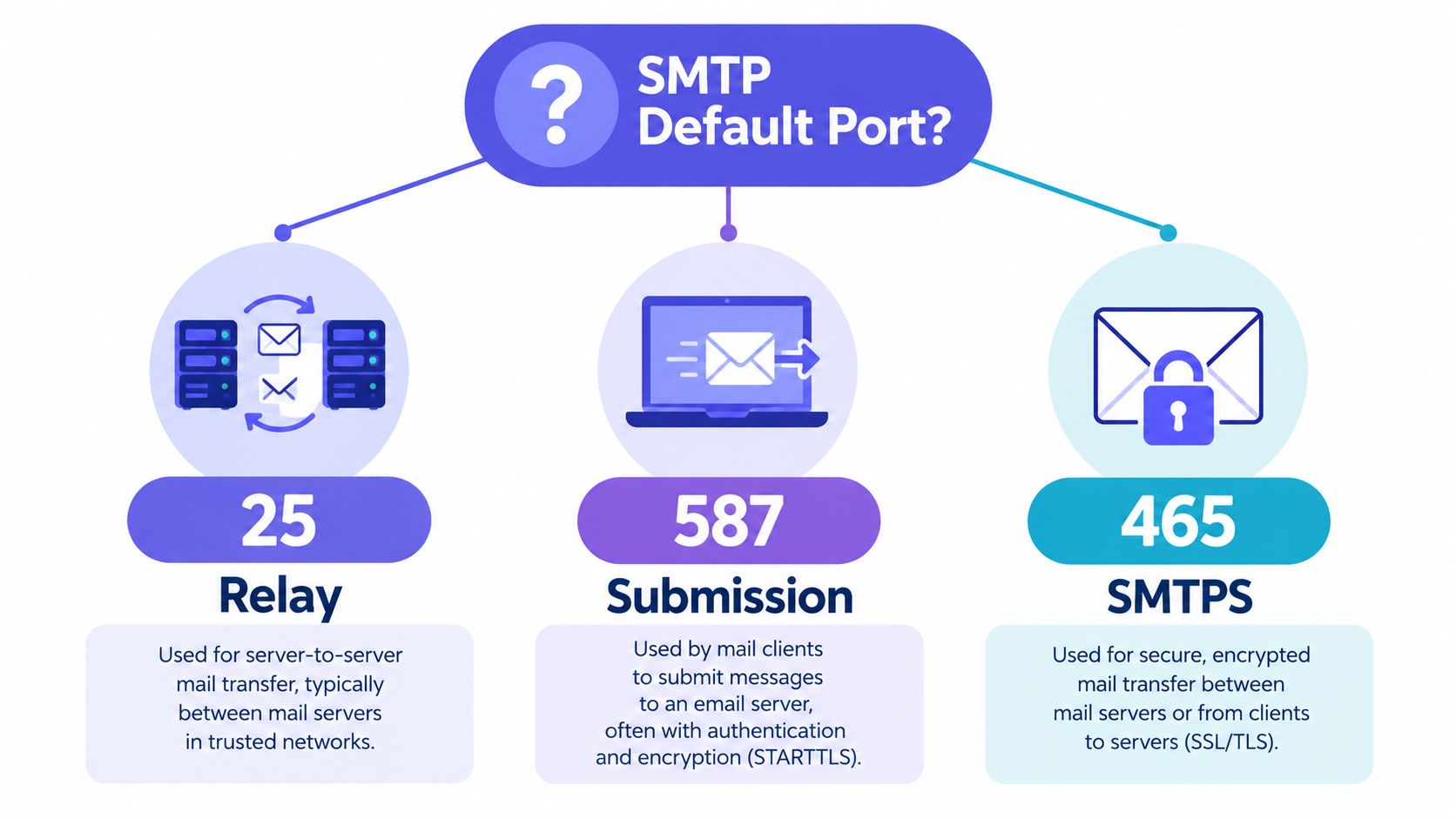
There isn't one default because there isn't one job. Port 25 is relay, port 587 is submission, and port 465 is submission with implicit TLS. Those are three operational roles with different callers, different trust models, and different expectations about authentication.
Think of it by direction. When one mail server hands a message to another mail server for a recipient domain, that's relay. When your application, mail client, or website hands a brand new message to your own provider and says please send this for me, that's submission. The protocol on the wire looks similar, but the relationship between the two sides is completely different.
The Question Behind the Question
When a developer asks which port to use, they're usually asking three things at once. Who am I in this conversation, a server or a client? How does encryption start, immediately or after an upgrade command? And does the other side expect me to prove who I am with credentials before I can send?
If you can't answer those, picking a port is guessing. That's why tutorials that say use 587 leave people stuck the moment a form asks them to choose between SSL and STARTTLS, or a host blocks outbound traffic, or a verification probe returns something ambiguous.
A port number tells you which door you knocked on. It doesn't tell you whether you were allowed inside, whether the conversation was encrypted, or whether a mailbox exists behind that door.
What Goes Wrong When Roles Get Mixed Up
Confusing relay with submission causes predictable bugs. Teams point application mail at port 25 and wonder why their cloud host or office network drops it. Other teams test a recipient domain on port 587 and interpret the result as if they'd probed that domain's inbound mail system. Both mistakes start from treating any open SMTP speaking port as evidence of the same thing.
It isn't. Keeping 25, 587, and 465 separated by role is the mental model that makes every later configuration choice, error message, and diagnostic result readable.
How SMTP Relay and Submission Actually Differ
Picture a postal system with two very different counters. At the back, sorting facilities exchange sacks of mail with each other all day. They don't ask individual customers for ID. They judge each other by reputation, by whether previous sacks were legitimate, and by whether the sending facility is known for dumping junk into the system.
At the front, there's a public counter. You walk up with a letter you've just written, you show who you are, and the clerk accepts it into the system under your name. If you abuse that counter, your account gets shut down, because the clerk knows exactly who handed over the letter.

The Two Agents You Need to Name
Email has the same split. A Mail Transfer Agent, or MTA, moves mail between servers. That's the sorting facility, and its server to server work is described in detail in this explanation of what SMTP relaying involves.
A Mail Submission Agent, or MSA, is the front counter. It accepts new messages from clients and applications. Under the formal message submission specification in RFC 6409, an MSA on port 587 should require SMTP authentication and must reject the MAIL command by default when the session is unauthenticated, unless another trusted authorization mechanism applies.
Why Trust Works Differently on Each Side
Relay has an open door problem. A receiving MTA must accept connections from servers it has never met, because anyone on the internet might legitimately need to deliver mail to its users. So relay policy leans on things like the connecting server's reputation and behavior, not on a shared password.
Submission has the opposite shape. The MSA knows its users in advance, issues them credentials, and can apply per account rate limits and abuse controls. That's the whole point of splitting submission onto its own port, operators can enforce stricter rules on outgoing user mail without breaking inbound delivery from strangers.
- Relay caller: Another mail server delivering mail for its users to your users.
- Submission caller: Your own user, app, or service asking to send new mail.
- Relay trust basis: Reputation and policy applied to an unknown but expected peer.
- Submission trust basis: Credentials tied to a known account.
Once you can name which counter you're standing at, the port usually names itself.
Port 25 and the Relay Channel
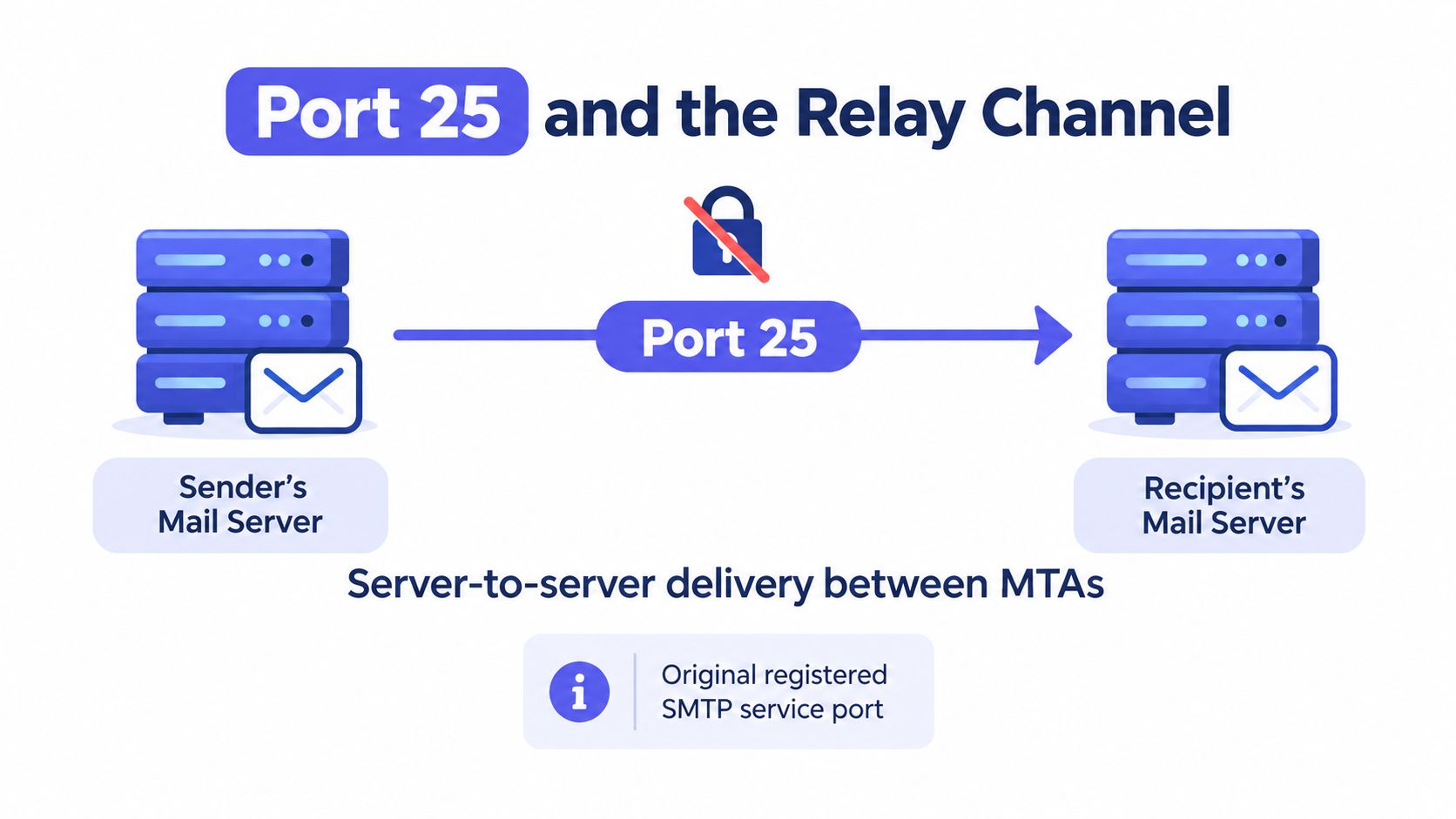
Port 25 is the original. It's the registered Simple Mail Transfer service port, established for server to server relay, and it remains the core inter server SMTP channel today. When your provider's server delivers a message to the recipient domain's mail exchanger, that hop normally happens on port 25, even if your application never touches that port directly.
The standards history makes the boundary explicit. As the RFC 6409 document history records, message relay continues over port 25 while message submission normally uses port 587. That separation was deliberate, so operators could apply different authentication, authorization, rate limiting, and anti abuse policies to submission traffic.
Why Networks Block a Port That's Still Essential
Here's the part that confuses people. Port 25 is vital between servers, yet many consumer and business networks restrict outbound connections to it. Both facts are true, and they don't contradict each other.
A compromised laptop or an abused cloud instance blasting mail directly to port 25 across the internet is a classic spam pattern. Blocking outbound 25 from end user networks stops that pattern cold while leaving real mail servers, which operate under different arrangements, free to relay. So if your app cannot reach port 25 from your hosting environment, that usually tells you something about your network's policy, not about SMTP being broken.
Applications sending transactional or marketing mail shouldn't treat port 25 as their default client channel anyway. They belong on a provider's submission service, where authentication ties the traffic to an accountable account.
What an Open Port 25 Does Not Prove
This matters enormously for verification. A successful TCP connection to a recipient domain's mail exchanger on port 25 tells you that inbound mail infrastructure is reachable. It does not prove that a specific address exists, that the domain accepts mail for that address, or that you're permitted to relay through that server.
Practical rule: Treat a port 25 result as a reachability signal for inbound infrastructure, never as a deliverability verdict for an individual mailbox.
The short walkthrough below shows what that server to server conversation looks like on the wire, which helps separate reachability from acceptance.
An open port means a server answered the doorbell. Whether it accepts your letter, and for whom, is decided later in the conversation, if the server chooses to reveal that much at all.
STARTTLS Versus Implicit TLS on 587 and 465
Now for the two submission ports, and the single difference between them that causes most configuration failures. Both 587 and 465 carry authenticated submission. They differ in when encryption starts.
With port 587, the connection opens as plain SMTP. The client and server greet each other in the clear, then the client issues the STARTTLS command, the connection upgrades to TLS, and only then should credentials and message content flow. It's like starting a phone call normally, agreeing to switch to a secure line, and continuing the conversation once the secure line is live.
With port 465, there's no plain beginning at all. TLS starts immediately when the TCP connection is established, from the very first byte. The call begins encrypted.
The Deprecation Confusion You Inherited
If older documentation told you port 465 was deprecated and to avoid it, that advice was accurate for its era and is now out of date. The original SMTPS assignment for 465 was withdrawn, which is why a generation of guides dismisses the port. But in practice, implicit TLS submission never went away, and the standards eventually caught up with reality.
RFC 8314, published in January 2018, updated the standards to treat implicit TLS on port 465 as a valid long term submission method under the submissions service name, and it recommends that implementations support both port 465 and STARTTLS on port 587 during a transition period. The RFC also notes that port 587 had already achieved wide deployment but hadn't replaced existing implicit TLS use on 465.
So neither port is the fake one. Correctly configured, both can provide comparable security, provided encryption is required before credentials or content are transmitted. On 587 the client must issue STARTTLS and verify the upgrade succeeded, because the port number alone doesn't encrypt anything.
SMTP Port Roles and TLS Behavior at a Glance
| Port | Role | TLS startup | Typical caller | Authentication |
|---|---|---|---|---|
| 25 | Server to server relay | Optional upgrade via STARTTLS between servers | A sending MTA delivering to a receiving MTA | Not based on end user credentials |
| 587 | Message submission | Starts plain, upgrades with STARTTLS | Mail clients, apps, websites submitting new mail | Expected, SMTP AUTH after TLS |
| 465 | Message submission, submissions service | Implicit TLS from the first byte | Clients and apps configured for SSL or implicit TLS | Expected, SMTP AUTH inside TLS |
The Mismatch That Breaks Everything
Most failed setups are a mode mismatch, not a wrong number in isolation. Point a client expecting implicit TLS at port 587 and it will try to start a TLS handshake with a server that's waiting to say hello in plain text. Point a STARTTLS client at 465 and it will send a plain greeting into a server that's waiting for a handshake. Either way you get a timeout or a handshake failure, and neither error mentions ports.
When a settings form gives you a dropdown labeled SSL, TLS, or STARTTLS next to the port field, those two fields are a pair. Change one without the other and you've built a conversation neither side can start.
Choosing the Right Port in Real Configurations
Start with your role, not with a remembered number. Are you submitting new mail as an authenticated client, operating relay between servers, or probing someone else's inbound infrastructure? Each answer points somewhere different, as the standard summarized in the datatracker entry for RFC 6409 makes clear by reserving port 587 for submission while port 25 keeps the relay job.
A Decision Path You Can Actually Follow
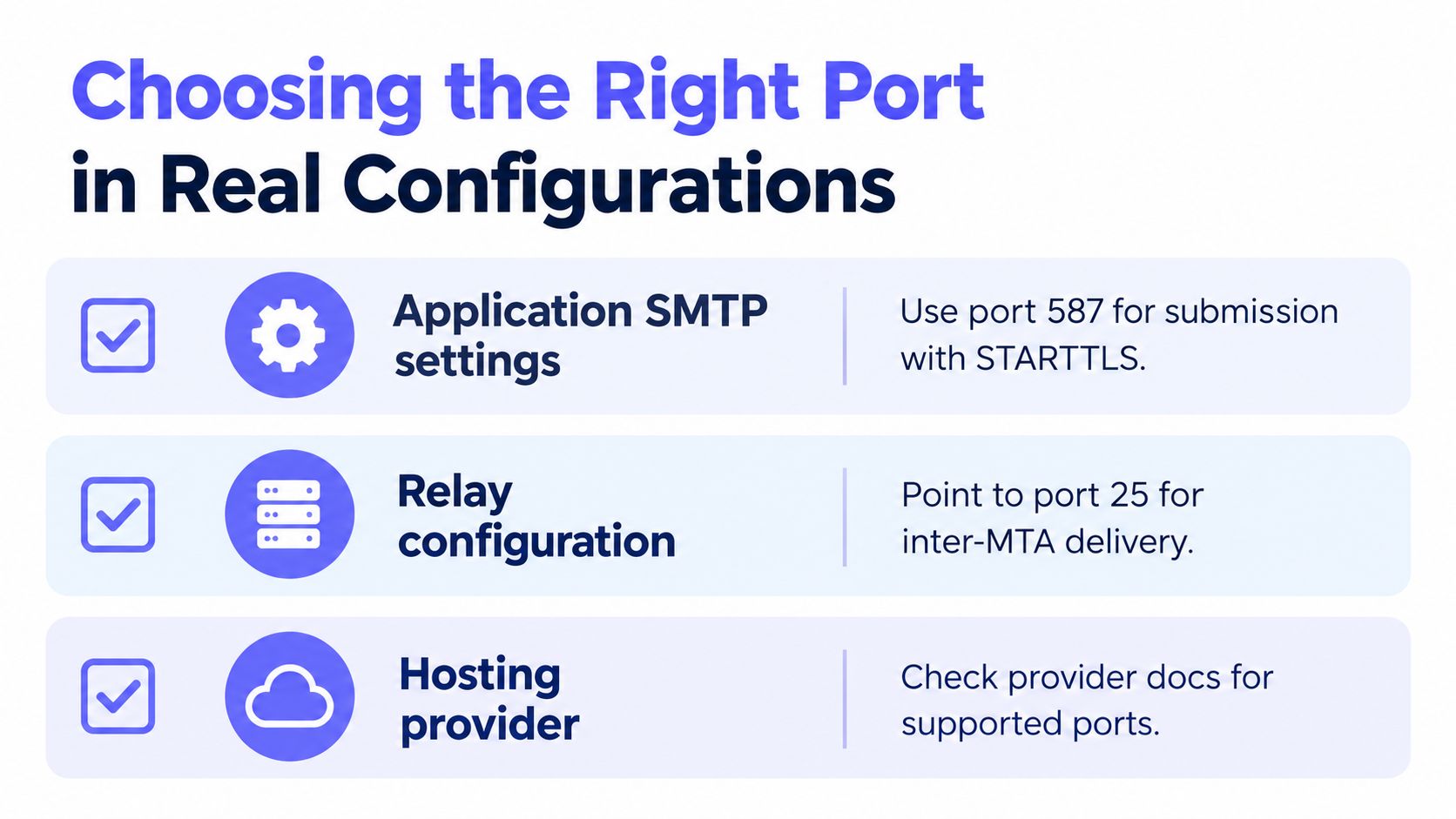
- Submitting from an app or client: Use your provider's submission service, normally 587 with STARTTLS, or 465 if the client or library explicitly expects implicit TLS.
- Relaying between mail servers you operate: That's port 25 territory, assuming the host permits outbound connections on it.
- Checking a recipient domain: You're looking at its inbound exchangers, which brings in DNS first. Understanding what an MX record does matters here, because MX records are what direct receiving systems toward the right mail servers before any port conversation happens.
What a Major Provider's Own Guidance Shows
Real provider documentation splits the roles exactly this way. Google Workspace SMTP relay documentation lists ports 25, 465, and 587 for relay, states that TLS enabled configurations use port 587, and notes that unauthenticated non TLS relay relies on IP address authentication rather than SMTP authentication. Google's client guidance separately maps port 465 to SSL and port 587 to TLS or STARTTLS.
Read that carefully and you'll notice the port is never described alone. It's always paired with an authentication method and an encryption mode. That's the correct unit of configuration, a port plus TLS mode plus auth method, not a bare number.
The Three Mistakes That Repeat Everywhere
- Assuming 587 encrypts by itself: It doesn't. If your client doesn't issue and verify STARTTLS, credentials can cross the wire unprotected.
- Using port 25 for app mail from a restricted network: The connection hangs, and teams misdiagnose a network policy as a server outage.
- Copying settings between unlike devices: A printer, scanner, or legacy library that only speaks implicit TLS needs 465. Forcing it onto 587 because a guide said 587 is correct will fail without an error and repeatedly.
When a configuration fails, write down the role, the port, the TLS mode, and the auth method as four separate facts. The broken one usually becomes obvious once they're no longer blurred into a single setting.
What a Port Test Actually Tells a Verification System
Verification is where port confusion stops being an annoyance and starts producing wrong decisions in production. A signup flow that treats a raw port result as a verdict on an email address will reject real users and accept bad ones, and the logs won't explain why, because the result was collapsed into a single label too early.
A careful system separates the stages. Each stage answers a narrower question than the one product teams usually ask, and that's precisely what makes the output useful.
The Stages Hiding Inside One SMTP Check
- DNS and MX lookup: Does the domain publish mail exchangers at all, and which hosts should be probed?
- TCP reachability: Can a connection be opened to that host on the relevant port, in practice the inbound relay port for recipient domains?
- SMTP banner: Did a mail server answer with an SMTP greeting, rather than some other service or a middlebox?
- TLS negotiation: If encryption was attempted, did the handshake or STARTTLS upgrade succeed?
- Recipient level response: How did the server respond when presented with the address, keeping in mind many servers deliberately avoid revealing whether a mailbox exists?
Collapsing those into one pass or fail throws away the diagnostic value, which is why a proper definition of SMTP verification has to distinguish probing a recipient domain's inbound servers from testing your own outbound submission service. Testing port 587 evaluates your provider's submission availability. It says nothing about a recipient's mailbox.
Reading Failures Without Fooling Yourself
Each failure mode points at a different layer. A timeout may indicate firewall policy or provider throttling rather than a dead domain. A TLS handshake failure usually means the wrong encryption mode for that port. An SMTP rejection after a successful connection generally reflects authentication, policy, reputation, or recipient domain controls, not a bad port choice.
Tooling design matters here. Mailbeam, as one example of a verification API, returns validity alongside a score and machine readable reason codes across checks such as syntax, MX, and SMTP existence, so a signup flow can react differently to a throttled probe than to a domain with no mail exchangers. Whatever tool you use, insist on that separation.
Port open does not mean email deliverable. Interpreting it that way is one of the most consequential and most common errors in signup flow validation.
Label results by stage and by port role, inbound relay versus authenticated submission, and your verification output becomes something support and engineering teams can act on instead of argue about.
Common Pitfalls, Quick Answers, and Final Takeaways
Does switching from port 25 to 587 improve deliverability? No, not by itself. Port 587 isn't a more deliverable version of port 25. They're different channels for different jobs. Your mail still crosses the internet between servers on the relay channel after submission, so deliverability depends on authentication, reputation, content, and recipient policy, none of which a submission port change fixes.
Is port 587 always more secure than port 25? The comparison is mostly meaningless, since you're rarely choosing between them for the same task. Security comes from requiring TLS before credentials flow and from authenticating the submitter. A 587 connection where the client never verifies STARTTLS is a real risk, while relay on 25 between servers can also upgrade to TLS. Judge the behavior, not the number.
Quick Answers to the Rest
Why did my mail break when I only changed the port? Because you probably changed the expected TLS mode too. Moving between 465 and 587 without switching between implicit TLS and STARTTLS creates a handshake neither side can complete.
My provider only offers one submission port. Is that a problem? Usually not. Use the one offered, pair it with the TLS mode and authentication method the provider documents, and confirm your client or library supports that pairing. Both 465 and 587 are legitimate long term options.
Why can't my server reach port 25 at all? Your network or host is likely restricting outbound 25 as an anti abuse measure. If you're submitting application mail, that's your cue to use a submission service. If you operate relay, talk to your host about their policy for mail servers.
A verification probe connected successfully. Can I tell the user their address is valid? No. You've learned the domain's inbound infrastructure answered. Existence and acceptance are separate questions, and many servers intentionally won't answer them during a probe.
The Checklist to Keep
- Name your role first: Relay, submission, or recipient domain probing.
- Pair the settings: Port, TLS mode, and authentication method travel together.
- Require encryption before credentials: Verify STARTTLS succeeded on 587, or use implicit TLS on 465.
- Read failures by layer: Timeout, handshake, and rejection each implicate a different cause.
- Never equate reachability with deliverability: An answering server is the start of the evidence, not the conclusion.
Hold onto the three role model and the SMTP default port question dissolves. There was never a single number to memorize. There was a job to identify, and once you've identified it, the right port, the right TLS mode, and the right interpretation of any error all follow from that one decision.
If port confusion has been leaking into your signup flow as false rejections or mystery bounces, Mailbeam gives you a real time verification API that separates MX, SMTP, and other checks into clear reason codes you can act on, built for EU hosted, GDPR first processing. Try it in your registration flow and see what your current checks have been collapsing by visiting Mailbeam.