
You've sent the campaign, your platform reports successful delivery, and the numbers look reassuring. Then replies slow down, conversions miss expectations, and someone discovers that a large share of the messages reached spam, a secondary tab, or no visible folder at all.
That gap is why inbox placement testing matters. Delivery confirms that a receiving server accepted a message. Placement asks where that accepted message went, and whether a recipient could reasonably see it. Better testing starts before the seed send, with clean addresses, correct sender identity, and a production message that matches what real subscribers will receive.
Table of Contents
- Why Delivery Reports Hide Missing Inbox Reach
- Building a Seed List That Mirrors Your Audience
- Running Tests and Reading Provider Results
- Fixing Authentication Reputation and Content Issues
- Automating Tests and Cleaning Lists Before You Send
- Turning Placement Wins Into Real Engagement
Why Delivery Reports Hide Missing Inbox Reach
A campaign can show successful SMTP delivery while subscribers never see it in a useful folder. The receiving server accepted the message, yet filtering may have placed it in spam, a promotional or secondary tab, or somewhere the recipient rarely checks.
That distinction defines inbox placement testing. Delivery measures acceptance by the receiving server. Placement measures visibility after acceptance. Calculate inbox placement rate from inbox-visible seeds divided by accepted seeds, and report rejected messages separately. A bounce is a transport failure, not a placement failure.
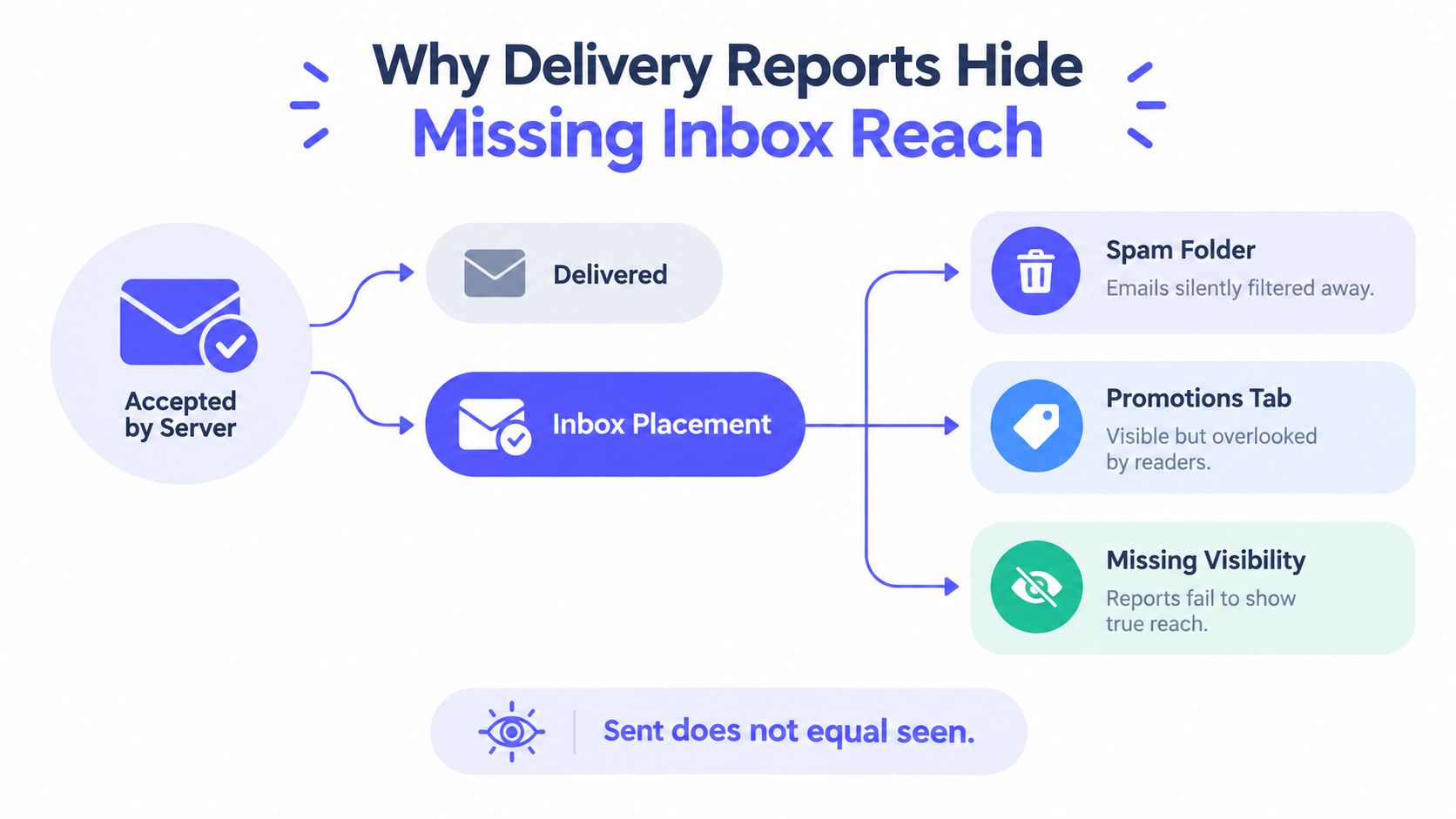
Validity's worldwide 2022 benchmark found average inbox placement below 85%, meaning a substantial share of legitimate, permission-based marketing email missed the inbox. Provider mix, geography, engagement, and sender identity all influence the result, so the figure is a warning rather than a universal target. Its practical lesson is straightforward: a high sent or delivered count does not prove that recipients could see the message. Validity's email deliverability benchmark provides context for tracking placement separately.
One global rate can conceal a provider failure
Mailbox providers apply different filtering signals. A blended campaign result can look acceptable while Microsoft recipients see heavy junk placement, or while Gmail treats the same message differently from Yahoo. Provider-level results identify the failing environment.
Validity's 2025 benchmark series reported Microsoft at 75.6% measured inbox placement, while Gmail's average placement declined from 89.8% during 2024 to 84.2% in the fourth quarter of that year. The cited results show a 14.2 percentage-point gap, large enough for an overall average to hide a provider-specific failure. Treat each provider as its own diagnostic stream rather than relying on one worldwide rate.
Practical rule: Track inbox-visible placement by provider, and investigate failures before increasing volume.
Placement results become more useful when paired with authentication, reputation, list quality, and content checks. Use this guide to email deliverability issues to connect a provider-level symptom with those operational causes. Before running a seed test, check MX records and SMTP responses for malformed, inactive, or misconfigured addresses. Cleaner pre-send infrastructure reduces avoidable failures, so the test reflects placement rather than basic address hygiene.
Building a Seed List That Mirrors Your Audience
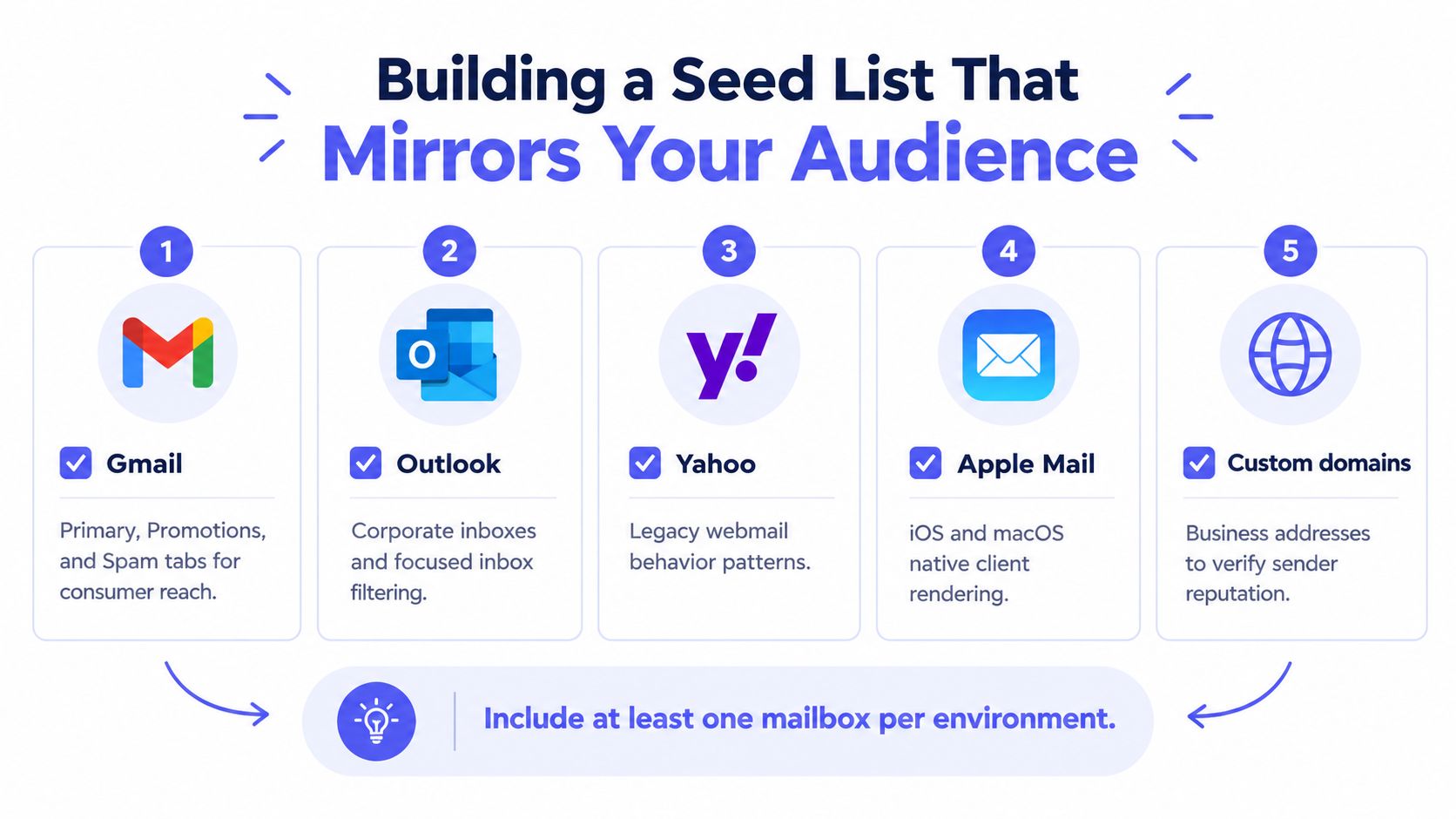
A seed list is useful only when it resembles the environments your subscribers use. A panel made entirely of consumer Gmail accounts can tell you something about Gmail, but it won't explain a Microsoft 365 problem, a corporate filtering policy, or a regional mailbox pattern.
Start with the provider distribution in your live audience. Include consumer and business environments represented in that data, then preserve enough coverage to compare outcomes over time.
Choose environments, not just addresses
A practical panel can include:
- Gmail: Test the inbox, Promotions, and Spam locations separately. A message in Promotions is visible, but it may not meet a primary-inbox objective.
- Google Workspace: Business domains can apply different administrative controls and reputation signals than consumer Gmail.
- Outlook.com and Microsoft 365: Include both consumer and corporate contexts when they appear in your audience.
- Yahoo: Its filtering behavior adds useful webmail coverage.
- Apple Mail: Test the underlying mailbox provider as well as the native client experience, because the app itself isn't the same thing as the receiving provider.
- A corporate domain: Use a controlled business address to expose domain-level policy or reputation issues.
- Regional providers: Add them when geography makes them material to your subscriber base.
Industry guidance commonly describes seed panels around 100 to 300 addresses and suggests waiting roughly 10 to 20 minutes before recording folder outcomes. Those figures are operating conventions, not guarantees, and the panel should be weighted toward your real provider distribution rather than averaged equally. MailertoGo's inbox placement guidance explains the role of provider coverage, outcome categories, and representative testing.
Keep the message and identity identical
Send the exact production artifact. That means the same:
- From address and visible From domain.
- Subject line and preheader.
- HTML and plain-text parts.
- Links, tracking domain, and image hosts.
- Sending infrastructure and authentication.
- Suppression rules and campaign type.
- Planned send time and approximate sending context.
A stripped-down test email measures a different object. So does a test sent from a marketing subdomain when the live campaign uses a transactional identity. Keep separate seed coverage for transactional, onboarding, and marketing streams if those streams use different domains, IP pools, volumes, or engagement profiles.
Avoid stale or overused seeds. A mailbox that never receives normal mail can produce a distorted result, while a seed used constantly across unrelated senders may no longer represent an ordinary recipient. Keep ownership clear, record the provider and environment for every address, and retain the panel version used for each test.
Weight interpretation to the audience
Don't calculate one equal-weight average unless equal weighting reflects the audience. If most subscribers use Outlook, a single Outlook seed shouldn't carry the same interpretive importance as a provider that barely appears in the list. Keep raw provider results visible even when you publish a weighted summary.
The panel also shouldn't be treated as a prediction of every subscriber's experience. Seed mailboxes lack the full engagement history, complaint behavior, and recipient-level signals that providers use in live filtering. They're controlled sensors, not replacements for real-user telemetry.
Running Tests and Reading Provider Results
Run the test with the same message, identity, infrastructure, and timing that the campaign will use. Record outcomes after the agreed observation window, but don't treat the first snapshot as a permanent verdict. Repeat across several sends because mailbox algorithms respond to reputation, volume, recipient engagement, and complaint history.
Use four distinct outcome categories:
- Inbox-visible: The message reached the intended inbox or visible tab defined by your business objective.
- Spam or junk: The provider accepted the message but filtered it into a spam location.
- Delivered but missing: The provider accepted the message, yet the seed shows no visible message in the expected locations.
- Rejected or bounced: The receiving system declined the message. Report this separately from placement.
A provider-specific placement calculation should use accepted messages as the denominator:
Provider placement rate = inbox-visible seeds ÷ accepted seeds
Don't mix rejected messages into that denominator. Doing so makes placement look worse by combining transport failure with filtering. Don't classify missing mail as spam either, because silent filtering is a different diagnostic signal.
Read patterns before changing the message
| Observed pattern | Likely cause | Check next |
|---|---|---|
| Rejections across providers | Transport, authentication, infrastructure, or policy failure | SMTP responses, SPF, DKIM, DMARC alignment, TLS, reverse DNS, and sender identity |
| Spam placement concentrated at one provider | Local reputation or provider policy issue | Provider telemetry, complaint signals, sending domain, IP pool, and recent volume |
| Spam placement across nearly every provider | Broad authentication, content, reputation, or infrastructure problem | Authentication alignment, content treatment, domain reputation, and stream configuration |
| Accepted messages missing from visible folders | Silent filtering, rendering, seed quality, or observation issue | Seed health, timestamps, message trace, provider logs, and raw headers |
| Inbox placement passes but secondary tabs dominate | The message is visible but not reaching the primary location | Define the business objective, then review content, engagement, and campaign classification |
| Results change sharply between sends | Snapshot sensitivity or changing reputation context | Compare volume, timing, complaints, engagement, and infrastructure for each run |
Keep the raw result for every address, including timestamp, provider, stream, folder, response status, and test version. A dashboard is useful for trends, but raw records let you determine whether a later change came from content, authentication, volume, or the seed itself.
Fixing Authentication Reputation and Content Issues
Troubleshooting gets faster when you separate failure modes instead of changing the subject line, sending domain, and template at the same time. A placement result tells you where the message landed. It doesn't identify the reason.
Start at the transport layer. Confirm that the receiving server accepted the message and preserve the SMTP response code. If the message was rejected, don't begin with copy edits. A spam-word change can't repair a failed connection, an invalid sender identity, or a policy rejection.
Follow a fixed diagnostic order
First, verify identity and authentication. Check SPF, DKIM, and DMARC alignment, not merely whether each mechanism exists. Inspect TLS, reverse DNS, HELO identity, and consistency between the visible From domain and the authenticated sending domain. A message can pass a basic technical check while still presenting an identity mismatch that affects trust.
Next, compare provider patterns. Break results down by provider, campaign type, sending domain, IP pool, and message version. A Microsoft-only failure points toward a local reputation or policy problem more than a universal content defect. Broad failure warrants a wider review of authentication, infrastructure, and message treatment.
Then, inspect the message. Review link domains, tracking behavior, HTML and text balance, redirects, attachments, image loading, and unsubscribe handling. Don't reduce this step to hunting for a list of “spam words.” Providers evaluate the whole sender and message context.
Finally, review reputation and engagement. Use Gmail Postmaster-style domain and IP reputation signals where available, Microsoft sender telemetry, complaint data, bounce trends, and campaign-level seed results. Seed tests show placement, but they don't reveal how real recipients respond.
For identity-specific troubleshooting, this email authentication error guide is a useful companion to the checks above. Authentication also needs to be evaluated per stream. Marketing, transactional, and onboarding traffic can share infrastructure while carrying different volumes, expectations, and complaint patterns.
Don't let a positive seed result overrule a failing production signal. A seed can pass because it uses the wrong stream, the wrong domain, or a reputation context that doesn't match the live audience.
Provider guidance summarized by Broadcom expects more than a technically accepted message. The relevant controls include SPF, DKIM, DMARC, valid forward and reverse DNS, RFC-compliant mail, one-click unsubscribe, and consent-based sending. Enforcement can move from spam placement to rejection, particularly for high-volume senders. Broadcom's sender guidance is useful when the question is policy compliance rather than creative optimization.
Change one variable and preserve the evidence
Run a controlled retest after each meaningful fix. If authentication alignment changes and the subject line changes at the same time, you won't know which action affected the result. Keep timestamped raw outcomes, the message version, sending identity, volume context, and provider response.
Common mistakes include testing only Gmail, using stale seeds, stripping tracking links from the test, treating Promotions as an automatic failure, ignoring missing mail, and making several changes before rerunning. Fix one variable, repeat the same test, and compare provider-level outcomes rather than celebrating a single blended score.
Automating Tests and Cleaning Lists Before You Send
Manual seed testing is valuable during investigation, especially when you need to inspect headers, folders, or a single campaign artifact. It becomes inefficient when every send requires someone to assemble addresses, record folders, compare historical outcomes, and notice a provider decline.
Automation adds scheduling, consistent message capture, historical comparisons, and alerts. Tools such as Validity's Everest and Litmus can support recurring deliverability checks, while provider telemetry adds signals that seeds can't provide. The trade-off is that automation can make a flawed test repeatable. It won't make an unrepresentative panel or mismatched sending identity accurate.

Put hygiene before placement diagnosis
Seed testing should tell you how providers filter a valid campaign. It shouldn't be overwhelmed by addresses that were mistyped, abandoned, disposable, role-based, or impossible to deliver.
A pre-send verification layer can check:
- Syntax: Catch malformed addresses before they enter a campaign.
- Domain and MX availability: Identify domains that aren't configured to receive mail.
- SMTP existence: Check whether the recipient appears deliverable without relying only on syntax.
- Disposable domains: Prevent temporary signups from polluting lifecycle and engagement data.
- Role-based addresses: Flag shared mailboxes such as support or sales when those addresses need separate handling.
- Catch-all behavior: Mark domains where acceptance doesn't prove that a specific mailbox exists.
Mailbeam is one option for this pre-send layer. Its HTTP API and web tools return validity, a numeric score, and machine-readable reason codes, while its checks cover syntax, MX, SMTP existence, disposable domains, role-based addresses, free providers, and catch-all behavior. It supports synchronous signup validation, CSV and asynchronous bulk processing, webhooks, and EU-hosted processing with a default DPA. Those capabilities address address quality, not inbox placement itself, so they should complement, not replace, seed tests and provider telemetry.
Use different controls for different workflows
At signup, block or challenge disposable and clearly invalid addresses before they become users, suppressing poor-quality records at the source. For a bulk campaign, verify the CSV before import, quarantine uncertain results, and retain a decision trail for the contacts that were excluded.
List cleaning is not a license to delete every address that doesn't engage immediately. Use verification results alongside consent, bounce history, complaint history, and engagement policy. This guide to cleaning email lists covers the operational side of removing risky or unusable records before they affect sending reputation.
The lean workflow is straightforward:
- Validate new addresses during registration.
- Verify imported or aged lists before major sends.
- Run the exact campaign through a representative seed panel.
- Review provider placement and real-user signals.
- Send only after transport, identity, and audience checks pass.
- Retain raw results for regression analysis.
That sequence keeps address quality from disguising a filtering problem. It also protects the reputation signals that providers use when deciding where future messages belong.
Turning Placement Wins Into Real Engagement
A message can pass a seed test and still produce weak business results. Placement proves that a controlled mailbox received and exposed the message. It doesn't prove that a human noticed, trusted, clicked, replied, or converted.
Open rate is especially fragile as a standalone validation signal. Apple Mail Privacy Protection can fetch tracking pixels automatically, inflating reported opens by roughly 15% to 35% for affected audiences, according to independent reporting in this analysis of Apple Mail open-rate measurement. The practical response isn't to discard opens entirely. It's to rank them below stronger downstream evidence.
Use a measurement hierarchy
Report the signals in separate layers:
- Transport: Accepted, rejected, or bounced.
- Placement: Inbox-visible, secondary tab, spam, or missing, broken down by provider.
- Authenticated interaction: Clicks tied to controlled links, replies, and confirmed sessions.
- Business outcome: Conversions, activated accounts, purchases, or other defined downstream actions.
- List quality: Invalid, disposable, role-based, suppressed, and complaint-prone records.
Clicks, conversions, replies, and downstream actions provide stronger evidence of human interaction than opens alone. Use authenticated links and conversion controls so automated pixel fetching can't be mistaken for interest. A high open rate paired with weak clicks should prompt questions about privacy-proxy inflation, message relevance, rendering, offer clarity, and audience quality.
Placement is a visibility signal. Engagement is a human-response signal. Keep them on separate lines in every report.
Sustain the loop by retesting after changes to sending infrastructure, authentication, volume, domain, template, or audience mix. Review provider-level placement alongside complaint, bounce, click, reply, and conversion data. A passing test is a snapshot, not a permanent guarantee.
The most reliable operating model combines clean addresses, compliant sender identity, representative seed testing, provider-specific diagnosis, and real-user engagement evidence. That combination shows not only whether a message arrived, but whether the right recipients could see it and acted on it.
Mailbeam helps teams validate addresses before they enter signup flows or campaigns, with API and bulk checks for syntax, MX, SMTP existence, disposable, role-based, and catch-all behavior. Visit Mailbeam to add pre-send address hygiene to the inbox placement workflow.