
A mistyped address slips through a signup form. The account gets created, the welcome email fires, and the receiving server rejects it as a hard bounce. Do that a few thousand times across a quarter and your sending domain carries a reputation problem that takes months to unwind, long after the form bug was fixed.
Email verification is where API design decisions become visible fast. Postman's 2025 State of the API report found that 69% of more than 5,700 developers, architects, and executives surveyed globally spend at least 10 hours per week on API-related tasks, so the shape of a request and the honesty of its error response matter more than any architecture diagram. The Wikimedia Foundation's 2025 Developer Satisfaction Survey reports that 76% of 138 developer respondents had used or created Wikimedia APIs during the previous year, which tells you how much production behavior now runs through HTTP calls that someone else designed.
What follows is a practitioner's tour of eight API development examples, all built around real verification work: synchronous signup gating, disposable-domain blocking, bulk hygiene jobs, webhook delivery, reason-code UX, pre-send deliverability checks, low-latency caching, and quota management. Each one gets the integration pattern, the failure modes that show up in production, a scenario, and a tactic list you can lift into your own codebase.
Table of Contents
- 1. Real-Time Email Verification at Signup With a Synchronous API Call
- 2. Blocking Disposable Addresses in Registration APIs
- 3. Asynchronous Bulk Verification for Contact List Hygiene
- 4. Webhook-Driven Delivery of Verification Outcomes
- 5. Reason-Code Driven Error Messaging in Forms
- 6. Pre-Send Deliverability Checks Before Transactional and Marketing Sends
- 7. Low-Latency Caching and a DNS-Only Verification Path
- 8. API Key Management, Plan Quotas, and Usage Metering
- Comparing the 8 API Development Examples
- Choosing the Right Pattern and Putting It to Work
1. Real-Time Email Verification at Signup With a Synchronous API Call
A form submits, your backend makes one HTTPS request to a verification endpoint, and the account row is written only after a verdict comes back. That is the entire pattern, and it is the one worth starting with.

Where the call sits in the request path
The browser posts to your backend. Your backend posts to the verifier with an API key in an Authorization header and a JSON body holding the address. The response returns a validity flag, a numeric score, and a machine-readable reason such as a non-existent mailbox or a disposable domain. Your handler then accepts, rejects, or flags before insert. Keep the call server-side, always, because a key shipped to the browser is a key that has already leaked.
A SaaS onboarding form that shows an inline error when the reason code says the mailbox doesn't exist is the cleanest version of this. Fintech account opening usually gates on a score threshold instead, because a partial match still deserves human review.
What it costs and what it buys
Downstream systems inherit clean data from day one, which is the whole point. The price is latency on the critical path and a hard dependency that can fail while a user stares at a spinner.
- Set a client timeout of 2 to 3 seconds. Decide the timeout behavior before you ship. Most products should allow signup, mark the account unverified, and verify asynchronously.
- Map each reason code to its own message. A syntax failure wants "check for a typo". A dead mailbox wants something different.
- Treat catch-all as policy, not a verdict. Catch-all domains accept everything, so a positive result there proves little.
- Log the score and the reason. Support will ask why an account was blocked, and "the API said no" is not an answer.
The failure mode nobody documents: the verifier stalls, your handler throws, and a user who typed a perfectly good address gets a 500.
The sequencing details, including what to do when a probe returns an unknown verdict, are worth reading alongside real-time email validation. If you want to study how a good interactive console renders request and response schemas side by side, the RealtyAPI.io interactive API playground is a useful reference even outside its own domain. Documentation quality is now an adoption factor in its own right: the Stack Overflow 2024 Developer Survey, with responses from 65,437 people who code across 185 countries, found that 90% of respondents who use technical documentation use API and SDK documentation as a learning resource.
2. Blocking Disposable Addresses in Registration APIs
Disposable domains are the cheapest way to inflate a signup counter. A dedicated check flags or blocks addresses from temporary-mail providers during account creation, and the provider maintains the domain list so your team doesn't chase new throwaway services every week.
The integration is usually a parameter on the same verification call rather than a second request, which keeps the signup path to one round trip.
The trade-off between blocking and flagging
Hard blocking feels decisive and often isn't. Domain lists move in both directions: privacy-focused mail services get misclassified, corporate domains occasionally land on a list for a week, and a blocked user rarely writes to support. They just leave.
Flagging plus step-up verification handles the ambiguous middle. A SaaS platform that blocks free-trial signups from disposable domains and asks for a work or personal address is making a defensible product decision. A marketplace that flags the address for manual review keeps a legitimate signup that a blunt block would have lost.
Blocking is a growth decision disguised as a security control. Measure it that way.
- Prefer flagging for borderline cases. Reserve hard blocks for addresses that are unambiguously throwaway.
- Log every blocked attempt with its reason code. Without that data you can't see false positives, and you will have them.
- Build an override path. Support should be able to approve a legitimate user in seconds, not file a ticket with engineering.
- Re-check at activation, not only at signup. A clean address at registration can be burned before the user confirms.
The detection mechanics and what separates a maintained list from a stale one are covered in disposable email detection. Watch the ratio of blocked to accepted signups for the first month. A sudden jump usually means a list update misfired, not that your audience changed overnight.
3. Asynchronous Bulk Verification for Contact List Hygiene
Not every verification belongs in a request cycle. Quarterly list cleaning runs against tens of thousands of addresses, and nobody is waiting on the response. That calls for the opposite design: upload a file, get a job identifier, collect results later.
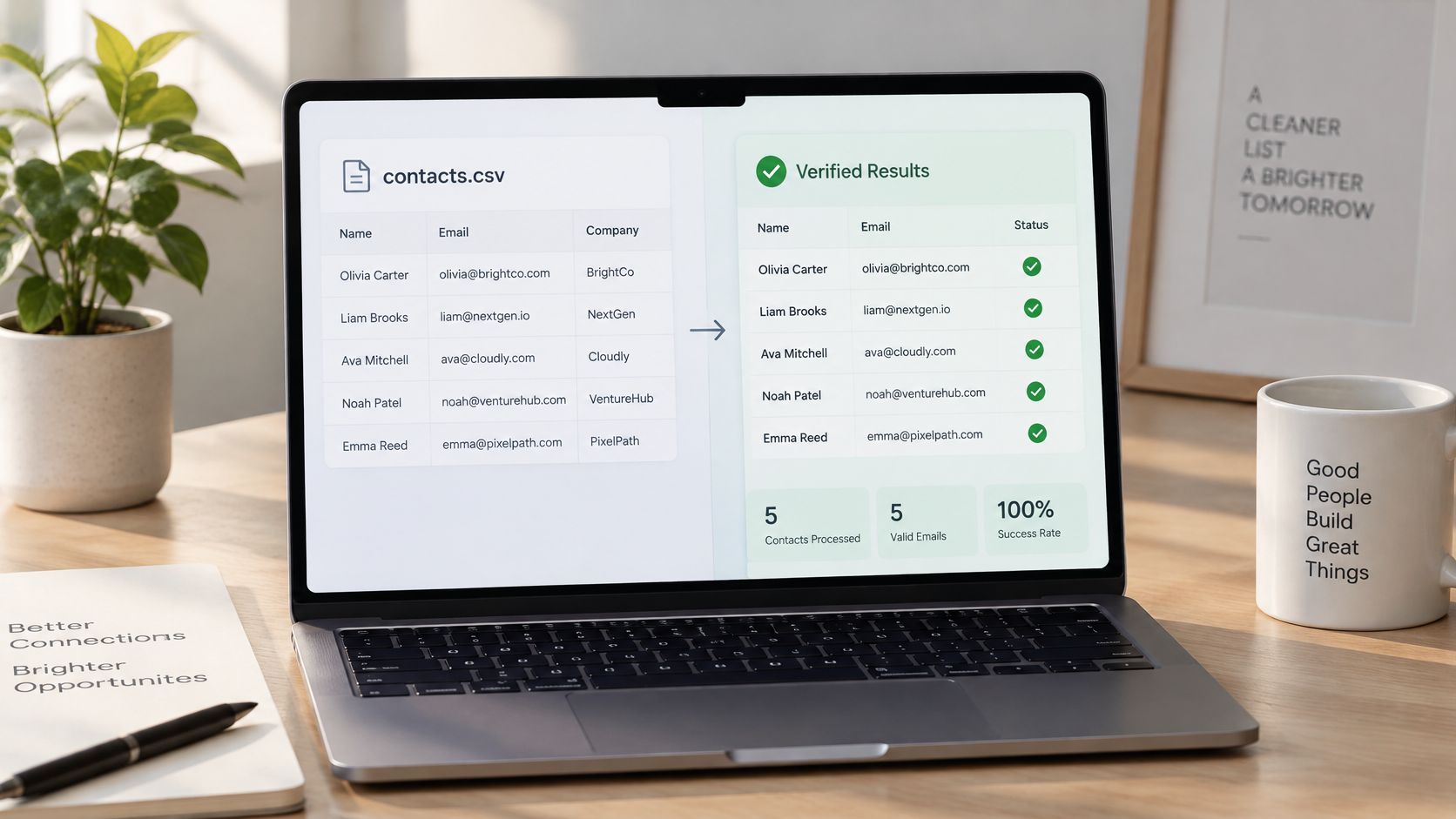
The flow is simple to describe. Your job posts a CSV, receives a job ID, polls a status endpoint or waits for a webhook, then downloads a results file that annotates each row with a verdict and a reason. Latency stops mattering. Throughput and cost per record start mattering a lot.
Design the job around the file, not the record
A marketing operations team cleaning a quarterly export before a product launch campaign is the canonical case. So is an agency verifying client lists before onboarding them into a sending platform. Both care about one thing: can the results be reconciled back to the source rows without guesswork?
- Deduplicate and normalize before upload. Lowercase, trim whitespace, and drop duplicates locally. You pay per record at most providers, and paying twice for the same address is avoidable waste.
- Keep the original file ID mapped to your internal records. Store the job ID next to the list name and the upload timestamp, or reconciliation becomes a manual exercise in matching filenames.
- Poll with backoff, or use the webhook. A status check every two seconds for a job that takes twenty minutes is noise on both sides.
- Download and persist results inside the retention window. Batch result files are temporary by design, and a job whose output expired is a job you run again at full cost.
A batch job that finishes in twenty minutes for a fraction of a cent per record beats a thousand synchronous calls that each need someone waiting.
One habit worth building: run the same small slice of a list through both the batch endpoint and the synchronous one before trusting either. If the verdicts disagree on more than a handful of rows, you have a configuration difference worth understanding before you export decisions to a CRM.
4. Webhook-Driven Delivery of Verification Outcomes
Polling a status endpoint works until you're running forty jobs a day and the polling loops outnumber the actual API calls. Webhooks invert the relationship. The verifier pushes an event to an HTTPS endpoint you control the moment an outcome exists.

The receiving service does the interesting work. A batch job completes and a handler writes contact status fields into the CRM. A signup event triggers a verification webhook whose payload lands in a fraud pipeline alongside device signals. Neither sender nor receiver needs a scheduler.
Treat the webhook as an untrusted request
Your endpoint is public. Anyone who learns the URL can post to it, so signature verification isn't optional. The broader operational contract matters just as much: recent practical API guidance recommends documenting a state machine such as accepted, processing, completed, failed, or expired, alongside explicit timeout and retry rules, correlation IDs, webhook signatures, and replay windows, as laid out in this API development and operational contract guide.
- Verify the signature before parsing the body. Reject unsigned or expired payloads with a 401 and move on.
- Make handlers idempotent on the event or job ID. Retries are guaranteed, duplicate processing shouldn't be.
- Return a fast 2xx and process asynchronously. A handler that does SMTP lookups inline will time out and get retried forever.
- Store raw payloads for a short window. Troubleshooting an event you can't replay is guesswork.
The mechanics of proving a payload came from the sender are set out in this guide to signed payload verification for webhooks. Keep the receiver dumb and the processing queue smart. That separation is what makes the pattern survive a traffic spike.
5. Reason-Code Driven Error Messaging in Forms
An "invalid email" error is a dead end. The user doesn't know whether they mistyped, used a domain that doesn't accept mail, or hit a rule they can't see. A verification API that returns machine-readable reason codes lets you replace the dead end with an instruction.

The pattern is a lookup table, not conditional logic. Your handler receives a code, resolves it against a mapping you control, and returns the matching message key to the form. A syntax failure produces "check the address for typos". A role-based mailbox produces a nudge toward a personal address. A disposable domain produces something honest and short.
Keep the mapping in version control
Treat the code-to-message file like any other contract. It changes when the API adds codes, and it should be reviewed when it does, because a missing key usually renders as a blank error.
- Version the mapping file and test it. A code with no entry should fall back to a safe generic message, never to an empty string.
- Stay vague on security-sensitive checks. Telling a bot exactly which rule it tripped turns your error message into a testing oracle.
- Exercise every code path in staging with known sample addresses. Keep a fixture list of addresses that reliably produce each verdict, and run it after any API version bump.
- Surface the code in support tooling. An agent who sees the reason alongside a rejected signup resolves the ticket in one reply instead of three.
A support dashboard that shows the reason code next to the rejected account is the highest-value consumer of this pattern, and it costs almost nothing to build. The full set of codes and what each one means is documented in this reference to verification reason codes. Write the messages for the person filling in the form, not for the engineer who wrote the handler.
6. Pre-Send Deliverability Checks Before Transactional and Marketing Sends
A contact can be valid when it enters your database and fail by the time you send. Check addresses at ingestion, during CRM syncs, and before queueing high-impact messages. The right checkpoints depend on how often records change and what a failed delivery costs.
Measure before and after, not just after
Set a baseline before adding a pre-send check. Compare bounce rates over the same time window, using the same traffic segments and instrumentation. Otherwise, a change in list composition or campaign mix can look like an improvement.
- Set different rules for different sends. Apply stricter checks to marketing lists, where invalid addresses can affect a large campaign. For transactional messages, let an unknown result proceed when delaying a password reset or receipt would cause more harm than the possible bounce.
- Avoid repeated probes. Store verification results and reuse them while they remain relevant. Rechecking an unchanged address on every send adds latency and unnecessary requests.
- Handle verification failures without stalling sends. Set a timeout, then queue the transactional message if verification does not return in time. Record the unresolved status and reconcile it later.
Practical rule: A verification timeout should not hold a time-sensitive transactional message in the queue. Send it, then update the address state when a result is available.
7. Low-Latency Caching and a DNS-Only Verification Path
A full SMTP probe takes time. A DNS-level check returns in tens of milliseconds. Serving repeat lookups from cache and routing inline validation to the lighter path is what keeps a signup form feeling instant, and it's the standard compromise for latency-sensitive APIs.
The accuracy trade-off is real. A DNS-only result confirms the domain can receive mail, not that the specific mailbox exists. That's usually enough for inline feedback and not enough for a decision you'd defend in an audit.
Benchmark your own gateway before optimizing
Platform migrations offer a useful template here. Identity platform Ory moved to Tetrate Enterprise Gateway over a structured five-month rollout designed to preserve feature parity and avoid performance regressions, reporting approximately 40% lower resource consumption with some workloads seeing throughput improvements, according to Tetrate's Ory migration case study.
The transferable part is the method, not the number: benchmark the existing path, migrate incrementally, validate at each stage, and measure infrastructure consumption separately from raw latency. The KPI set that tells you something is CPU and memory per request, sustained throughput, tail latency, error rate, and rollback frequency.
- Use fast DNS-level checks inline and deeper probes at activation. Two tiers, two purposes.
- Set cache expiry by how fast your data changes. Domain-level facts age slowly. Mailbox-level facts don't.
- Measure p95 and p99 in your own environment. Published averages describe someone else's traffic.
- Test under realistic load. Synthetic single-request benchmarks hide the queueing that appears under concurrency.
A cached response feels like a fast API. A predictable timeout with a documented fallback is what makes it a reliable one, because SMTP probes fail, providers throttle, and the form still has to do something sensible.
8. API Key Management, Plan Quotas, and Usage Metering
At signup, a single uncapped verification endpoint can be abused to consume quota or probe addresses. Separate credentials and explicit limits make usage easier to trace and contain.
The OWASP API Security Top 10 identifies risks that apply to this pattern: broken object-, function-, and property-level authorization, unrestricted resource consumption, and unrestricted access to sensitive business flows. For an email verification endpoint, unrestricted consumption can turn automated traffic into unexpected usage.
Design for quota exhaustion before it happens
Issue separate keys for staging, production, and batch jobs. If one leaks or a batch process misbehaves, you can revoke that key without interrupting unrelated integrations. For agency workflows, attach a client identifier to each request so usage can be attributed without reconstructing it from logs.
- Store keys in a secrets manager and rotate them. Avoid committing credentials to repositories or leaving them in local environment files. See this guide to securing and rotating API keys.
- Handle 429 responses with backoff. Retrying immediately adds load while the limit is still active; delay retries and stop after a defined number of attempts.
- Alert before the quota is exhausted. An 80% threshold leaves time to investigate usage or adjust the integration before requests fail.
- Define the fallback in advance. Decide whether signup should continue, pause, or queue verification when the API times out or the plan limit is reached. Record that behavior in a runbook.
- Limit abuse at more than one level. Apply request caps per IP and account, normalize addresses before using them in rate-limit keys, and keep internal diagnostics out of user-facing reason codes.
These controls make failures easier to diagnose: a 429 points to a quota or rate limit, a timeout points to an unavailable dependency, and a revoked key points to an authorization problem. Give each case a distinct alert and recovery path.
Comparing the 8 API Development Examples
| Example | Integration Pattern | Best For | Main Trade-off |
|---|---|---|---|
| Real-Time Email Verification at Signup (Synchronous API Call) | Verify each address synchronously during signup | Product teams seeking clean user cohorts from day one | Adds signup latency and requires policies for timeouts and false positives |
| Disposable and Temporary Email Blocking in Registration APIs | Check domain lists during registration and block or flag disposable addresses | SaaS teams protecting trial access and cohort quality | Legitimate privacy-focused users may be blocked |
| Asynchronous Bulk Verification for Contact List Hygiene | Submit a CSV or batch job and retrieve results after processing | Marketing and growth teams cleaning large contact lists | Results are delayed and require file handling and reconciliation |
| Webhook-Driven Verification Outcome Delivery | Push verification results to a configured HTTPS endpoint | Teams routing outcomes into CRMs or event pipelines | Requires secure, idempotent handling of retries and duplicate events |
| Reason-Code Driven Form Error Messaging | Map API reason codes to clear, localized user messages | Product and support teams improving signup guidance | Requires maintaining mappings and avoiding overly revealing messages |
| Pre-Send Deliverability Checks for Transactional and Marketing Pipelines | Check MX records and, where supported, probe SMTP before sending | Teams protecting sender reputation and reducing hard bounces | SMTP checks can be inconclusive and add latency or cost |
| Low-Latency Caching and DNS-Only Verification Path | Use cached results or DNS-only checks for fast responses | Engineers building responsive, high-traffic signup flows | Faster checks may be stale or unable to confirm mailbox existence |
| API Key Management, Plan Quotas, and Usage Metering | Use scoped API keys with metered plans and quota controls | Platforms and agencies managing verification budgets | Quota exhaustion or retry loops can disrupt service and increase costs |
Choosing the Right Pattern and Putting It to Work
Pick by failure mode, not by novelty. If fake accounts and mistyped addresses are polluting your user table, you need the synchronous inline check with a hard timeout and a fallback. If your problem is a stale list and a rising bounce rate, batch endpoints and pre-send gates do more per hour of engineering. If outcomes need to reach three systems without a polling loop, webhooks are the only sane answer.
Most mature setups end up combining two or three deliberately. The common shape is DNS-level checks inline for speed, a full verification at activation, batch jobs for imported lists, and webhooks feeding the CRM. What kills projects is turning all of it on at once and having no baseline to judge the result against.
Here's a starting sequence I'd recommend. Choose the single pattern that maps to your biggest current pain, whether that's bounce rate, fake signups, or stale lists. Implement it with an explicit timeout, a versioned reason-code mapping, idempotent handlers if events are involved, and logging that captures the verdict and the code for every decision. Run it for a fixed window, compare against the same traffic segment from before, then expand.
Two details get skipped and shouldn't. First, decide what happens on failure before you launch, because a verifier outage shouldn't become a signup outage. Second, treat reason codes as a product surface, not an internal detail, since the difference between "invalid email" and "this address doesn't accept mail" is the difference between a support ticket and a fixed typo.
Teams that want to see these patterns in a working API can look at Mailbeam, where verification is a single JSON-over-HTTPS POST to the Mailbeam API endpoint, returning verdicts in under 100ms for inline flows, with free-plan access to syntax, MX, disposable, and role-based checks plus bulk CSV upload and webhooks.
Mailbeam is built for the flows above: a real-time verification endpoint that returns validity, a score, and a machine-readable reason, running on EU-hosted infrastructure with no cross-border transfer for verification processing. Free-plan access covers syntax, MX, disposable, and role-based checks, along with the REST API, bulk CSV upload, and webhooks, so you can wire up signup gating and list hygiene without a sales call. Visit Mailbeam to read the API reference, pick up a key from the dashboard, and send your first verification request.