
Unsolicited commercial email grew rapidly in the early 2000s. By the time the U.S. CAN-SPAM Act became law on December 16, 2003, the channel had shifted from a research curiosity to a pipe where most of what moved was unwanted.
An email list check is the measurement layer for that problem. It tells you which addresses can receive mail, which ones carry risk, and what decision each group deserves before a single message leaves your infrastructure.
B2B marketing and product teams still treat the file as a delete button. Anything not marked valid gets cut, and the rest gets mailed. A verified address can still bounce or land in spam. A risky address can be a paying customer behind a privacy alias. I treat every check result as an input to a sending policy: suppress, hold, segment, or send, according to the bounce and complaint risk you will accept on that mailbox.
Table of Contents
- Which Checks Sort Your List and What Each Result Means
- How to Run a Staged Check on Your Whole List
- Why a Verified Address Can Still Bounce or Land in Spam
- Deciding What to Do With Disposable, Role and Catch-All Addresses
- Benchmarks to Track After Each Cleanup
- Confirm the List Is Clean Before Your Next Send
Which Checks Sort Your List and What Each Result Means
A list check is not one test. It's a set of separate tests, each answering a different question, and each returning a signal that maps to a default action before any product-specific policy comes into play.
| Check | What it catches | Typical result | Default action |
|---|---|---|---|
| Syntax | Malformed addresses, leading or trailing dots, consecutive dots, paths over 256 octets | Invalid | Remove before any network lookup |
| MX records | Domains with no mail exchange, or a null MX that accepts no mail | Invalid | Block, since no mailbox can receive mail |
| SMTP existence | Recipient rejected during a handshake, with no email sent | Valid, invalid or unknown | Block definitive rejections; retry temporary failures |
| Catch-all | Server accepts any recipient, so the mailbox cannot be confirmed | Catch-all | Quarantine for secondary review |
| Disposable domain | Throwaway and temporary inbox services | Risky | Decide by product risk using the decision table |
| Role address | Shared addresses such as info@, noreply@ and admin@ | Risky | Warn, reject or permit by policy |
| Consumer provider | Gmail, Hotmail, Yahoo and similar free mailboxes | Informational | Use for segmentation, not rejection |
| Spam trap risk | Addresses that belong to traps used to catch senders | Risky | Hold out of sends until reviewed |
The five result classes are where the useful information sits. Valid means the address passed syntax, the domain publishes mail routing, and the server accepted the recipient during a handshake. It doesn't mean a human reads that inbox. Invalid is a definitive failure: broken syntax, no routing, or an explicit rejection, and it's the only class you can act on without review.
Risky covers addresses that can technically receive mail but carry a question mark: disposable domains, shared role mailboxes, and suspected trap addresses. Catch-all means the server accepts every recipient you offer, so the mailbox itself can't be confirmed. Unknown is the honest bucket for timeouts, greylisting, rate limits and anti-enumeration defenses that produced no usable answer.
A binary keep-or-delete rule throws away the distinction between those classes. Delete every catch-all and every unknown, and you cut real contacts at enterprise domains where catch-all routing is standard practice. Keep them all without review and you carry the risk you were trying to remove.
Nor is the list as clean as it looks. ZeroBounce's email list decay reporting found that 23% of the addresses it checked were invalid or risky in 2025, compared with 28% in 2024. Falling from 28% to 23% is progress, not a clean bill of health, when roughly one address in four still needs a decision.
So the first action isn't a deletion. It's a count. Sort the list into the five classes, see where the weight sits, and only then decide what each class deserves. If you want a single sortable number that keeps the reason codes visible underneath, an email risk score does that job better than a boolean.
How to Run a Staged Check on Your Whole List
Run the tests in order of cost, cheapest first, and stop spending network time on addresses that already failed. The staged approach is how RFC 5321 mail routing rules translate into an affordable job: syntax parsing before DNS resolution, DNS before any SMTP probe.
Most of the early work happens before a single network lookup, and it's mostly bookkeeping.
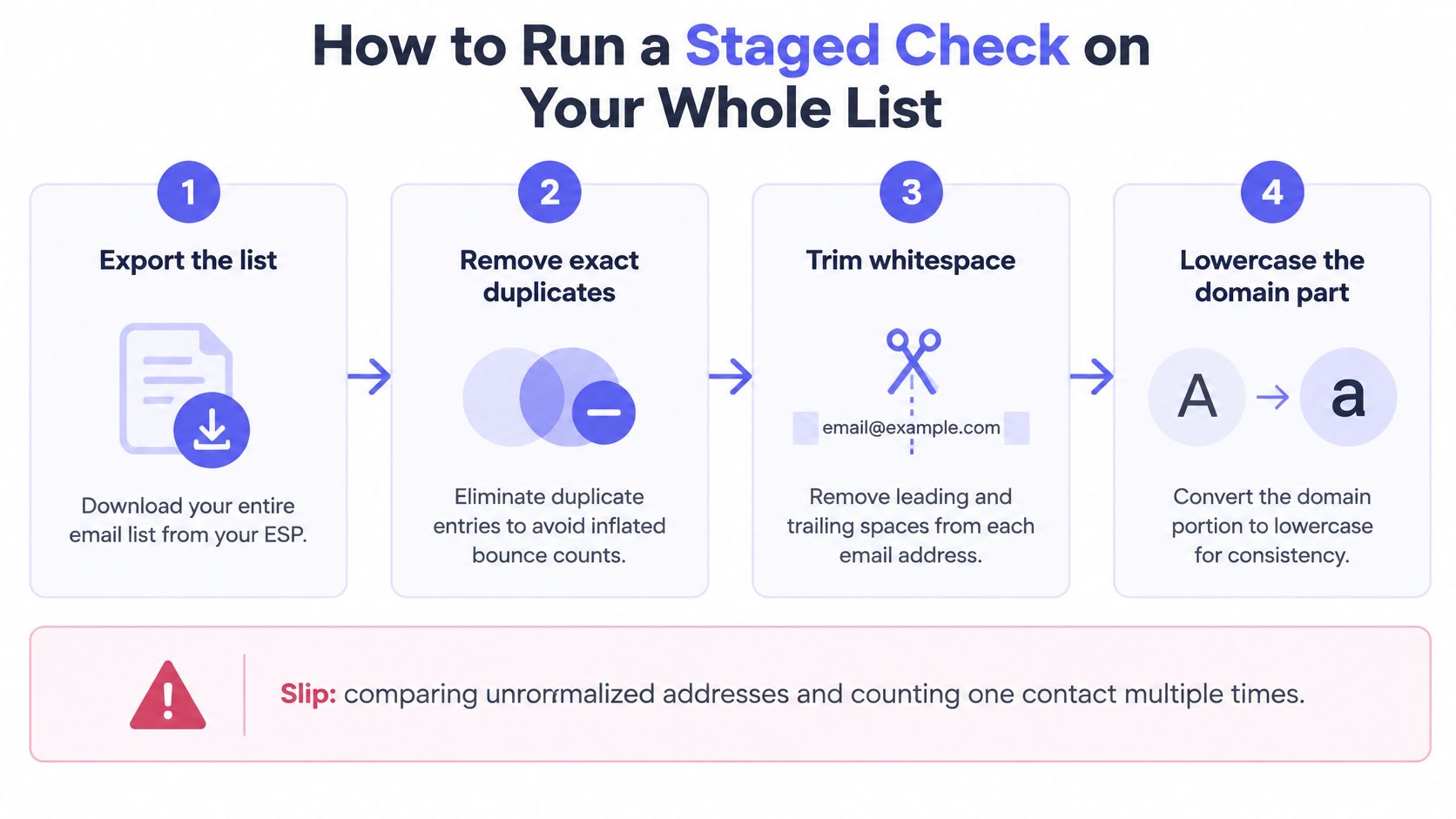
- Export and normalize. Pull the full list, strip leading and trailing whitespace, lowercase the domain part, and delete exact duplicates. Duplicates inflate every bounce and complaint count you'll compare against later. The common slip is comparing unnormalized addresses and counting one contact twice under two spellings.
- Parse against SMTP syntax. Drop malformed addresses, leading or trailing dots, consecutive dots and paths over the 256-octet limit before any network call. This is the cheapest test in the chain and it removes a large share of junk. An over-strict regex is the usual error, because it rejects legal edge cases a real mail server would accept.
- Resolve MX records. Cache DNS answers for their TTL, fall back to A or AAAA records only where no MX exists, and treat a null MX as final. A null MX is a domain stating that it accepts no mail at all. Teams get this wrong by treating it as a transient error and retrying it forever.
- Probe SMTP at a controlled rate. Retry transient failures with bounded backoff and leave breathing room between probes to the same server. Fast probing earns rate limits and anti-enumeration blocks, which fills your results with false unknowns.
- Classify into five buckets. Valid, invalid, risky, catch-all and unknown. Forcing a yes or no at this stage is where good data turns into bad decisions.
- Export three files. Deliverable, risky and undeliverable go out separately. Merging them back into one import file undoes the entire exercise.
- Write the audit record. For each address, store the normalized value, timestamp, DNS result, SMTP class, retry state and final action. Without it, a suppressed contact returns on the next import and the whole cycle repeats.
A vendor that returns only the word valid, with no reason code and no distinction between a rejected recipient and a timed-out server, hasn't given you a check result. It's given you a coin flip.
If you'd rather buy the job than build it, a comparison of email list cleaning services is worth reading before you commit, particularly on how each tool classifies catch-alls and whether it exposes reason codes.
Retention matters here too. Mailbeam keeps batch lists and their results for 72 hours so they can be downloaded, then deletes them, which keeps an old customer file from sitting in a third-party system indefinitely.
Why a Verified Address Can Still Bounce or Land in Spam
The most common misreading of a check result is that a green row means a safe send. It doesn't. Verification measures the recipient. Mailbox providers judge the sender, the domain and the behavior of the campaign, and those are separate systems that fail separately.
Say a 10,000-address list goes through a full check. 9,650 pass syntax, MX and SMTP, and 350 are invalid or risky enough to come out. Bounces drop on the next campaign, as expected.
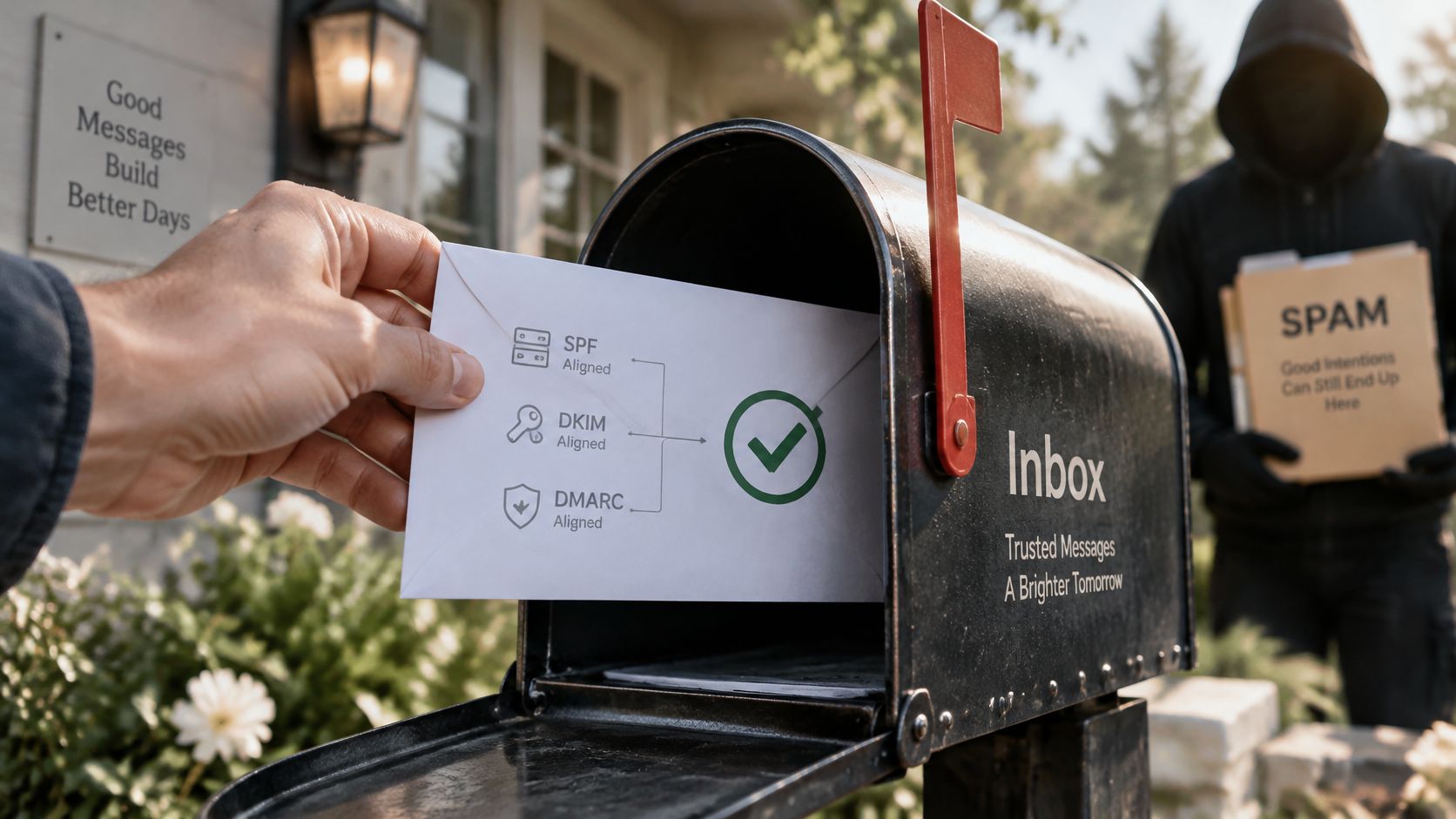
Then the trouble starts. The sending domain has no DMARC policy, and complaints crossed the ceiling on the last three sends. The message goes to the remaining 9,650 real people and lands in the spam folder anyway. Every recipient is genuine and the campaign still fails.
Sender guidance covering Gmail, Yahoo and Outlook now extends well past recipient validity: SPF, DKIM and DMARC alignment, valid reverse DNS, TLS, one-click unsubscribe and complaint-rate control. Gmail and Yahoo recommend keeping complaint rates below 0.3%, with 0.1% or lower as a safer target. None of those controls appear in a syntax, MX or SMTP result.
Here's the distinction that fixes most confused deliverability conversations.
Recipient-level checks tell you whether an address can accept mail. Sender-domain controls tell you whether mailbox providers will trust you when you send. Campaign-level controls, meaning segmentation, frequency and complaint handling, tell you whether the audience wants it. Removing invalid addresses can improve bounce rates while leaving all three of the bigger reputation risks untouched.
What the check can't do: verification cleans the address. It doesn't earn permission, authentication or engagement.
Spam trap screening has its place, but it doesn't replace list hygiene, which still needs permission-based collection, double opt-in and pruning unengaged contacts. The collection side is where traps get avoided in the first place, and how to avoid spam traps covers that work in detail.
So when messages keep failing after a clean check, the useful question isn't which addresses are bad. It's which sender control is missing: authentication, complaint handling, or separation between transactional and marketing traffic.
Deciding What to Do With Disposable, Role and Catch-All Addresses
Blocking every temporary domain feels decisive. It's often the wrong default, because legitimate people use privacy aliases, student addresses, testing inboxes and short-lived addresses for entirely reasonable reasons.
| Address type | Low-risk use (reading, newsletters) | High-risk use (credits, payouts, API access) | Metric to watch |
|---|---|---|---|
| Disposable domain | Permit with confirmation email | Challenge with stronger verification or manual review | Abuse rate by signup source |
| Role address | Permit, and warn in support flows | Require a personal address | Complaint and reply rate |
| Catch-all domain | Permit and send a confirmation | Quarantine for review | Bounce rate on the first send |
| Definitive SMTP failure | Block | Block | Hard bounce rate |
| Consumer provider | Permit | Permit with normal checks | Activation rate |
Domain lists also miss more than vendors admit. An independent benchmark of disposable-domain detection cited an average detection rate of 59% across 17 services, meaning a static blocklist alone leaves a lot of throwaway addresses untouched and doesn't justify blanket rejection.
The signals that change the decision
Domain status is one input among several. Read it alongside the MX result, the SMTP behavior, account velocity, IP or device reputation, payment signals, and whether the confirmation email was completed.
A user who opens the confirmation link, signs in from a stable device and reads documentation is a different risk from a fresh account that requests a promo credit ninety seconds after signup. Both can sit behind a disposable-looking domain. Layering signals into signup-risk scoring beats a single yes or no on the domain.
MX existence deserves particular caution. A domain with functioning mail infrastructure proves it can receive mail. It says nothing about whether the person behind the address will still be there next month, or whether they intend to abuse the account once it holds credits.
What to measure after the policy goes live
Track outcomes per signup source, not in aggregate. Activation quality, abuse rate, support burden and false-positive rate are the four numbers that tell you whether the policy is working or just annoying buyers.
Verification itself shouldn't add retention risk either. At Mailbeam, addresses sent for real-time verification aren't stored after the check completes, which keeps a signup gate from turning into a data liability.
Benchmarks to Track After Each Cleanup
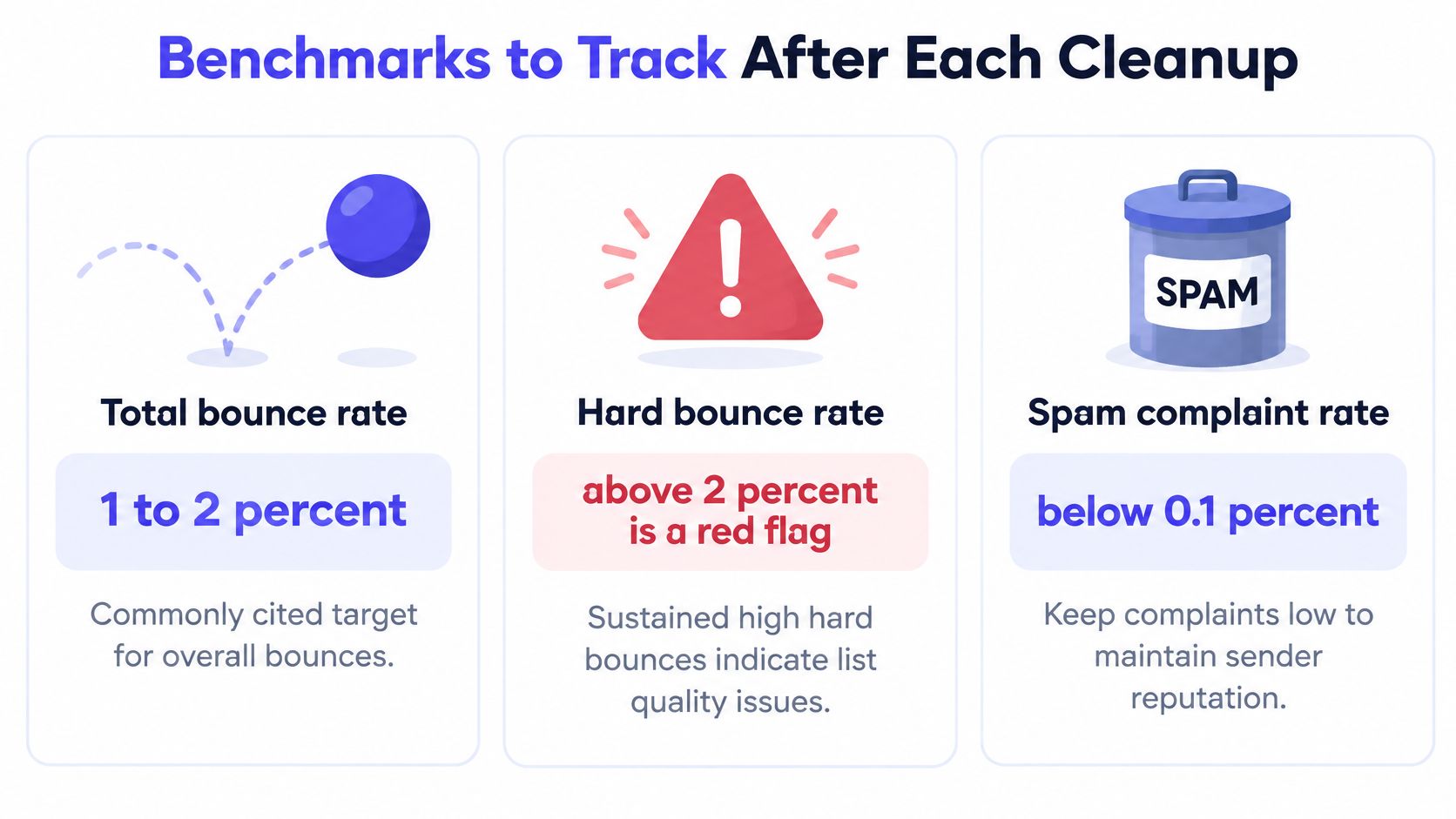
A cleanup you can't measure is a guess with a CSV attached. Acoustic's email marketing metric guidance puts the commonly cited operational target at a total bounce below roughly 1% to 2%, and treats a sustained hard-bounce rate above 2% as a deliverability warning. Neither figure is a universal guarantee. Bounce rates move with acquisition source, sending infrastructure, industry, and whether soft bounces are folded into the total.
| Metric | Reference value | Source or context |
|---|---|---|
| Total bounce rate | Roughly 1% to 2% as a commonly cited target | Acoustic operational target; shifts with source, infrastructure and industry |
| Hard bounce rate | Sustained above 2% signals a deliverability warning | Benchmark material, not a universal guarantee |
| Unknown-user rate, 2025 average | 1.46% | Hard bounces from nonexistent addresses, Validity deliverability figures |
| Average hard bounce rate, 2025 | 0.21% | Mailchimp-platform data analyzed by Mailerio |
| Average soft bounce rate, 2025 | 0.70% | Same Mailerio analysis of Mailchimp-platform data |
| Spam complaint rate ceiling | Below 0.3%, with 0.1% or lower as the safer target | Gmail and Yahoo bulk-sender guidance |
| Average spam complaint rate, 2025 | 0.06% | Validity benchmark across tracked senders |
Those reference points only mean something against your own baseline. A hard-bounce rate that sits high relative to that baseline, or that rises from one cleanup to the next, deserves investigation even when it stays under the 2% reference. Purchased lists often run hotter than lists built from organic signups, so compare sources separately instead of judging the whole file against one market average.
Close the loop with a holdout group
Track five numbers after every cleanup: hard-bounce rate, soft-bounce rate, acceptance rate by verification class, false-positive complaints, and conversion loss from rejected signups. Then compare campaign outcomes against a holdout group, split by source and by verification class.
A verified address can still bounce or get filtered. Each class has to feed a sending policy: suppress, throttle, or send. Real-time checks at signup, plus periodic bulk revalidation, are the maintenance cycle that holds, because domains change configuration, mailboxes get abandoned, and throwaway addresses keep appearing.
Test the process against the four failure modes that cause most of the damage: treating MX existence as proof of a mailbox, assuming SMTP acceptance means the message will land, deleting every catch-all address, and trusting a vendor's valid label without reading the reason code behind it.
Keep an audit record for each batch and apply idempotent updates, so a repeated check can never re-enable a contact you already suppressed. For the sending-side mechanics behind these thresholds, reducing your email bounce rate walks through the same metrics once the list is back in a campaign.
Confirm the List Is Clean Before Your Next Send
Turn the checks into a go or hold decision, and make it a gate rather than a discussion.
- Invalid addresses removed. Syntax failures, null MX domains and definitive SMTP rejections are out before the send is scheduled.
- Catch-all and risky addresses held. They sit in a review queue, not in the campaign.
- Complaint rate inside the ceiling for each major mailbox provider. One provider breaching it is enough to hold the send.
- An audit record exists for every batch. Address, timestamp, DNS result, class and final action, all retrievable.
If any item fails, hold the send and rerun the affected segment. Mailing through a known problem just to hit a calendar date trades one campaign for weeks of reputation damage.
The cheapest next step is a sample. Run a few hundred addresses from your current list through verification and count each class before commissioning a full cleanup. Mailbeam's free plan includes 1,000 verifications per month and doesn't require a credit card, which is enough to see the shape of the problem.
For a large list, submit the whole file as a batch, receive a webhook when processing finishes, and export the deliverable, risky and undeliverable segments as separate files.
Then put revalidation on a schedule. Run bulk checks quarterly, and always rerun before a large send to a list that hasn't been touched in months.
List checking is a decision system, not a delete button, and Mailbeam is built to feed that system: real-time verification during signup plus bulk batch checks that return validity, a score and a machine-readable reason for every address, so your team can route each result to the right policy instead of guessing. Start with a sample of your current list and count how many addresses land in each class before a single message goes out. Visit Mailbeam to run that first check.