53% of surveyed senders weren't monitoring blocklists for their sending domains and IP addresses, according to Mailgun's 2025 deliverability report. That's a significant blind spot, but monitoring alone won't prevent the underlying problem. By the time a listing appears, a sender may already have mailed an address they should never have activated or should have stopped contacting.
Learning how to avoid spam traps starts with treating recipient data as an operational system. Control how addresses enter, preserve evidence of permission, retire inactive contacts, and investigate suspicious events by acquisition source. Authentication matters too, but it solves a different problem: proving who sent a message doesn't prove anyone asked to receive it.
Table of Contents
- Which Trap Types Cause Hits and How to Block Each
- How to Capture Only Permissioned Addresses
- How to Clean an Existing List Before Any Campaign
- Handling Risky Addresses Without Losing Real Users
- Sending Cadence and Inactivity Rules That Protect Your List
- Monitoring Metrics and How to Respond to a Trap Hit
- Run a Trap-Risk Audit on Your List This Week
Which Trap Types Cause Hits and How to Block Each
In Validity's 2021 analysis, approximately 72% of observed spam-trap hits came from recycled addresses, around 20% from typo traps, and about 8% from pristine traps. Those are shares of hits in that analysis, not the probability that an address in your database is a trap.
Recycled traps were once legitimate mailboxes. Their owners stopped using them, and operators later repurposed them to identify senders who kept mailing stale databases. A subscriber's original permission doesn't establish that the mailbox remains appropriate to contact indefinitely.
Typo traps exploit address-entry mistakes, including misspelled provider domains. Pristine traps are created specifically to expose unsolicited or poorly permissioned collection. Although pristine traps represented the smallest share in this dataset, a hit can have serious reputation consequences because it points toward an acquisition failure.
Match the control to the entry route
Trap types, shares and prevention controls
| Trap type | Share of observed hits | How it gets in | Main prevention control |
|---|---|---|---|
| Recycled | About 72% | Once valid, went dormant, then repurposed | Sunset inactive contacts and suppress hard bounces |
| Typo | About 20% | Misspelled domain at signup or import | Validate at capture and offer domain corrections |
| Pristine | About 8% | Created to expose non-permissioned collection | Confirmed opt-in and audit of every acquisition form |
Screening reduces risk; it doesn't guarantee a trap-free list. Traps aren't publicly labeled, and an address that accepts mail isn't necessarily an address you should contact.
Use any available trap intelligence to narrow your investigation, not to hunt for a single suspicious-looking recipient. Match affected campaigns to their source forms, import batches, contact ages, and sending systems. If trouble concentrates in an old CRM export, tightening signup syntax checks won't fix that batch.
Likewise, a spike associated with a new acquisition form calls for a different response from trouble associated with dormant subscribers. Inspect whether the form activates addresses before confirmation, whether bots can submit repeatedly, and whether integrations preserve subscription status.
A successful mailbox check answers a technical question. It doesn't answer whether you have permission or whether that permission is still operationally useful.
The practical takeaway is that spam-trap prevention is a list-maintenance problem first and a validation problem second. Capture checks prevent avoidable mistakes, but ongoing suppression determines whether old mistakes keep receiving campaigns.
How to Capture Only Permissioned Addresses
A form submission should create a pending subscription, not an immediately marketable contact. M3AAWG's spam-trap guidance emphasizes auditing address collection, maintaining suppression controls, and reviewing imported or otherwise unverified lists rather than treating validation as sufficient protection.
Build the permission workflow into every acquisition route, including embedded forms, account settings, event registrations, and administrative imports.
Make activation conditional on permission
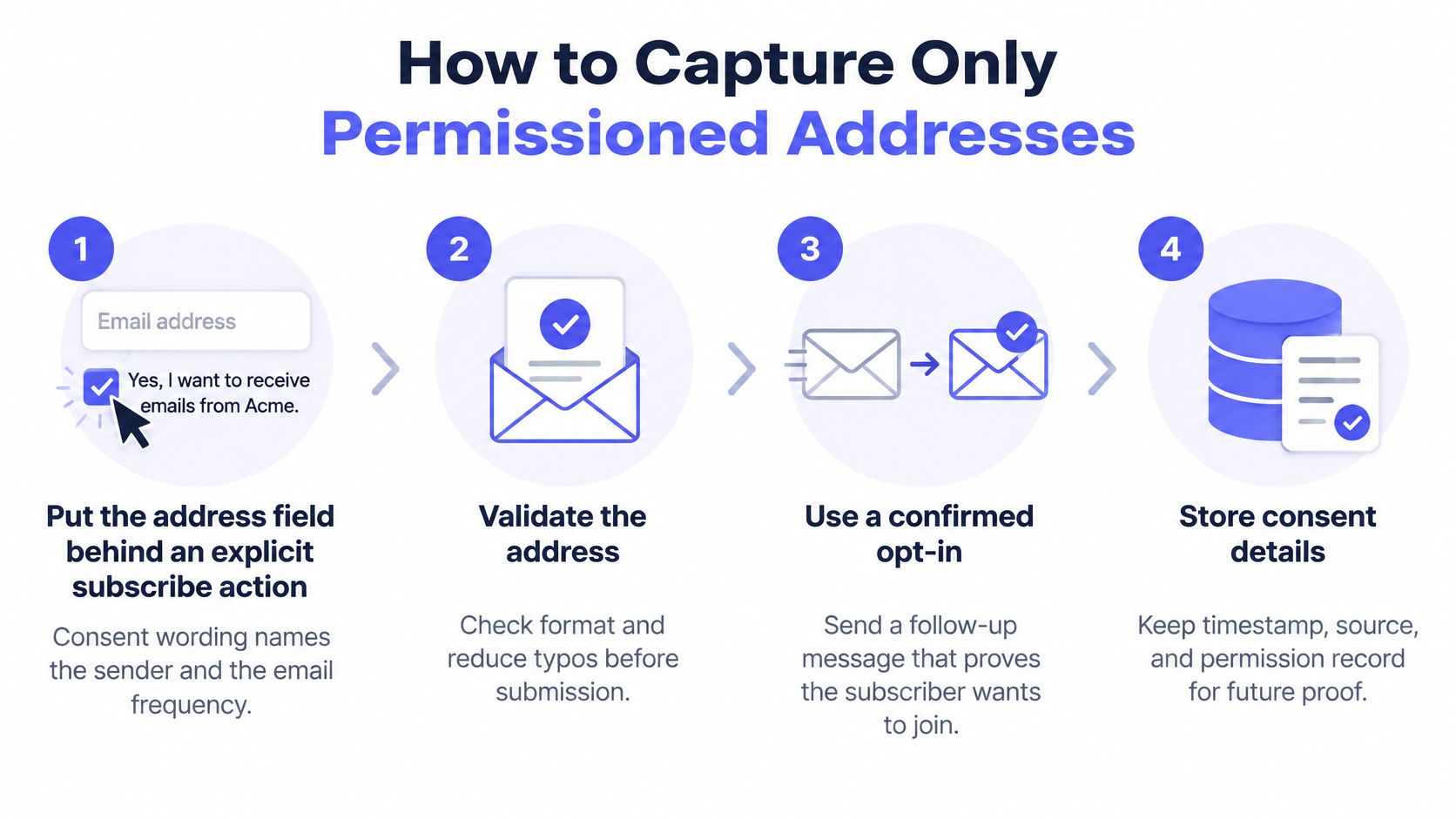
Require an explicit subscribe action. Name the sender and describe the intended email frequency beside the address field. Don't assume that creating an account or downloading a document grants newsletter permission.
Validate at submission. Check syntax, domain existence, and disposable status before triggering email, then apply your product's risk rules. A common failure is validating the public form while leaving a mobile client or integration free to bypass the same checks.
Offer corrections without changing addresses without notice. If someone types gmal.com, suggest gmail.com and let them accept or reject the correction. Automatically rewriting an address can direct messages to a mailbox the user never intended.
Require a confirmation click before activation. A double opt-in workflow separates a submitted address from a confirmed subscription. Don't skip confirmation merely because a returning user already has an account, especially if they've changed their address.
Store the evidence with the record. Keep the source form, submission timestamp, applicable consent wording, and confirmation event. Preserve those fields through CRM synchronization rather than replacing them with an unexplained subscribed flag.
Exclude unconfirmed records from campaigns. Give pending subscriptions an expiry policy and ensure campaign queries explicitly require confirmed status. An import tool that defaults every contact to active can undo the entire workflow.
The capture process should remain understandable to both engineers and marketing operators.
Measure confirmed subscribers, not submissions
Confirmation reduces the chance that typo addresses, bot-generated submissions, or addresses entered without the owner's knowledge become active recipients. It does introduce friction: some legitimate people won't finish subscribing. That's a real acquisition trade-off, but counting unconfirmed submissions as subscribers hides risk rather than creating usable reach.
If you're comparing campaign platforms, TopToolAdvisor's email marketing picks can help build a shortlist. Evaluate each option against your actual workflow: pending states, confirmation enforcement, suppression portability, and consent-field exports.
Track confirmation rate by acquisition source. A weak rate on a particular form should trigger checks for confusing copy, broken confirmation delivery, mistyped addresses, or automated abuse. Keep complaint and unsubscribe suppression records permanently, and suppress hard bounces immediately so later imports can't reactivate them.
How to Clean an Existing List Before Any Campaign
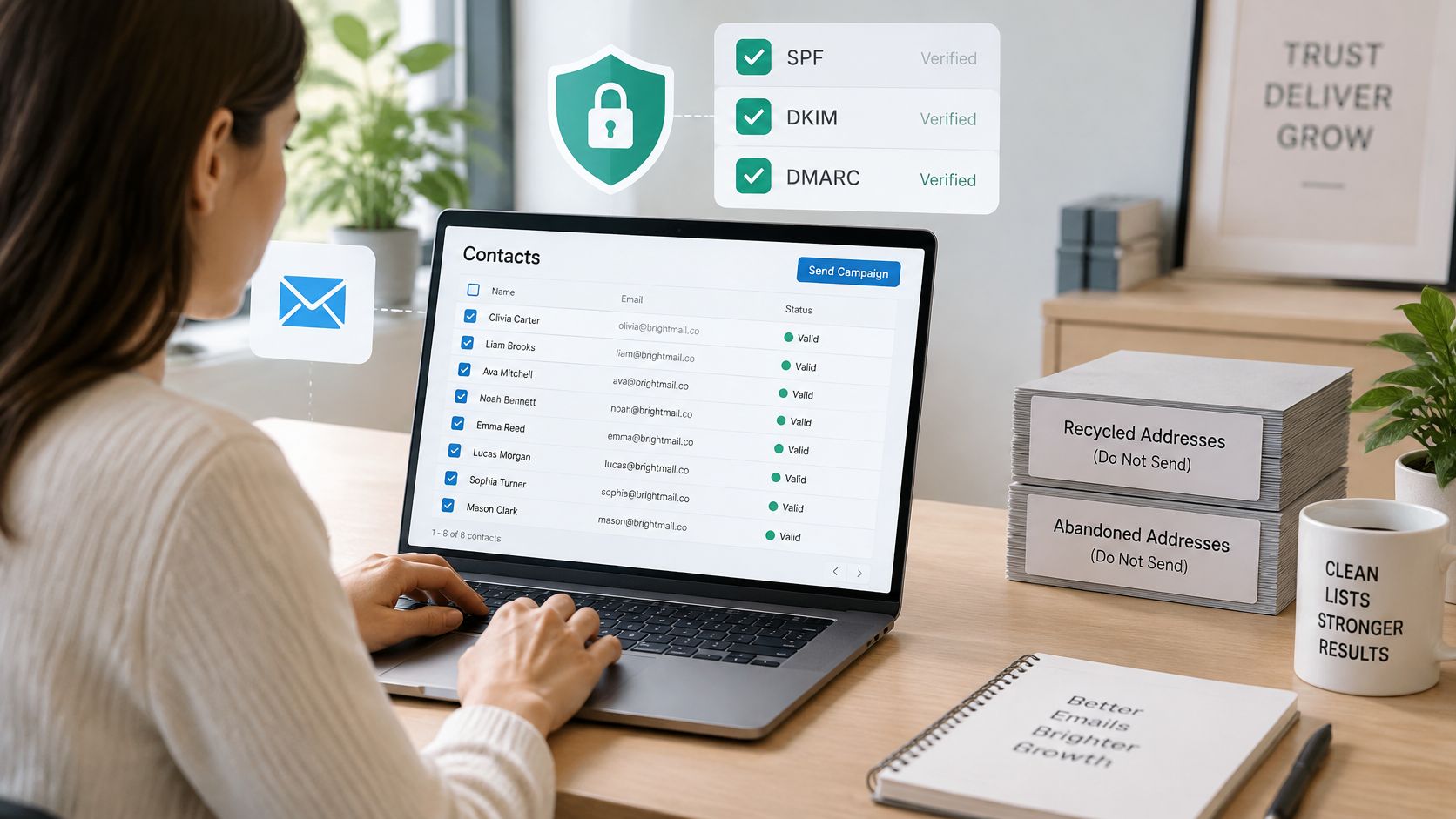
SPF, DKIM, and DMARC establish sender identity, not recipient consent. As Suped's explanation of spam traps makes clear, authentication can't prevent an authenticated sender from mailing recycled, scraped, or abandoned addresses. Repairing authentication doesn't repair a bad list.
Start with a working copy of your contact data, while keeping the original export available for investigation.
Clean provenance before deliverability
Audit each source. Attach collection origin, collection date, and permission evidence to every address. If a record says only imported, identify the actual file, system, event, or partner behind that import.
Quarantine unreviewed batches. Keep purchased, legacy, and unexplained imports outside campaign eligibility while you inspect them. A vendor's assertion that contacts are verified doesn't establish permission to receive your messages.
Verify records you're otherwise entitled to keep. Separate confirmed undeliverable, disposable, role-based, catch-all, and uncertain results. Preserve the reason codes so an engineer can implement the correct action instead of collapsing every result into invalid.
Resolve failed audits by segment. Compare acquisition source, age, engagement, bounce history, and import batch before deciding whether to suppress or seek renewed permission. Don't send a re-permission campaign to scraped or unknown-provenance addresses merely to discover whether anyone objects.
Apply suppression before rebuilding campaign audiences. Reconcile complaint, unsubscribe, and hard-bounce records against the cleaned list. Check that scheduled automations and downstream CRMs consume the updated state rather than yesterday's export.
The distinction between quarantine and suppression matters. Quarantine holds records while you investigate; suppression makes an explicit sending restriction enforceable. Give each status an owner and a release condition so a temporary holding segment doesn't become a future campaign audience.
Preserve the decision trail
Use a documented email-list cleanup process to write results back into the source of truth. Useful fields include verification outcome, review status, suppression reason, reviewer, and review date.
The accompanying video offers another format for reviewing the topic.
Spam-trap screening doesn't replace list hygiene. Permission-based collection, double opt-in, and pruning unengaged contacts remain necessary even when a batch receives reassuring verification results.
After cleanup, compare hard-bounce behavior with the previous comparable campaign, keeping acquisition source and recipient domain visible. A lower aggregate rate can conceal a problematic batch if another segment performs well. If you already have a suspected trap incident, keep that segment paused until you've investigated its entry route and corrected the process that admitted it.
Handling Risky Addresses Without Losing Real Users
Risky doesn't mean spam trap. Disposable, role-based, free-provider, catch-all, and long-inactive addresses aren't interchangeable categories, and none is proof of a trap by itself. The practical distinctions in emailvalidation.io's deliverability guide support a graduated response rather than blanket rejection.
A catch-all domain can receive mail for real customers. A role address can be a legitimate business contact, while a temporary mailbox may suit a short-lived test. Choose an action based on the product context and the strength of the evidence.
Risky address cases and graduated actions
| Address case | Example | Recommended action |
|---|---|---|
| Confirmed undeliverable | Mailbox definitively fails the SMTP existence check | Hard-block at signup and suppress from sends |
| Disposable throwaway | Mailinator, YOPmail, Guerrilla Mail | Block at signup where abuse risk is material |
| Role-based | info@, noreply@, admin@ | Require confirmation or suppress from marketing; allow for B2B accounts |
| Catch-all domain | Accepts mail even for unknown mailboxes | Use the score field and require confirmation; never block on this alone |
| Free provider | gmail.com, outlook.com | Permit after the user confirms ownership |
| Long inactive | No opens or clicks for a long period | Suppress from campaigns; inactivity isn't proof of a trap |
Use scores to decide, not just flags
Use the score field alongside individual check results to distinguish uncertainty from confirmed failure. Our policy is never to block a user solely on catch_all_unverifiable. Blocking signups on confirmed undeliverable results is safe; blocking on unknown results turns away real users.
An SMTP timeout or ambiguous response isn't the same as a definitive mailbox rejection. Give uncertain users a recoverable path, such as confirmation or a retry, rather than presenting an inaccurate address-doesn't-exist error.
Product rule: Every rejection should have a reason the user can understand and an appropriate way to correct it.
Say a business customer registers with an info@ address. If the product supports shared business accounts, allow the signup after ownership confirmation rather than rejecting it solely because it's role-based.
By contrast, a throwaway address from a known disposable provider can be blocked at the form when account abuse is a material concern. Explain that a persistent address is required for that product; don't claim the address is a spam trap.
Write these decisions into signup rules before launch. Specify what gets blocked, what needs confirmation, what goes to review, and what remains excluded from marketing. Consistent rules protect legitimate users without forcing support staff to improvise exceptions.
Sending Cadence and Inactivity Rules That Protect Your List
Begin a new or reactivated segment with its most recently engaged recipients, not the full audience. Compare complaints and hard bounces with a comparable prior sending period, then widen eligibility only if results remain stable. Keep the content and offer reasonably consistent so you can distinguish an audience-quality problem from a campaign change.
A smaller send isn't a way to make an unpermissioned list acceptable. Staged sending is appropriate only after you've established eligibility to contact the audience. Don't use low volume to test whether a purchased batch attracts complaints.
Give inactive contacts a defined end state
Consider a hypothetical newsletter program that uses a quarter without recorded clicks or meaningful activity as its review window. Contacts crossing that window enter a short re-engagement sequence, provided they still have a defensible permission history and no incident-related exclusion.
Tell them what they'll receive and offer a clear way to remain subscribed. Those who don't respond leave campaign audiences. Preserve the suppression decision so an old export doesn't put them straight back into circulation.
Use more than opens alone when deciding whether someone is engaged. Clicks, replies, preference updates, and relevant account activity can help distinguish a quiet subscriber from a record with no meaningful relationship to your service.
- Frequent promotional sends: Review disengagement promptly because recipients have repeated opportunities to respond.
- Monthly newsletters: Evaluate inactivity against the actual number of messages recipients had a chance to receive.
- Seasonal programs: Consider the buying or renewal cycle rather than copying another sender's calendar.
- Dormant segments: Review permission and history before attempting re-engagement, then restrict any restart to eligible recipients.
Keep campaign suppression separate from account access
A customer who stops reading marketing emails may still need receipts, security notices, or password resets. Don't turn a marketing sunset decision into account deletion or indiscriminate suppression of necessary transactional mail.
Assign an owner to each inactivity rule and test the exclusion in scheduled campaigns. The useful same-day rule is simple:
Don't increase volume to a segment whose engagement deteriorated in the last comparable sending cycle.
Hold volume steady or reduce it while you investigate. Sending more messages to compensate for weaker response increases exposure without resolving why recipients stopped engaging.
Monitoring Metrics and How to Respond to a Trap Hit
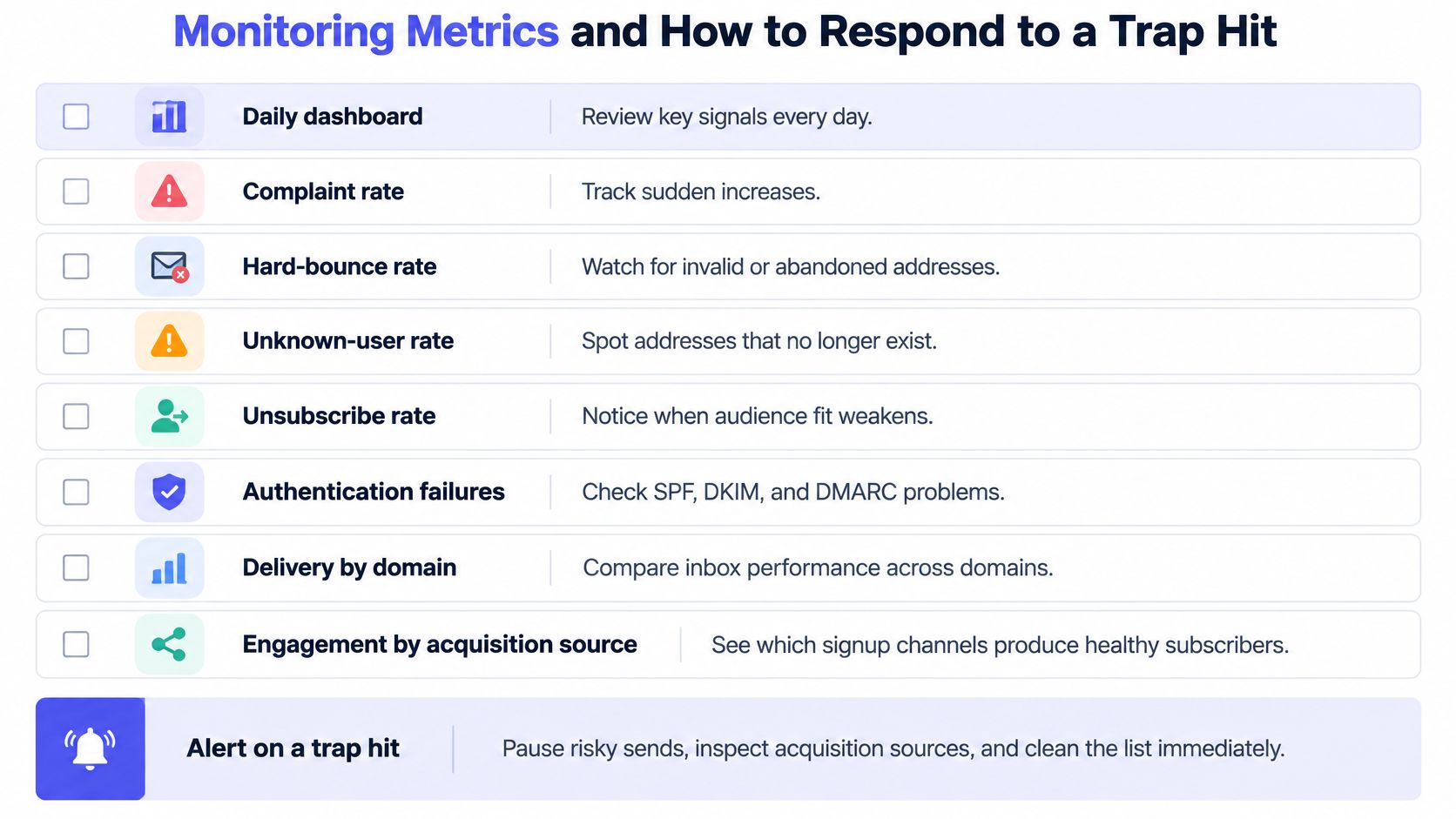
Review a daily dashboard that keeps recipient behavior separate from sending-infrastructure failures.
- Complaint rate: Identify sudden increases by campaign and source.
- Hard-bounce rate: Inspect definitive failures by batch.
- Unknown-user rate: Locate sources producing nonexistent recipients.
- Unsubscribe rate: Watch for weakening audience fit.
- Authentication failures: Check SPF, DKIM, and DMARC alignment.
- Delivery by domain: Separate provider-specific problems from broad deterioration.
- Engagement by acquisition source: Identify unhealthy acquisition channels.
Configure SPF and DKIM, publish aligned DMARC, and separate marketing from transactional streams. These controls protect sender identity and operational continuity; they aren't evidence of recipient permission.
Set alerts before you need them
Daily monitoring thresholds and responses
| Metric | Alert trigger | First response |
|---|---|---|
| Spam rate | Reaches the provider limit stated below | Pause the affected source |
| Hard-bounce rate | Exceeds the segment's documented normal range | Suppress the hits and audit the batch |
| Unknown-user rate | Rises sharply against the source's baseline | Re-verify the source before the next send |
| Unsubscribe rate | Exceeds the comparable campaign baseline | Review content and cadence for the segment |
Set internal alerts early enough to act before reaching provider limits. Our email deliverability explainer provides context for interpreting these signals together rather than treating every delivery decline as proof of a trap.
Keep the response checklist visible to the people who can pause sends.
Respond in order
- Pause the affected source or segment, including scheduled automations.
- Preserve event data, campaign membership, import identifiers, and provider responses.
- Audit collection and validation, including integration paths that bypass normal controls.
- Notify affected customers when your platform manages their sending.
- Resume with a smaller engaged cohort only after correcting the source.
A trap hit is a data-quality incident, not an instruction to change subject lines or rotate domains. Fix the source before restoring volume.
Recovery requires sustained behavior: Google's sender guidelines require spam rates below 0.3%, and Gmail states that bulk senders regain mitigation eligibility only after staying below that level for seven consecutive days. A clean day isn't proof of recovery.
Run a Trap-Risk Audit on Your List This Week
Make the audit a release gate for your next campaign, not an open-ended spreadsheet exercise. Give someone responsibility for the export, someone authority to suppress segments, and someone responsibility for fixing acquisition defects.
The deliverable is a clear record of which contacts remain eligible, which sources need review, and which workflows must change.
Turn findings into enforceable decisions
Export the fields needed to explain each record. Include acquisition source, signup date, permission status, last engagement, bounce history, and import identifier. Keep original values intact so you can trace later decisions.
Screen the entire list for trap risk. Mailbeam's batch endpoint can evaluate the whole list and return a risk level for each address. Treat that result as a prioritization signal rather than a definitive label.
Combine screening with your own engagement signals. Use never-opened and never-clicked indicators alongside permission history and source quality. A concerning result on an unexplained legacy import deserves a different decision from uncertainty on a recently confirmed subscriber.
Apply suppression by segment and record the reason. Write decisions back into campaign eligibility, not just an analyst's worksheet. Keep source-level findings so you can identify whether the problem began in a form, import, or integration.
Start daily monitoring within the same week. Confirm that someone receives alerts and can pause scheduled sends. An unattended dashboard doesn't provide an operational safeguard.
Schedule the next audit before closing this one. Include reviews after imports, acquisition changes, and unusual delivery events. Don't assume an approved list stays suitable as contacts age and sending patterns change.
Handle verification data deliberately
We don't store email addresses sent for real-time verification after verification completes. For EU teams with strict data-handling requirements, that non-retention policy is relevant, but it doesn't replace reviewing processing locations, access controls, and the separate handling of batch files.
Record what left your system, which workflow processed it, and where the results were written. Avoid distributing complete contact exports to people who only need source-level findings.
Choose which acquisition source to pause first today. Start with the source you can't explain or the segment showing the clearest deterioration, then require evidence before restoring its campaign eligibility.
Mailbeam offers real-time email verification and batch spam-trap risk screening to help you keep questionable addresses out of signup flows and campaign audiences. Visit Mailbeam to screen your next list, then combine the results with consent records and engagement signals before deciding what to send.