
A password reset should be the easiest email your product sends. Yet a user reports that it landed in spam, even though your team sends only a small number of messages and the address is correct. Before rewriting the template or asking the user to check for typos, separate two questions: can this recipient receive mail, and can inbox providers verify and trust your sending domain? They're different problems, and fixing one won't automatically fix the other.
Table of Contents
- Why Good Mail Still Lands in Spam
- Authenticate Every Sending Service
- Keep Complaint Rates Under Control
- Write Mail People Want to Open
- Clean Addresses Before You Send
- Find the Real Reason for Spam Placement
- Put a Deliverability Routine in Place
Why Good Mail Still Lands in Spam
A real signup address doesn't prove that your product's mail will reach the inbox. The recipient's address can be valid while the sending service lacks an authentication record, uses a domain that doesn't align with the visible From address, or has earned complaints from people who didn't expect the message.
Inbox placement depends on several signals working together. Providers check whether the sending domain authorized the message, but they also respond to complaints, content, list quality, and recipient engagement. A polished logo and a familiar product name can't repair a missing authorization record. Likewise, authentication doesn't guarantee that a person wants the message.
Low volume doesn't mean no risk
Small SaaS, fintech, and developer teams often assume that authentication matters only once they reach bulk-sender volumes. That's a risky assumption. Google says unauthenticated messages can receive temporary or permanent failures, or be placed in spam, and recommends authentication more broadly. A low-volume password reset can still be affected by sender-side configuration even when the address is genuine. Google's sender guidelines
Start by sorting the failure rather than changing everything at once. If an address is invalid, a verification problem may be the cause. If it's a real address but the message is filtered, check the sending side: authentication and alignment first, then infrastructure, complaints, content, and engagement. A user's report that a message is “missing” is a reason to investigate, not proof that a typo or spam-trigger word caused it.
A clean address can reduce undeliverable sends, but it can't authorize your mail domain. That distinction matters most for transactional mail: the message may be expected and important, but receiving providers still need to assess who sent it and whether recipients trust it.
Authenticate Every Sending Service
Receiving providers need to verify that your domain authorized a message and that it wasn't altered in transit. Start with a complete inventory, not a DNS change. List every service that sends as your domain, including transactional, marketing, and support platforms, and note which sending domains or subdomains each one uses.
An overlooked billing vendor can fail authentication even if your primary mail system is configured correctly. The failure may affect only invoices or receipts, which makes it easy to blame the wrong platform.
Build the records in a controlled sequence
Publish one consolidated SPF record. Include every legitimate sender in a single record. Multiple SPF records can cause authentication problems, and SPF has a ceiling of 10 DNS-lookup mechanisms under RFC 7208. Don't keep appending vendors indefinitely. Restructure or flatten authorization when needed.
Enable DKIM for every mail stream. Ask each provider to sign the mail it sends for you, using a 2048-bit key where supported. Signing only the marketing platform leaves transactional or support mail with a gap.
Publish DMARC in monitoring mode. Begin with
p=none, configure aggregate reporting, and align the policy to the visible From domain. Review reports for unknown senders and alignment failures before applying enforcement.Test representative mail and confirm alignment. Send messages to Gmail, Yahoo, and Microsoft accounts. Check that SPF or DKIM authenticates and that at least one aligns with the visible From domain.
Gmail requires bulk senders to use both SPF and DKIM, with the visible From domain aligned to at least one. Its guidance also recommends DMARC, which gives domain owners a way to specify how receivers should handle authentication failures and provides reporting for troubleshooting. These requirements became especially prominent when Gmail and Yahoo introduced stronger bulk-sender requirements in February 2024. Google's authentication and sender guidance
Keep DMARC in monitoring mode until legitimate sources pass alignment checks. Then consider moving toward quarantine or reject. If you're tracking down a specific configuration failure, use this guide to common email authentication errors.
Keep Complaint Rates Under Control
A password reset can pass SPF, DKIM, and DMARC checks and still draw a spam complaint if it reaches the wrong person or arrives after an account relationship has ended. Authentication verifies the sending domain. Complaint rates measure recipient reactions, so a clean address does not repair a domain's reputation.
Gmail advises senders to keep their spam rate below 0.1% and avoid reaching 0.3%. For bulk senders, a reported rate at or above 0.3% can make them ineligible for mitigation until the rate remains below that level for seven consecutive days. Treat these figures as warning thresholds, not targets. Gmail's Postmaster Tools guidance
| Signal | Limit | Operational response |
|---|---|---|
| Gmail spam rate | Keep below 0.1% | Check the campaign, audience, and signup source when the rate rises. |
| Gmail bulk-sender mitigation eligibility | Avoid 0.3% or higher; remain below the threshold for seven consecutive days to regain eligibility | Pause or narrow the affected sends, then track the rate. |
| Commercial email opt-out | Honor requests within ten business days | Make opting out clear and suppress requests promptly. |
Make consent and suppression part of the workflow
For SaaS and fintech services, separate product-triggered mail from promotional campaigns when monitoring complaints. A small number of complaints on low-volume transactional mail can point to a mismatched event, such as an alert sent to an old or shared address. For larger campaigns, break results down by audience and acquisition source before changing every sending stream.
Collect affirmative consent, identify the sender clearly, and set expectations about message type and frequency. Suppress hard bounces and consider reducing or stopping marketing to people who have not engaged for a long time. Give recipients a prominent one-click unsubscribe, so they can leave without reporting spam.
U.S. CAN-SPAM rules require commercial messages to include a clear opt-out notice and working mechanism, and require senders to honor requests within ten business days. Legal compliance does not guarantee inbox placement. Delayed suppression can turn an unsubscribe request into a complaint and affect later campaigns.
Review complaint patterns by recipient domain, campaign, signup source, and sending stream. If complaints cluster around one signup form, fix that acquisition path; if they rise across streams, investigate the domain's broader reputation.
Write Mail People Want to Open
A fintech receipt can be legitimate and still confuse someone if its subject line reads like a promotion. A SaaS digest sent daily may frustrate users who expected a weekly summary. A support follow-up can look suspicious if the sender name differs from the brand a customer remembers from signup.
Make identity and purpose immediately clear. Use a stable From name and address, write a subject that matches the message, and state near the top why the recipient is getting it. If someone opens a receipt, they shouldn't have to search for the purchase or account event that prompted it.

Match the message to the relationship
Keep transactional messages distinct from marketing. A password reset shouldn't be buried in promotional creative, and a promotional campaign shouldn't make the identity of an important security alert harder to recognize. Different streams also make it easier for your team to investigate whether the problem is specific to a campaign or affects product mail.
Send to people who recently opted in or used the product, and tailor the message to what they signed up for. If a segment goes quiet, consider reducing its frequency before removing it. But don't keep mailing a list just because someone uploaded it: having a contact record isn't evidence that a person expects your messages.
If a recipient can't tell who sent the message and how to stop it within a few seconds, the message is asking for confusion.
For a new campaign, read the first screen as a recipient would. Does it identify the sender? Does it explain why the message arrived? Is the subject an accurate preview of the body? When you're ready to inspect how the actual message is put together, this email marketing walkthrough offers another view.
Clean Addresses Before You Send
Address verification and sender authentication solve different problems. A verifier can help identify an address that's likely to bounce; it can't add SPF, sign DKIM, or reduce complaints from people who consider the message unwanted.
You can allow any string through a signup form and clean the list later. That's simple at first, but invalid and disposable addresses can accumulate before your next campaign. You can also build your own checks using syntax validation and DNS or SMTP probes, but those checks need ongoing maintenance. A managed verification service can run checks during signup and during periodic list cleaning, though the result still needs sensible product rules. For a deeper explanation of recurring list maintenance, see this guide to email list hygiene.
Choose the right point to check
A useful verification response can include whether an address is valid, a numeric score, and a machine-readable reason. Checks may assess syntax, MX records, SMTP existence, disposable domains, role accounts, free providers, and catch-all behavior. Reason codes can help product teams decide how to respond: block a disposable address, prompt someone to correct a typo, or flag a catch-all result for cautious handling.
Mailbeam offers a real-time HTTP API and web tools for these checks, as well as batch CSV processing, asynchronous cleaning, and webhooks. Its cached or DNS-only paths are around 80 milliseconds, while full SMTP probes take under a second. For teams handling EU data, the service is hosted in Frankfurt, includes a default DPA, doesn't retain single checks after completion, and deletes batch uploads after roughly 72 hours, according to its product information.
| Approach | What it can do | Trade-off |
|---|---|---|
| Accept all addresses and clean later | Keeps signup simple | Invalid or temporary addresses can enter the active list before a cleanup run. |
| Build checks in-house | Gives engineering control over validation behavior | Your team maintains the checks and handles ambiguous results. |
| Use managed verification | Provides a reusable check at signup and during list maintenance | You still need to choose how the product responds to risky or uncertain results. |
Use signup checks when you need to prevent disposable or undeliverable addresses from entering an account flow. Run list cleaning before broader sends to find older records that may no longer be usable. In either case, verification reduces the risk of undeliverable sends; it doesn't fix sender-side reputation or authentication.
Find the Real Reason for Spam Placement
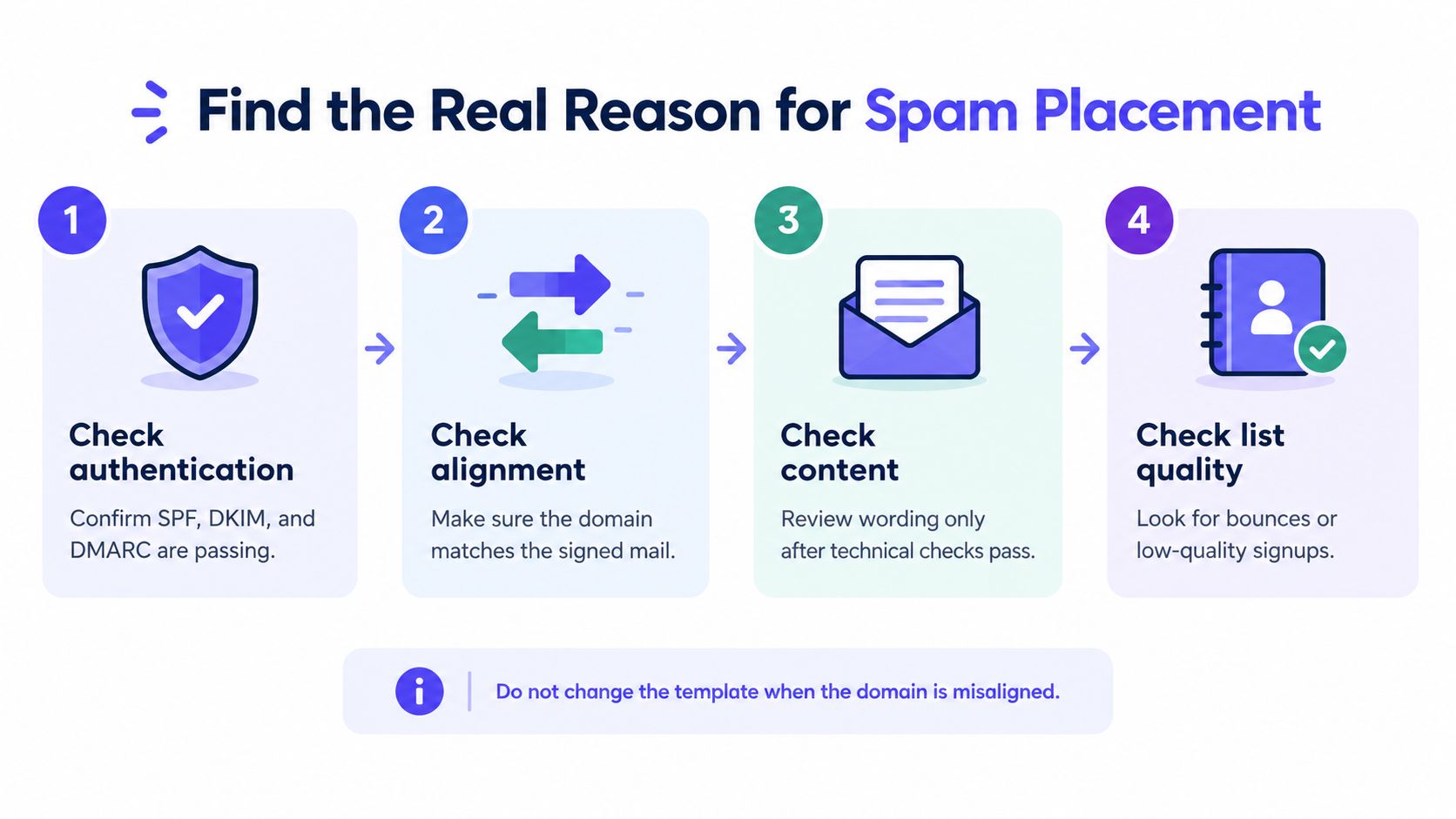
When a message lands in spam, changing its wording first is tempting because the template is visible and easy to edit. But if the sending domain isn't aligned, a subject-line rewrite doesn't address the failed signal.
Investigate one layer at a time
Test representative messages at major providers. Send examples to Gmail, Yahoo, and Microsoft recipients. Check whether SPF or DKIM authenticated and whether it aligned with the visible From domain.
Review the configuration for common omissions. Look for multiple SPF records, a vendor missing from the sender inventory, DKIM enabled on only one stream, or a DMARC policy that doesn't cover the relevant subdomains.
Check basic infrastructure and identity. Confirm that forward and reverse DNS are valid and that the From domain is consistent across the affected mail stream. These details can be overlooked by a low-volume team that rarely troubleshoots delivery.
Inspect complaints and acquisition source. If authentication and infrastructure check out, see whether a campaign, form, or sending stream is attracting unwanted responses. Narrow the cause before replacing the template.
Check the recipient record. Determine whether the address was valid, disposable, or a role account. A recipient-side problem can explain an individual failure, but it doesn't establish that the sending domain is healthy.
The stronger Gmail and Yahoo bulk-sender requirements introduced in February 2024 put authentication, domain alignment, and easy unsubscribing in sharper focus. But passing those checks doesn't guarantee inbox placement if complaints, content, list quality, or engagement are poor. For a structured way to check where messages land, use these inbox placement testing principles.
Put a Deliverability Routine in Place
Deliverability needs maintenance because sending tools, signup flows, and recipient expectations change. Keep the routine small enough for the people responsible for product mail and marketing to run.
A practical cadence
- Each week, review DMARC aggregate reports for unknown senders, forwarding-related failures, and alignment errors. Keep enforcement in monitoring mode until legitimate sources pass the checks; then consider whether to move toward quarantine or reject.
- Before each campaign, review the spam-rate trend against Gmail's 0.1% guidance and the 0.3% threshold. Suppress unsubscribes and hard bounces before sending.
- When a signup flow changes, confirm that it still tells people who's sending mail and what to expect. Check that any address verification you use fits the signup experience rather than making the form feel broken.
This week, inventory every platform that sends as your domain. Confirm that SPF is consolidated, DKIM covers each sending stream, and DMARC reports reach someone who can investigate them. Then sample the active list with an address verifier before your next broadcast or onboarding launch.
The useful habit is to treat authentication, permission, message clarity, and address quality as separate checks. When placement slips, you'll have a better chance of finding the failed signal without changing every part of the program at once.
Use Mailbeam's Email Verifier or HTTP API to check addresses in signup flows, and its batch tools to clean existing lists before sending. Visit Mailbeam to review the verification options and choose a workflow that fits your product.