
In 2025, Kaspersky recorded more than 144 million malicious or potentially unwanted email attachments, a 15% increase from 2024, according to Kaspersky's reporting on malicious email attacks. That figure counts payloads: the fake invoices, the shared documents, the tracking links. It says nothing about the addresses carrying them, or the addresses already sitting in your signup database.
An email risk score answers a different question. It's a cumulative estimate of how risky a single address is to accept or to mail, built from format checks, domain infrastructure, mailbox responses and abuse signals. It won't tell you whether a message is malicious, and it won't tell you whether the person behind the address is honest. What it tells you is how much evidence exists that the address can receive mail, and how much of that evidence points to a low-quality signup.
That narrower job still matters, because the decisions it feeds are expensive to get wrong. Treat the score as a measurement of reachability and signup quality, then decide, workflow by workflow, which action each result is allowed to trigger.
Table of Contents
- What an Email Risk Score Measures
- The Signals Behind Every Score
- Reading the 0-100 Score Without Overreacting
- SMTP Responses and Reason Codes Explained
- Catch-All Domains and Uncertain Results
- Cleaning an Existing List With Spam Trap Risk
- Choose Block, Allow, Verify or Send Cautiously
What an Email Risk Score Measures
An email risk score is a cumulative estimate, usually on a 0-100 scale, of how risky an address is to accept or to mail. Think of it as a credit score for an inbox: many small observations, weighted and combined, produce one number you can set thresholds on. The number can't explain itself, which is why a workable implementation returns reason codes alongside it, naming the checks that pushed the result up or down.
Volume is why a single lookup can't do this job. Global email volume grew from about 269 billion messages per day in 2017 to roughly 376.4 billion per day in 2025, according to DeepStrike's compilation of spam and email traffic statistics. The estimated spam share fell from 56.63% in 2017 to 45.6% in 2023, before later estimates placed it near 52% in 2025, implying roughly 195 billion unwanted messages daily.
That pattern carries its own lesson. The absolute quantity of unwanted mail can rise even when its percentage of total traffic falls, because overall volume expands faster than the share shrinks. A threshold tuned against 2017 traffic is measuring a different internet.
So the score has two jobs, and they're easy to conflate. It estimates whether an address is reachable, and it estimates whether accepting or mailing it is appropriate for this particular workflow. A signup form, a CRM import and a transactional send each weigh those differently.
Ask two questions of every result: can this address receive mail, and is this the right workflow to accept it in? A number that answers only the first question gets misapplied to the second.
What the score is not matters just as much. It isn't proof that a mailbox exists, and it isn't a character reference for the sender or the person typing the address. Those are separate trust decisions, made with different evidence.
The Signals Behind Every Score
An MX lookup can make a dead mailbox look healthy. The domain accepts mail, the address is formatted correctly, and neither result says whether the person who used it can still receive anything. That gap is why each check needs to be weighted by the kind of evidence it produces.
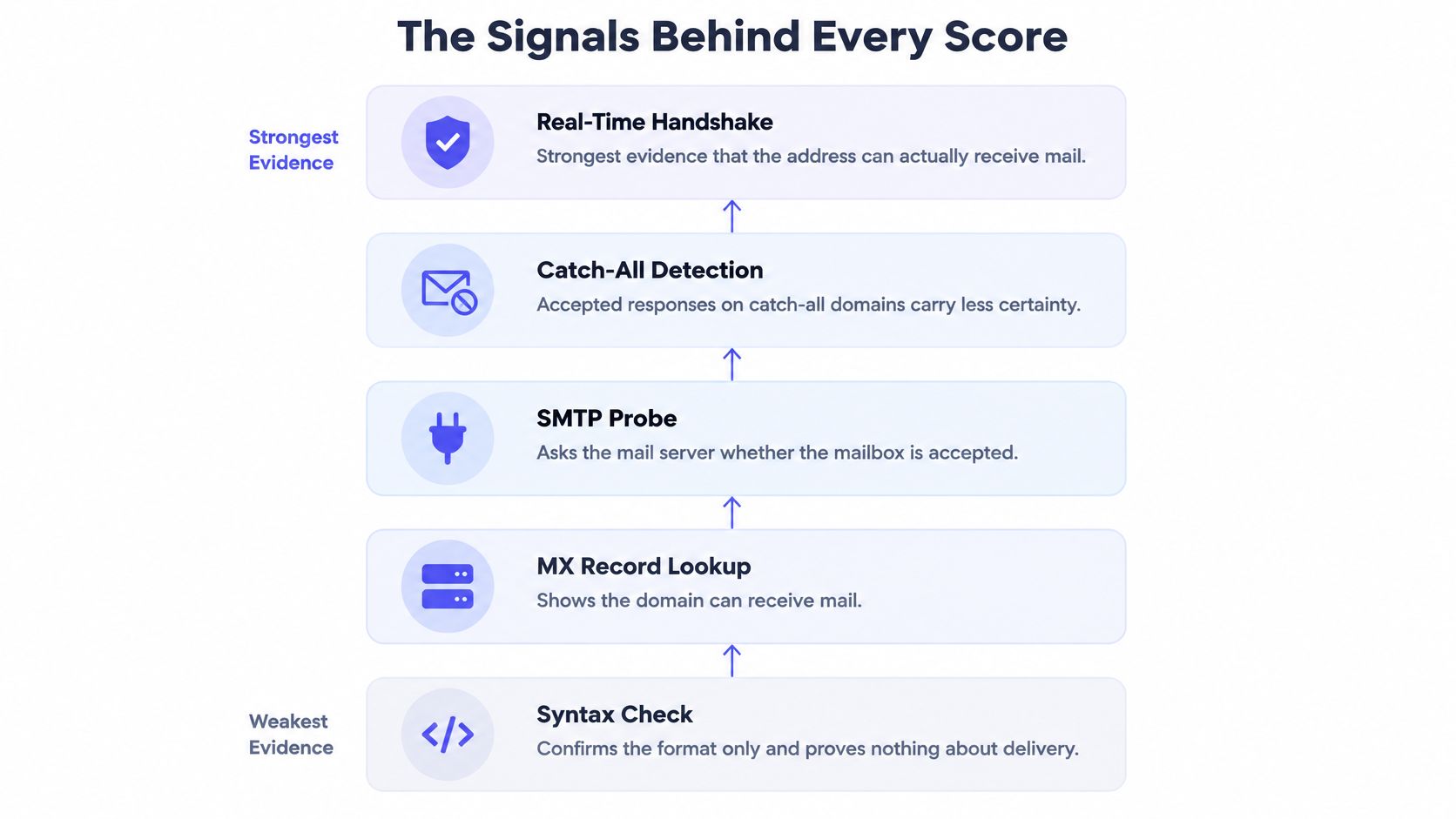
Syntax validation sits at the bottom of the hierarchy. It confirms that the string is shaped like an address and catches typos such as a missing @ or an invalid domain format. Nothing is listening on the other end yet, so a pass has limited value beyond ruling out malformed input.
From Format to Handshake
A domain lookup moves one step further: the domain publishes mail servers, so it can receive mail. It still says nothing about a specific mailbox. A corporate domain can host thousands of live addresses while the one being checked was deleted last week, and the lookup cannot tell the difference.
SMTP probing produces stronger evidence because the receiving server is asked whether it will accept the recipient. That answer carries weight on a normal domain and less on one configured to accept everything. Catch-all detection exists to flag that ambiguity, so the score does not over-read an acceptance that means very little.
Four more signals sit around that core, and each measures something different. Disposable-domain matching describes throwaway signup behavior rather than bounce risk. Role-based classification flags shared inboxes such as info@ or sales@ as a policy question. Authentication records describe domain-level identity and sending policy. Abuse indicators describe likely intent. The table ranks the common signals by what each can establish.
Verification signals and what each one proves
| Signal | What it shows | What it cannot prove | Evidence strength |
|---|---|---|---|
| Syntax check | Address follows a valid format | That the mailbox exists or receives mail | Weak |
| MX record lookup | Domain has mail servers | That a specific mailbox exists | Weak |
| Role-based address | Shared inbox such as info or sales | Who the individual mailbox owner is | Moderate for policy decisions |
| DMARC authentication | Sender domain alignment and policy | That a message or recipient is safe | Partial |
| Disposable domain match | Address uses a throwaway provider | Bounce risk for a permanent mailbox | Strong for signup quality |
| Catch-all detection | Domain accepts any recipient | Whether a specific address exists | Lowers SMTP certainty |
| SMTP mailbox probe | Server accepts or rejects the recipient | Certainty on catch-all domains | Strong when the domain is not catch-all |
Where Authentication Stops Being Useful
DMARC shifted email practice toward policy-based validation of sender identity. Its scope is narrower than a trust decision: a passing result shows that a message aligns with an authenticated sending domain, while a failing result can reflect misconfiguration as readily as abuse. Either outcome leaves the recipient question open.
That makes authentication useful as a consistency check and weak as a standalone safety verdict. A domain can authenticate properly and still submit a disposable address, a role account or a mailbox that no longer exists.
A passing authentication check is evidence about a domain, not a guarantee about a message. A failing one isn't proof of malice either.
Mailbeam's 0-100 score blends these checks rather than giving any one of them veto power. The response also separates the signals into fields such as valid, score, disposable, catchAll, mx, reason and latency_ms, which makes it possible to see whether a result was driven by reachability, signup quality or uncertainty.
The embedded walkthrough below follows an address through those layers in sequence, from format checks to the mailbox response.
When a result surprises you, read the reason code before the number. It names the check that drove the outcome, so a low score caused by syntax points to a different problem than a low score caused by disposable-domain matching. Mailbeam publishes its scoring weights, uses closed reason codes and regenerates its accuracy report on every change, giving you a composite score whose inputs can still be audited.
Reading the 0-100 Score Without Overreacting
A score of 61 doesn't mean the address has a 61% chance of bouncing. It's a ranking of confidence, not a probability, and treating it as one leads teams to set thresholds that look scientific and behave arbitrarily. The number tells you where this address sits relative to everything else the model has seen.
Our recommendation is a threshold of 60 or higher for most use cases. That's a starting line, not a universal answer. A newsletter signup and a payout account should never share the same cut-off, because the cost of a false accept differs enormously between them.
Where the Accept Line Sits
Working outward from 60, a usable first policy looks like this: scores at or above 60 pass with normal monitoring, scores in the 40 to 59 range trigger a confirmation email or a delayed recheck, and scores below 40 go to blocking or manual review in flows where abuse is costly. Write the bands down, assign an owner per workflow, then tune them against real outcomes rather than intuition.
Practical rule: two workflows, two policies. Gate account creation hard, and let list-cleaning accept more risk, because suppression is reversible while a blocked real customer usually isn't.
Two Results Worth Walking Through
Say a signup returns a score of 72. Its MX records resolve, it isn't on a disposable provider, and the only mark against it is that the domain is catch-all. Nothing here justifies rejection, so the address passes and the reason code gets logged for later review.
Now say another signup returns 35. The domain is a throwaway provider and the SMTP probe was rejected outright. That combination isn't ambiguous, and asking the user for a real address is the honest response.
The score alone never explains which of those two situations you're in. Pair it with the reason code or you're guessing.
Catch-all results deserve their own habit. Our guidance is to never block users solely on a catch_all_unverifiable reason, and to let the score field carry the nuance instead. A catch-all domain is a server configuration, not evidence of fraud, and companies with strict mail gateways produce these results constantly.
Log the score and the reason together from day one. Then pull a sample of rejected signups every month and read them. False positives hide in rejection logs, and nobody reports them for you.
SMTP Responses and Reason Codes Explained
The SMTP conversation is the closest thing to direct evidence a verifier gets, and it returns a protocol class, not a verdict. RFC 5321 defines a 550 response as "mailbox unavailable," a category that covers a nonexistent mailbox, a lack of access, and a policy rejection. Those are three different situations behind one code, and all three are permanent.
That's why the reply class belongs in the score as evidence rather than as a boolean flag. Two addresses can both be "not valid" for reasons that call for opposite handling.
Reading 5xx and 4xx Differently
A 5xx reply is the server's final answer. Suppress the address, and do it before enrollment rather than after the first bounce.
A 4xx reply is a different animal. Greylisting, throttling, a provider having a bad afternoon: the mailbox may be perfectly real, and the answer may change on retry. Treating a transient failure as a permanent one discards good addresses and tells real users their email doesn't work.
SMTP results, risk class and handling
| Result | Meaning | Score treatment | Handling |
|---|---|---|---|
| 550 mailbox unavailable | Mailbox nonexistent, no access or policy rejection | High risk | Suppress before enrollment |
| 4xx temporary failure | Transient, may succeed on retry | Deferred, not final | Retry later and do not reject |
| Accepted on a non-catch-all domain | Recipient accepted by the server | Low risk | Allow with normal monitoring |
| Accepted on a catch-all domain | Server accepts any address | Medium, uncertain | Allow cautiously or confirm by email |
| MX present, recipient rejected | Recipient or policy problem | High risk | Verify or block depending on the flow |
| No usable MX records | Domain-level delivery failure | High risk | Block with a clear message |
Why Domain Context Changes the Verdict
A domain with working mail servers that rejects your recipient is a recipient-level or policy problem. A domain with no usable mail infrastructure is a domain-level delivery failure. Same score band, different diagnosis, and a support team that can't tell them apart will send the wrong reply to both.
Catch-all behavior muddies the strongest signal you have. A server that accepts arbitrary recipients returns the same acceptance for a real mailbox and a made-up one, so a 250 reply on a catch-all domain is weaker evidence than the identical reply anywhere else. The score should say so rather than rounding up.
Diagnostic habit: before you write a user-facing error message, check whether the reason code describes the mailbox, the domain, or the provider's mood.
Tell the User Which One Happened
Reason codes should preserve the underlying SMTP class and the diagnostic context that produced it. When they do, a product team can show "check this address" to one user and "try again in a few minutes" to another, instead of a generic failure that sends both of them to support. Our guide to verification reason codes maps the classes to messages worth showing, which is a faster route than inventing the taxonomy yourself.
Catch-All Domains and Uncertain Results
A B2B signup arrives from someone at a mid-sized company, on the corporate domain. The SMTP probe comes back accepted. The score lands at 56, somewhere in the middle, and the growth team wants to know why a working corporate address didn't score cleanly.

The answer is that the server accepted a recipient, not a mailbox. On a catch-all domain, any address gets the same welcome, including ones that were never provisioned. Deliverable and known-valid are not the same claim, and a score that conflates them will overstate its own certainty.
This isn't an edge case. Recent domain-census reporting found that 20.0% of domains tested accepted mail for deliberately nonexistent addresses, according to the Domain Census Infrastructure Report, which is why catch-all behavior limits address-level certainty across a large slice of the business web.
What to Do With a Medium Result
Send a confirmation email and watch whether the address engages. That tests the one thing the probe couldn't. Keep the account, don't flag the user as fraudulent, and let engagement decide what the SMTP reply couldn't.
The instinct to escalate is understandable and usually wrong. A strict mail gateway belongs to a cautious IT department, not a fraud ring. Our walkthrough of how catch-all domains behave during verification covers the variations you'll meet, from servers that accept everything to ones that accept conditionally.
Retention Is Part of the Score Design
Storing raw addresses, probe results and behavioral metadata creates a data-minimization problem for any regulated organization, and a bigger one when scores get reused beyond the purpose they were collected for. A score computed to clean a list shouldn't become a permanent risk dossier on a customer.
Keep scores purpose-bound, attach expiry and recheck guidance, and be conservative with shared inboxes, privacy-protective forwarders and newly created domains, where false positives are most likely to lock out a genuine user.
An explainable result that says "unverified, catch-all domain" is more useful than a confident one that says "invalid" and can't justify it.
Cleaning an Existing List With Spam Trap Risk
Spam traps are addresses that providers and blocklist operators maintain to catch senders who never clean their lists. They're never publicly labeled, which is why screening returns a risk level rather than a confirmed answer. The assessment combines domain status, known trap patterns, provider recycling behavior and syntactic markers, and it leans toward flagging when the evidence is thin. Treat the output as risk reduction, not a guarantee.
The workflow below turns a screening result into a smaller, safer list.
- Screen the whole file through the batch endpoint. Screening an entire list at once returns a comparable risk level for every contact before you decide anything, so you can review the whole file in one pass instead of checking addresses individually.
- Separate the high-risk addresses and read their reason codes. A flagged address on an aged domain with no engagement history is a different problem from one flagged on syntax alone, and the reason code tells you which bucket you're holding.
- Cross-reference against your own never-opened and never-clicked data. A trap flag plus two years of silence is a strong case for removal. A trap flag on a contact who opened something last month deserves a second look first. The risk level narrows the file, and your engagement data makes the final call.
- Suppress the addresses that are both risky and unengaged, and watch the rest. Deleting engaged contacts to satisfy a screen trades a deliverability problem for a revenue problem.
- Put the list on a recheck schedule. DNS records, mailbox state and provider behavior all change, so a clean result has a shelf life measured in months.
Screening doesn't replace list hygiene, and no vendor can do that part for you. Permission-based collection, double opt-in and pruning unengaged contacts remain the foundation, with screening layered on top. If the sending reputation side needs work too, this sender authentication and warm-up playbook covers the configuration and pacing that keep a cleaned list from reacquiring the same problems.
Boundary worth knowing: screening reduces exposure to traps. It cannot certify that an address was collected with consent, and it won't repair a domain that already has a complaint history.
One rule sits above the workflow. Mailbeam's terms prohibit using verification to check addresses for spam, phishing or unsolicited messaging, because a tool that improves deliverability for opted-in mail becomes an abuse accelerator in the wrong hands. Teams cleaning a purchased list should stop before step one. For the collection and monitoring habits that keep trap exposure low, see the guide to avoiding spam traps.
Choose Block, Allow, Verify or Send Cautiously
The decision has two dimensions, and often only one is instrumented. The address score measures reachability and signup quality. Domain authentication, recorded consent and complaint history measure sending risk. Gmail and Yahoo require bulk senders to use SPF and DKIM, publish DMARC, support one-click unsubscribe and keep spam complaints below 0.3%, per Validity's 2025 benchmark research. Two different measurements, two different failure modes.
A low-risk mailbox can still underperform spectacularly if your domain fails DMARC alignment or the recipient never asked for the message. Conversely, a catch-all or temporarily unreachable address isn't a fraudulent one, and labelling it that way blocks real people.
A low-risk address is one of two conditions for sending, not a green light on its own. The other condition is that your own domain and consent record hold up.
Decision matrix by result, context and action
| Situation | Address signal | Domain and consent context | Action |
|---|---|---|---|
| Clearly undeliverable | 550 response or no usable MX | Any | Block at signup |
| Throwaway address | Disposable domain match | Any | Block or ask for a real address |
| Strong, valid address | Score 60 or higher, SMTP accepted | Authentication passes and consent recorded | Allow |
| Catch-all or unknown result | Medium score on a catch-all domain | Consent recorded | Verify later with a confirmation email |
| Good address, weak sender setup | Low risk | DMARC alignment fails or no consent | Send cautiously and fix authentication first |
| Temporary failure | 4xx response | Any | Retry later and do not block |
Read down the action column and one asymmetry stands out. Blocking signups on undeliverable results is safe, but blocking on unknown results blocks real users, which is why the score field exists to handle the uncertain middle rather than forcing every result into a valid or invalid bucket.
Pilot the Thresholds Before You Enforce Them
Set a threshold per workflow, then run it in shadow mode against a sample of real signups before it rejects anyone. Compare what the policy would have blocked against what those addresses did over the following month. Many find their first threshold too aggressive.
Log the reason code with every decision, not just the score. Six months later, the reason is the only thing that will tell you whether a rejection was correct.
Finally, schedule a recheck. Scores age as domains lapse, mailboxes close and providers change policy, and an address that passed cleanly last year may not pass now. Treat the number as a snapshot with a date on it, and the policy matrix above will keep making sense as the underlying evidence shifts.
Mailbeam returns a 0-100 score with a machine-readable reason code for every address, so you can set one threshold for newsletter signups and a different one for account creation without rebuilding your form logic. Verification runs on EU-hosted infrastructure, and single lookups aren't retained once the check completes. Try the free verifier or point the API at a sample of your own signups at Mailbeam.