Choosing an SMTP port isn't the whole configuration. The key decision is whether your client starts TLS immediately or begins an SMTP conversation and upgrades it. Port 465 expects implicit TLS from the first byte. Port 587 normally starts with SMTP and switches to encryption using STARTTLS. If the port and the library's security mode don't match, you can get a handshake failure, a connection that waits for a greeting that never comes, or an unsafe plaintext fallback.
Use this as a practical reference for port behavior, the submission flow, security checks, and the errors that expose a mismatch. The key is to configure the protocol mode deliberately, then verify that the connection, certificate, and authentication sequence behave as expected.
Table of Contents
- Why Port SMTP TLS Configuration Breaks in Production
- Core SMTP and TLS Terms Defined
- How Ports 25, 587, and 465 Evolved
- Port 587 and the STARTTLS Submission Flow
- Port 465 and Implicit TLS Submission
- Comparing Port 465 and Port 587 Side by Side
- Security Baseline for SMTP TLS Connections
- Choosing the Right Port and Mode for Your Client
- Common Port and TLS Errors and How to Fix Them
- Timeouts, Retries, and Fallback Behavior
- How to Choose Between In-House Probes and a Verification Service
- Verifying Your SMTP TLS Setup End to End
Why Port SMTP TLS Configuration Breaks in Production
The common advice to “pick the right SMTP port” leaves out the part that breaks deployments: a port number doesn't tell your library how to speak TLS. Engineers can copy a provider's port correctly and still configure the wrong transport mode. A client expecting STARTTLS on port 465 may wait for an SMTP greeting, while a client expecting implicit TLS on port 587 may begin a TLS handshake before the server has offered the upgrade.
Those mismatches often look like network trouble. A connection might hang, fail during negotiation, or reach an authentication error that distracts from the fact that the client and server never agreed on how encryption begins. Provider dashboards add to the confusion because labels such as “SSL,” “TLS,” “SMTPS,” and “STARTTLS” aren't used consistently across libraries.
Practical rule: Match the encryption mode to the port before you investigate credentials or message delivery.
For authenticated application sending, port 587 is the standards-defined submission service, while port 465 is also a valid secure-submission option using implicit TLS. Port 25 primarily serves mail transfer between servers, not direct submission by an end-user application. Those roles are covered in the port-history section below.
Treat this as a lookup reference when debugging: identify the client's mode, compare it with the selected port, and check what the server advertises before sending anything sensitive. If the configured port and mode disagree, fix that mismatch rather than retrying the same connection with weaker security.
Core SMTP and TLS Terms Defined
SMTP is the protocol used to send mail between systems and to submit messages from a client to a mail server. TLS is the encryption layer that protects a connection while the client and server communicate.
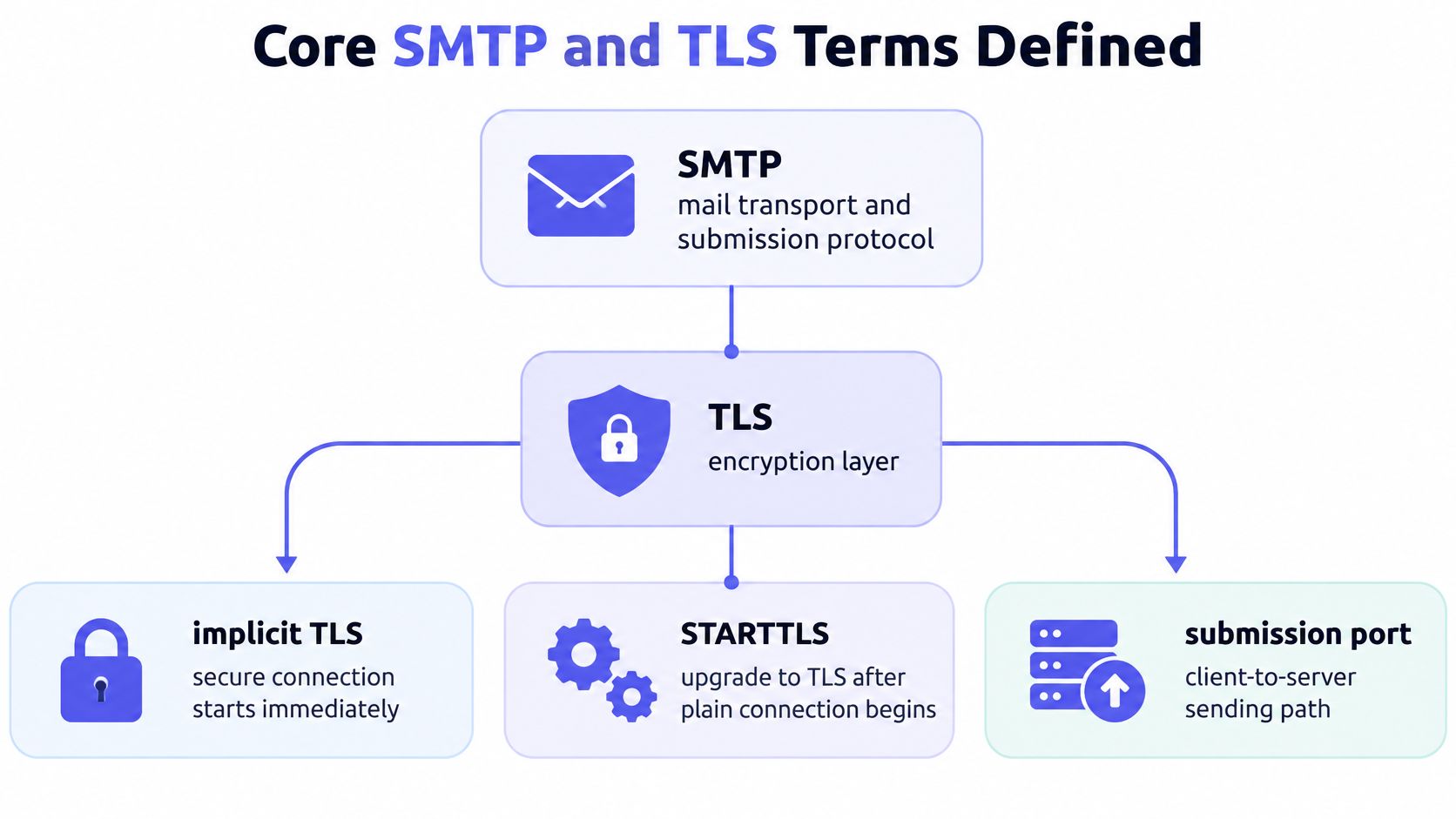
The terms that matter when configuring a client are:
- Implicit TLS: TLS negotiation begins as soon as the TCP connection opens. There's no plaintext SMTP greeting first. Port 465 uses this mode for secure message submission.
- STARTTLS: The client begins an SMTP conversation, then asks the server to upgrade the existing connection to TLS. Port 587 normally uses this mode.
- Message submission: Authenticated client-to-server sending, such as an application handing a transactional message to its email provider.
- Mail transfer: Server-to-server relay, the role primarily associated with port 25.
- SMTPS: A common label for SMTP submission over implicit TLS. Libraries may use this name differently, so check what transport behavior the setting enables.
The distinction between implicit TLS and STARTTLS isn't cosmetic. It determines what the client sends immediately after connecting. With implicit TLS, the first exchange is a TLS handshake. With STARTTLS, the client first speaks SMTP and must confirm the server offers the upgrade before requesting it.
Library labels can obscure that difference. Don't assume that a setting called “TLS” means STARTTLS, or that “SSL” necessarily describes a different modern encryption protocol. Read the library's transport documentation and verify the behavior on the wire.
How Ports 25, 587, and 465 Evolved
SMTP port history reflects a practical separation: server-to-server transport and authenticated message submission are different jobs. Port 25 is the original SMTP port and remains primarily associated with mail transfer between mail servers, not direct submission by end-user applications.
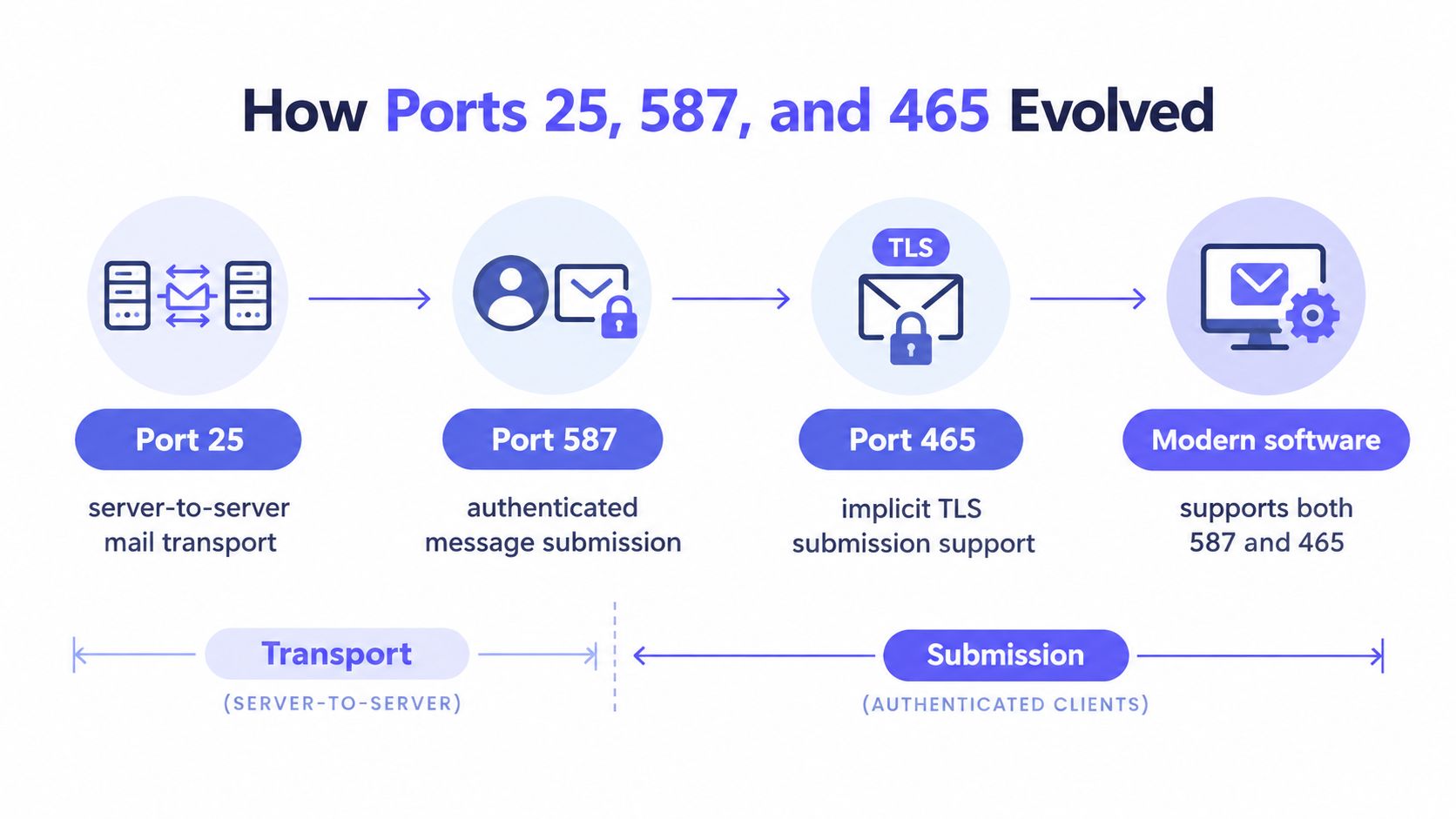
The IETF formalized a distinct message-submission service through RFC 2476, later replaced by RFC 6409, which assigns port 587 to submission. That gave clients a purpose-built path for handing messages to a server, separate from the traditional relay role of port 25. The IANA registry lists port 587 as “submission” under RFC 6409.
Port 465 has a less straightforward history. It was assigned in 1997 for SMTP over implicit TLS, then that assignment was withdrawn as STARTTLS on port 587 became the preferred standardization path. In practice, port 465 remained widely used despite its unassigned status. RFC 8314, published in January 2018, formally restored it for secure message submission. IANA lists it as “submissions,” meaning message submission over TLS, under RFC 8314. The history and current port roles are detailed in RFC 8314's secure email submission guidance.
That's why it's inaccurate to describe port 465 as an obsolete workaround. Modern software commonly supports both options: 587 for explicit TLS negotiated with STARTTLS, and 465 for implicit TLS. The choice is about the connection mode your client and provider support, not whether one port is legitimate and the other is not.
Port 587 and the STARTTLS Submission Flow
Port 587 is the standards-defined service for authenticated client-to-server submission under RFC 6409. The client begins with SMTP, checks for the STARTTLS extension, and upgrades the same connection before authentication. RFC 3207 defines STARTTLS as an SMTP service extension and permits its use on the submission port. The RFC 3207 STARTTLS specification and errata describe that upgrade mechanism.
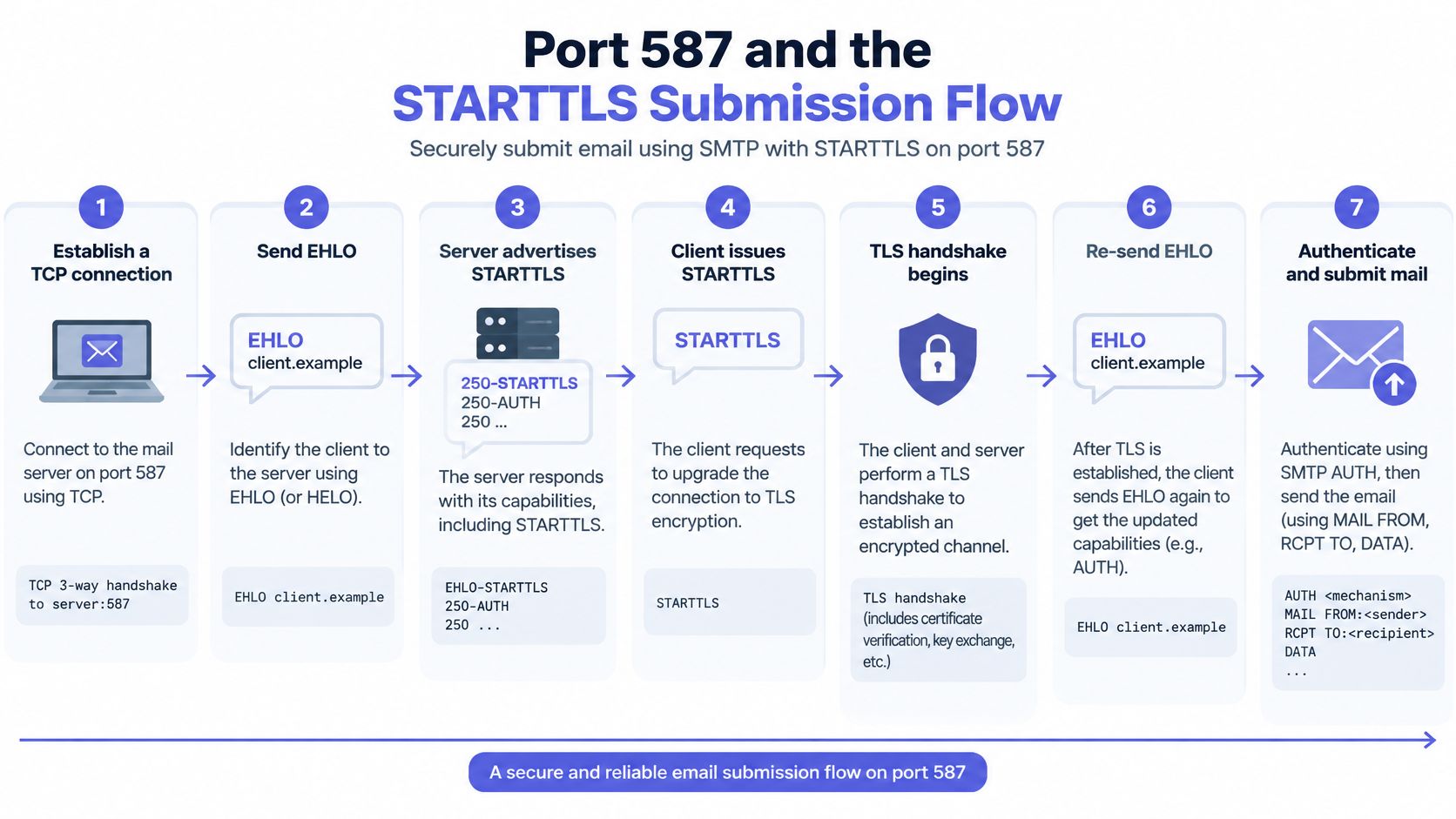
The expected sequence is:
- Establish a TCP connection to the submission server.
- Send
EHLOand read the server's advertised capabilities. - Confirm that the server advertises
STARTTLS. - Issue the
STARTTLScommand. - Complete the TLS handshake and validate the certificate.
- Send
EHLOagain inside the encrypted session. - Authenticate with SMTP AUTH, then submit the message.
The second EHLO matters because the client needs the server's capabilities for the encrypted session. Don't send credentials, message content, or other sensitive data before TLS negotiation succeeds. If the server doesn't advertise STARTTLS, stop and report a configuration or policy error instead of continuing in plaintext.
This walkthrough illustrates the exchange:
Port 465 and Implicit TLS Submission
Port 465 uses implicit TLS. The client opens a TCP connection and immediately begins the TLS handshake. It must not send a plaintext SMTP greeting or issue EHLO before encryption is established.
That sequence differs from port 587, where the client starts with SMTP and asks the server to upgrade the connection. If a client is configured for STARTTLS but pointed at port 465, it may wait for a plaintext greeting that won't arrive. If it sends plaintext SMTP to a server expecting implicit TLS, the negotiation fails because each side is speaking a different protocol at the start of the connection.
After the handshake succeeds, the client validates the server certificate against the intended hostname and continues with SMTP inside the encrypted session. Authentication belongs inside that session, not before it.
Port 465 isn't just an old setting that survives through habit. RFC 8314 formally restored it for secure message submission, so both it and port 587 are valid choices when the client and server use matching modes. Check the side-by-side comparison next if you're deciding which configuration your library should use.
Comparing Port 465 and Port 587 Side by Side
The operational difference between these ports is when TLS starts. That affects the first bytes exchanged, the library setting you choose, and what a mismatch looks like in logs.
| Criterion | Port 465 | Port 587 |
|---|---|---|
| TLS behavior | Implicit TLS begins immediately after the TCP connection opens | SMTP begins first, then upgrades through STARTTLS |
| Plaintext SMTP before TLS | No | Yes, only for the initial negotiation |
| Authentication | Only after the TLS handshake succeeds | Only after STARTTLS succeeds and the encrypted session is established |
| Standards reference | RFC 8314, secure message submission over TLS | RFC 6409, message submission |
| Typical library mode | Implicit TLS, sometimes labeled “SMTPS” or “SSL” | STARTTLS or “explicit TLS” |
Provider and framework labels aren't reliable substitutes for checking behavior. One library may use “TLS” for implicit TLS, while another uses it for STARTTLS. “SSL” can also be a legacy label for an encrypted transport rather than a request to use an obsolete protocol.
Configure the connection mode, not just the port. If the library's setting is ambiguous, verify its documentation or test the handshake before deploying.
A working configuration pairs port 465 with implicit TLS or port 587 with STARTTLS. The decision tree below turns that pairing into a repeatable check.
Security Baseline for SMTP TLS Connections
Secure SMTP submission requires more than enabling encryption. Production clients should validate the server certificate against the intended hostname, reject obsolete TLS versions and weak cipher suites, and stop if encryption is required but can't be established.
Certificate validation checks that the identity in the certificate matches the hostname the application intended to contact. Trusting a certificate chain alone isn't enough: a valid certificate for a different server doesn't prove that the client reached the right endpoint. This check is especially important when configuration differs between environments or providers.
For STARTTLS, fail-closed behavior is essential. If the server doesn't advertise the extension, or TLS negotiation fails, the client must not continue with credentials or message content in plaintext when policy requires encryption. A silent downgrade can expose both authentication data and mail content without an obvious application-level failure.
Use a TLS configuration that rejects outdated protocol versions and weak cipher suites. Those checks belong in the client's security policy, not in an assumption that the remote server will enforce every requirement you need.
Security baseline: Authenticate only after the encrypted session is established, and fail visibly when the required TLS path isn't available.
SMTP relay describes how one mail server hands messages to another, which is a different concern from securing client submission. For that distinction, see Mailbeam's guide to SMTP relaying. The certificate and negotiation failures that surface these policy checks are covered in the troubleshooting section.
Choosing the Right Port and Mode for Your Client
Start with the library's transport semantics, not the provider's port number. Find out whether the client expects implicit TLS from connection start or an SMTP session that upgrades through STARTTLS. Then match the port to that behavior.
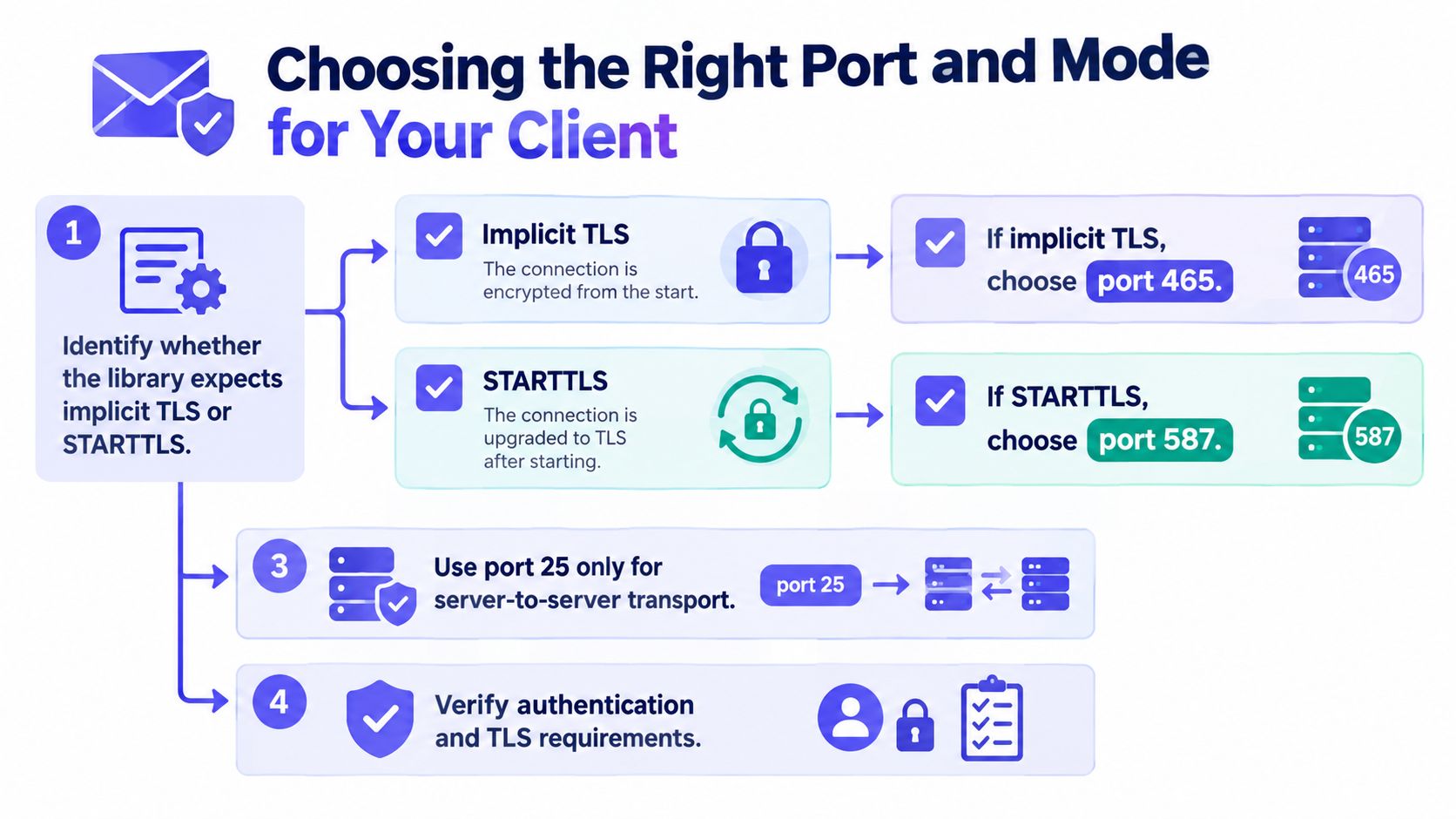
Apply the decision in this order:
- Identify the library mode. Confirm whether the setting means implicit TLS or STARTTLS. Don't infer behavior from a label such as “TLS” or “SSL.”
- If the client uses implicit TLS, choose port 465. The handshake must begin as soon as the connection opens.
- If the client uses STARTTLS, choose port 587. Require the server to advertise the extension, then upgrade before authentication.
- Use port 25 only for server-to-server transport. It isn't the normal authenticated submission path for an application.
- Verify authentication and TLS requirements. Validate the hostname, authenticate only after encryption succeeds, and make the client fail closed.
If a server on port 587 doesn't advertise STARTTLS, don't treat that as permission to send in plaintext. Stop with an explicit error that identifies the missing capability. If a client configured for STARTTLS connects to port 465, change the mode or the port; don't retry with a weaker transport.
Make the failure actionable in logs. A message such as “STARTTLS not advertised on configured submission endpoint” is more useful than a generic connection error, and it directs the engineer to the actual mismatch. For concrete error signatures, see the next section.
Common Port and TLS Errors and How to Fix Them
Port-and-mode mismatches often surface before SMTP authentication or message submission. Classify the failure by where the exchange stopped rather than immediately changing credentials.
| Symptom | Likely cause | Fix |
|---|---|---|
| TLS handshake failure on port 465 | The client is trying to use STARTTLS instead of beginning with implicit TLS | Configure the connection for implicit TLS or use the STARTTLS submission port with the matching mode |
| Connection hangs while waiting for an SMTP greeting on port 465 | The client expects plaintext SMTP before TLS | Start the TLS handshake immediately after opening the TCP connection |
| Authentication is rejected or exposed before encryption | The client is authenticating before the TLS negotiation completes | Move SMTP AUTH after successful TLS and the encrypted-session EHLO |
| Certificate hostname mismatch | The client connected using a name that doesn't match the server certificate | Use the intended provider hostname and keep certificate hostname validation enabled |
| STARTTLS isn't advertised on port 587 | The endpoint didn't offer the required upgrade, or the client reached the wrong service | Stop the submission attempt and check the endpoint and security policy |
The first two failures are especially easy to confuse with a server outage. Check the configured mode alongside the port, then inspect the point at which the client expected either a TLS handshake or an SMTP greeting. Keep the security baseline in force while diagnosing; disabling certificate checks may hide the cause without fixing it.
If the application can't send and the SMTP exchange has progressed beyond TLS, use Mailbeam's email-not-sending troubleshooting guide to separate transport errors from other sending problems. When a failure looks like slowness rather than an immediate protocol error, check the timeout and retry policy instead of blindly repeating the request.
Timeouts, Retries, and Fallback Behavior
A slow server and a mode mismatch don't fail the same way. A mode mismatch often produces a handshake error quickly, or leaves the client waiting for an SMTP greeting that won't arrive because the server is waiting for a TLS handshake. A slow server, by contrast, may eventually respond within the connection window.
Use separate timeouts for connection establishment and protocol negotiation where your mail library supports them. That makes it easier to see whether the TCP connection failed, the TLS handshake stalled, or the server stopped responding during SMTP. Logs should capture the selected port, transport mode, negotiation stage, and failure reason without recording credentials or message content.
Retries also need a policy. A temporary connection interruption may justify another attempt, but a TLS-mode error is usually a configuration problem. Repeating the same misconfigured exchange won't make the server advertise a missing capability or change the client's handshake mode.
Never automatically downgrade to plaintext when TLS fails. If encryption is required, terminate the attempt and surface an explicit error. That is the fail-closed behavior described in the security baseline, and it prevents a transient negotiation failure from becoming a credential or content leak.
Treat a missing STARTTLS capability, a hostname mismatch, or a protocol-mode disagreement as actionable errors. Retry only after the endpoint, library settings, or network conditions have changed.
How to Choose Between In-House Probes and a Verification Service
SMTP TLS configuration answers how your application submits mail. It doesn't tell you whether a recipient mailbox exists. Teams that need address-level checks can build and maintain their own SMTP probes and domain data, or use a managed verification endpoint that consolidates those checks.
An in-house system gives engineers direct control over probe behavior and integration. It also means maintaining the checks, explaining results to product teams, and adapting when remote servers handle SMTP differently. That can make sense when verification logic is tightly coupled to internal systems or compliance requirements.
A managed endpoint is an alternative when the team wants a consistent API response rather than a collection of internal checks. Mailbeam's SMTP verification guide describes a service that checks syntax, MX records, SMTP existence, disposable and role-based addresses, free-provider status, and catch-all behavior. The platform returns validity, a numeric score, and a machine-readable reason, so an application can make a defined decision or show a clearer message.
Mailbeam provides a developer-focused HTTP API and companion tools, with EU-hosted infrastructure and GDPR-first data handling. Its verification results can support synchronous signup checks as well as batch list maintenance; webhooks can pass outcomes into a signup flow, CRM, or internal event pipeline. That's distinct from SMTP port selection: verification checks address-level signals, while port and TLS settings govern the application's own sending connection.
Choose based on ownership and workflow. If the team needs custom probe control and can maintain it, build in-house. If it wants a documented endpoint and explainable results without operating the probe system itself, evaluate a managed service against its integration and compliance requirements.
Verifying Your SMTP TLS Setup End to End
A successful TCP connection doesn't prove the SMTP configuration is secure, and a successful submission doesn't prove the recipient address is valid. Check the transport and the recipient as separate parts of the sending path.
Run this verification routine:
- Confirm the port and mode agree. Use implicit TLS for port 465 or STARTTLS for port 587.
- Test the handshake against the intended hostname. Confirm the certificate is valid for that name, not merely that the server presented a certificate.
- Check the SMTP sequence. On STARTTLS, require the advertised capability and complete the upgrade before authentication. On implicit TLS, complete the handshake before sending SMTP commands.
- Verify the authentication boundary. Confirm that SMTP AUTH only happens inside the encrypted session.
- Check the recipient separately. A correct submission path can still deliver a bounce if the destination address doesn't exist.
Mailbeam offers free utilities including an Email Verifier, Disposable Email Checker, MX Record Checker, and Email Validator. Run a real address through an address-verification check and review its result alongside your SMTP connection test. Reason codes can also be surfaced in product interfaces so users and support teams can distinguish an invalid address from a transport configuration failure.
Make the configuration explicit in your environment settings, then test it from the same runtime and network where the application sends mail. That gives you a repeatable check for both protocol mode and recipient quality.
Mailbeam provides real-time email verification through a developer-friendly API and web tools, including checks for SMTP existence and explainable reason codes. Visit Mailbeam to test an address or explore tools that complement your SMTP TLS checks.