
The support ticket runs three lines. A new user signed up for a trial, waited for the activation email, and gave up. When you pull the record, the address looks almost right: the name is spelled correctly, the domain belongs to a real company, and the only problem is a single transposed letter that turned a working domain into one that has never accepted mail.
Nothing downstream of that typo worked. The welcome sequence bounced, the receipt bounced, the password reset bounced. The account sits in your database as a row with an email column that will never deliver, and every automated system that touches it now treats a dead address as a live customer.
Email has carried that weight since Ray Tomlinson sent the first networked message in 1971, a milestone the Mailstore history of email documents as the moment messaging moved from a single machine to machines talking to each other. More than five decades later, the address is still the key to account activation, recovery and receipts.
Real time email verification is the discipline of deciding, while the person is still on the page, whether that key is likely to work. It returns evidence rather than certainty, and most of the engineering work sits in turning that evidence into a specific action.
Table of Contents
- Why Signup Is the Right Moment to Check Email
- How Real-Time Checks Run in One Request
- Response Times and What Happens When Checks Stall
- Turning Verdicts Into Signup Decisions
- Handling Catch-All and Disposable Addresses Without Hard Blocks
- Measuring the Deliverability Gain
- Confirm Your Signup Rules Before Launching Verification
Why Signup Is the Right Moment to Check Email
A user types their work address into a free trial form and hits submit. The confirmation never arrives. The address had a domain typo, the kind nobody catches in their own writing late at night, and your team will never hear from that person again.
The form was the only moment when fixing it was cheap. The person was present, motivated, and one keystroke away from a working account.
Email still rewards that kind of care because people open it daily. In a 2025 ZeroBounce survey of 985 people across four continents, 93% of respondents said they used email every day.
A check at signup is not a cleanup later
Checking at signup and cleaning a list later are not the same job performed at different times. List cleaning is forensic work: you export, you verify in bulk, you delete the dead rows. By then the bounces have already been recorded against your sending domain, and the people behind those dead rows have moved on.
Real time verification inverts the order. It puts the check in front of the write. The form sends the address to an endpoint, the endpoint runs several checks against it, and an answer comes back before the user's row is created.
What the verdict actually is
The verdict isn't a certificate that a human owns the mailbox. It's evidence: what the syntax looks like, what the domain's mail infrastructure says, whether the domain belongs to a known throwaway service, whether the address is a shared department mailbox, whether the domain accepts everything. Each fact describes the address. Together they justify a decision.
If you run a card-free trial, that decision is your only real qualification gate, which makes the flow itself worth testing. Otter A/B's notes on no-credit-card trial experiments cover what to change when the signup form is doing the filtering.
The reframe that matters: verification doesn't answer "is this a real person". It answers "what does this address tell me, and what should I do about it right now".
The rest of this article walks through the request itself: the checks that run in parallel, how long each path takes, how to map every verdict to a signup action, and how to handle the two edge cases that cause most internal arguments, catch-all domains and disposable addresses.
How Real-Time Checks Run in One Request
A verification request doesn't walk through a checklist. It asks every question at once and waits for the slowest answer.
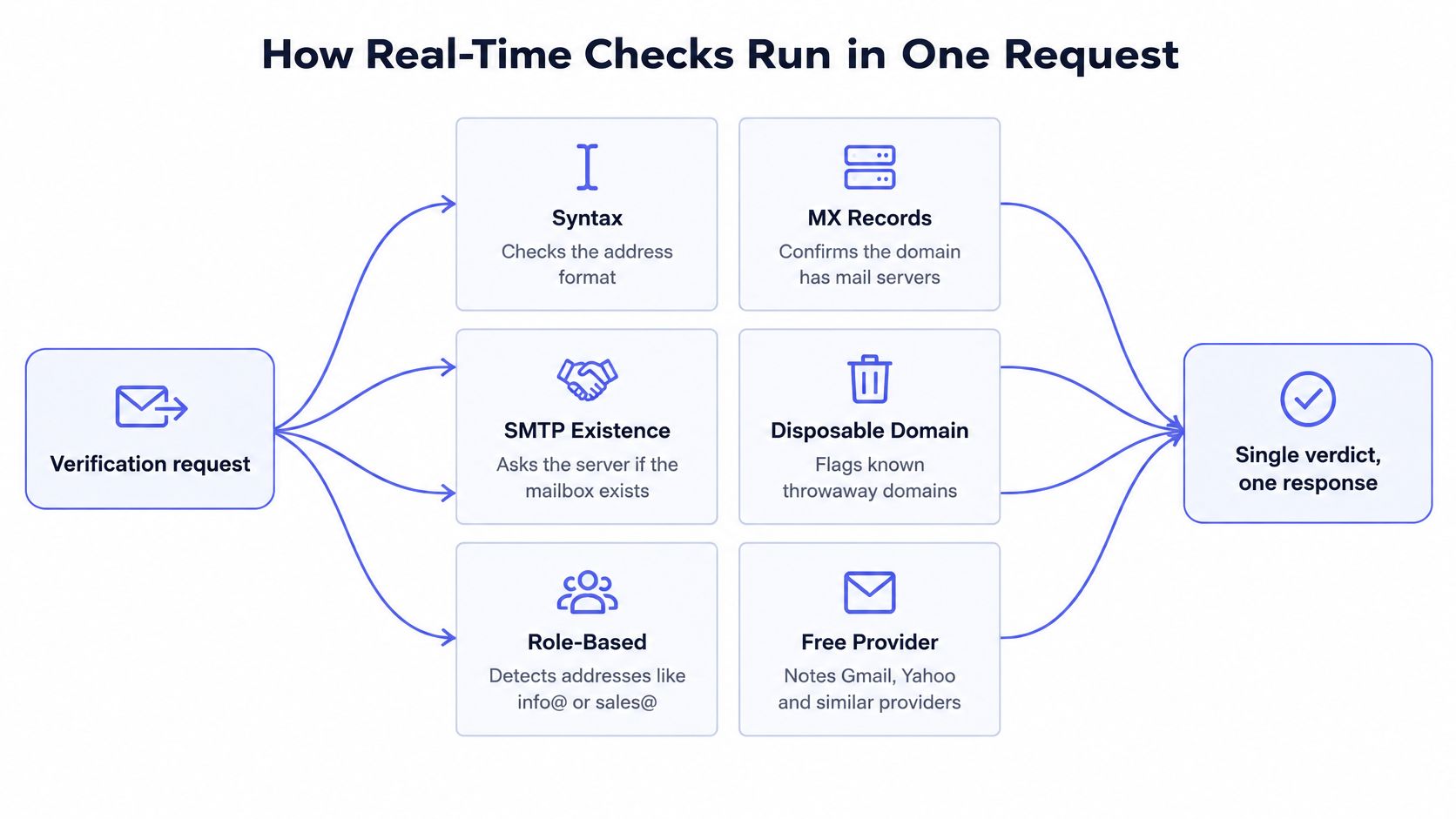
The checks are independent, so they run in parallel. Syntax validation finishes in microseconds, the domain lookup takes milliseconds, and the conversation with the receiving mail server takes longest. Running them concurrently means the request takes roughly as long as the slowest check, not the sum of all of them.
What each check can and cannot tell you
| Check | What it confirms | What it cannot prove |
|---|---|---|
| Syntax | The address is well formed | That a mailbox exists |
| MX records | The domain is set up to receive mail | That this individual mailbox exists |
| SMTP existence | The receiving server accepted the recipient during the dialogue | That the person will read the message |
| Disposable domain | The address belongs to a known throwaway service | The intent behind the signup |
| Role-based address | The address is a shared mailbox such as info@ or admin@ | Who reads it |
| Free-provider check | The address uses a consumer mail provider | The business identity of the user |
| Catch-all behavior | The domain accepts any recipient | Whether this specific recipient is real |
Read the third column as a list of things you'll be tempted to assume and shouldn't. A positive SMTP result means one server, at one moment, agreed to accept a message. It says nothing about whether a person will open it, whether the mailbox is monitored, or whether the domain will still exist next quarter.
The order a user actually experiences
From the outside this looks like a single form submit. Inside the request:
- The form posts the address to the verification endpoint, either from the browser with a publishable key or from your backend inside the account creation handler.
- Syntax validation runs first because it's free. A malformed string never triggers a network call.
- The domain's mail exchange records are looked up to see whether anyone is configured to receive mail for it.
- An SMTP dialogue opens with the receiving server and asks, in effect, whether it would take this recipient.
- List and pattern checks run alongside, covering known disposable domains, shared role mailboxes, consumer providers, and whether the domain accepts everything.
- A verdict, a score and a reason code come back, and the form decides what to do with them.
The SMTP verification glossary entry explains the dialogue step in more detail if you want the protocol-level view.
Why a successful SMTP conversation isn't proof
The SMTP specification is explicit about this boundary. A server must not return a successful 250 response to VRFY or EXPN unless it has verified the address, and a server that has only validated syntax should say so rather than pretend otherwise. The IETF's RFC 5321 makes that distinction between syntax validation and mailbox confirmation a rule of the protocol itself.
In practice, plenty of receiving systems deliberately conceal whether a mailbox exists, because telling strangers which addresses are real is a gift to spammers. SMTP probing is probabilistic evidence, not a directory lookup. That's why a solid pipeline classifies temporary failures, throttling, greylisting and disabled verification commands as unknown rather than invalid. Collapsing those into "invalid" is how signup flows reject real customers who happen to use an unusual mail server.
What happens to the address afterwards
Verification touches personal data, so handling matters as much as the result. We process addresses in memory and discard them once the verdict is returned, with nothing written to long-term storage, and addresses sent for real time verification aren't retained after verification completes. If you operate under GDPR or a comparable regime, that's the property to get in writing from any provider rather than inferring from a privacy page.
Response Times and What Happens When Checks Stall
Most verification requests finish fast enough that the user never notices. Two paths dominate the timing.
A cached or DNS-only lookup returns in about 80 ms. Repeat lookups for common domains are faster still, because MX record caches are pre-warmed for widely used providers, so a mainstream consumer address doesn't pay the full lookup cost. A full SMTP probe, where the service opens a conversation with the receiving server, takes under one second.
| Path | Typical response | What the signup form does |
|---|---|---|
| Cached or DNS-only lookup | About 80 ms | Verdict returned inline with no visible delay |
| Full SMTP probe | Under one second | Verdict returned inline; the form waits briefly |
| Slow or unresponsive mail server | Unknown status, returned before the timeout ceiling | Returns unknown status instead of blocking the request |
| Verification call error or timeout | Hits the timeout ceiling you configured, around one second | Signup proceeds; the address is re-verified through the batch API |
The gap you should know about
Measured p50 and p95 latency figures haven't been published yet, and we plan to publish them once the engine is live. Until then, treat any single number, including ours, as a design target rather than a promise for your traffic.
Measure the added latency in your own form, on your own network, against the domains your users sign up with. A B2B product with a heavy enterprise address mix will see a different distribution from a consumer app full of large consumer providers, and no vendor benchmark can predict that for you.
Why slow servers return unknown, not invalid
A server that throttles the connection, greylists your sender, or answers with a temporary failure hasn't told you the mailbox is bad. It's told you it isn't answering right now. Those are different facts.
Collapsing them into "invalid" is how a signup form blocks a legitimate customer on a bad afternoon for their mail administrator. The same logic covers timeouts. If the check doesn't come back, the honest answer is that you don't know.
Fail open, then clean up in the background
If the verification call errors or times out, the signup is allowed and the address is re-verified later through the batch API. That's deliberate. A verification service that fails closed turns its own outage into yours, and the cost lands on your conversion rate rather than on the vendor's error budget.
The trade-off in one line: fail-open keeps the funnel moving and lets a few bad addresses through until the batch pass catches them.
Treat the batch pass as a real part of the system, not a chore. Run it daily or weekly depending on volume, and route its findings into the same reason codes so support staff see one consistent explanation regardless of which path produced it.
Set the form's patience deliberately
Keep the wait short, around one second, and show a neutral message while the check runs, something like "checking your address" rather than a spinner that implies the user is waiting on something important. Log every timeout against its domain, so you can tell the difference between a rare slow server and a pattern that deserves a policy decision.
Turning Verdicts Into Signup Decisions
A verdict is an input, not a rule. Two teams can receive the same unknown result and correctly do different things with it, because their accounts carry different risk.
The part most integrations get wrong is reading only the status and ignoring the reason code. Two addresses can both come back invalid for unrelated reasons, one because the domain doesn't resolve and one because the mailbox was rejected, and the message you show the user should reflect which.
| Verdict | Typical cause | Suggested signup action |
|---|---|---|
| Valid | Syntax, domain and mailbox checks pass | Accept and continue |
| Invalid | Malformed address or no MX records | Block with a message asking the user to correct the address |
| Disposable | Throwaway domain from a known temporary service | Challenge with a verification link or block by policy |
| Role-based | Shared department mailbox such as info@ | Accept for B2B signups; flag for consumer signups |
| Catch-all | Domain accepts any recipient | Accept with double opt-in and limit email-dependent features |
| Unknown | Temporary failure, greylisting or timeout | Allow signup and re-check later |
Four habits that make the mapping work
Write the message from the reason code, not the status. A likely domain typo deserves a prompt to check the spelling, with the suggestion field surfaced in the UI. A rejected mailbox deserves different wording. A generic "invalid email" tells the user nothing and invites them to try the same mistake again.
Log the reason code next to every outcome. Six weeks later, support needs to explain why a specific account was challenged. A log line with a code answers that in seconds; a boolean does not.
Split role addresses by product type. A B2B tool should welcome info@ because companies sign up through shared inboxes. A consumer app should flag it, since it usually means someone is registering on behalf of an organisation that hasn't approved anything.
Never hard-block unknown. Ambiguity belongs in the allow column with a re-check attached, for the reasons covered by the timing table above. Rejecting on ambiguity is a self-inflicted conversion problem.
Machine-readable codes exist so that signup, CRM and campaign systems can each act on the same verdict without re-deriving it. If you're wiring the response into product logic, start from the reason codes documentation so your conditionals match what the API returns.
Combine score and reason code for deterministic handling: block clearly invalid addresses, challenge risky ones, allow confirmed ones. Set thresholds by starting permissive, reviewing a week of logged outcomes, and tightening only where false blocks are rare and real abuse is common.
Reading the two rows that cause most arguments
Unknown comes from temporary failures, greylisting or a timeout. It isn't a judgment about the address. Let the signup through and queue a re-check. If unknown results cluster on a handful of corporate domains, that's a mail server configuration quirk on their side, not a fraud signal.
Catch-all is the opposite trap. The domain accepts anything, so the SMTP dialogue succeeds no matter what you send. Treating that success as confirmation is how teams end up with a list of addresses that look verified and never deliver.
Handling Catch-All and Disposable Addresses Without Hard Blocks
Two verdicts sit between valid and invalid, and hard blocks handle both of them badly.

Sorting, not judging, is the right mental model. Neither case tells you the person is fake. They tell you the evidence is incomplete, and incomplete evidence calls for a graduated response.
Catch-all domains accept mail for strangers
A catch-all server accepts any recipient, real or invented, so a successful SMTP response proves only that the domain is configured to take everything. It's not a rare configuration either. One industry dataset reported catch-all rates ranging from 13.3% to 28.1% per month, averaging 17.5% during the first nine months measured, according to Cleanmylist's analysis of catch-all addresses.
That frequency rules out the easy option of rejecting them. Many catch-all domains belong to enterprises with deliberately permissive mail gateways, which means a hard block mostly stops legitimate staff at large companies.
Accept confirmed addresses; challenge risky or catch-all ones with a verification link before enabling email-dependent features; never hard-block an ambiguous result that might belong to a real enterprise. Password resets and receipts depend on the address working, so the challenge link matters most for transactional mail. Marketing can wait for engagement instead.
Here's a walkthrough of how the challenge step fits into a live signup flow.
Say a prospect signs up with an address on a catch-all company domain. Create the account, send the link, and hold team invitations and notification emails until the link is clicked. The person gets immediate access to whatever doesn't need email, and you avoid provisioning a workspace around an address nobody confirmed.
Disposable addresses aren't all abuse
Throwaway addresses inflate signup counts, depress engagement, and make trial abuse easy. They also serve people testing a product before committing an identity, people dodging spam after a previous leak, and people operating under organisational policies that forbid work addresses on external services.
The data suggests confirmation does more work than rejection. Disposable addresses represented 11.2% of newsletter signups without double opt-in, compared with 0.3% when double opt-in was used, according to Bouncezero's state of email validation report. Blocking at the form and confirming by link produce very different outcomes, and only one of them also keeps the privacy-conscious user.
Practical rule: challenge the address, don't ban the person. A verification link sorts intent from a denylist that can't.
The graduated version looks like this:
- Read the verdict first. A disposable-domain flag is a starting signal, not a sentence.
- Add velocity limits per IP and per device, so one network creating many accounts gets attention regardless of which domains it uses.
- Raise strictness with account value. A free newsletter signup and a paid trial with a card on file deserve different tolerance.
- Challenge rather than block the low-risk cases. Send the link, keep the account usable for non-email features, and record whether the person confirmed.
An example of the split: five accounts from one IP within an hour, all on temporary domains, get blocked outright. A single signup that clicks the confirmation link gets accepted, even though its domain was flagged. The behaviour, not just the domain, decided the outcome.
Log the domain, the verdict, the action taken and the later confirmation outcome. Keep retention minimal, since none of that needs to live for years, and explain challenges in plain language without exposing diagnostic detail that helps someone game the rules.
Measuring the Deliverability Gain
The mechanism is simple. Every invalid or unreachable address removed at signup is one less bounce, and fewer bounces protect the sender reputation that sits behind every message the account sends later.
Scale makes that matter. A 2018 report from the Association for Computing Machinery cited Radicati Group estimates of 3.8 billion email users worldwide sending approximately 281 billion messages per day, as covered in MIT's coverage of that CACM report. At that volume, even a small invalid-address rate produces a large pile of failed deliveries, wasted sending capacity and distorted engagement numbers.
Three numbers to track
Hard bounce rate on the first transactional email is the cleanest signal, because it isolates deliverability from engagement. Confirmation completion rate tells you whether the verification step itself is costing you signups. The share of signups landing in unknown or challenged states shows whether your rules are calibrated to your actual traffic or to your imagination of it.
Verification cannot fix your sender authentication
Recipient checks and sender configuration are separate systems, and no amount of address validation repairs a domain that fails authentication. Google's sender guidance requires everyone delivering to Gmail accounts to configure SPF or DKIM and to maintain valid forward and reverse DNS, including PTR records; bulk senders need SPF, DKIM and DMARC, where DMARC passes only when SPF or DKIM authenticates and the authenticating domain aligns with the domain in the visible From header, as set out in Google's sender guidelines.
A useful discipline: when welcome emails start bouncing, audit authentication records before blaming the verification step.
A workable evaluation: compare the baseline week before launch with the week after, then open the unknown bucket and check whether those domains have DNS or authentication faults of their own. A good result is straightforward. Fewer bounces on first sends, no rise in blocked real users, and a challenge bucket you can explain line by line. The guide to email deliverability covers the sender-side mechanics that verification can't touch.
Confirm Your Signup Rules Before Launching Verification
Before enabling email checks, decide what each result should mean for the person trying to sign up. Verification returns evidence about an address, not proof that its owner is a real person or wants an account. Write down the signup action for each kind of verdict so the API response becomes consistent product behavior, not an improvised engineering choice.

Decide five things first
Choose which checks run during signup, and what happens if the request times out. Define the action for each verdict, including whether a catch-all or disposable address can proceed with limited access pending confirmation. Decide which reason codes you log, and who reviews them if a user disputes a block. Agree on these rules with the people responsible for signup experience and conversion before wiring them into the form.
That gives engineers a clear map: a verdict comes in, the corresponding rule determines the next step, and the user sees an appropriate message.
Test with addresses you choose
Create a staging set with known-good addresses from common providers, a deliberately mistyped domain, a disposable address, a role-based address, and a catch-all test domain. Send them through the live endpoint and check that each result triggers its intended action.
Follow the entire path. Review the message shown to the user, the reason code recorded, and what the account can access before confirmation. A correct API response is only useful if the form and account rules handle it as intended.
Measure latency in your own form
Record p50 and p95 response times from your signup flow, then keep those measurements as a baseline for later releases. The observed time includes how your application calls and handles the endpoint, so measure in the form rather than relying on a standalone API result. Use the baseline to see whether verification affects signup completion.
Plan the thirty-day review
After a month, compare blocked signups with support tickets. If legitimate users were stopped, adjust the rule; if unwanted addresses got through, tighten it. Keep the final policy and reason-code handling documented, so the decision behind a refusal is clear to both the team and anyone reviewing the process.
Mailbeam's real-time verification API is built for signup flows and returns a verdict, score, and reason code. Addresses are processed in memory and discarded once the verdict returns. Setup takes under five minutes, and ongoing verification upkeep costs less than an hour of developer time per month.
One next action
Run the staging set this week. Record each result alongside the signup action and user-facing message it should trigger. That gives you a practical readiness check before enabling verification in production.
Create an account at Mailbeam and run your test addresses through the endpoint. Use the results to write signup rules that match the evidence, rather than treating every address as valid or invalid.