
The most repeated advice about Ruby on Rails email validation is to swap the built-in pattern for a stricter regex. That's the wrong first move, and it buys you almost nothing.
A longer regex doesn't tell you whether the domain publishes mail servers, whether the mailbox accepts mail, or whether the address belongs to a service that hands out throwaway inboxes by the thousand. It only changes where a bad address fails: on your form instead of in a bounce report three days later. A stricter pattern mostly converts a visible bounce into an invisible one.
The useful split is between what your application can decide on its own and what needs a network call. Rails decides shape, in memory, in microseconds. Everything else is a signal from outside, and signals from outside fail slowly, return ambiguous answers, and occasionally take the whole signup down with them.
This walkthrough covers the build in the order I'd do it on a team: model code first, then the API call in a service object, then the background path, the tests, and the policy that ties the results together.
Table of Contents
- Five Layers of Email Validation in a Rails App
- Choosing a Regex Without Rejecting Real Addresses
- How to Add Format Validation and Normalization to Your Model
- How to Call a Real-Time Verification API from Rails
- Background Checks and Bulk Cleaning Without Blocking Signups
- Testing Email Validation in Rails Specs
- Confirm the Address Before You Activate the Account
Five Layers of Email Validation in a Rails App
Rails validates shape and nothing else. Every other question about an address, whether the domain has mail servers, whether the mailbox exists, whether it belongs to a throwaway service, has to be answered outside the application process.
The Active Model validation API has used email as its canonical format example since at least the Rails 3.0.8 documentation, and it's precise about what the check does: it tests whether an attribute matches a developer-supplied regular expression. Text before an at-sign, a domain label, a top-level domain of at least two letters. The same documentation shows how little is required in practice, since a rule as thin as format: /@/ is technically legal. Nothing in that check touches DNS, SMTP, or sender reputation.
So a signup flow ends up with five distinct layers, and they don't belong in the same place.
| Layer | What it catches | Typical cost | Where it runs |
|---|---|---|---|
| Rails format check | Malformed strings, a missing @ or domain | No network call, negligible | Model validation |
| Normalization and uniqueness | Case and whitespace duplicates, concurrent signups | One database index lookup | Model plus a unique index |
| MX record lookup | Domains with no mail servers | One DNS query, cacheable | Background job or API |
| SMTP probe | Mailboxes that don't exist, some rejections | Seconds, may be greylisted | API or worker |
| Disposable and role detection | Throwaway services, info@ and admin@ addresses | A lookup against a maintained list | API response |
The second layer is the one teams skip. Ada@Example.com and ada@example.com are one account, and a model-level uniqueness check won't stop both rows appearing when two requests land at the same moment. That takes a unique database index on the normalized column, not a validator.
The third and fourth layers are network calls with different shapes. An MX lookup is one cacheable DNS query that answers in milliseconds. An SMTP probe opens a conversation with the receiving server and answers in seconds, when it answers clearly at all.
Disposable and role detection is the fifth layer, and it's the one nobody can hand-roll. It needs a maintained list of throwaway domains and a documented decision about info@ addresses. No regex you write will ever cover it.
The rule the rest of this build follows: a Rails validator decides what enters your database, while a verification result decides what deserves an active account.
Choosing a Regex Without Rejecting Real Addresses
I'd keep URI::MailTo::EMAIL_REGEXP and add one narrow business rule on top of it. Rails ships no dedicated email validator, so the standard-library pattern is what most guidance reaches for, directly or through a hand-rolled regex (Active Model basics). It's a sound default, but it's looser than its reputation suggests.
It happily accepts a domain with no dot after the at-sign, so ada@example passes and persists as a valid account, and it sets no length cap at all. That's a gap you close with a rule, not with a bigger expression.
| Approach | Handles well | Gets wrong | Main risk |
|---|---|---|---|
URI::MailTo::EMAIL_REGEXP |
Common ASCII addresses, plus tags | Accepts a domain with no dot after @ | No length cap, needs an extra domain rule |
Minimal check, format: /@/ |
Strings that contain an @ | Almost every malformed string | Pushes all failures to later layers |
| Hand-rolled RFC 5322 pattern | Nearly all RFC-valid forms | Edge cases in quoting and comments | Unreviewable, slow to maintain |
| Narrow ASCII-only pattern | Plain ASCII addresses | Internationalized domains, some plus-tagged forms | Rejects legitimate international users |
| Format check plus MX lookup | Syntax-valid domains with mail servers | Nothing at the syntax stage | Network call, must run asynchronously |
The trade-off that catches people is the last two rows. An ASCII-only pattern looks responsible until a customer in Cologne types an address on a German domain and gets told it's invalid. And a format check paired with an MX lookup feels thorough while still proving nothing about the mailbox itself. The distinction between a matching pattern and a working inbox is worth understanding properly before you tune anything (email format validation explained).
What to check before the pattern ships
- Anchor with
\Aand\z. In Ruby,^and$match at line boundaries, so a multi-line string slips past a pattern that looks anchored. - Keep the pattern in one constant. An
EMAIL_PATTERNreferenced by every model means a change touches one file instead of nine. - Test the awkward set, not the happy path. Plus-tagged, quoted, Unicode, and role addresses all belong in the spec.
- Never let the regex be the only gate before sending. A format check that guards your welcome email is a deliverability incident waiting on the first typo.
The recommended default is the standard-library pattern, one business rule requiring a dot after the at-sign when your product excludes internal domains, and the network layers stacked above it rather than folded into it.
How to Add Format Validation and Normalization to Your Model
The model work is small and finishes in one sitting. The order below matters, because each step depends on the previous one being in place.
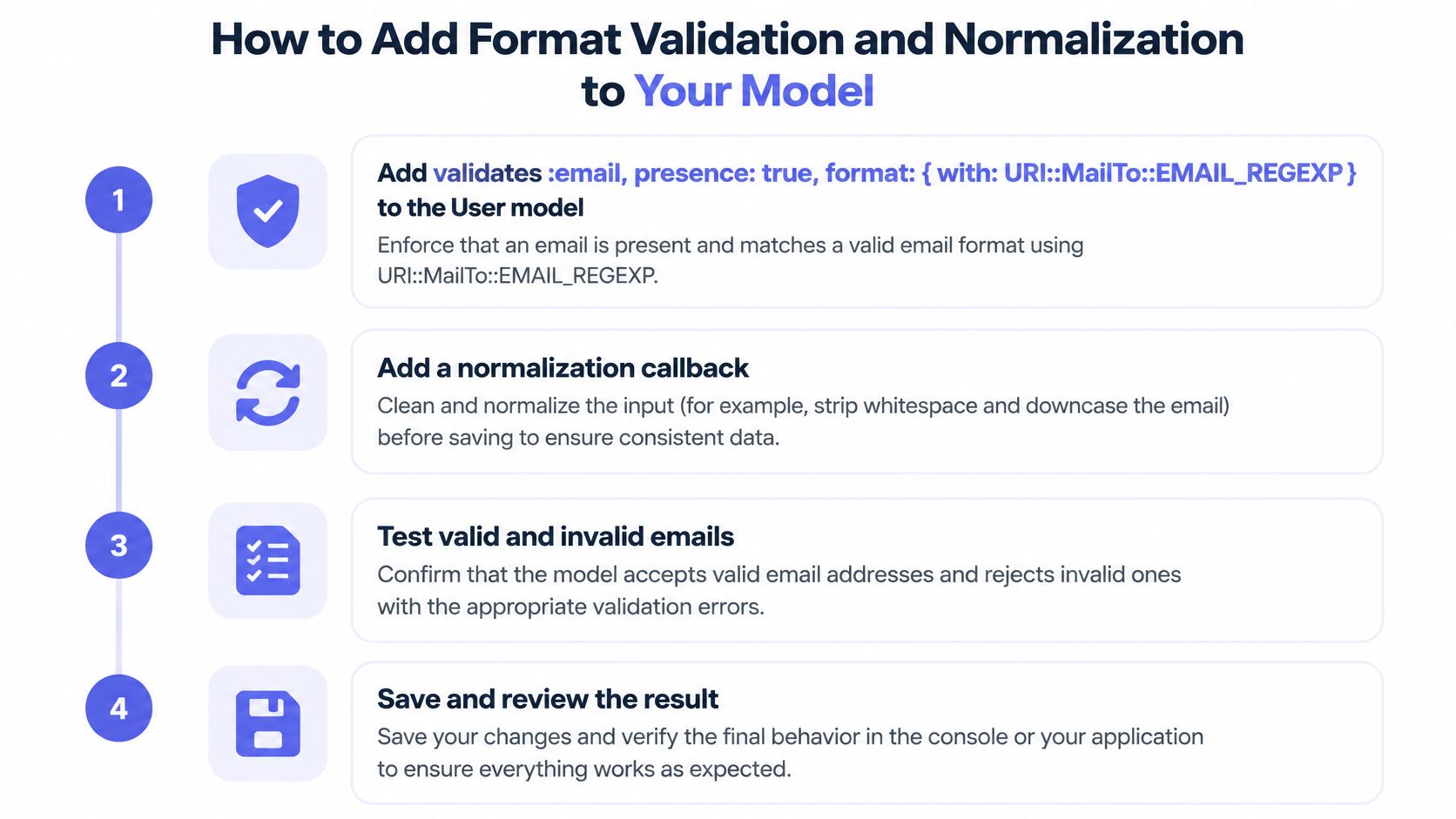
Add the validator with presence in front of it.
validates :email, presence: true, format: { with: URI::MailTo::EMAIL_REGEXP }. Rails delegates this to Ruby's standard-library expression rather than providing an email validator of its own (Rails validation helpers). Keeppresencefor a specific reason: format validators skip nil values, so without it a blank submission sails straight through.Normalize before validation, not after. A
before_validation :normalize_emailcallback that runsemail.to_s.strip.downcasehandles the two things users type wrong: trailing spaces from a paste, and a capital letter on the domain. Write the case policy in a comment. Support staff will ask within a month.Move uniqueness into the database. A migration with a unique index on the normalized column is the only thing that survives concurrent signups, where two requests both pass the model check and both insert. Application-level validation alone is race-prone.
Mirror the index with a validator.
validates :email, uniqueness: { case_sensitive: false }so a duplicate shows an inline error on the form instead of raising a database exception the user can't read.Decide whether you keep what they typed. A separate
email_rawcolumn pays for itself when auditability or a "did you mean" correction matters. Skip it if you don't need either, but decide rather than defaulting.Write the duplicate test. One spec that submits
Ada@Example.COMafterada@example.comand asserts a single record exists catches the normalization regression that ships unnoticed.
What the model still can't tell you
After those six steps the model guarantees a plausible string, one normalized row per person, and an inline error for duplicates. It guarantees nothing about whether mail sent to that address will arrive. The MX and SMTP questions are still open, and they stay open until something outside the process answers them.
How to Call a Real-Time Verification API from Rails
The integration is one HTTP call wrapped in a service object. The work is in where you put it and how you handle the slow path.
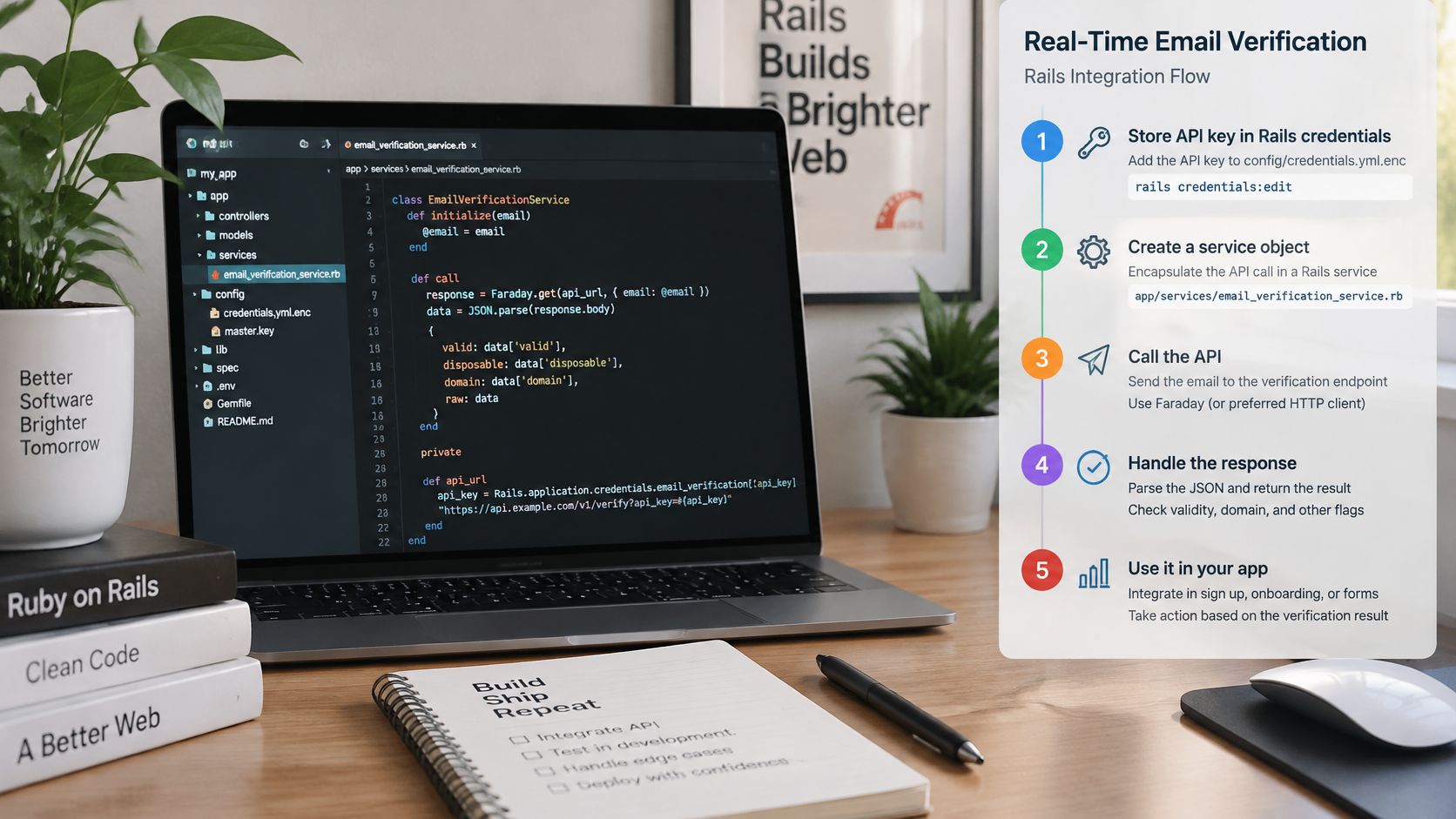
Keep the key out of the repository. Rails encrypted credentials via
bin/rails credentials:edit, or an environment variable read at boot. Not in the model, not in a committed initializer, not in anything a browser can read.Put the call in a service object, not in
valid?. AnEmailVerifier.call(address)returning a small result object keeps validation deterministic and testable. A network call inside a validation callback fires on saves you didn't intend to check, slows every write, and turns a third-party outage into a failed signup. The testability point settles it: stubbing a service object takes one line.POST the typed address to
/v1/verify. Fire the call when the user submits the form, or on blur if you want to correct the address while they're still in the field. UseNet::HTTPor Faraday with an open timeout around 1 second and a read timeout around 2. Confirm the authentication header name and the complete reason-code list against the current API reference before shipping; those are the two details worth verifying rather than assuming, since they change faster than the rest of the contract.Read two fields, ignore the rest.
validis true when the address passes all critical checks, andreasonis null when the address is valid. That pair drives the form; everything else is for logs.Map codes to sentences a person can act on.
invalid_syntaxbecomes "That address looks mistyped, check the part after the @." Showing the raw code creates a support ticket.Split a 422 from a 5xx. Mailbeam returns status 422 for validation errors, such as an address that fails RFC 5322 syntax or runs longer than 254 characters. That's a normal form failure. A timeout or a server error is not the user's fault.
Run it last. The API should only be called after local validation has already rejected the obvious problems, so you're paying for fewer lookups and asking the network fewer questions.
This is one of the few places where a managed call beats hands-on work. Mailbeam is a real-time email verification API built for signup flows, and a single inline call returns a verdict in under 100ms, so the field stays responsive. The alternative, running your own SMTP probes plus a disposable-domain list, is a small infrastructure project you then maintain forever.
When the API is slow or down
Timeouts are a design decision, not an edge case. A verifier that takes four seconds shouldn't hold a form submit, and one that's fully down shouldn't block registration either. Let the request continue with the account in a pending state and send the confirmation email queued behind it. If a third-party outage stops people from signing up to your product, the integration is in the wrong place. The trade-offs between inline checks and deferred ones are worth reading up on before you pick (real-time email validation in signup flows).
Background Checks and Bulk Cleaning Without Blocking Signups
Every verification result resolves to one of three outcomes: block, hold, or accept. Write that mapping down before you write the code, because detection isn't the hard part. Deciding what a negative result means for a paying customer is.
| Reason code | Signup outcome | Follow-up |
|---|---|---|
| invalid_syntax | Block with an inline error | None, the user corrects the address |
| no_mx_records | Hold as pending | Recheck in a background job before activation |
| smtp_rejected | Create the account as pending | Send a confirmation email that decides |
| disposable_domain | Block at signup | Log the reason code only |
| role_address | Accept and flag for review | Apply your support or marketing rule |
Those codes come from the verification response when valid is false, and they're the ones you'll see most often.
Where a hold lives in the model
A block becomes an ActiveModel error on :email, rendered inline beside the field. A hold sets a status column to pending and lets the record exist, with activation happening on confirmation. Keeping those two mechanisms separate is what makes the form and the database tell the same story to the same user.
The asynchronous path
Enqueue an ActiveJob when the synchronous call times out, and for the deeper MX and SMTP work on accounts that already exist. Retry server errors with exponential backoff, cap the attempt count, and make every job idempotent. A job that runs twice must not write two verification records or overwrite a newer result with an older one, which is the bug you'll find two weeks after launch if nobody thought about it.
What you keep after the check
For list hygiene, export in batches of a few thousand, send them through the batch endpoint, and write back a timestamp and reason code per address rather than a pass/fail flag. That's the core of a repeatable email database cleaning workflow.
On privacy, store the reason code and the check time instead of raw diagnostic output, set a retention period you can defend, and decide deliberately whether a verification result becomes part of the user profile. For products facing EU users that decision is a data-protection question as much as a technical one, covering what leaves your infrastructure, where it's processed, how long it's held, and whether a processor agreement exists, which is the governance side of reducing bounce rates without creating new risk. One detail helps here: addresses sent for real-time verification are not stored after the call completes.
A negative SMTP probe is evidence, not a verdict. Greylisting, catch-all configuration and anti-harvesting behaviour all reject mailboxes that work perfectly well, so
smtp_rejectedshould hold the account, not delete it.
Testing Email Validation in Rails Specs
Test the layers you own without touching the network, then stub the layer you don't. That split keeps the suite fast and keeps a live quota out of CI.
Model specs cover format, normalization and uniqueness with no external calls, so they run in milliseconds. Stub the verifier with WebMock or VCR, recording one real response as a fixture for the happy path and hand-writing fixtures for each failure code. Service specs assert that every reason maps to the right message and the right outcome. A request spec covers the timeout path, where signup should succeed with a pending status.
For the job, enqueue it, run it inline with perform_enqueued_jobs, assert the retry on a 5xx, and check that a second run leaves the record unchanged.
| Input | Expected result | Layer tested |
|---|---|---|
| ada@example.com | Valid and saved | Format and uniqueness |
| Ada@Example.COM | Saved as ada@example.com | Normalization |
| ada+news@example.com | Valid, plus tag kept | Format |
| ada@example | Passes format, rejected by your domain rule | Business rule |
| user@exämple.de | Rejected raw by the ASCII format check, valid after Punycode conversion | Internationalized domains |
| info@example.com | Flagged as role address by stubbed API | Stubbed API response |
| name@disposable-example.com | Blocked by stubbed disposable result | Stubbed API response |
Every row becomes one example with its expected result written out, which is faster than inventing cases at review time.
Keep a small live check out of CI
Run a handful of real calls against a staging key on a schedule, not on every build. It catches contract changes, like a renamed field or a new reason code, without making your pipeline depend on someone else's uptime or burning quota on every push.
What a healthy suite looks like
Change the regex and a spec fails. Return a 422 with an unusable body and the user sees a readable error instead of a 500. Break the normalization callback and the duplicate test goes red. When all three are true, the layers are separated and the next developer can move one without breaking the others.
Confirm the Address Before You Activate the Account
Adopt the outcome table as written and change only the rows your own data contradicts. That's the default I'd ship, because it treats verification as a reversible decision rather than a gate.
Confirmation is the strongest deliverability check available, and no API can replace it. A user who clicks a link in an email has proved they control that mailbox. A verification service can prove the domain has mail servers and the mailbox accepted a probe; only the click proves a person is on the other end.

The operational stance follows from that. An outage at the verifier should cost you a confirmation email, not a customer. Pending accounts, retried jobs and a clear message on the form cover the failure modes without anyone watching a dashboard at midnight.
Roll it out in order. Add the model validator first, since it's free and catches typos. Wire one API call behind a feature flag next. Log reason codes for two weeks without acting on them, then tune the outcome table against the distribution you see. Most products discover that role_address is common and harmless while disposable_domain is rarer than expected.
If you're building the surrounding auth flow at the same time, you can deploy authentication with Passflow rather than hand-rolling sessions alongside the verification work.
The decision to make this week is narrow, and it's the one that shapes everything else: which signals block registration outright, and which ones only trigger a confirmation email. Once that's written down, the code follows without argument.
Mailbeam handles the network layers this guide pushes out of the request: one call returns a verdict, a score and a machine-readable reason covering syntax, MX, SMTP, disposable domains, role addresses and catch-all behaviour, with EU-hosted processing and no retention of single verifications. If you'd rather keep the model validator and stop maintaining probe infrastructure, you can start at Mailbeam and point your service object at it.