
The most popular advice about email verification is to run every address through a verifier and block anything that doesn't come back valid. That rule sounds responsible. It also rejects real customers and waves through addresses that will bounce next month.
What it misses is that verification is a chain of narrow proofs, not one broad one. A domain can be perfectly configured to receive mail and still hold a mailbox nobody has opened in two years. A receiving server can refuse to confirm any address at all and still deliver every message you send it. Collapse those two situations into "invalid" and you've made a policy decision your form can't defend to the person on the other side of it.
Each gate proves something narrower than it looks, and the payoff lands in two places: the signup form, where an address enters your product, and the stored list, where old addresses rot.
Table of Contents
- What an Email Address Verifier Decides
- The Checks Behind a Single Verdict
- When an MX Record Is Not Enough
- How Signup Flows Should Treat Each Result
- List Hygiene for Addresses Already Collected
- Throwaway Domains, Role Inboxes and Typos
- Put Verification on the Signup Form First
What an Email Address Verifier Decides
An email address verifier inspects a single address at the moment it matters, either before an account exists or before a message leaves, and returns a classified result instead of a bare yes or no. Three fields do the work: whether the address passed the critical checks, a reason code naming what blocked it, and a per-check breakdown showing what each gate saw.
That structure matters more than the vendor behind it. A boolean forces your form into two outcomes when reality has at least six. Treat the return value as a set of product rules and the form starts behaving like it has judgment.
Verification is also an established operational habit, not a novelty. The 2017 Litmus State of Email Deliverability report found that marketers who described their email programs as successful were 45% more likely to use an email address verification service than marketers at less successful organizations, 34.7% versus 23.9%. The same report put BriteVerify at 35.4% of respondents and FreshAddress at 14.6%, a reminder that even a mature category stays concentrated.
| Result | What it means | Signup action |
|---|---|---|
| Valid | Critical checks passed and no reason code | Allow and store the address |
| Typo suggestion | Domain is close to a known provider, such as gmal.com | Show the suggestion and wait for the user |
| Disposable | Throwaway service such as Mailinator or YOPmail | Block, or allow only a low-risk trial |
| Role address | Shared inbox such as info@ or sales@ | Allow on a company form; challenge for a personal account |
| Catch-all | Server accepts many or all local parts | Allow with a risk flag; do not treat the mailbox as confirmed |
| No mail exchanger | Domain is not set up to receive mail | Block |
| Mailbox rejected | SMTP says that recipient does not exist | Block and do not send |
| Timeout or error | The probe did not finish | Allow the signup and recheck later |
The rows that decide themselves
Valid is the only row that means what people assume it means: the critical checks passed and the reason field is empty, so the account proceeds with no added friction. No mail exchanger and mailbox rejected sit at the other end. The first says the domain isn't set up to receive mail at all, which is a mistyped domain far more often than a hostile one. The second is the receiving server telling you, in as many words, that this recipient doesn't exist. Both are blocks on an ordinary consumer signup, and neither is worth a retry.
Catch-all is the row that breaks binary thinking. The server accepted the address, but it accepts almost anything, so the answer confirms the domain is alive and says nothing about the mailbox. Keep the account, attach a risk flag, and leave that address out of any count of confirmed mailboxes until something else proves a human is reading.
A timeout is an outage, not a verdict. Your call failed, the network hiccuped, or the receiving server refused to answer. That's a fact about your infrastructure, not about the person signing up, and it should never produce a rejection message.
A role address sits between those poles. info@ and sales@ are real, monitored and useless as a login for a consumer app, while being exactly right on a company enquiry form. Validity isn't the question there. Which form the address arrived on is.
Every row above comes from a specific gate, which is where the next question lives.
The Checks Behind a Single Verdict
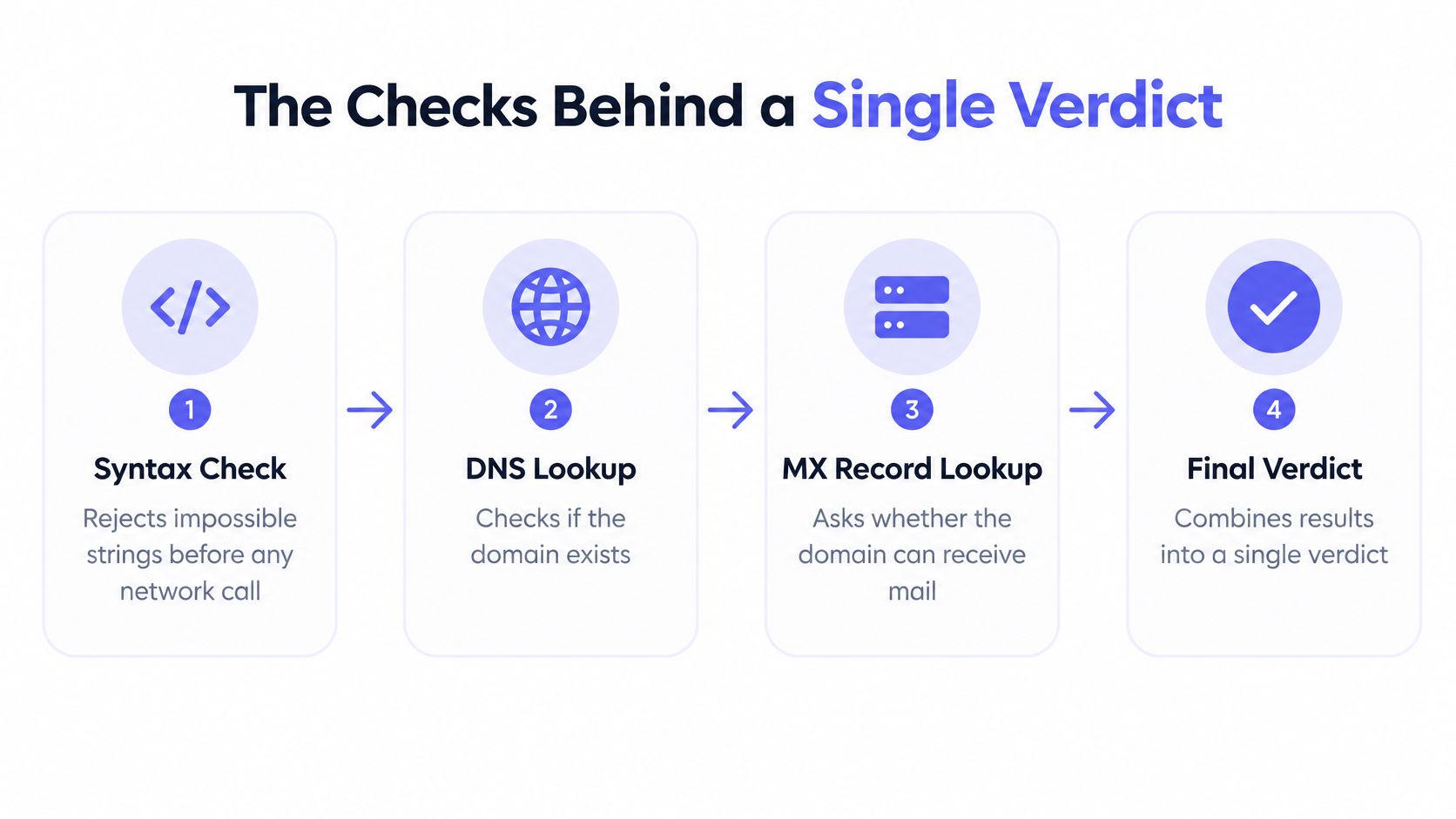
A verifier isn't a lock with one key. It's a row of gates, and each gate answers a smaller question than the whole. Syntax runs first and rejects impossible strings, a missing @, stray spaces, illegal characters, before anything touches the network. DNS then asks whether the domain exists at all. The MX lookup asks whether that domain is configured to receive mail. Only after that does an SMTP probe ask the receiving server about the specific mailbox, which is the first question about a person rather than about plumbing.
A fourth layer has nothing to do with the network. Disposable-domain intelligence, role-address patterns, free-provider detection and random-input checks describe intent and risk, and no server reply will ever state them.
What the gates return when you run them at scale
The distance between domain readiness and mailbox validity is large and measurable. A 2026 study of 10,241,981 email verification attempts across 293,934 recipient domains found that 12.3% of checked addresses were invalid, roughly one in eight. Another 33.1% belonged to catch-all domains, where the server accepts mail for many or all recipient names and therefore can't confirm whether a particular mailbox exists.
Then comes the number that reframes the exercise. Only 0.3% of checks failed at the DNS level because of a missing MX record. Almost every problem address sat on a domain that looked technically ready for email.
A domain that can receive mail is not a mailbox that exists, and neither of those is a person who reads what you send.
The catch-all share also caps what an SMTP probe can deliver. About a third of the tested addresses couldn't be settled by a simple recipient-exists reply, however many times you asked.
Why the answer still helps
None of that makes verification pointless. It makes it a risk classification with named signals. Each gate keeps its own output and its own confidence, and the product combines them: syntax and MX as hard requirements, SMTP as strong evidence when it answers, disposable and role signals as policy inputs, catch-all as a flag on an otherwise acceptable address.
That's the difference between a verifier you can explain to a support agent and a black box that returns a score. When someone writes in to ask why their signup was held, "the domain publishes no mail exchanger" is an answer. "The system said no" isn't. Verification predicts risk. It never promises that next month's campaign reaches an inbox.
When an MX Record Is Not Enough
A published MX record proves exactly one thing: some server is willing to accept mail for the domain. It says nothing about who owns the mailbox, whether they asked for your message, or whether the address will still work next Friday. Treat it as a shortcut to "this address is safe" and you're trusting plumbing to describe a person.
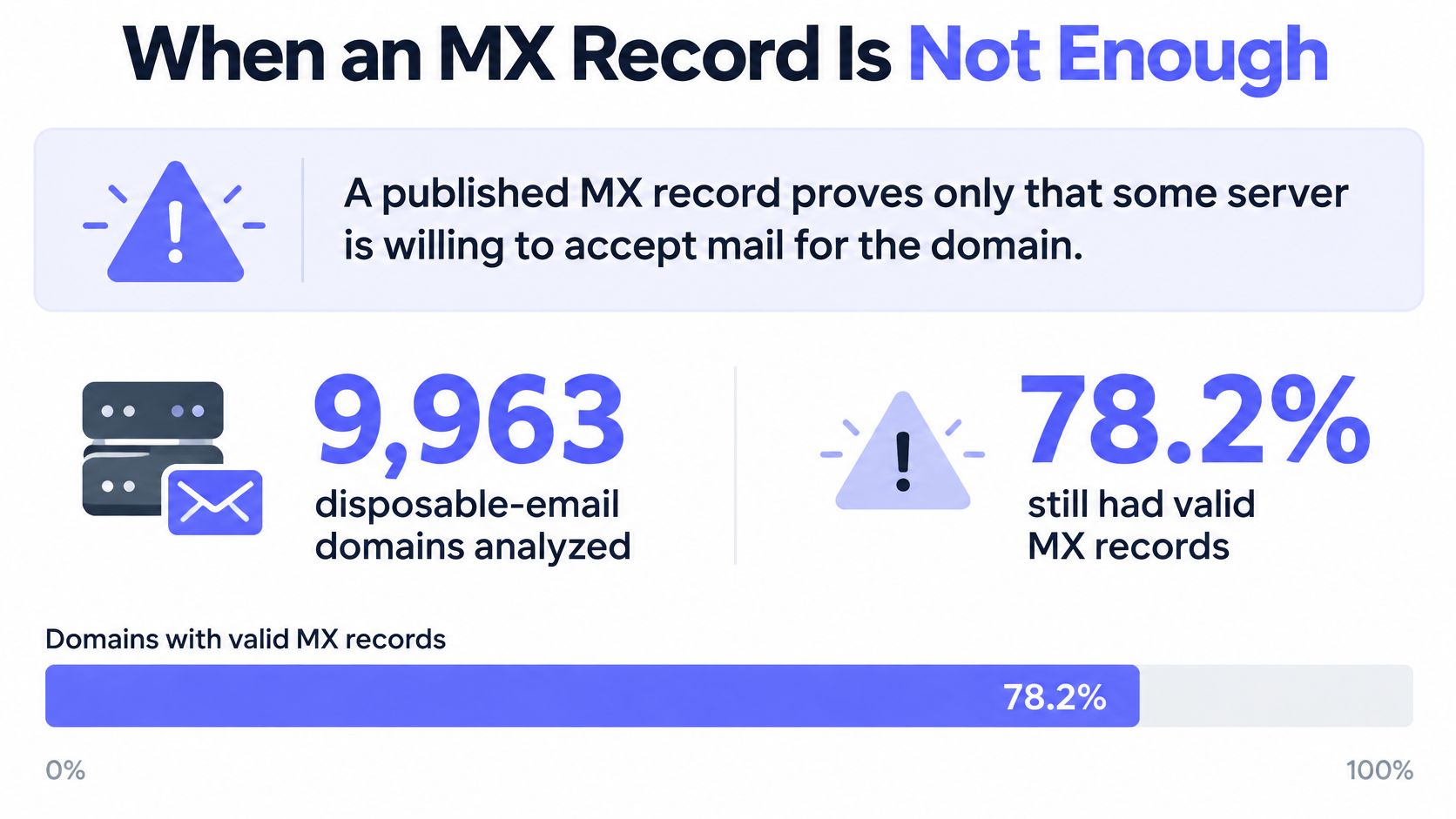
Throwaway services show the gap most plainly. A 2026 analysis of 9,963 disposable-email domains found that 78.2% passed a basic mail check, including 69.2% with published MX records, and that 98.7% of the disposable domains newly added during the study period had MX records. Point a DNS-only tool at a temporary inbox and it sees a healthy domain.
That's why a static deny file decays. New throwaway domains show up before blocklists catch them, so the disposable signal has to be refreshed on a schedule you stick to rather than assembled once and filed away.
The question the form is really asking
The useful FAQ isn't "does this email exist". It's "what should a signup do when the domain accepts mail and the address may be temporary or unverifiable". Those are different design problems, and the second one has a policy answer rather than a technical one.
A fintech signup, or anything in a regulated workflow, should treat a mail-capable throwaway domain as a block or as a step up to a stronger identity check. The cost of a fake account is high enough to justify the friction. A low-risk product trial can take the opposite view: let the trial start, keep that address out of engagement metrics, and put the gate where money or a real commitment appears.
Pair the MX result with disposable intelligence and catch-all detection, then return a reason code. A bare "mail server found" status gives the product nothing it can act on.
What you're buying is the difference between domain capability and intent. A server that accepts mail costs a spammer nothing. Whether the person behind it plans to come back is the thing your form is trying to learn, and no DNS lookup gets you there.
How Signup Flows Should Treat Each Result
The verifier and the person filling the form are solving different problems. One returns reason codes. The other wants an account. The form sits between them and has to turn each result into an action, plus a sentence the person can use.
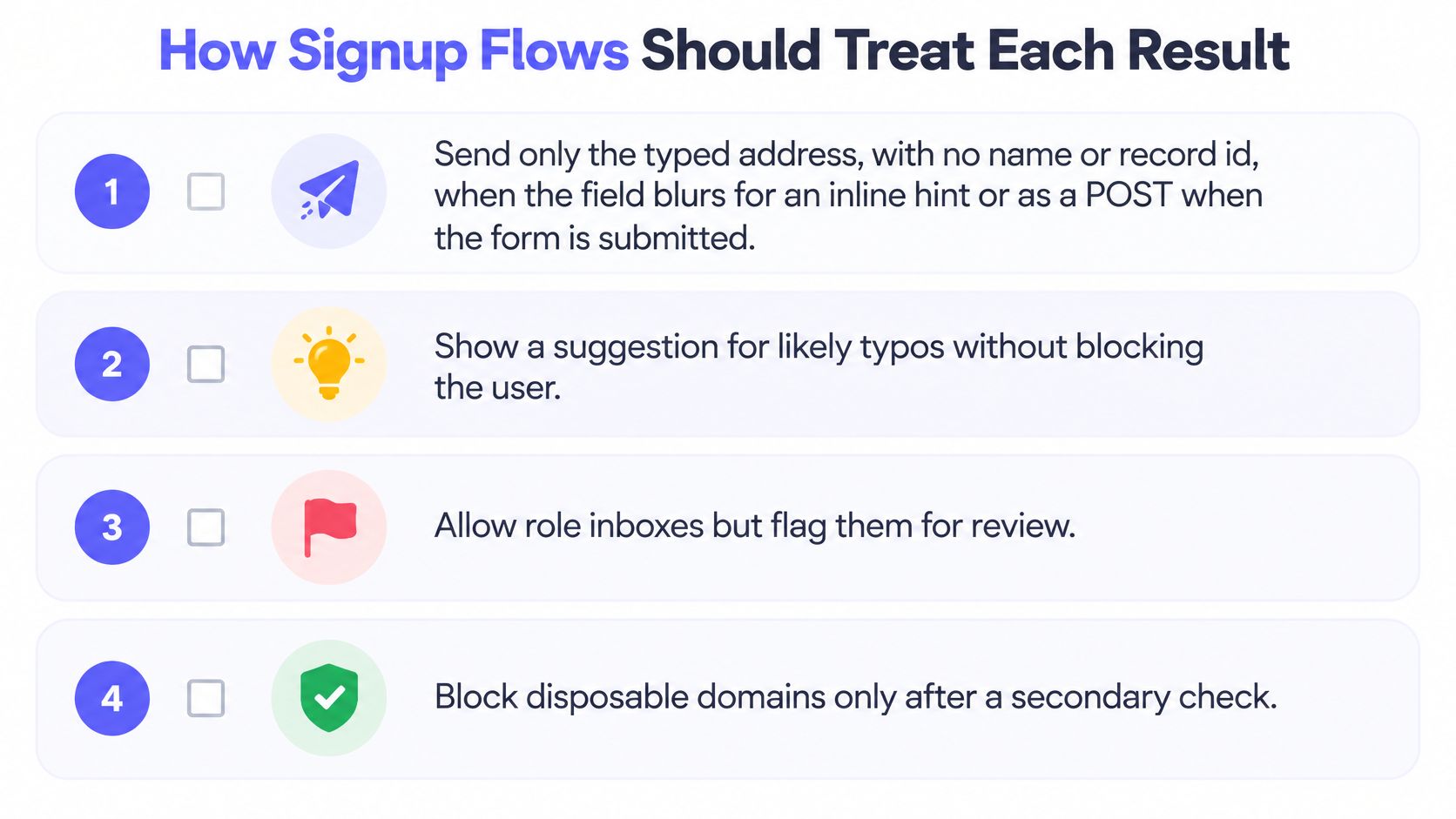
- Send the typed address and nothing else. POST that single value to
/v1/verifywhen the field blurs, for an inline correction, or when the form is submitted. Leave the name, the record id, and every other field off the request. The call stays small, and personal data stays in your form. If the trigger is still unsettled, these patterns for real-time email validation lay out blur versus submit. - Read the checks, not just the headline. Syntax, MX, SMTP, disposable, role address, and free provider each return on their own. An MX record only shows the domain can receive mail. Catch-all servers and disposable domains both clear that bar, so a single yes is the wrong output. Separate results let you hold the catch-all and block the throwaway from the same response. A true valid flag with a null reason means the critical checks passed. It does not prove anyone will read the mail.
- Show a suggestion and stop there. When the domain is one letter off a common provider, such as gmal.com next to gmail.com, put the correction in a suggestion beside the field and let the person accept it. Writing that address onto the account without a yes creates a login nobody owns.
- Map the reason to a sentence the person can act on. "Temporary email addresses aren't accepted here. Please use a work or personal address" names the change. "Something went wrong, try again" sends them back to the same keystrokes.
- Fail open when the call doesn't answer. If the request errors or times out, allow the signup and queue that address for a later batch recheck. A slow probe should not turn a real customer away.
- Write the reason onto the account. The first time a marketing send is held, support needs the code that caused it, not a reconstructed guess.
The timeout path is a decision you make in advance
A verification call waits on a third party and on a receiving server that owes you no fast reply. Treating that silence as a rejection ties conversion to somebody else's uptime. Let the account through, then hold the address out of promotional sends until the batch recheck passes. The door stays open, and you do not mail a result you never finished.
The message matters as much as the rule
A held signup and a blocked signup look the same unless the copy says which one it is. A disposable domain gets a direct explanation. A role address on a consumer form gets an invitation to use a personal inbox. A typo gets a suggestion, not a warning.
One rule sits above all six. Nothing in the response proved that a specific person owns the mailbox. Catch-all and role results are risk labels, so run them through double opt-in before they enter a promotional series. A real-time check processes the address in memory and discards it once the verdict returns, so the form is not keeping a second copy of the list.
List Hygiene for Addresses Already Collected
An address that passed when collected may fail later. Mailboxes close, domains change, and old records can become risky. A scheduled hygiene run helps keep those changes from feeding into the next campaign. Verification services routinely identify issues in older lists, including nonexistent mailboxes, spam traps, disposable domains and abuse addresses.
List maintenance is a recurring deliverability challenge for senders. In Mailgun's 2025 survey, 33.8% of senders named maintaining list hygiene as a deliverability challenge, and 28.4% named reducing bounces. Set a schedule around the way each list is used, rather than relying on someone to remember a cleanup.
| List state | When to verify | Keep | Suppress |
|---|---|---|---|
| New signup | Real time, before the account is created | Valid and low-risk | Disposable, no MX, mailbox rejected |
| Marketing list before a send | Batch before each major campaign | Deliverable segment | Undeliverable, spam traps, abuse |
| Dormant contacts | Before a win-back after months of silence | Still valid on recheck | Now invalid or high-risk |
| Cold outreach file | Before the first message in a sequence | Company domains that pass policy | Invalid rows and any role addresses the policy blocks |
Three exports, three different actions
A single pass-or-fail column hides distinctions that matter. Split the results into deliverable, risky and undeliverable segments, then decide what each group is allowed to do.
Mail the deliverable segment. These addresses passed the checks and have no flagged reason for caution. They can be included in the next campaign, though a passing result does not prove that a person will read the message.
Quarantine the risky segment. Catch-all domains, timeouts and other uncertain results are not confirmed bad addresses. Hold them out of engagement calculations and recheck them before a later send, rather than suppressing them permanently.
Suppress the undeliverable segment. Hard-bounce addresses should not be sent to the provider again. Apply the same rule to spam-trap and abuse hits. Retrying those addresses can turn a list-quality problem into a sending-reputation problem.
The export should be a segmented file that feeds the campaign, not a spreadsheet nobody opens. When choosing a tool, compare email cleanup apps by whether their outputs make these actions clear. The process from import to segmented export is explained in this guide to cleaning up email lists, which treats hygiene as repeatable work rather than a one-off purge.
Throwaway Domains, Role Inboxes and Typos
Say a consumer app opens signups on a Tuesday afternoon and four addresses arrive within the hour.

The first is alex@gmal.com. Syntax passes, the domain resolves, gmal.com has mail records, so a DNS-only check waves it through and the account is created against an inbox that will never receive anything. A verifier that compares the domain against known providers catches the transposition and returns a suggestion instead of a verdict. The form shows alex@gmail.com beside the field and waits. One keystroke later, the account belongs to a real person.
The second is the same local part at a well-known throwaway service. The domain is alive and accepts mail, which is exactly why it slips past a naive check. A disposable email detection layer recognises the provider, so the signup is refused with a message that names the reason instead of a generic retry prompt.
The third arrives as team@ on a corporate domain that runs a catch-all server. The probe asks whether that mailbox exists, the server says it will take anything, and the verifier records the limit. The account is allowed with a risk flag, and the welcome series waits until the person clicks something and confirms a human is there.
Here's the same loop running end to end on a live address, so the order of the checks is easier to follow.
The fourth visitor types sales@ at a vendor they buy from. That's a role inbox, real and monitored, and the business lead form keeps it without complaint. A consumer app asking for a personal login would send the same address back with a request for a named one, because a shared inbox can't hold an individual account.
One more edge sits outside those four. A former employee whose mailbox the server now rejects is suppressed on the spot, never retried, and never handed to a sending provider as a hard bounce.
Four addresses, four outcomes, one form. A single green checkmark would have flattened all of them into the same result and pushed the sorting work onto a support queue a week later.
Put Verification on the Signup Form First
Two places need this, and only one of them is urgent. The signup form is where throwaway addresses and typos enter the product, and it's the only moment you can ask someone to fix an address while they're still looking at the field. The list sitting in your CRM can wait a week. A fake account created today inflates your activation numbers and starts receiving mail tomorrow.
So wire the form field first, using the result table from the opening section as the literal specification for your handler. Pick one trigger, inline on blur or on submit, send only the address, and keep the call non-blocking. If the verifier doesn't answer, let the person in and put the address in a recheck queue. Log the reason code on the account so support has something to read when a send is held months later.
Then schedule the first cleaning run on the backlog, following the cadence in the table above. Mailbeam answers real-time checks inside the signup request in under 100 ms, so the field feels instant, and batch cleaning covers the addresses already collected.
Nothing here is a licence to buy a list or mail people who never asked. Verification gets rid of bad rows and hard bounces. Consent is a separate job, and no reason code gives it to you.
Mailbeam verifies an address inside the signup request and returns a valid flag, a per-check breakdown and a reason code, so a typo, a throwaway inbox and a catch-all domain each get the response they deserve instead of the same rejection. Addresses aren't stored after the check, and the batch tools clean the list you already have. Start with one form field at Mailbeam and let the reason codes show you which decisions your product needs to make.