If a port is open and your client completes a STARTTLS handshake, have you proved that your mail will stay encrypted?
Many people say yes. They're mixing up three different things. A port can be reachable, TLS can be negotiated on it, and the server's identity can still be unverified. Picking the right port for TLS is only the first step. You also need the right encryption mode for that port, a valid certificate, and, for stronger protection, a policy that refuses plaintext fallback.
Table of Contents
- Default TLS Ports for Every Protocol
- Why HTTPS Runs on Port 443
- Email Submission on Port 465 Versus Port 587
- Choosing IMAP or POP3 Ports for Mail Retrieval
- What an Open Port Does Not Prove
- Confirm the Right Port Before You Connect
Default TLS Ports for Every Protocol
There's no single port for TLS. TLS is a way to wrap a connection, not a service with one door. Each protocol gets its own default port, and the right choice depends on both the service and how TLS starts.
Implicit TLS means encryption begins as soon as the connection opens, before any application words are exchanged. STARTTLS means the connection starts in plaintext, then the client asks to upgrade it to TLS. You'll see the mechanics in detail later. For now, match the label to the port.
Default Ports by Protocol
| Protocol | Port | TLS mode | Typical use |
|---|---|---|---|
| HTTPS over TCP | 443 | Implicit TLS | Web pages and APIs |
| HTTP/3 over QUIC | 443 (UDP) | Implicit TLS in QUIC | Modern browsers and CDNs |
| SMTP submission, implicit TLS | 465 | Implicit TLS | Authenticated mail sent by apps and clients |
| SMTP submission, STARTTLS | 587 | STARTTLS upgrade | Mail clients and applications sending mail |
| SMTP relay | 25 | Opportunistic STARTTLS | Server-to-server mail delivery |
| IMAPS | 993 | Implicit TLS | Mailbox access and sync across devices |
| IMAP with STARTTLS | 143 | STARTTLS upgrade | Older mail clients |
| POP3S | 995 | Implicit TLS | Mail download to a single device |
| POP3 with STARTTLS | 110 | STARTTLS upgrade | Legacy download setups |
| FTPS, implicit TLS | 990 | Implicit TLS | Secure file transfer |
| LDAPS | 636 | Implicit TLS | Directory lookups and logins |
| DNS over TLS | 853 | Implicit TLS | Encrypted DNS queries |
Start at the top if you're setting up a website. Web traffic normally uses TCP 443 for HTTPS, and UDP 443 when HTTP/3 over QUIC is enabled. Same number, different transport.
Email takes three rows because sending has three different jobs. Use 465 only with implicit TLS, 587 for authenticated submission with STARTTLS, and 25 for relay between mail servers. If you're unsure what sits behind those ports, an explanation of what an email server does helps before you change client settings.
Retrieving mail is separate from sending it. IMAP uses 993 or 143. POP3 uses 995 or 110. The other rows follow the same pattern, one default port per service.
A port number is a convention, not a guarantee. An administrator can run a service on a different port, so the number alone never proves encryption.
Find your protocol in the table. Then check that both the port and the mode in your client or server match that row.
Why HTTPS Runs on Port 443
Why does a browser usually connect to port 443 when you enter an HTTPS address? Port numbers act like labeled doors: they help a client find the service it expects. For HTTPS, that usual door is TCP 443.
Browsers, firewalls, and load balancers rely on this convention. When they see an https:// address, they look for the service on TCP 443 unless the address names a different port.

Why HTTPS Needs Its Own Door
HTTP and HTTPS begin their conversations differently. A TLS connection starts with a TLS ClientHello, while a plain HTTP connection starts with an HTTP request line. Using separate ports lets the server know which kind of first message to expect.
RFC 2818 defines port 443 as the default for HTTP over TLS. The IANA registry entry for https lists TCP 443 for HTTP over TLS/SSL and UDP 443, used by HTTP/3 over QUIC. Port reachability only tells you that a connection can reach the service. It does not, by itself, confirm that TLS was negotiated or that the certificate was validated.
What to Configure
- Serve HTTPS on TCP 443: Clients, proxies, and monitoring tools expect this default.
- Keep port 80 narrow: Use it to redirect visitors to the HTTPS address and, where needed, for certificate validation. Avoid serving the main site over plain HTTP.
- Use a custom port only when needed: An address such as https://example.com:8443 works, but clients must be given that port explicitly.
HTTPS can run on another port, but changing the default can mean extra work. Links, firewall rules, and integrations may all need to specify the custom port.
Before calling a site ready, check that TCP 443 is allowed through the firewall and load balancer. Enable UDP 443 too if HTTP/3 is configured. Then visit the port 80 address and confirm it redirects to HTTPS. Check that the certificate matches the hostname, and that the client reports a validated TLS connection.
Email Submission on Port 465 Versus Port 587
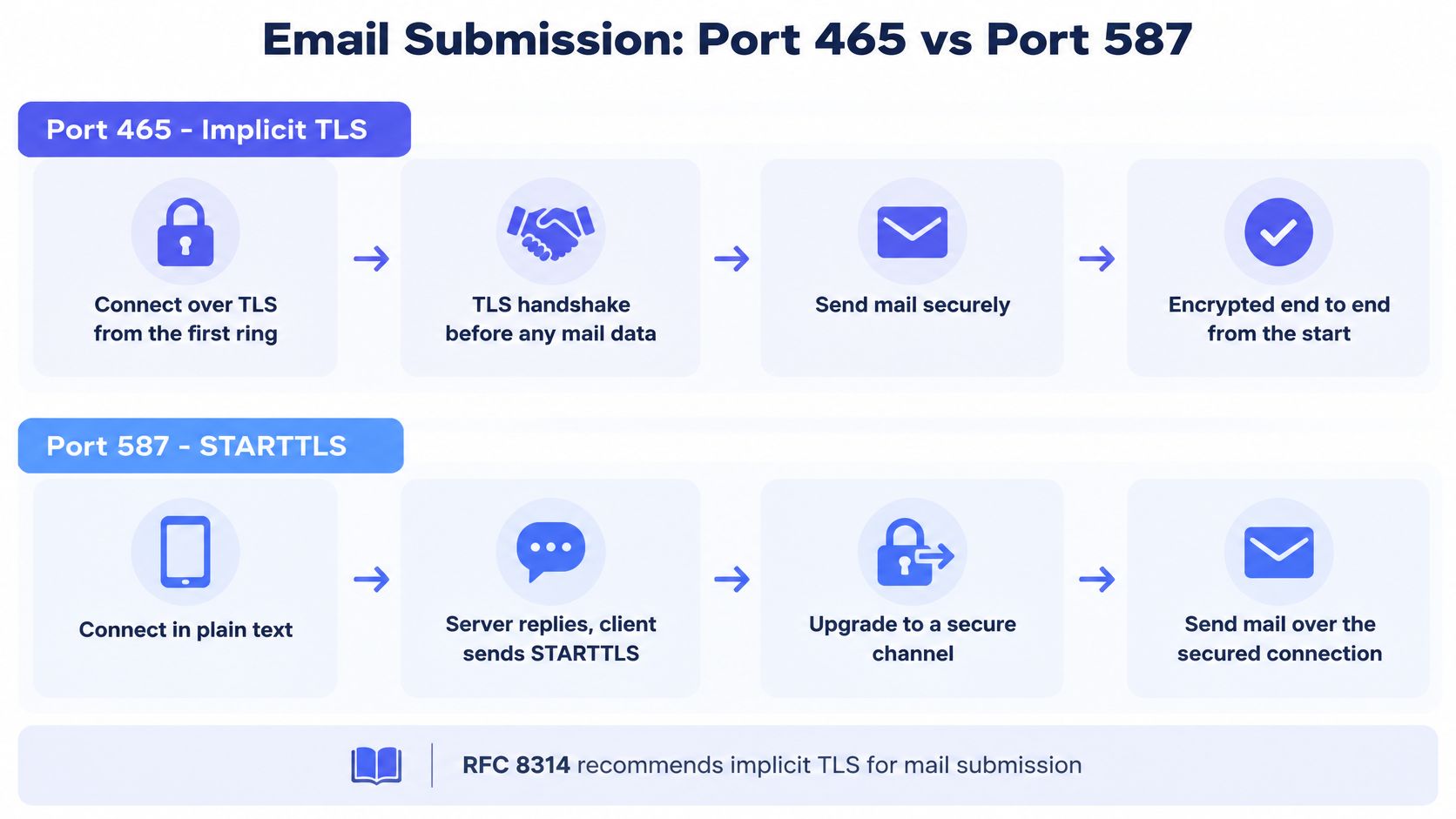
Port 465 is a phone call that's private from the first ring. Nobody hears an unprotected greeting. Port 587 is a call that starts on an open line, then both sides agree to switch to a secure line before saying anything sensitive.
That difference in timing is the whole distinction, and it's where most setup failures start.
Port 465 Starts With TLS
RFC 8314 defines TCP port 465 as submissions. The RFC 8314 specification for implicit TLS says the TLS handshake begins immediately after the TCP connection is established, and the SMTP conversation then runs inside the encrypted channel. It also recommends supporting both 465 with implicit TLS and 587 with STARTTLS during the transition period.
That order matters if you're writing a probe or debugging by hand. On 465, you must start TLS before you send any SMTP command. If you send EHLO first, you're speaking plaintext to a server that's waiting for a TLS handshake. You'll get a protocol error, a stalled connection, or a defensive disconnect.
Port 587 Upgrades in Steps
On 587, the sequence runs the other way. Follow it in order and don't skip the checks.
- Open a plain SMTP connection: Connect to port 587 without TLS.
- Send EHLO: Read the server's list of advertised features.
- Confirm STARTTLS is advertised: If it isn't there, don't send credentials.
- Upgrade the connection: Complete the TLS handshake and validate the certificate.
- Authenticate and submit: Only now should a username, password, or message cross the wire.
A short demonstration of that upgrade sequence is often clearer than a log file, so watch the handshake order as it happens.
Port 25 is different again. It's primarily for server-to-server relay, where STARTTLS is the normal upgrade mechanism. Don't treat it as a general-purpose port for your app or mail client to submit outgoing mail.
The most common mistake is simple. Someone picks SSL/TLS with port 587, or STARTTLS with port 465. The server is healthy, the password is right, and the connection still fails because the mode and port disagree. Match the mode your client offers to the port your provider documents, and change both together if you switch.
Choosing IMAP or POP3 Ports for Mail Retrieval
Sending ports don't fetch your mail. Retrieval is a separate decision, and it starts with one question. Do you read mail in more than one place?
IMAP keeps mail on the server. Your phone, laptop, and webmail all see the same folders, and a message you read on one device shows as read on the others. POP3 downloads mail to a device, usually one device, and it may remove the server copy after download.
The Four Retrieval Options
| Protocol | Port | TLS mode | Best fit |
|---|---|---|---|
| IMAPS | 993 | Implicit TLS | Syncing one mailbox across devices |
| IMAP with STARTTLS | 143 | STARTTLS upgrade | Older clients that can't use implicit TLS |
| POP3S | 995 | Implicit TLS | Downloading mail to a single device |
| POP3 with STARTTLS | 110 | STARTTLS upgrade | Legacy download setups |
The pattern should look familiar. The higher, dedicated ports, 993 and 995, start with TLS. The older ports, 143 and 110, start in plaintext and upgrade with STARTTLS.
Two Everyday Scenarios
Someone reads work mail on a phone during the commute and a laptop at a desk. She flags a message on the train and expects to find that flag later. She needs IMAP on 993, because the server stays the shared source of truth for folders and read states.
A small office runs a shared mailbox on a server with limited storage. One front-desk computer is the only machine that reads it, and staff want mail pulled down to that machine. POP3 on 995 can suit that setup, provided someone backs up the downloaded mail and accepts that other devices won't see the same mailbox state.
If you're still weighing how the two protocols behave day to day, a comparison of IMAP and POP3 covers storage, sync, and offline access in more depth.
Rule of thumb: Choose 993 for IMAP and 995 for POP3. Drop to 143 or 110 only when a client or provider leaves you no other option.
Ports 143 and 110 with STARTTLS exist for legacy clients. They're a compatibility path, not a first choice. Replace them with 993 or 995 when your provider supports the implicit TLS ports.
Whatever you pick, don't allow a plaintext login as a fallback. Once you've set a client or server to require TLS, a failed upgrade should stop the connection, not quietly continue and expose the password.
What an Open Port Does Not Prove
An open port proves one small thing. Something answered. It does not prove your mail is protected.
That gap is where port guides often stop too early. They tell you 587 uses STARTTLS or 465 uses implicit TLS, then call both secure. Real protection has several layers, and each layer can fail on its own.
Four Layers, Checked Separately
- Port reachability: The TCP connection opens. You've proved a service is listening, nothing more.
- Negotiated TLS: The server accepts implicit TLS, or agrees to STARTTLS and completes the handshake.
- Certificate validation: The certificate chain is trusted, the certificate is current, and the hostname matches.
- Enforced transport policy: The sending or receiving side refuses to fall back to plaintext when TLS fails.
STARTTLS needs the last two layers most. Because the conversation starts in plaintext, an attacker in the middle can try to strip or downgrade the upgrade. That attack fails when the sender validates certificates properly and follows a strict policy for the recipient domain.
Three mechanisms supply that policy. MTA-STS lets a domain advertise that senders should require TLS. DANE, using TLSA records bound through DNSSEC, ties the expected certificate to the domain. SMTP TLS Reporting tells domain owners when delivery over TLS fails, so they can fix misconfigurations that would otherwise stay silent.
Policy Adoption Is Still Thin
You can't assume those policies exist. The 2025 Dutch domain measurement of email security standards found DANE on 14% of domains and MTA-STS on 6%, while 32.5% had neither configured. Weighted by message volume, adoption rose to 25% for DANE and 19.1% for MTA-STS, which shows large mail systems are ahead of the long tail of smaller domains.
That's the practical warning. TLS enabled doesn't mean transport security is reliably enforced. Encryption may be opportunistic, the certificate may not be checked, and a small recipient domain may offer weaker guarantees than a large provider. Treating every reachable server as equally safe hides that difference, which is why SMTP verification that separates each check gives you more to act on than a single pass or fail.
Connection Outcomes and the Action to Take
| Outcome | What it proves | Recommended action |
|---|---|---|
| Port reachable only | TCP connection opens | Not enough; continue to TLS checks |
| Encrypted but opportunistic | STARTTLS negotiated, identity not verified | Accept, record TLS version and flag as unverified |
| Authenticated and validated | Certificate is trusted and matches the hostname | Accept and mark as verified |
| Policy-enforced | MTA-STS or DANE present, plaintext fallback refused | Accept; retry or alert on mismatch |
| Downgraded or failed | Encryption not offered or stripped | Quarantine or alert; do not send credentials |
Report TLS capability and policy posture as separate results. A single green tick for an open port tells your team almost nothing.
Confirm the Right Port Before You Connect
Don't guess, and don't keep swapping ports until one works. A connection that succeeds by accident may be plaintext, misvalidated, or pointed at the wrong service. Work through these checks in order.
A Seven-Step Check
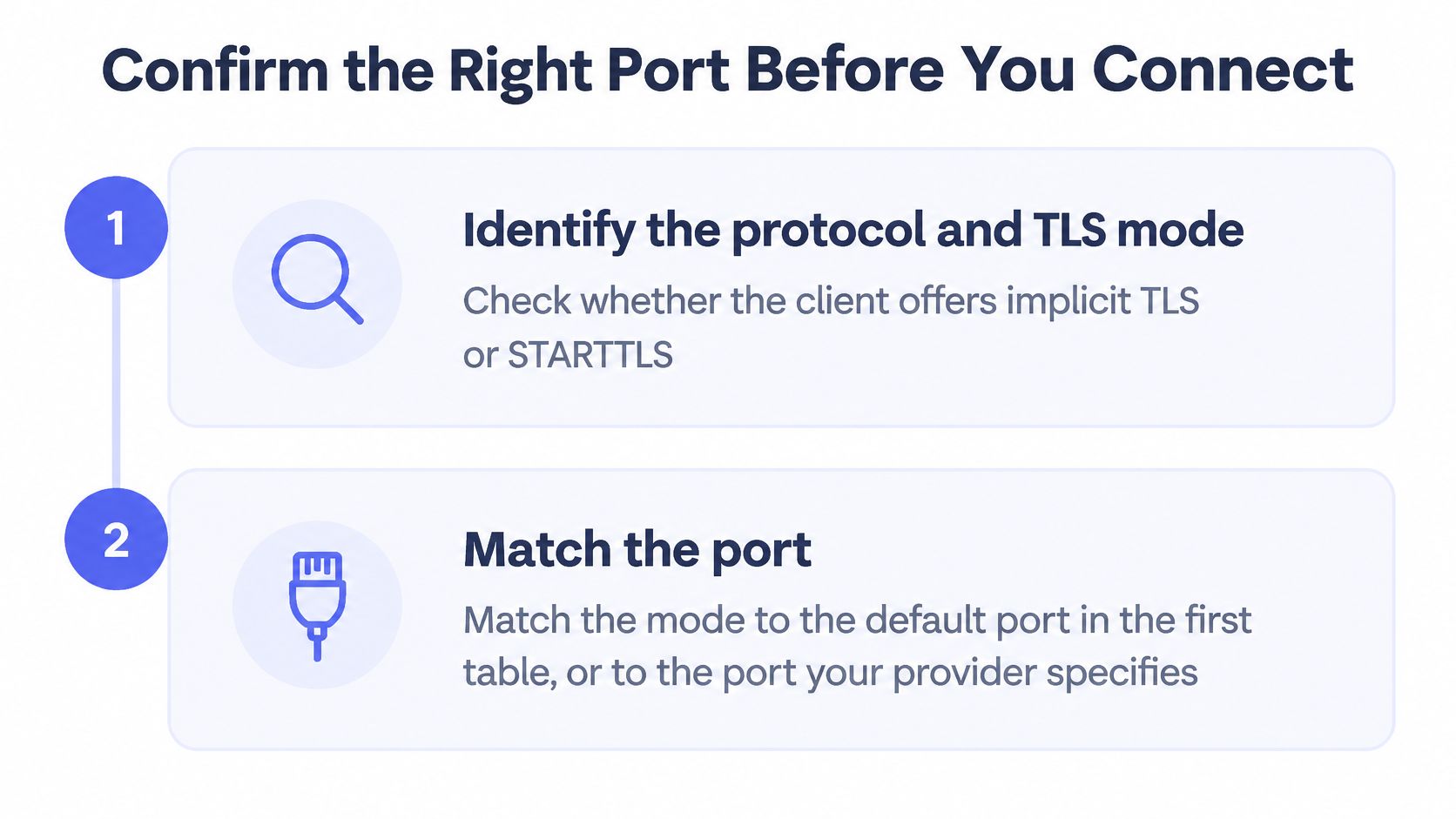
- Identify the protocol and mode: Decide what you're configuring, such as SMTP submission, IMAP, or HTTPS, and whether your client offers implicit TLS or STARTTLS.
- Match the port: Use the default from the first table, or the exact port your provider documents. Don't pair a port with the other mode.
- Confirm reachability: Run
nc -vz mail.example.com 465. A success message means the TCP connection opens. It doesn't prove TLS yet. - Test implicit TLS: Run
openssl s_client -connect mail.example.com:465. The handshake should complete before you send any SMTP command. - Test STARTTLS instead, if that's your mode: Run
openssl s_client -starttls smtp -connect mail.example.com:587. Confirm the server advertises STARTTLS after EHLO and that the upgrade completes. - Validate the certificate: Check that it's current, issued by a trusted authority, and matches the hostname you're connecting to. Record the negotiated TLS version.
- Check published policy for recipient domains: Look for MTA-STS or DANE. If neither exists, record the result as lower assurance rather than treating it as fully enforced.
Notice that steps 4 and 5 are separate paths. Keep them separate in scripts and probes too. Code that sends EHLO first will break on implicit TLS ports, and code that starts TLS immediately will break on STARTTLS ports. Add handshake and command timeouts to both paths, and log the exact failure reason so you can tell a blocked port from a bad certificate.
For the DNS side of a new domain, Mailbeam offers a free MX Record Checker on mailbeam.dev that shows which mail servers a domain publishes. Use it to confirm you're testing the hosts the domain publicly announces.
Keep this checklist: Correct port. Correct mode. Valid certificate. Policy status recorded.
If all four lines are answered, you're not relying on an open door as proof of security. You know what answered, how it encrypted, who it claimed to be, and what happens if encryption fails.
Choosing the right port for TLS fixes the connection, but it doesn't tell you whether an address can receive mail at all. Mailbeam checks syntax, MX records, and SMTP reachability through a real-time verification API and free web tools, so you can validate addresses in your signup flow before bad mail hurts deliverability. Visit Mailbeam to test an address or look up a domain's mail servers before your next send.