
An SMTP port is the numbered TCP port a mail server or application connects to for SMTP, with port 25 for server-to-server relay, port 587 for authenticated submission with STARTTLS, and port 465 for authenticated submission with implicit TLS.
If your application can't connect, does that mean the recipient's email address is bad, or have you only learned something about your network? That distinction matters when a signup confirmation, password reset, or receipt fails to send. A connection error can happen before the recipient's mailbox is ever checked.
The useful question isn't just which port to enter. It's what job the connection needs to do, which encryption mode the server expects, and what your test proves.
Table of Contents
- SMTP Ports 25, 465 and 587 at a Glance
- What an SMTP Port Actually Does
- Port 25 Relay and Port 587 Submission Explained
- Implicit TLS on 465 Versus STARTTLS on 587
- Why Port 25 Gets Blocked and What It Means
- Choose the Right Port and Test It
SMTP Ports 25, 465 and 587 at a Glance
An SMTP port identifies the TCP endpoint your software uses to communicate with a mail service. The usual choices separate mail-server relay from authenticated submission, rather than representing different versions of SMTP.
The IANA service-name and port-number registry records the SMTP and submission service assignments. Use the following comparison to match your connection to its intended role.
SMTP ports at a glance
| Port | Main role | How encryption starts | Typical user |
|---|---|---|---|
| 25 | Server-to-server relay between mail servers | Optional STARTTLS | Mail servers delivering to other domains |
| 465 | Authenticated submission | Implicit TLS from the first byte | Apps and clients where the provider requires implicit TLS |
| 587 | Authenticated submission | Upgraded with STARTTLS | Email clients and transactional apps |
For a web application, background worker, or script sending transactional email, start with the provider's submission settings. You're handing a message to a service that will deliver it, not normally operating the infrastructure that contacts every recipient domain directly.
Choose a configuration, not just a number
Treat the hostname, port, TLS mode, and authentication settings as a matched configuration. Changing only the port can leave your client speaking the wrong connection protocol to an otherwise healthy server.
A setting labeled “secure” can also be misleading. In some libraries, it means encryption begins immediately, not that the connection must eventually be encrypted.
Practical rule: Copy the provider's complete SMTP configuration, then explicitly require encrypted authentication.
For an application, STARTTLS submission is a sensible starting point unless the provider documents implicit TLS instead. The provider's settings page takes priority over a general recommendation because it describes the endpoint you're connecting to.
Don't try each port at random until one stops producing errors. A connection that opens successfully still needs the correct encryption and authorization behavior before it's suitable for production.
What an SMTP Port Actually Does
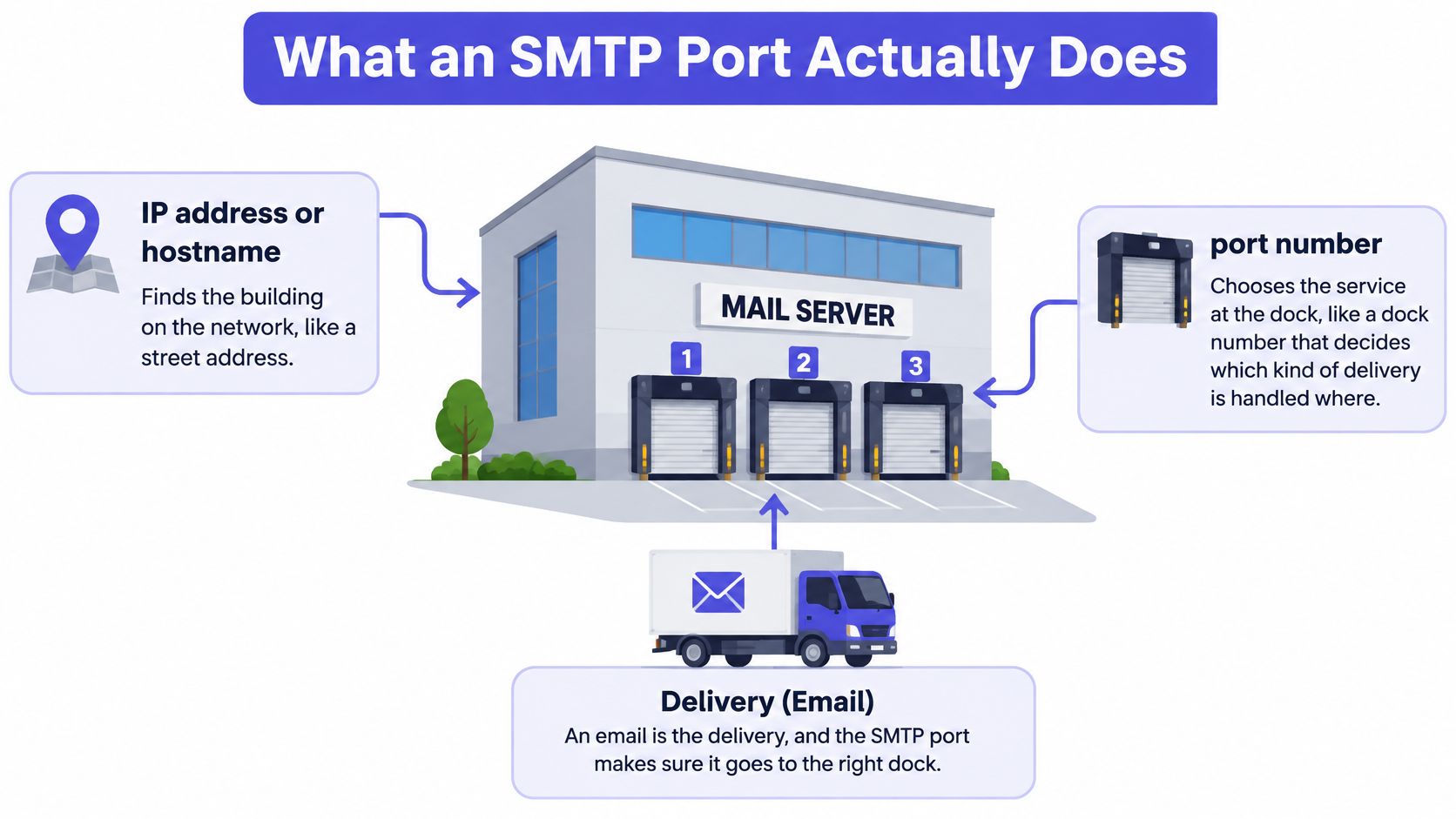
Think of a mail server as a building with numbered loading docks. The street address gets a delivery truck to the building; the dock number selects where a particular kind of delivery is handled.
A hostname or IP address locates the machine. A TCP port selects a service listening on that machine. Neither tells you, by itself, whether a particular email address exists.
The relationship between the host, service, role, and encryption looks like this.
Follow the conversation
Say your checkout application opens a connection to its configured submission service. On a STARTTLS connection, the server first sends an SMTP greeting. Your application responds with EHLO, which introduces the client and asks which extensions the server supports.
The client then negotiates encryption, authenticates, and issues the commands needed to submit the message. Each stage can fail independently, so an error message is useful only if you know which stage produced it.
- Connection stage: Can your application reach the service?
- TLS stage: Can the client establish and validate the encrypted connection?
- Authentication stage: Does the service authorize this account to submit mail?
- Message stage: Will the service accept the sender, recipient, and message?
The port doesn't replace any of those steps. It tells your software which service endpoint to approach, while the SMTP dialogue establishes what happens next.
Follow the message
After accepting your application's message, the sending service makes a separate connection to the recipient domain's mail server. Your application's submission connection and the provider's delivery connection are different network sessions, often operated by different systems.
This explains a common source of confusion: your application can submit successfully even if the provider later encounters a delivery problem. Conversely, your application can fail to connect before any recipient server has been contacted.
A port number doesn't encrypt data. The configured TLS mode and the successful TLS negotiation determine whether that connection is encrypted.
Port 25 Relay and Port 587 Submission Explained
Submission is the handoff from a user or application to a service responsible for sending mail. Relay is the transfer between mail servers along the delivery path.
RFC 6409 reserves port 587 for message submission, normally using Extended SMTP, and states that message relay continues to use port 25. The distinction lets administrators apply account-level submission policies without treating incoming mail from other domains as if it came from a logged-in application.
Two terms help clarify the participants. A mail-submission agent, or MSA, accepts submitted messages. A mail-transfer agent, or MTA, transfers messages between mail systems. One software package may perform both jobs, but those jobs still have different requirements.
A receipt travels through different roles
Suppose a customer completes a checkout and your application generates a receipt. The application connects to its email provider's submission endpoint, establishes the required encrypted connection, and authenticates using its configured account credentials.
The provider accepts the receipt for onward delivery. Its mail-transfer infrastructure then identifies the recipient domain's receiving mail host and opens a separate relay connection to it.
Your application doesn't need the recipient's mailbox password. It authenticates to its own sending service, which handles the subsequent transfer. The recipient's mail server evaluates that incoming delivery under its own receiving policies.
That handoff is the operational meaning of SMTP relaying. It's not just another name for entering SMTP credentials into an application.
Why the separation matters
A submission service can associate activity with a particular account. It can require authentication, restrict permitted senders, apply rate limits, and enforce account policies.
A receiving relay service must handle traffic from other mail servers, which generally aren't customers logging into a local submission account. That doesn't make it an unrestricted relay: accepting mail for local recipients is different from agreeing to forward arbitrary messages elsewhere.
A server accepting mail for its own domain isn't automatically an open relay.
Before changing your configuration, answer these questions:
- Application or client: Is my code handing mail to a provider for delivery? Use its authenticated submission service.
- Mail infrastructure: Is my server receiving mail or transferring it between domains? Configure the relay role.
- Both roles: Does my deployment do both? Keep the listeners, access rules, and authentication policies distinct.
The role determines the configuration family. A failed login isn't a reason to point application code at a receiving mail server instead.
Implicit TLS on 465 Versus STARTTLS on 587
Implicit TLS and STARTTLS can both protect authenticated submission, but they begin differently. The client and server must agree about what to send immediately after the TCP connection opens.
RFC 8314 defines port 465 as the default for the submissions service using implicit TLS and recommends support for both 587 with STARTTLS and 465 with implicit TLS during interoperability transitions. Implicit TLS is a standardized submission option, not merely an obsolete compatibility setting.
Implicit TLS begins before SMTP
With implicit TLS, the client starts a TLS handshake immediately. Only after that succeeds does the SMTP conversation begin inside the encrypted connection.
Your library may call this setting SSL/TLS, SMTPS, or implicit TLS. A label containing SSL doesn't mean you should enable obsolete SSL protocols; use the library's modern TLS support.
STARTTLS upgrades an SMTP session
With STARTTLS, the client receives the SMTP greeting and sends EHLO before requesting encryption. It then issues STARTTLS, completes the TLS handshake with certificate validation, and repeats EHLO inside the protected session.
Credentials must never be sent before TLS succeeds. Configure the client to require the upgrade rather than continuing without encryption if the server doesn't offer it.
Choose the mode using these rules:
- Provider documents STARTTLS: Use its STARTTLS submission endpoint and require a successful upgrade.
- Provider requires implicit TLS: Select implicit-TLS mode in a library that explicitly supports it.
- Testing a relay endpoint: STARTTLS may be available there, but that doesn't turn the endpoint into your default authenticated submission service.
For configuration terminology across clients and libraries, this guide to the port for TLS helps distinguish an immediate TLS connection from an upgrade.
A mismatch often looks like a handshake or protocol error. An implicit-TLS client expects TLS immediately, while a STARTTLS client expects an SMTP greeting first. If they disagree, changing the password won't fix the problem.
Why Port 25 Gets Blocked and What It Means
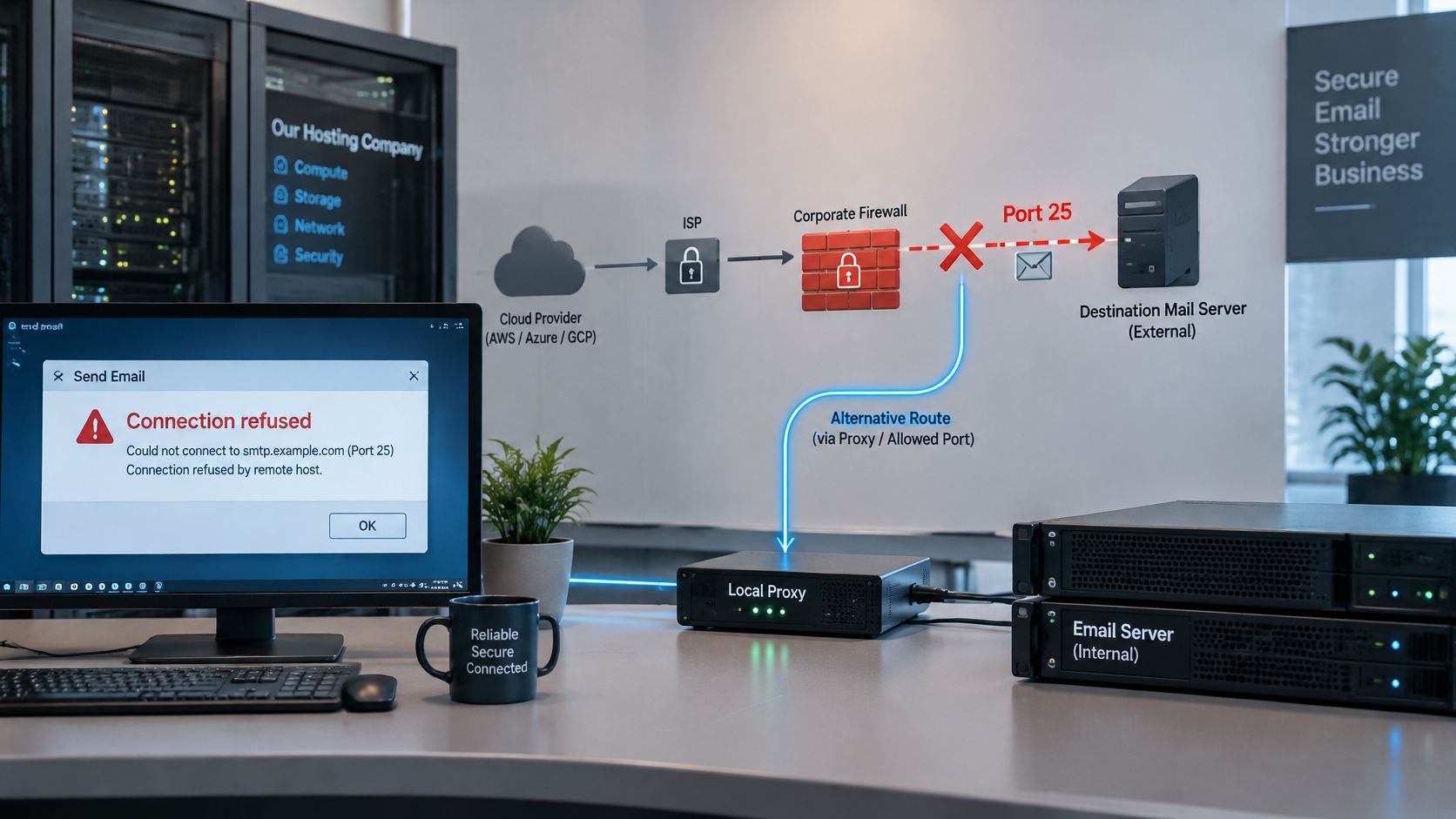
A connection timeout on a relay port doesn't establish that the recipient's domain or mailbox is invalid. The connection may have been filtered before it reached the receiving server.
The IETF's email submission operations guidance documents access providers blocking outbound port 25 or redirecting it through a local SMTP proxy. Cloud networks, hosting companies, corporate firewalls, and consumer ISPs may impose restrictions to reduce abuse.
This diagram illustrates where a network restriction can interrupt the delivery path.
Separate the network from the recipient
Check the domain's MX records first, identify whether you're testing a receiving server or a submission endpoint, and test from an environment permitted to make that connection. The IANA registry identifies port 25 as SMTP, making it the relevant service for ordinary recipient-MX reachability tests.
Don't substitute an authenticated submission endpoint when your goal is testing a recipient domain's receiving infrastructure. Likewise, use your provider's documented submission endpoint when your goal is sending application mail.
Connection symptoms, likely causes and next checks
| Symptom | Likely cause | Next check |
|---|---|---|
| Connection timeout on port 25 | Outbound port 25 blocked by the network or host | Test submission on 587 or 465; ask the host whether port 25 is open |
| Connection refused on 587 | Wrong hostname or port, or a firewall rule | Compare the hostname and port with the provider's documentation |
| TLS handshake error on 465 | Client uses STARTTLS where implicit TLS is required | Switch the client to SSL/TLS mode |
| Mailbox rejected after the SMTP greeting | Recipient server rejected the address | Treat as a delivery result, not a network failure |
These causes are diagnostic starting points, not guarantees. For example, a refusal can also mean no service is listening, while a TLS error can involve certificate validation rather than mode selection.
Check the right firewall direction
Allow outbound submission traffic from applications and clients. Reserve outbound relay access for hosts that deliver between domains, and allow inbound relay traffic on receiving mail servers. For practical rule examples, consult Fivenines' host firewall configuration examples, then check any separate cloud-network policies.
Ask your ISP or host whether outbound relay traffic is filtered before blaming the recipient. An alternate port such as 2525 is a provider-specific workaround, not a universal SMTP submission standard.
For an additional walkthrough, use this video alongside your connection logs.
A successful greeting proves that an SMTP service answered. It doesn't prove that a mailbox exists.
A later recipient rejection is an SMTP delivery result, not a network timeout. Read its response carefully: temporary deferrals, policy restrictions, and catch-all behavior can prevent a simple exists-or-doesn't-exist conclusion.
Choose the Right Port and Test It
Test the complete sending configuration from the environment that will run your application. A successful laptop test doesn't establish that a production container, virtual machine, or worker has the same outbound access.
Use this sequence to choose the endpoint and interpret the result.
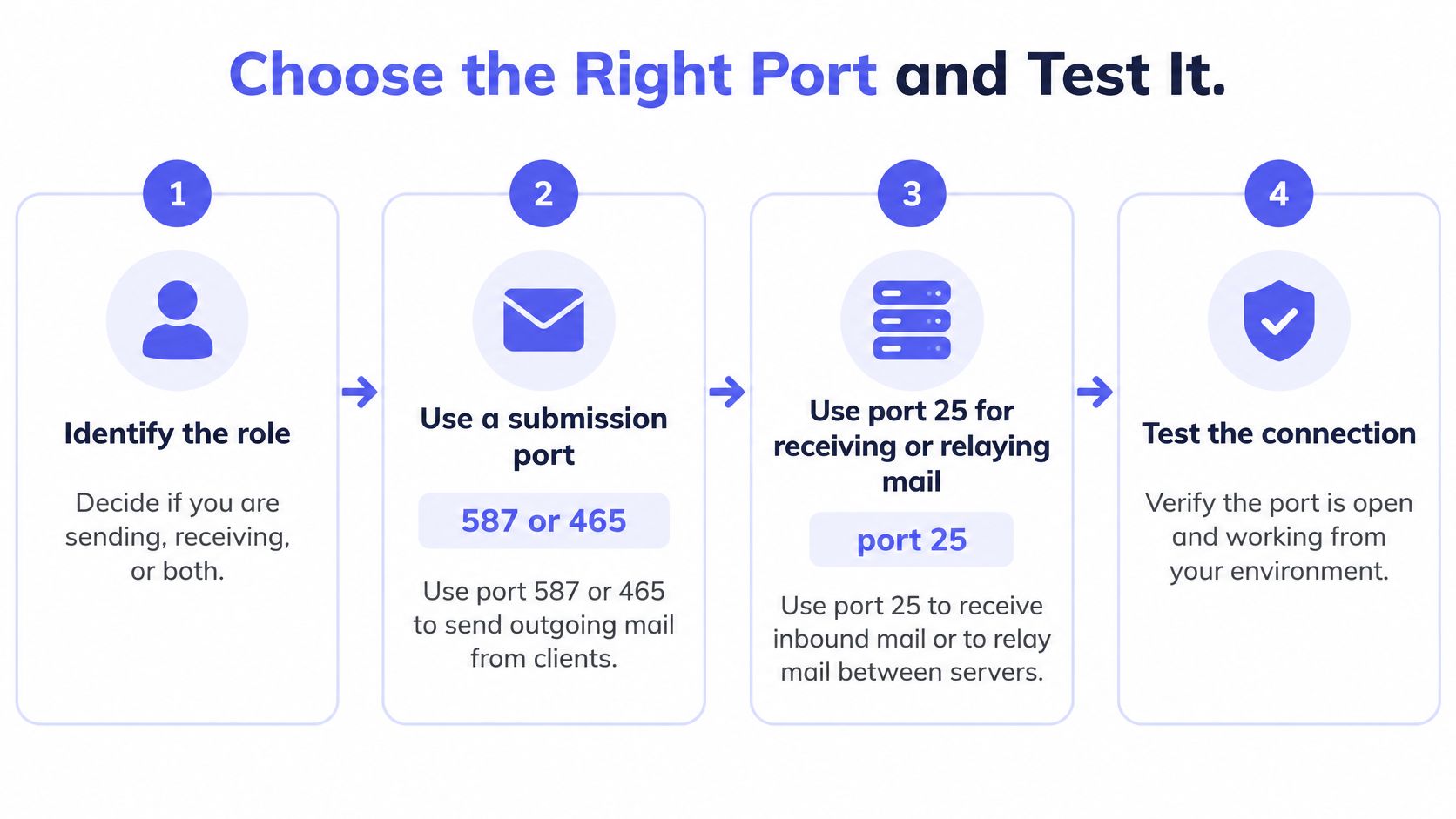
Identify the role. Decide whether the process submits application mail or operates mail-transfer infrastructure. Don't give an ordinary signup worker responsibility for direct inter-domain delivery unless that's an intentional architectural choice.
Copy the provider's documented settings. Match the hostname, submission port, TLS mode, and credentials. If the documentation is incomplete, STARTTLS submission is a reasonable starting configuration to investigate, not proof that the provider supports it.
Require TLS and certificate validation. Don't disable validation to make a handshake error disappear. Check the expected hostname, trust store, and library options instead.
Test from production and preserve separate outcomes. Record connection success, SMTP greeting, TLS result, authentication outcome, and message acceptance independently. Redact credentials and sensitive message content from logs.
Verify the handshake before sending live mail
The TLS submission guidance in RFC 8314 supports distinguishing port 587 with STARTTLS from port 465 with implicit TLS. For a STARTTLS test, inspect the greeting, EHLO capabilities, successful upgrade response, certificate validation, repeated EHLO, and authentication, in that order.
In Node.js Nodemailer, for example, secure: false selects a connection that doesn't begin with implicit TLS. Pair it with requireTLS: true when requiring STARTTLS; secure: false alone isn't a guarantee that encryption will be enforced. Consult the library's option names rather than directly translating a checkbox label.
If submission still fails, follow a structured email-not-sending troubleshooting process instead of changing several settings at once. A timeout calls for network investigation; an authentication failure calls for account and credential checks.
For signup decisions, enforce the verification verdict on your server. Teams typically call Mailbeam from their backend on form submit, keeping the decision out of client-controlled code.
Before enabling live sends, confirm validated TLS, successful authentication, and acceptance of a controlled test message. Keep that sending test separate from your decision about whether a user's address is valid.
Mailbeam offers real-time email verification through an API that checks syntax, MX records, and SMTP behavior, with machine-readable reasons for handling results. Visit Mailbeam to add backend verification to your signup flow and distinguish address-level findings from SMTP connection problems.